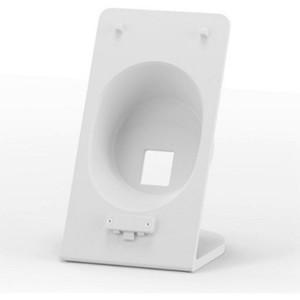
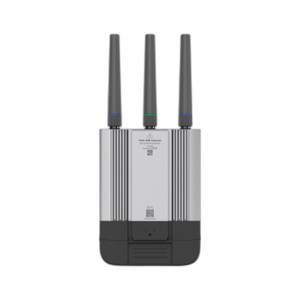
Ubiquiti UACC-UMR-TS Metal Table Stand for Mobile Router
Overview
The UACC-UMR-TS (often searched as UACC UMR TS) is a metal table stand engineered for desktop deployment of the Ubiquiti Mobile Router. This accessory bridges the gap between field-mounted and permanently installed networking infrastructure — it elevates the Mobile Router above desktop clutter, improves airflow around the device's antennas, and positions the unit at a height that simplifies cable management and visual status monitoring. Metal construction ensures the stand won't flex under the weight of the router plus cabling, and it integrates cleanly into any installation environment without requiring wall or ceiling modification.
Design & Mounting
The stand provides a stable base that holds the Mobile Router in a fixed, upright position. Metal construction means durability — no plastic creep or wobble, even after months of continuous operation. The elevated desktop footprint reduces thermal stress by allowing ambient air to circulate freely beneath and around the device, which matters in warm server closets or field deployment cabinets. Because the stand keeps the router off the desk surface itself, you avoid dust accumulation on the base and maintain clear sightlines to indicator LEDs and reset buttons.
Deployment Context
This accessory suits several real-world scenarios: temporary network deployments where drilling into walls or ceilings isn't permitted; rack-adjacent staging where the Mobile Router needs to sit beside (not inside) standard equipment cabinets; warehouse or retail environments where a mobile hotspot or failover link needs to be repositioned frequently; and field service trucks or command centers where the router must survive vibration and jostling during transport. The table stand keeps the unit accessible for antenna adjustment, SIM card swaps, or power cycling without dismounting from a bracket or wall.
Compatibility
The UACC-UMR-TS is purpose-built for Ubiquiti Mobile Router deployments. It does not modify the router's electrical or functional characteristics — the stand is purely mechanical. Security integrators and IT architects planning redundant or temporary network links should verify Mobile Router sizing and antenna configuration against the stand's footprint before purchase, though the design accommodates standard antenna arrays without interference.
Frequently Asked Questions
Q: Does the UACC-UMR-TS require any tools to assemble?
A: Assembly details are not specified in the available product documentation. Contact the retailer or Ubiquiti support for step-by-step assembly instructions.
Q: Can the stand be used outdoors?
A: The stand is designed for desktop and indoor deployment. For outdoor use, consider weather-sealed enclosures or wall/pole mounting solutions rated for your environmental conditions.
Q: What is the maximum weight capacity of the UACC-UMR-TS?
A: Weight capacity specifications are not provided in the current product information. Consult Ubiquiti's technical documentation or support for load ratings.
Q: Is the stand compatible with other Ubiquiti networking devices?
A: The UACC-UMR-TS is engineered specifically for the Mobile Router. Use with other devices is not recommended without verification of form factor and mounting point compatibility.
Q: Does the stand include cable routing or management features?
A: Specific cable management details are not documented. The elevated design naturally improves access to the router's ports; cable tray or additional routing accessories may be needed depending on your installation.
Ted PerryPerspective based on aggregated IPSD and affiliated engineering team experience.
The UACC-UMR-TS fills a real gap in temporary and semi-permanent Mobile Router deployments. Metal construction is not a luxury feature — it's a deployment requirement when you need the router positioned at a fixed height and stable enough to survive cable strain and minor vibration without creeping or tipping.
Deployment Considerations:
- Desktop Footprint: The stand occupies desk or cabinet space. Measure your available surface area before purchase, and account for antenna clearance — Ubiquiti Mobile Routers typically include external antennas that extend beyond the device housing.
- No Environmental Rating: This is an indoor accessory. It offers no IP rating, so avoid direct water spray, condensation-heavy environments, or outdoor exposed mounting. For field deployments in trucks or trailers, ensure the stand is mounted inside a climate-controlled cab or weatherproofed enclosure.
- Cable Management: The elevated position improves airflow but does not include integrated cable routing. Budget for external cable management if your installation involves multiple WAN links or power connections — loose cables hanging from a desktop stand will tangle and create trip hazards.
Best suited for: security integrator staging areas, NOC temporary failover setups, retail or warehouse hotspot installations where the router needs to move or be repositioned monthly, and field service vehicles where a fixed-height mount keeps the unit accessible without permanent installation.