
Access Control Reader Buying Guide
How to choose an access control reader — credential technology (prox, smart card, mobile/BLE, biometric, multi-tech), Wiegand vs OSDP, indoor/outdoor rating and keypad options.

Jerry Tildsen
Access Control & Intercoms Specialist · Working integrator
Bottom line
Choosing the right access control reader comes down to three core decisions: what credential technology your users will carry (legacy prox, smart card, mobile, or biometric), what protocol the panel speaks (Wiegand or OSDP), and how harsh the installation environment is. Match those three vectors first, then layer in keypad requirements and form factor. The SKUs below span proximity RFID, smart card, mobile/BLE, multi-tech, and standalone keypad classes — so there is a well-suited option for most commercial and light-industrial deployments.
How to Choose
Access control readers vary far more than their price tags suggest. Before specifying any reader, work through these decision factors in order — getting one wrong typically means a forklift swap after installation.
- Credential Technology: 125 kHz proximity (HID Prox, EM4100) is ubiquitous but trivially cloneable with a $30 tool from Amazon — it is a liability in any environment where tailgating or card cloning is a realistic threat. 13.56 MHz smart cards (MIFARE, DESFire EV3, SEOS) add mutual authentication and encrypted sector reads. Mobile/BLE credentials via an app eliminate card issuance overhead and enable time-fenced access revocation in seconds. Multi-tech readers let you migrate a mixed-credential population without swapping hardware twice.
- Wiegand vs. OSDP: Wiegand is a 1970s-era unidirectional, unencrypted bus — it cannot confirm the reader is genuine and the wire can be intercepted and replayed. OSDP v2 (IEC 60839-11-5) is bidirectional, RS-485-based, supports AES-128 encryption, supervised line tamper detection, and reader firmware updates from the panel. Specify OSDP wherever the panel supports it; Wiegand only where legacy panels make OSDP impractical.
- Environmental Rating (IP/IK): Indoor lobbies can tolerate an unrated or IP40 reader. Covered exterior vestibules need at minimum IP55 (jet-spray resistant). Exposed exterior — parking structures, gate posts, loading docks — demand IP65 or better. Marine or wash-down environments push to IP67. Verify the gasket rating on the mounting surface too; a reader rated IP65 installed against an uneven concrete block loses its seal.
- Keypad Requirement: Two-factor (card + PIN) is increasingly required by insurance riders and FedRAMP-adjacent physical security policies. Decide upfront: dedicated keypad reader, or separate PIN pad wired in parallel. Integrated keypad readers save conduit runs but limit form-factor options at the door.
- Power Architecture: Most Wiegand readers draw 100–300 mA at 12 VDC from the panel's aux supply. IP-connected readers (OSDP over TCP/IP or proprietary) may require PoE or PoE+ — confirm panel compatibility and switch port budget. PoE+ (IEEE 802.3at, up to 30 W) is needed for readers with integrated cameras, displays, or high-intensity illumination.
- Network vs. Panel-Dependent Architecture: Traditional readers are dumb edge devices — all intelligence lives in the access controller. IP-based reader terminals (like Ubiquiti UniFi Access) embed local intelligence, handle their own credential database, and report events over the LAN, which changes the panel selection entirely. Make sure your access control software supports the reader's management plane before committing.
- Form Factor and Mounting Depth: Single-gang, mullion, and wall-box form factors each require different rough-in conduit placement. Multi-tech readers are often deeper than single-technology equivalents. Verify back-box depth and confirm whether a spacer or adapter plate is needed before rough-in — retrofitting a wall opening after drywall is expensive.
Models to Consider
Selected from our catalog by spec-fit. All channel-direct and factory-new — not ranked by price.

HID 20NWS-01-000000
Smart Card
The HID 20NWS-01-000000 is a wired smart card reader rated IP65, making it a strong fit for covered exterior doors or vestibules where 13.56 MHz credential security (MIFARE/DESFire/SEOS-class) is required and a clean, cable-terminated installation is preferred over a back-box form factor.
View product →
Ubiquiti UA-G3-PRO-W
Mobile/BLE
The Ubiquiti UniFi Access G3 Pro is well-suited for modern commercial deployments running a UniFi Access ecosystem where mobile/BLE credentials, a built-in camera, and GbE LAN connectivity are priorities; its IP55 rating and wall-mountable terminal form factor fit covered exterior and interior lobby applications, but note it operates within Ubiquiti's proprietary management plane rather than a traditional Wiegand or OSDP panel.
View product →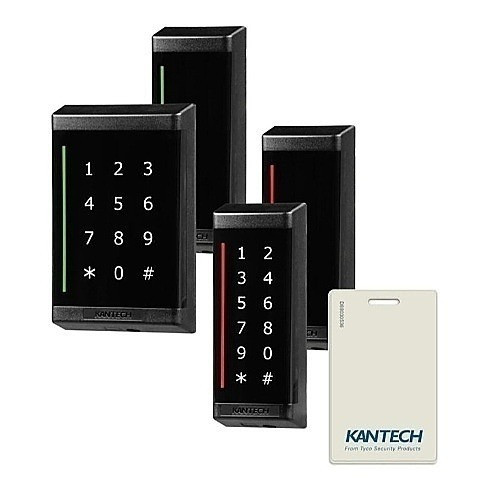
Kantech P345-SPACER
Multi-Tech
The Kantech P345-SPACER is a multi-technology reader rated IP65, making it a strong fit for sites running mixed credential populations — legacy 125 kHz prox alongside 13.56 MHz smart cards — where the goal is a single hardware platform that survives a phased credential migration without swapping readers mid-project.
View product →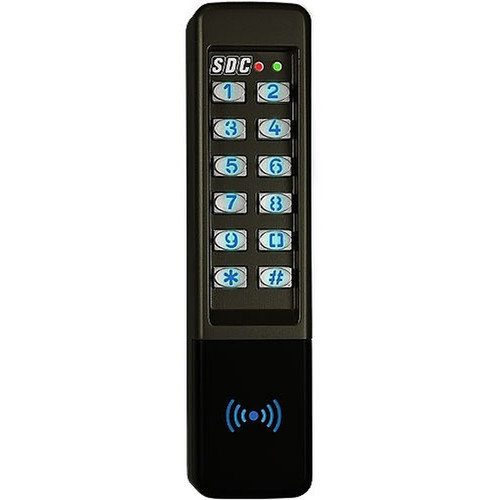
SDC 923P
Keypad
The SDC 923P is a wired standalone keypad well-suited for lower-complexity access points — server room doors, utility closets, or secondary egress lanes — where PIN-only or card-plus-PIN two-factor is required and the installation does not justify a networked reader or a full panel-connected credential reader.
View product →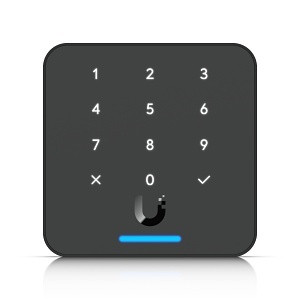
Ubiquiti UA-G3-FLEX-B
Keypad
The Ubiquiti UniFi Access G3 Flex in black is a compact 10/100 IP-connected card reader with IP55 protection, well-suited for interior doors in a UniFi Access deployment where a lower-profile wall-mount form factor is preferred over the full terminal and PoE budget per port needs to be kept lean.
View product →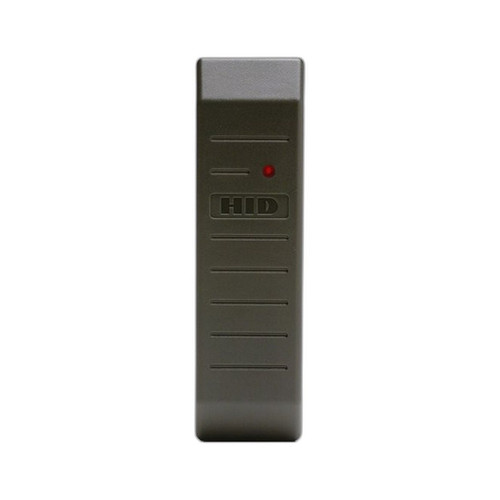
HID 5365EGP00
Proximity/RFID
The HID 5365EGP00 is a wired proximity reader rated IP55 in a mount form factor, well-suited for indoor-to-covered-exterior applications on panels requiring standard 125 kHz HID Prox credentials where budget, simplicity, and broad panel compatibility (Wiegand) take priority over smart card or mobile credential capability.
View product →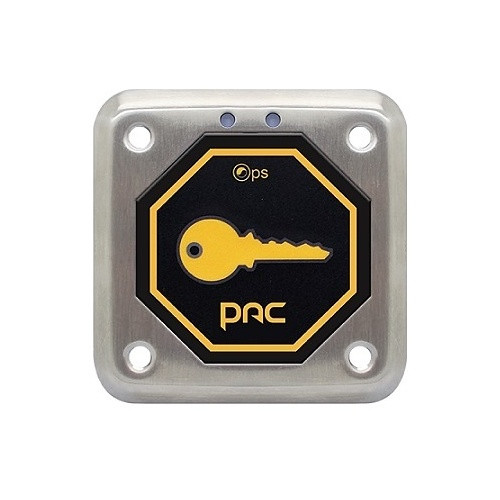
Comelit 909020116
Proximity/RFID
The Comelit 909020116 is a PoE+-powered proximity reader in an enclosure form factor with a best-in-class IP67 rating, making it a strong fit for exposed exterior installations — gate posts, parking structures, or industrial entry points subject to rain, hose-down, or high-humidity environments — where the switch infrastructure already provides PoE+ and panel wiring runs would be impractical.
View product →Frequently Asked Questions
What is the difference between Wiegand and OSDP readers?
Wiegand is a legacy unidirectional protocol that transmits credential data in the clear over two signal wires — it offers no encryption, no reader authentication, and no tamper detection on the line. OSDP v2 is a bidirectional RS-485 protocol that supports AES-128 channel encryption, supervised wiring (the panel knows immediately if the reader is cut or tampered), and bi-directional communication for LED/buzzer control and firmware updates. If your access control panel supports OSDP, it is the technically superior choice for any door where security is a genuine concern; Wiegand remains acceptable only on legacy panels that predate OSDP support.
Can I mix old proximity cards with new smart card readers on the same system?
Yes — that is exactly what multi-technology readers are designed for. A multi-tech reader can read both 125 kHz prox formats (HID Prox, EM4100) and 13.56 MHz smart card formats (MIFARE, DESFire, SEOS) simultaneously, presenting the credential to the panel in standard Wiegand or OSDP format regardless of which card was presented. This lets you issue new smart cards to new employees while existing prox cardholders continue working uninterrupted, then retire the legacy cards on your own schedule without a hard cutover.
What IP rating do I need for an outdoor access control reader?
For covered exterior locations with indirect weather exposure, IP55 (protected against low-pressure water jets from any direction) is generally the minimum practical threshold. For fully exposed exterior mounting — gate columns, open parking structures, loading dock door frames — specify IP65 or higher, which adds protection against sustained water jets. In wash-down environments or locations subject to standing water or flooding risk, IP67 (temporary immersion to 1 meter) provides meaningful additional margin. Always verify that the mounting surface and conduit seal maintain the reader's rated IP integrity after installation.
Do mobile/BLE credential readers work with any access control panel?
It depends on the architecture. Some mobile credential platforms (HID Mobile Access, Allegion Engage) are credential-layer solutions that present a standard Wiegand or OSDP card number to any compatible panel — in that model, the panel never knows a phone was used instead of a card. Other platforms, like Ubiquiti UniFi Access, are vertically integrated: the reader, management software, and credential platform are all proprietary and the reader does not present to a third-party panel at all. Confirm the management architecture before specifying — mixing a vertically integrated reader into a Lenel, Genetec, or Software House panel deployment is not straightforward.
When do I need PoE+ instead of standard PoE for an access control reader?
Standard PoE (IEEE 802.3af) delivers up to 15.4 W at the switch port, which is sufficient for most basic IP readers. PoE+ (IEEE 802.3at) delivers up to 30 W and is required for readers with integrated high-resolution cameras, bright LCD displays, electric lock power pass-through, or high-intensity infrared illuminators. Always check the reader's maximum draw specification — not just the nominal — and verify the switch port's per-port PoE budget before deployment, particularly on large access deployments where aggregate PoE draw can exceed switch capacity.
Is a keypad reader or a separate PIN pad better for two-factor access control?
Integrated keypad readers are simpler to install — one device, one back-box, one conduit run — and are the right choice for most standard commercial doors. Separate PIN pads wired in parallel make sense when you want to keep the card reader in a highly visible position (for easy tap) while mounting the PIN pad at a more ergonomic height, or when the card reader form factor you have specified does not offer an integrated keypad variant. Note that on Wiegand systems, a separate PIN pad must be wired to the panel independently and the panel must support dual-reader two-factor logic; on OSDP systems this is typically handled more cleanly through a single reader port.
Related Resources
- Access Control Reader comparisons — head-to-head spec matchups
- Best Access Control Reader for Multi-Tenant Buildings
- Best Mobile Credential Access Control Readers
- All product comparisons
Speccing this for a project?
Send us your requirements and our senior specialists will confirm specs, compatibility, availability and pricing — free, usually within one business day. Channel-direct, factory-new, serving commercial integrators since 2014.
Get a Free QuoteComparing for a project?
Send us the models you are weighing and our team will confirm specs, compatibility, availability, and pricing — free, usually within one business day.