
How to Choose the Right Network Switch and PoE Infrastructure
A technical buyer's guide for security integrators, IT architects, and network designers specifying switching infrastructure for surveillance, access control, VoIP, and wireless deployments. Covers PoE class and power budget, managed versus unmanaged, switching capacity, industrial DIN-rail options, and uplink strategy.
In This Guide
A network switch is the most failure-sensitive component in most surveillance and access control systems. When a camera, reader, or phone stops working, the root cause is a bad port, an exceeded PoE budget, or a VLAN misconfiguration far more often than a failed endpoint. Getting the switch spec right during design is dramatically cheaper than debugging it later, and the three specs that actually matter (PoE budget, switching capacity, management class) are hidden behind a dozen marketing terms that obscure the differences.
Key Specifications Explained
PoE Standards: 802.3af, at, and bt
Power over Ethernet has three IEEE standards. 802.3af (Type 1, Class 0-3) delivers up to 15.4W at the PSE port, which powers fixed-lens IP cameras, basic VoIP phones, and access-point radios without external radios. 802.3at (Type 2, Class 4, commonly "PoE+") delivers 30W, which covers motorized varifocal cameras, IR-heavy outdoor cameras, PTZ cameras with motors, and Wi-Fi 6 access points.
802.3bt (Type 3, Class 5-6 at 60W; Type 4, Class 7-8 at 90W) powers PTZ cameras with heaters and wipers, multi-sensor cameras, high-density Wi-Fi 6E APs, and video-conferencing endpoints. Check the endpoint datasheet for maximum power consumption with all accessories engaged, not typical load.
PoE Power Budget
The total PoE budget is a single number the switch publishes, and it is separate from per-port capability. A 24-port switch that supports 802.3at (30W per port) rarely has 720W of total budget; most ship with 370-470W. The math matters. If you connect 24 cameras averaging 12W and peaking at 22W with IR on at night, the peak aggregate is 528W, which exceeds the switch budget and causes port shutoffs during darkness.
Plan at 80% of budget maximum, using peak draw not typical. For IP cameras, use datasheet "Max Power Consumption" with IR, heater, and PTZ motors all active. Use our PoE Power Budget Calculator for a per-device breakdown.
Managed vs Unmanaged vs Smart-Managed
Unmanaged switches are zero-configuration. They forward packets, negotiate PoE, and nothing else. They work for simple deployments under 8 cameras on a single VLAN.
Smart-managed (sometimes "web-managed") switches add a web GUI for VLANs, basic QoS, port statistics, and PoE scheduling. They run 95% of small-to-medium surveillance deployments and cost 30-40% more than unmanaged.
Fully managed switches add CLI (SSH/console), SNMP, 802.1X authentication, advanced QoS, link aggregation, and spanning tree configuration. Required for enterprise deployments, multi-VLAN facilities (separate networks for cameras, access control, VoIP, data), and any installation that will be supported remotely. Managed options are available in rack-mount and industrial DIN-rail formats.
Switching Capacity and Forwarding Rate
Switching capacity (Gbps) is the total aggregate throughput across all ports at wire speed. A 24-port 1G switch has 24 Gbps of potential full-duplex traffic (48 Gbps counting both directions). Look for switches rated at full line-rate capacity, not oversubscribed models. Forwarding rate (Mpps, million packets per second) should be at least 1.488 Mpps per Gbps of switching capacity.
Oversubscribed switches drop packets during burst traffic, which shows up as intermittent camera disconnects or VoIP audio quality drops. Entry-level unmanaged switches often omit forwarding rate from the spec sheet. Do not deploy these on surveillance networks with more than 8 cameras.
Uplink Options: Copper, SFP, SFP+
Uplink ports connect the access switch to a distribution or core switch. Copper uplinks (RJ45) max out at 1 Gbps and 100m. SFP (Small Form-factor Pluggable) slots accept 1G fiber or copper transceivers and extend reach to 10 km on single-mode fiber. SFP+ slots accept 10G transceivers.
For surveillance deployments with more than 16 cameras on an access switch, plan 10G uplinks. A 24-camera switch with 4MP cameras at H.265+ generates roughly 36-48 Mbps per camera, totaling 864-1152 Mbps at steady state. A 1G uplink saturates during motion events. Use SFP+ fiber uplinks to the recorder switch, with dual uplinks configured as LAG for redundancy.
Industrial vs Commercial Enclosures
Commercial rack-mount switches are designed for 32-104°F temperature-controlled telecom rooms. They will fail in outdoor enclosures, unheated warehouses, parking garages, or manufacturing floors.
Industrial DIN-rail switches are rated -40 to +167°F, handle shock and vibration, and accept dual 24-48VDC power inputs for redundant supplies. They are required for outdoor cabinets and industrial environments, cost 2-3x commercial equivalents, and last 3-5x longer in those conditions.
Midspan PoE Injectors
When the existing switch is non-PoE or the PoE budget is exhausted, midspan PoE injectors add power to specific ports without replacing the switch. Single-port injectors supply one device; 8-16 port midspans powers whole runs. Use injectors that match the endpoint class exactly; a Class 3 injector powering a Class 4 camera causes power negotiation failures or intermittent reboots at peak load. For runs exceeding 100m, use a PoE extender rather than an injector at the camera side.
VLAN Segmentation for Surveillance
Surveillance networks should always run on a dedicated VLAN isolated from corporate data. Cameras are high-bandwidth and publish streams continuously; mixing them with user data causes QoS problems on both. Use separate VLANs for cameras, access control, VoIP, and guest Wi-Fi, with 802.1Q tagging on uplinks and a firewall or L3 switch handling inter-VLAN routing. Smart-managed or fully managed switches are required. Unmanaged switches cannot segment traffic.
Redundancy and Power Supply Options
For 24/7 operations, specify switches with dual hot-swap power supplies or external RPS (Redundant Power Supply) connectors. Loss of a single PSU should not take down recording. Dual PSUs also allow firmware updates and preventative maintenance without downtime. For redundant uplinks, configure LACP (Link Aggregation Control Protocol) on two uplink ports to separate distribution switches. For the recorder side, specify the NVR on a dedicated switch port with VLAN pinning to prevent broadcast storms from affecting recording. See our Network and PoE Planning Guide for full architecture design.
Featured Network Switches
Top-selling switches for surveillance and access control deployments.

Cradlepoint Inc ZSCL-MTA 4-Port 2.5G Managed Switch
ZSCL-MTA
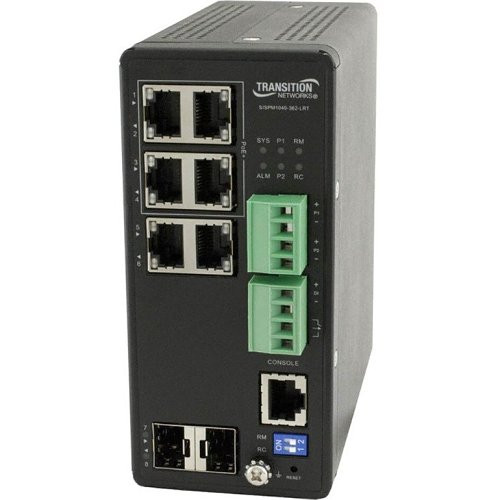
Lantronix SISPM1040-362-LRT-L1Y3 6-Port Gigabit Switch 3-Year
SISPM1040-362-LRT-L1Y3

Lantronix SISPM1040-582-LRT-L2Y1 8-Port Managed Switch One-Year
SISPM1040-582-LRT-L2Y1

Ubiquiti USW-PRO-8-POE UniFi Network Switch
USW-PRO-8-POE
Deployment Scenarios
Small Office: 8-16 Cameras
A small office with 8-16 indoor cameras and minor PoE peripherals runs well on a single 16-port or 24-port switch. Recommended: 24-port smart-managed switch with 802.3at (30W/port), 370W+ total PoE budget, 2x SFP+ uplinks, and dedicated VLAN for cameras. Rack mount in a ventilated telecom closet. Pair with a 16-channel NVR on its own switch port.
Mid-Size Retail: 24-48 Cameras
Retail deployments with 24-48 cameras plus POS terminals, wireless APs, and VoIP phones need separation across VLANs and headroom on uplinks. Recommended: two 48-port managed L2+ switches with 740W+ PoE budget each, 10G fiber uplinks to a core switch or firewall, 802.1Q tagging for camera/VoIP/data/guest VLANs, and LACP link aggregation between the switches. Use a combination of managed switches and dedicated PoE injectors for long-cable-run cameras.
Warehouse and Distribution
Distribution centers have long cable runs, dusty unheated environments, and often require industrial switches in field cabinets. Recommended: core managed switch in the network room plus DIN-rail industrial switches in field cabinets at -40 to +158°F rating, dual 24VDC power supplies, 802.3at/bt PoE for PTZ and multi-sensor cameras, fiber runs over 100m between cabinets, ring topology or ERPS for redundancy. Pair with a 64-channel enterprise NVR sized for 90-day retention.
Multi-Site Campus
Campus deployments link multiple buildings through fiber backbones. Each building gets a local access switch, with inter-building links carried over single-mode fiber to a core switch. Recommended: 48-port access switches per building with SFP+ uplinks, core L3 switch with 10G+ SFP+ fiber ports, separate VLANs per building for camera traffic with inter-VLAN routing at the core. For outdoor fiber runs, use weatherproof fiber enclosures and lightning protection at both ends. Central recording uses redundant NVR cluster with failover configured.
Parking Lot and Perimeter
Parking lots have cameras up to 500 feet from the nearest telecom closet. Standard 100m Cat5e cannot reach. Recommended: fiber media converters at the building with single-mode fiber to outdoor-rated DIN-rail switches in roadside cabinets, PoE++ injectors for high-power PTZ cameras at 60W+, surge protection at both cabinet ends, and per-port VLAN assignment. For cameras within 100m, use Cat6 or Cat6a direct from the switch. Any cameras beyond use fiber plus local PoE injection.
Manufacturing Floor
Manufacturing environments expose switches to vibration, dust, EMI from motors, and temperature swings from 40 to 140°F. Use industrial switches only. Recommended: L2 managed DIN-rail switches with metal enclosures rated IP40, shock/vibration certified, fanless convection cooling, redundant 24VDC power, and PROFINET or EtherNet/IP support if the network carries control traffic. Specify switches with high MTBF (>700,000 hours) for critical lines. Camera VLANs isolated from OT networks by firewall.
More Top-Selling Switches
Additional switch models in stock for various deployment sizes.
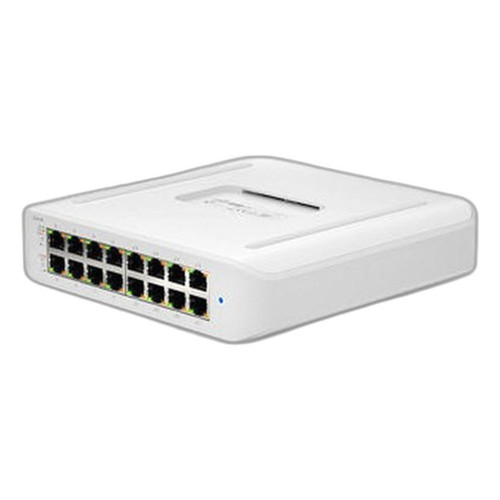
Ubiquiti USW-LITE-16-POE UniFi Network Switch
USW-LITE-16-POE
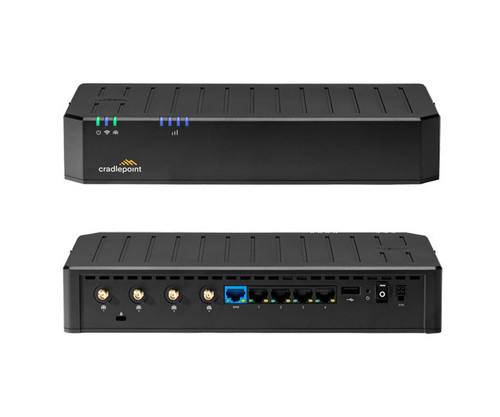
Cradlepoint Inc TAA-BKA3-01005GC-GN 4-Port Managed Gigabit Switch
TAA-BKA3-01005GC-GN
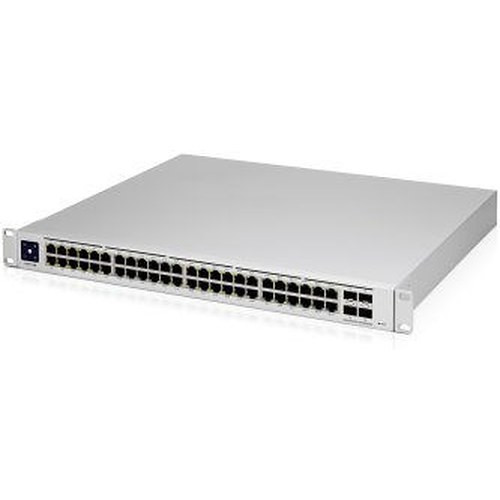
Ubiquiti USW-PRO-48-POE UniFi Network Switch
USW-PRO-48-POE

Ubiquiti USW-PRO-MAX-48-POE UniFi Network Switch
USW-PRO-MAX-48-POE
Common Mistakes to Avoid
- Counting per-port PoE capability as total budget. A switch listed as "802.3at 30W" supports 30W per port, not 30W x 24 ports. Check "Total PoE Budget" in the datasheet and size to peak draw with 20% headroom.
- Using unmanaged switches in multi-camera deployments. Unmanaged switches cannot VLAN-segment traffic, prioritize streams, or diagnose individual port issues. Over 8 cameras, use smart-managed minimum.
- Mixing commercial switches into outdoor or industrial environments. Commercial switches have 32-104°F operating ranges. Deployed in parking garages, unheated warehouses, or outdoor cabinets, they fail within 18-24 months.
- Specifying 1G uplinks on switches supporting 24+ cameras. A 24-camera switch with 4MP H.265 cameras generates close to 1 Gbps steady state; motion events saturate the uplink and drop frames at the recorder. Use 10G uplinks on anything over 16 cameras.
- Leaving no PoE or port headroom for expansion. A deployment planned exactly to camera count has no margin for added cameras, readers, or APs. Size switches to 70-75% utilization to accommodate 18-24 month growth.
- Skipping surge protection on outdoor runs. Long Cat5e runs between buildings or to outdoor cabinets act as lightning antennas. Inline surge protectors at both ends cost under $50 and prevent destroyed switch ports after every storm.
- Running camera and data traffic on the same VLAN. Surveillance streams are continuous, high-bandwidth, and sensitive to jitter. Mixed traffic degrades both camera recording and user productivity. Always VLAN-isolate.
What to Ask Your Integrator
- What is the calculated peak PoE draw per switch, and what percentage of total budget does that represent? What is the headroom for expansion?
- Are all cameras, access points, and VoIP phones on segmented VLANs? How is inter-VLAN routing handled?
- What is the uplink strategy per access switch? Are uplinks redundant (LACP)?
- For outdoor or industrial environments, are switches industrially rated with dual power inputs?
- What happens if a switch PSU fails at 2 AM? Does monitoring alert, and what is the replacement plan?
- Is spanning tree configured? Are ring or mesh topologies used where redundancy matters?
- What VLANs are configured, and is 802.1X authentication enabled on user-facing ports?
- How are switch firmware updates scheduled, and is there a rollback plan if an update causes issues?
Quick Comparison: Switch Tiers
| Specification | Budget Tier | Mid-Range | Premium / Enterprise |
|---|---|---|---|
| Port Count | 8-16 ports | 24-28 ports | 48 + uplinks + stacking |
| PoE Class | 802.3af (15.4W/port) | 802.3at (30W/port) | 802.3bt (60-90W/port) |
| PoE Budget | 65-130W total | 250-400W total | 740-1500W total |
| Management | Unmanaged or web-GUI | Full Layer 2 managed (CLI, SNMP) | Layer 3 managed + stacking + VXLAN |
| Switching Capacity | 16-20 Gbps | 56-128 Gbps | 176+ Gbps with redundant PSU |
| Uplinks | 1-2x 1G copper | 2-4x 1G SFP | 4x 10G SFP+ or 25G |
| Redundancy | Single PSU | Optional dual PSU | Dual hot-swap PSU + RPS |
| Form Factor | Desktop or 1U rack | 1U rack | 1U/2U rack or DIN-rail industrial |
| Typical Price Range | $100 - $400 | $400 - $1,500 | $1,500 - $6,000+ |
Frequently Asked Questions
How many PoE watts do I need per switch port?
PoE 802.3af provides up to 15.4W per port, sufficient for most IP phones, fixed cameras, and wireless access points. PoE+ 802.3at delivers 30W, required for cameras with heaters, PTZ cameras, 802.11ax access points, and digital signage. PoE++ (802.3bt Type 3) supplies 60W for high-power PTZs and small IoT devices. PoE++ Type 4 offers 90W for video conferencing systems, thin clients, and LED lighting. Size the switch so its total PoE budget equals the sum of all connected device maximum loads plus 15% headroom.
What's the difference between managed and unmanaged switches?
Unmanaged switches are plug-and-play with no configuration, working fine for small offices with 8-24 devices. Managed switches add VLANs, QoS, port mirroring, SNMP monitoring, link aggregation, and spanning tree, required for surveillance networks, VoIP separation, and any business network over 25 devices. Smart or web-managed switches offer a subset of managed features at lower cost. For surveillance, always use managed switches to isolate cameras on their own VLAN and prevent network congestion from impacting video quality.
Should I use copper or fiber for camera backbones?
Copper Cat6 supports 1Gbps up to 328 feet (100 meters) between switches, adequate for most single-building installations. Fiber is required when distances exceed 328 feet, between separate buildings to prevent ground loops and lightning damage, or when aggregate bandwidth exceeds 1Gbps per link. Multimode fiber (OM3 or OM4) handles 1-10Gbps at up to 1,000 feet, while singlemode handles longer campus runs up to several miles. SFP or SFP+ modules in the switch make fiber upgrades straightforward as the network grows.
How do I calculate total PoE budget for a camera system?
Sum the maximum power draw of each camera at peak load (heater + IR + PoE overhead). A typical 4MP indoor dome draws 7-9W, a PoE+ outdoor bullet with heater draws 25-30W, and a large PTZ can hit 60W. Add 15-20% overhead for cable losses and efficiency. For 24 cameras averaging 15W each, you need 360W of PoE budget plus overhead, so a 500W PoE+ switch is appropriate. Never buy a switch where your current load exceeds 80% of the PoE budget.
Do I need VLANs for my surveillance network?
Yes, always use a dedicated VLAN for cameras. This isolates video traffic from user data, prevents cameras from being reachable from user workstations (reducing attack surface), and protects against broadcast storms that can saturate the network. Configure the camera VLAN as untagged to camera ports, tagged to NVR/VMS ports, and blocked from internet access except for NTP and firmware updates via explicit firewall rules. Separating video from data is also required for most cyber insurance policies.
What's the difference between a stackable and chassis switch?
Stackable switches combine 2-8 fixed-configuration units into a single logical switch managed through one IP, simplifying operations while providing redundancy if one unit fails. Chassis switches use a modular backplane with swappable line cards, supervisor modules, and power supplies, scaling to 100+ ports per chassis and offering field-upgradeable speeds from 1Gbps to 400Gbps. Stackables fit small-to-mid campus deployments up to about 200 ports. Chassis switches suit large enterprises, data centers, and campuses needing redundant everything with zero-downtime card swaps.
Ready to Size Your Network Switch?
Share the camera count, resolution mix, PoE class, cable runs, and environmental conditions. We will recommend the right switch class, uplink strategy, and PoE architecture for each site.