Rail Clips
Showing Results for Rail Clips
-
Axis
SKU: 02685-021
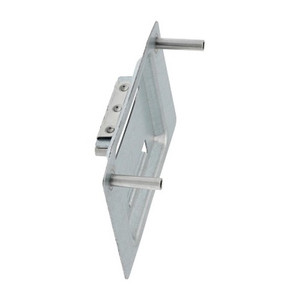
Axis TA1901 DIN Rail Clip - 02685-021
35mm DIN rail clip for Axis door controllers and I/O modules
- Fits standard 35mm DIN rails; mounts Axis network door controllers
- Tool-free installation with slide-and-lock mechanism; no drilling
- Metal construction secures modules in cabinets with vibration or thermal cycling
$52.00 $51.99 Save $0.01 -
Axis
SKU: 02361-001
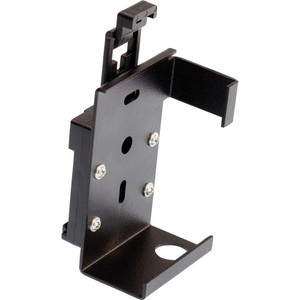
Axis F91 DIN Rail Mounting Clip - 02361-001
35mm DIN rail clip for compact AXIS F91 panel mounting
- Mounts F91 main units short-side-forward to standard DIN rail
- Cable routing in three directions—up, down, or outward from rail
- Includes angled bracket option for flexible installation geometry
In stock · Ships same business day$41.00 $40.99 Save $0.01 -
Axis
SKU: 5800-511
Axis 5800-511 DIN Rail Clip A 5-Pack
Steel DIN rail clips for Axis cabinets, midspans, and converters
- Five steel clips per pack mount to standard 35mm DIN rails
- Black finish resists corrosion in cabinet and rack environments
- Compatible with Axis T98A, T8120/T8133, and T8604/T8605 devices
In stock · Ships same business day$20.00 $19.99 Save $0.01 -
Axis
SKU: 5503-194
Axis T91A03 DIN Rail Clip B - 5503-194
Steel DIN rail clip for Axis surveillance equipment on 35mm rails
- Mounts Axis cameras and encoders to standard 35mm DIN rail systems
- Steel construction with black finish resists corrosion in industrial setups
- Includes mounting plate and fastening hardware; no additional parts needed
In stock · Ships same business day$20.00 $19.99 Save $0.01 -
Axis
SKU: 5017-028
Axis T91A02 DIN Rail Clip 86mm - 5017-028
86mm DIN rail clip for AXIS M7014 and P7214 camera mounting
- 86mm length sized for secure fit on standard DIN rail infrastructure
- Compatible with AXIS M7014 and AXIS P7214 surveillance equipment
- Precision-engineered construction for stable, organized multi-device setups
$13.00 $12.99 Save $0.01 -
Axis
SKU: 5026-431
Axis T8640 DIN Rail Clip - 5026-431
Compact DIN rail clip for Axis devices on standard 35mm rail
- Mounts Axis cameras and devices to 35mm DIN rail systems
- Quick installation design minimizes setup time in control rooms
- Industrial-grade construction withstands vibration in demanding environments
$43.00 $42.99 Save $0.01 -
Axis
SKU: 5017-027
Axis T91A02 DIN Rail Clip 77mm - 5017-027
77mm DIN rail clip for quick mounting of Axis encoders
- Fits AXIS Q7401, P8221, and 7701 devices with secure positioning
- Quick-install design reduces setup time and labor complexity
- Durable construction rated IK10 for demanding installations
$13.00 $12.99 Save $0.01 -
Digi International
SKU: 76002091
Digi International 76002091 TX54 DIN Rail Clip Accessory
DIN rail clip for Digi TX54 series industrial deployments
- TX54-compatible DIN rail clip for standard cabinet mounting
- Compact 10.6 x 7.9 x 2.2 in footprint fits crowded enclosures
- 5-year warranty supports long-life telecom infrastructure builds
$75.00 $74.99 Save $0.01 -
Digi International
SKU: 76002095
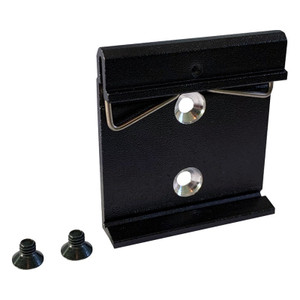
Digi International 76002095 DIN Rail Clip with Screws
DIN rail clip assembly with screws for Digi networking gear
- DIN rail clip with screws for Digi devices
- Standard 35mm DIN rail mounting compatibility
- 10/100 Ethernet device mounting accessory
$5.00 $4.99 Save $0.01
Rail Clips
Rail clips provide secure attachment for compatible security and networking components mounted to DIN rail and structured rail systems. Standardized rail mounting improves enclosure organization, accelerates servicing, and supports scalable commercial deployments.
Plan Your Deployment
- DIN rail and mounting rail compatibility
- Device footprint and clip interface requirements
- Load and vibration considerations inside enclosures
- Cable routing and termination space planning
- Serviceability and expansion planning
Rail Clips — Engineering-Grade Installation Accessories for Commercial Deployments
This category covers 7 working models of rail clips sourced manufacturer-direct or through channel-direct US distribution. Build the rest of your system around the architectural choices below — compatibility, environmental rating, and lifecycle decisions made here propagate through every downstream component you specify.
What to Look For
Compatibility comes first. Mounting brackets, housings, and adapters are specific to the camera or device they support — the same manufacturer often makes parallel lines that don't share accessories. Verify the part number against the camera/device datasheet or compatibility list before ordering. Installation labor consumed troubleshooting a mismatched mount is the most common rework on commercial jobs.
Environmental rating determines material and finish. Indoor accessories typically use steel or aluminum with a powder-coat finish; outdoor accessories need stainless steel or specifically-rated coastal-grade finishes for salt-air resistance. UV exposure degrades plastic over years; choose UV-stabilized polymers or metal for sun-exposed installs. Plan for replacement at year 7-10 on outdoor plastic accessories.
Mounting load capacity must exceed device weight by a healthy margin. Camera weight, housing weight, and any wind loading on PTZs combine. Wall, ceiling, and pole mounts each have rated maximum loads — check before specifying. Pole-mount and pendant-mount installations need conduit, junction boxes, and weather-sealing that aren't always specified in the camera kit.
Wire management and accessibility for service get overlooked in early planning. Bottom-loaded cable entry in housings, swing-out mounting plates, and accessible junction boxes save hours when a camera needs service. Cheap mounts that require complete dismount to access cables drive labor cost up at every service call. Specify service-friendly mounting hardware on installs you expect to service for 10+ years.
Key Specs in This Category
| Spec | Available Options |
|---|---|
| Type | Accessory |
Top Brands in This Category
Frequently Asked Questions
Will this mount work with my camera?
Mounts are camera-specific in most cases. The product description and manufacturer's compatibility list are the authoritative source. If you're not certain, send the camera model and the mount part number to our Senior Specialists; we'll confirm compatibility before you order. Returning a mismatched mount after installation labor is significantly more expensive than checking up front.
Do I need a junction box?
For most outdoor and exposed-conduit camera installs, yes — junction boxes house cable terminations and protect splices from weather. The camera's mounting requirements often specify the junction-box size and material. Some camera-and-mount combinations integrate the junction box into the mount; others require a separate box. Confirm before ordering to avoid pulling cable into an installation that can't accept it.
What's the difference between a wall mount and a pendant mount?
Wall mounts attach to vertical surfaces and project the camera outward. Pendant mounts attach to ceilings or overhead structures and suspend the camera below. Pole mounts are a specialized wall mount for poles. Choose by the mounting surface available and the field-of-view orientation required; many cameras work in any mount with the right adapter.
Are stainless steel mounts worth the extra cost?
For outdoor coastal installs (within ~5 miles of saltwater), yes — galvanized steel rusts visibly within 2-3 years in coastal air. For inland outdoor, marine-grade is overkill; powder-coated galvanized lasts 10+ years. For corrosive industrial environments (chemical plants, wastewater), stainless steel or specifically-rated coatings extend service life dramatically. Match the material to the environment, not the budget pressure.
Can I use one brand's mount with another brand's camera?
Sometimes — many mounts accept standard mounting patterns (¼-20 thread, M6 pattern, VESA spacing) and cross brands. Manufacturer-specific cast housings rarely do. Check the mount's hole pattern and weight rating against the camera's specs. When in doubt, use the camera manufacturer's recommended mount; cross-brand savings on mounts are typically small and the warranty implications of mismatched hardware aren't worth the risk.
Need help choosing? Talk to a Senior Specialist — direct line 877-277-7147 or request a quote.