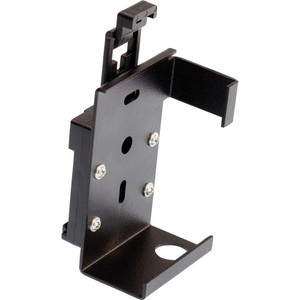
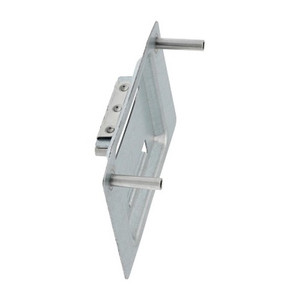
Axis 5800-511 DIN Rail Clip A 5-Pack
Overview
The Axis 5800-511 is a practical mounting solution for organizations deploying Axis network infrastructure in standardized cabinet and rack environments. This five-piece pack contains steel DIN rail clips engineered to mount Axis devices and converters securely to 35mm DIN rails—the industry standard for industrial control cabinets, network racks, and power distribution enclosures. Whether you're organizing edge devices in a distributed surveillance architecture or consolidating midspans in a central cabinet, these clips eliminate the need for custom mounting hardware.
Key Features
- Five Steel Clips Per Pack: Gives you mounting flexibility across multiple devices without reordering. Each clip is individually usable, so you can stage installations across different cabinet locations or replace worn clips without waste.
- Steel Construction: Resists corrosion and mechanical stress in cabinet environments. Steel grips the rail securely and maintains consistent clamping force over thermal cycling—important in unclimated equipment rooms where temperature swings are common.
- Black Finish: Blends visually with standard cabinet hardware and cosmetic enclosures. Reduces glare and clutter in the field of view if cabinets are occasionally photographed for documentation.
- 35mm DIN Rail Compatibility: Mounts to the universal DIN rail standard used across Europe and Asia-Pacific industrial automation. This ensures the 5800-511 works alongside PLCs, terminal blocks, and industrial switches in the same physical space, reducing cabinet sprawl.
- Proven Axis Integration: Specifically validated for T98A cabinets, T8120/T8133 midspans, and T8604/T8605 converters. No guesswork—these clips are designed to fit Axis form factors without modification or adapter plates.
Compatibility & Integration
The Axis 5800-511 (often searched as 5800 511) is verified for mounting with:
- AXIS T98A Cabinets: Secure edge storage and midspan units inside climate-controlled cabinet enclosures.
- AXIS T8120/T8133 Midspans: PoE midspan injectors that feed power to remote edge computing devices and cameras. DIN rail mounting consolidates power distribution in a single, organized row.
- AXIS T8604/T8605 Converters: Serial or analog interface converters. Mounting them on DIN rails alongside other infrastructure simplifies cabling and labeling.
For network switch and power-management applications, confirm your specific device model against Axis documentation before ordering—not all Axis network equipment is DIN rail–compatible.
Installation Notes
Each clip attaches to a standard 35mm DIN rail using mechanical engagement—no tools required, though a gentle tap may be necessary to seat the clip fully. Once mounted, devices slide horizontally along the rail, allowing reconfiguration without removing cables. Verify rail spacing in your cabinet before installation; non-standard rail widths or obstructed rail edges will prevent proper clip seating.
What's in the Box
Frequently Asked Questions
Q: Are these clips compatible with non-Axis devices on a 35mm DIN rail?
A: The Axis 5800-511 is designed and tested for Axis network equipment. While they mount to any standard 35mm DIN rail, compatibility with non-Axis devices is not guaranteed. Verify device footprint and mounting hole alignment before use.
Q: How many devices can I mount with one 5-pack?
A: Each device typically requires one clip. The 5-pack covers up to five single-clip devices, or fewer if a device uses multiple clips for stability. Check your device's mounting documentation for exact clip count.
Q: Will these clips work in outdoor or wet cabinet enclosures?
A: The clips themselves are steel and resist corrosion, but cabinet drainage and enclosure sealing are the primary factors. Place clips in the driest zone of the cabinet and verify enclosure door seals are intact.
Q: Do the clips include any fasteners or require tools to install?
A: The clips mount mechanically to the DIN rail with no fasteners or tools required. Simply slide onto the rail and seat fully. Devices then attach to the clip mounting points per device documentation.
Q: Can I mix and match with other Axis mounting hardware in the same cabinet?
A: Yes. The Axis 5800-511 integrates alongside other Axis mounting solutions—wall brackets, ceiling mounts, and cabinet fixtures—as long as space and cable routing allow.
Ted PerryPerspective based on aggregated IP Security Depot and affiliated engineering team experience.
The Axis 5800-511 is a straightforward but often overlooked piece of infrastructure. Five steel clips per pack is the sweet spot for small-to-medium edge deployments. If you're consolidating T8120 or T8133 midspans in a cabinet, each clip costs almost nothing per unit but saves real estate and improves cable management compared to surface mounting or wall-hanging midspans.
Technical Highlights:
- Steel Material: Resists thermal cycling and vibration in unclimated cabinets. Unlike plastic clips, steel maintains mechanical integrity over years of equipment swaps and thermal stress—matter for industrial environments.
- 35mm DIN Rail Standard: Ensures compatibility with industrial control cabinets already populated with PLCs, terminal blocks, and power distribution. One clip set works across multiple cabinet types without custom drilling or adapter plates.
- Five-Clip Quantity: Covers most single-device mounts. For larger consolidations, order multiple packs—total cost is minimal and avoids mixed inventory.
Deployment Considerations:
- Verify your cabinet DIN rail is true 35mm and not obstructed by cable trays or internal shelving before ordering. Misaligned or damaged rails will prevent proper clip seating and compromise mount security.
- Each clip typically handles one device. If your T8120 or converter is particularly heavy, confirm it uses a single mounting point; some larger Axis hardware may require two clips for stability. Check device documentation.
Deploy the 5800-511 when you're organizing edge midspans or converters in a distributed cabinet environment. It eliminates the amateur move of surface-mounting network hardware to cabinet sidewalls—cleaner, more professional, and future-proof for audits or physical inspections.