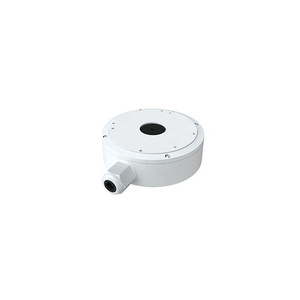
i-PRO M-JB-T Round Junction Box for Dome Cameras
The i-PRO M-JB-T is a compact aluminum junction box engineered for mounting fixed dome cameras on ceilings and walls in commercial environments. If you're deploying multiple dome cameras across office buildings, retail spaces, or institutional facilities and want to hide cable runs and maintain a clean aesthetic, this accessory handles the mechanical mounting and wire routing in a single compact unit.
Key Features
- Compact 126mm (5.0 in) diameter: Fits standard ceiling penetrations without forcing structural modifications or custom framing — critical on retrofit jobs where you want to minimize ceiling damage and rework time. The round form factor works in drop-ceiling grids and solid drywall equally well.
- Lightweight aluminum construction (0.24 kg / 0.53 lbs): You can install this on drywall or suspended ceilings without additional bracing or reinforcement. One technician can handle mounting and fastening — no second set of hands needed.
- Low-profile height (38.5 mm / 1.5 in): The compact vertical profile keeps the box flush in drop ceilings and tight soffit installations where space is constrained. The fixture won't protrude awkwardly into visible areas — essential in retail and office environments where aesthetics affect perception and property appearance.
- Factory-matched compatibility with i-PRO dome series: Direct OEM engineering with M-46-V, M-44-V, M-24-V-T, M-26-V, and related variants means mounting geometry and cable pass-through alignments are guaranteed. No adapter plates, no custom fabrication, no field troubleshooting. Install the box, mount the camera, and move to the next location.
- Integrated cable management: Internal routing channels organize network (Ethernet), power, and auxiliary wiring in separate paths. This keeps cables out of sight, reduces visible clutter, and makes future maintenance simpler when you need to swap or upgrade a camera without rewiring.
- Durable aluminum alloy construction: Resists corrosion in standard commercial indoor environments. Unlike plastic junction boxes, aluminum won't degrade under sustained heat or accidental UV exposure near skylights or high-bay lighting fixtures — a real concern in warehouses and industrial facilities with uncontrolled ceilings.
Integration & Compatibility
The M-JB-T integrates directly with i-PRO's fixed dome camera lineup. Verify your specific dome camera model appears in the compatibility list — this ensures mounting points and cable pass-throughs align correctly and eliminate field modifications. If you're deploying a mix of camera types across multiple locations, cross-check each model to avoid ordering wrong junction boxes.
For larger multi-camera deployments, pair the M-JB-T with a network video recorder to centralize recording and management. Consider PoE switches to power cameras without running separate 12VDC lines — this simplifies the cable routing the M-JB-T manages and reduces overall installation complexity.
When to Choose the M-JB-T
Choose this junction box when you're mounting i-PRO fixed dome cameras on ceilings or walls in environments where cable management and visual appearance matter. Retail stores, corporate offices, educational institutions, and hospitality venues all benefit from the clean installation this accessory enables.
For specific camera model compatibility questions or installation guidance, consult the i-PRO IP camera product pages and mounting documentation. If you're planning a multi-site deployment, work through the compatibility matrix for each location before ordering junction boxes in bulk.
When to Choose a Different Accessory
If you're installing cameras in outdoor or elevated-temperature environments, the M-JB-T is not suitable — it's engineered for standard indoor commercial conditions only. Consult i-PRO's outdoor camera lineup and companion weatherproof mounting accessories for those deployments. If you need wall-mounted boxes with larger cable capacity or adjustable routing, check i-PRO's rectangular junction box options in the same family.
Frequently Asked Questions
Q: Is the M-JB-T suitable for outdoor installations?
A: No. The M-JB-T is designed for indoor commercial deployments. For outdoor dome mounts, consult i-PRO's weatherproof camera lineup and companion mounting accessories rated for external environments.
Q: Does the M-JB-T work with non-i-PRO dome cameras?
A: The M-JB-T is factory-engineered for specific i-PRO models only. Using it with other brands' cameras may result in misaligned mounting points and cable pass-throughs. Verify your camera model is listed in the compatibility matrix before purchase.
Q: Can I wall-mount the M-JB-T instead of ceiling-mounting?
A: Yes. The M-JB-T supports both ceiling and wall mounting. Verify the mounting surface can support the weight and that cable routing is accessible from your planned locations.
Q: How many cables can the M-JB-T accommodate?
A: The integrated routing channels are designed for standard Ethernet (PoE), optional auxiliary wiring, and optional separate power lines. For dense multi-cable runs, verify cable counts and diameters against the internal channel cross-section in the detailed specifications.
Q: What fastening hardware is included with the M-JB-T?
A: Refer to the product documentation for exact fastener specifications and material (e.g., stainless steel vs. zinc-plated). Standard drywall anchors and ceiling clips are typically compatible; verify with the installation guide.
Q: Is the M-JB-T compatible with recessed or adjustable ceiling mounts?
A: The M-JB-T is a fixed-position junction box. For adjustable or pan/tilt installations, consult i-PRO's panoramic or motorized mounting accessories.
Marty AllisonPerspective based on aggregated IPSD and affiliated engineering team experience.
The M-JB-T is a pragmatic cable-management solution for multi-camera dome deployments. Its 126 mm diameter and 38.5 mm low profile eliminate the friction point that kills project timelines: visible cable runs and the visual clutter they create in customer-facing spaces. I've seen installers waste half a day routing cables through plenum ceilings or running them along visible conduit just to avoid ceiling penetrations larger than standard. This box cuts that problem in half.
Technical Highlights:
- 126 mm compact footprint: Fits standard 5-inch ceiling knockouts without modification. On retrofit jobs, this means one ceiling penetration per camera instead of separate holes for power, Ethernet, and drainage — real time and drywall savings.
- 38.5 mm profile: Sits flush in most drop-ceiling grids. The low height matters in corporate offices where T-bar ceilings are tight — a taller box will either protrude visibly or require supplemental framing, both of which add cost and look awkward.
- Aluminum alloy vs. plastic: Aluminum won't warp, degrade, or yellowing under heat from lighting fixtures overhead. In warehouses or retail with uncontrolled ceiling environments, this is the difference between a five-year installation and one that needs replacement in two.
Deployment Considerations:
- Compatibility is strict: The M-JB-T works with M-46-V, M-44-V, M-24-V-T, and M-26-V — verify your exact model before ordering. Mounting geometry is OEM-engineered, so substituting other i-PRO cameras may require field adapters or spacers, negating the time savings.
- Cable capacity has limits: The integrated routing channels handle Ethernet and standard auxiliary wiring, but don't expect dense multi-cable runs (e.g., separate 12 V power, PoE, and multiple audio lines simultaneously). Plan your power strategy upfront — if you need separate DC lines, size the channels during design or choose a larger rectangular junction box.
- Indoor-only environment: No IP67 or weatherproofing. Outdoor ceilings, covered loading docks with moisture drift, or high-humidity food-service areas require a different mounting solution.
Deploy the M-JB-T in office, retail, or hospitality environments where you're mounting three or more dome cameras and want a single, repeatable installation standard across locations. It eliminates custom fabrication and makes maintenance straightforward — a tech can swap a camera without disturbing ceiling structure or rerouting cables.