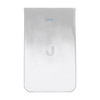
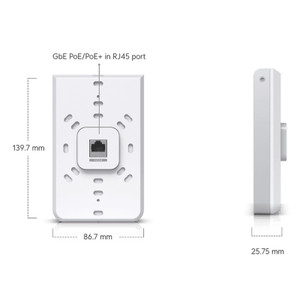
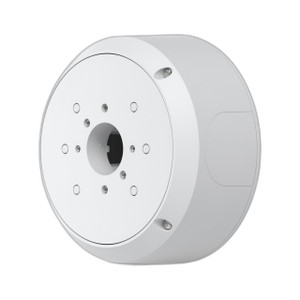
Ubiquiti UAP-IW-HD-JB-25 In-Wall Junction Box
The Ubiquiti UAP-IW-HD-JB-25 is a passive mounting enclosure designed to integrate UniFi access points into finished wall cavities. This is an accessory component—it provides no wireless capability of its own. Instead, it solves a specific integration problem: how to mount an access point flush-mounted within a drywall cutout while maintaining proper cable routing and mechanical support. If your deployment requires access points to remain hidden behind finished surfaces rather than mounted on ceilings or walls, this junction box eliminates the visual clutter of exposed infrastructure.
Key Features
- In-wall mounting cavity: Designed to fit standard drywall rough-in openings, allowing the access point to sit flush with the finished wall surface. This approach preserves architectural aesthetics in environments where ceiling mounts or surface-mounted enclosures would degrade interior design—hospitality properties, corporate offices, and healthcare facilities are typical use cases.
- 2.0 lb weight: Light enough to be held and positioned during installation without requiring additional bracing or support structure during mount-up. Simplifies one-person installation in retrofit scenarios where building access is constrained.
- Cable management integration: Internal geometry accommodates both power (PoE) and network cabling with routing channels that prevent sharp bends. Proper cable management extends the life of connectors and reduces field service callbacks due to intermittent connections.
- Standard drywall compatibility: Works with conventional wall framing and drywall cutout techniques. Requires verification against the specific access point model's dimensions before rough-in to avoid installation rework.
- Passive design: Contains no electronics, power supplies, or active switching. The junction box functions purely as a mechanical enclosure and wire management platform, meaning no additional power budget is consumed and no additional points of failure are introduced.
- UniFi ecosystem integration: Once mounted, the enclosure transparently supports standard UniFi controller discovery and device provisioning. The access point installed within the UAP-IW-HD-JB-25 behaves identically to ceiling-mounted units from a network management perspective.
Integration and Deployment Considerations
The UAP-IW-HD-JB-25 is most effective when planned during initial facility design or major renovation phases. Rough-in openings must be coordinated with building framing and electrical rough-in scheduling to avoid cost overruns. For retrofit installations, you'll need to identify stud locations, cut drywall openings, and route PoE cabling through wall cavities—labor-intensive but feasible if done methodically.
Fire-rating compliance is mandatory: verify that the wall assembly and any cable passes through the junction box meet local fire code requirements. Many jurisdictions require fire-stopping foam or sealant around cables and the mounting enclosure itself. Consult the authority having jurisdiction (AHJ) before cutting openings in fire-rated walls.
The UAP-IW-HD-JB-25 works with any UniFi access point model, but mounting orientation and cable clearance will vary. Confirm the target AP's mechanical dimensions against the junction box interior before committing to installation. If multiple APs are deployed across a facility, in-wall mounting distributes coverage effectively without visible infrastructure, but requires more careful pre-deployment site surveys to identify optimal cavity locations.
When to Choose a Different Approach
If you need rapid deployment, ceiling-mount brackets or surface-mount enclosures are faster and don't require drywall cutting. If the facility has existing exposed drop ceilings with cable trays, visible infrastructure is often acceptable and avoids rough-in complexity. For outdoor or extreme-temperature environments, the UAP-IW-HD-JB-25 is not suitable—outdoor-rated access point enclosures are required instead.
Frequently Asked Questions
Q: Does the UAP-IW-HD-JB-25 add any wireless capability or intelligence?
A: No. This is a passive mounting enclosure only. All wireless functionality comes from the UniFi access point installed inside it. The junction box provides mechanical support and cable routing; it does not amplify signals, add antennas, or perform any active processing.
Q: What rough-in opening size does the UAP-IW-HD-JB-25 require?
A: Dimensions vary by the specific UniFi access point model you plan to install. Review both the junction box and the target access point datasheets to confirm compatibility before cutting drywall openings. Standard openings are typically 4–6 inches, but always verify.
Q: Can I use the UAP-IW-HD-JB-25 in an outdoor wall cavity?
A: Not for direct outdoor exposure. The junction box is designed for interior use within finished wall cavities. Outdoor access points require weatherproof enclosures rated for rain, UV, and temperature extremes.
Q: Does the UAP-IW-HD-JB-25 need separate power, or does PoE cover everything?
A: The junction box itself is passive and requires no power. The access point installed within it draws power via standard PoE (802.3af or PoE+, depending on the AP model). Route the PoE cable through the junction box's internal management channels.
Q: Is the UAP-IW-HD-JB-25 compatible with all UniFi access point models?
A: It is designed to work with UniFi access points, but physical fit depends on the specific model's dimensions. Confirm rough-in dimensions and mounting tabs against the target AP's mechanical specification sheet before installation.
Q: What fire-rating or code compliance does the UAP-IW-HD-JB-25 have?
A: The junction box itself has no fire rating. Your wall assembly and any penetrations through fire-rated barriers must be fire-stopped per local building code. Work with your AHJ to determine the appropriate fire-stopping method around the cable entries and enclosure itself.
Ted PerryPerspective based on aggregated IP Security Depot and affiliated engineering team experience.
The Ubiquiti UAP-IW-HD-JB-25 solves one problem cleanly: how to hide access point infrastructure inside finished walls without compromise to mechanical mounting or cable routing. I've deployed this junction box in hotel renovations and mid-career office reconfigurations where visible infrastructure would degrade interior aesthetics. The 2.0 lb weight keeps installation simple, and the passive design means zero additional power or management overhead. Don't buy this expecting it to improve wireless performance—it doesn't. Buy it because your alternative is either ceiling-mounted APs (visible infrastructure) or surface-mounted conduit (equally visible), and your client won't accept either.
Technical Highlights:
- 2.0 lb form factor: Light enough for one-person wall mounting without temporary bracing. Critical advantage in retrofit work where you're cutting openings in existing walls and can't always pre-stage support structure.
- Internal cable management geometry: Prevents sharp bends on PoE and network runs, extending connector lifespan and reducing field rework due to intermittent connections. Proper routing is the difference between stable field performance and repeat service calls.
- Passive construction: No active components means no additional power budget consumption, no firmware updates required, and one fewer point of failure in the deployment. This simplifies troubleshooting when wireless problems occur—you know immediately they're access-point-side, not enclosure-side.
Deployment Considerations:
- Plan in-wall mounting during initial facility design or major renovation. Retrofit cutting is labor-intensive and code-sensitive, particularly on fire-rated walls. Verify rough-in dimensions for your target access point model before committing to drywall cuts.
- Fire-stopping is mandatory. Many jurisdictions require fire-rated foam or sealant around cable entries and the enclosure in fire-rated wall assemblies. Contact your AHJ before installation to determine the approved method for your wall type and cable routing.
The UAP-IW-HD-JB-25 is the right choice when your client insists on invisible infrastructure and you have the budget and schedule to cut and frame rough-in cavities. It's the wrong choice if you need rapid deployment or if your facility already has exposed ceiling infrastructure that can absorb visible equipment. Deploy it as part of a full UniFi build, not as a retrofit shortcut.