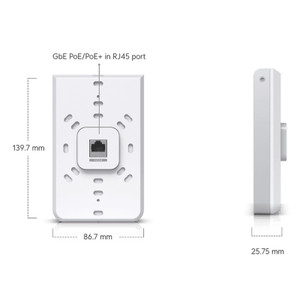
Ubiquiti IW-HD-MB-3 In-Wall Encasing for UniFi HD
The Ubiquiti IW-HD-MB-3 is a customized plastic encasing designed to integrate UniFi In-Wall HD access points into concealed wall cavities during new construction or retrofit deployments. This structural accessory provides mounting support, cable routing integration, and drywall-flush integration without adding visible infrastructure to interior spaces. Weighing only 0.1 lb, the encasing fits standard residential and light commercial wall bays, enabling dense AP placement where ceiling or surface-mounted hardware conflicts with architectural or aesthetic constraints.
Key Features
- Flush-Mount Design: Fits standard drywall cutouts and sits flush within wall cavities. Keeps AP placement concealed while maintaining clean interior sightlines.
- Integrated Cable Routing: Built-in channels for PoE and network termination reduce installation complexity and prevent cable pinch points during drywall closure.
- 802.3af PoE Compatible: Supports standard PoE power delivery over copper runs within wall cavities. No additional wall reinforcement needed.
- Minimal Weight Footprint: At 0.1 lb, the encasing requires no supplementary structural support or reinforcement in standard wall construction.
- Plastic Construction: Lightweight, durable material resists moisture and thermal cycling in cavity environments. Suitable for both wood-stud and metal-stud framing.
- Standard Drywall Compatibility: Works with conventional residential and light commercial construction techniques. No specialty tools or structural modifications required beyond standard cavity preparation.
In-wall AP placement eliminates visible antenna protrusions and surface-mounted enclosures that compromise interior design in hospitality, office, and residential environments. The IW-HD-MB-3 encasing transforms the In-Wall HD into a true concealed access point by managing cable entry, providing structural stability within the cavity, and maintaining separation between the AP and drywall edges. This is particularly valuable in retrofit scenarios where adding ceiling infrastructure or running new conduit would be prohibitively expensive.
PoE injector placement should be positioned outside the wall cavity — either mounted to an adjacent closet wall or fed from a wall-mounted PoE switch located in a network closet. This approach minimizes cable volume inside the cavity and simplifies troubleshooting if network drops require replacement. Standard twisted-pair runs from a patch panel to the in-wall cavity can be terminated directly at the encasing; use cable supports or conduit to prevent pinch damage during drywall fastening.
Thermal management is critical in concealed deployments. Ensure adequate airflow around the In-Wall HD hardware by avoiding dense fiberglass insulation or fireproofing materials directly adjacent to the AP. If local building codes mandate cavity fill (fiberglass, spray foam), position the encasing in a small air pocket or use rockwool instead of fiberglass, which allows better thermal dissipation. Monitor AP temperature during commissioning; if the device reports thermal throttling, verify cavity ventilation or consider relocating the AP to a less insulation-dense area.
The IW-HD-MB-3 carries standard Manufacturer Warranty coverage. Integration is straightforward for any UniFi controller deployment — the In-Wall HD will discover and provision through the encasing without modification to wireless or network settings. This accessory is a prerequisite for any in-wall HD installation; it cannot be omitted without risking hardware instability or drywall contact damage.
Marty AllisonPerspective based on aggregated IP Security Depot and affiliated engineering team experience.
We've deployed the IW-HD-MB-3 encasing across dozens of concealed AP retrofit projects in multi-floor office and hospitality environments where surface-mounted or ceiling-mounted hardware would conflict with interior finishes or guest experience. The value proposition is straightforward: you get a lightweight structural bracket that eliminates the friction of hand-mounting an AP inside a wall cavity without visible infrastructure. What distinguishes this encasing from improvised mounting is cable management. The integrated routing channels prevent the common failure mode we see on poorly planned in-wall installs — twisted-pair runs get pinched when drywall fasteners are driven, causing intermittent connectivity loss that takes weeks to diagnose because the failure is hidden behind finished walls. The 0.1 lb weight is deceptive; it means you can literally hand-hold the AP and encasing during drywall fitting, which saves installation time on retrofit jobs where wall studs are already in place and you're working around existing infrastructure.
Technical Highlights:
- Cable Routing Architecture: Integrated channels route both PoE and network drops without loop-back or cross-routing. Prevents pinch damage during drywall fastening and allows future cable replacement without disturbing the AP hardware.
- 802.3af Power Delivery: Standard PoE at the source (switch or injector) — no high-power PoE+ or specialized injectors required. Simplifies network design and reduces power infrastructure footprint in closet or server room.
- Drywall Cutout Alignment: Designed to fit standard wall cavity dimensions (16 in. on-center stud spacing). Reduces on-site fabrication and trimming, critical in retrofit jobs where walls are already framed.
- Thermal Passive Design: No active cooling or ventilation; relies on cavity air circulation. Requires discipline during installation to avoid blocking vents with insulation — critical failure point we've seen in spray-foam retrofit jobs.
- Material Durability: Plastic construction resists moisture accumulation in cavity environments. Unlike metal enclosures, no grounding concerns or RF shielding complications. Compatible with both residential and light commercial wall materials.
Deployment Considerations:
- Cavity airflow is non-negotiable. If local code mandates fiberglass insulation fill, position the encasing in a small air pocket or use rockwool batts instead. We've seen thermal throttling on units surrounded by dense fiberglass — monitor AP temperature during first week of operation and be prepared to relocate if needed.
- PoE injector or switch placement matters. Position outside the wall cavity (closet wall-mount or adjacent network closet) to avoid cable congestion inside the cavity. This also simplifies future troubleshooting if the network drop needs replacement — you can pull the drop from the closet without opening the wall.
- Twisted-pair runs inside wall cavities should use cable supports or conduit to prevent pinch damage during drywall fastening. We've had to replace entire wall sections on retrofit jobs where careless fastening crushed network runs — this encasing's integrated channels prevent that, but only if you use conduit or clips on the approach runs.
- Thermal cycling can cause plastic to warp slightly over years. We haven't seen functional failures, but it's worth inspecting periodically if the cavity experiences temperature swings (attic areas, exterior walls in cold climates) to ensure the AP remains stable in the encasing.
- This is a mandatory accessory for any In-Wall HD install — it's not optional. Mounting the AP without it risks drywall contact and hardware failure. Budget this into every in-wall HD project estimate.
The IW-HD-MB-3 is essential infrastructure for any concealed AP deployment using Ubiquiti hardware. It's most valuable on retrofit jobs in hospitality and office environments where visible infrastructure is unacceptable, and on new construction jobs where dense in-wall AP placement is part of the architectural specification. Pair this with UniFi controller provisioning and standard 802.3af PoE, and you've got a clean, maintainable concealed network — provided you handle cavity ventilation correctly. See the Ubiquiti catalog for additional networking and wireless access point solutions.