Ubiquiti IW-HD-BK-3 In-Wall HD Access Point Cover (3-Pack)
Overview
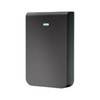
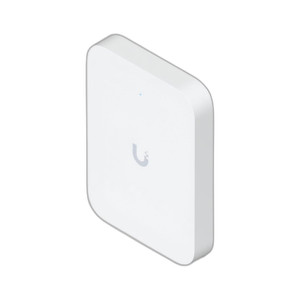
The IW-HD-BK-3 is a three-pack of protective covers engineered specifically for the Ubiquiti UniFi In-Wall HD Access Point. These covers provide mechanical protection and integrated mounting hardware for flush-mount wall installations. If you're deploying wireless access points into standard drywall cavities, the IW-HD-BK-3 handles both retrofit and new-build scenarios — delivering a finished, professional appearance while keeping the AP itself protected from dust and mechanical contact inside the wall cavity.
Key Features
- Protective Enclosure: Shields the UniFi In-Wall HD AP from dust and accidental contact during installation and maintenance. Reduces risk of debris entering ventilation openings or damaging connectors during wall-mounted deployment.
- Flush-Mount Integration: Designed for standard electrical wall boxes (drywall mounting). The cover integrates directly with existing building infrastructure — no special conduit or surface mounting required.
- Three-Pack Quantity: Contains three covers, making this suitable for small-to-medium office, education, or enterprise deployments requiring multiple access points across distributed locations.
- Retrofit and New-Build Ready: Works equally well in existing installations and new construction. Standard wall box compatibility means no unusual framing or structural modifications needed.
- Weatherproof Internal Cavity Protection: While designed for interior wall installations, the covers provide sealing against dust and environmental conditions inside wall cavities — useful in facilities with older HVAC systems or construction dust.
- OEM-Engineered Fit: Manufactured by Ubiquiti for the UniFi In-Wall HD series, ensuring exact mechanical fit and compliance with AP performance specifications. No third-party compatibility guesswork.
Integration & Compatibility
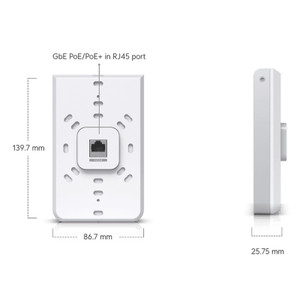
The IW-HD-BK-3 is engineered exclusively for the Ubiquiti UniFi In-Wall HD Access Point. Installation assumes a standard electrical wall box (86 × 86 mm or equivalent North American/international drywall cavity). If your wall cavity uses non-standard sizing or you are deploying UniFi outdoor or ceiling-mount models, this cover will not fit — verify the target AP model before ordering.
Deployment with UniFi network infrastructure benefits from centralized management via Ubiquiti's UniFi Network Controller, but the cover itself is passive hardware — it does not add configuration burden or require network integration.
What's in the Box
- 3x Protective covers for UniFi In-Wall HD Access Point
When to Choose a Different Approach
The IW-HD-BK-3 is a pure protective accessory; it does not alter the AP's wireless performance, throughput, or coverage. If you need to improve signal strength or range, you are addressing an AP selection or placement issue — covers alone will not fix inadequate coverage. If your wall boxes are non-standard or your building does not use flush-mount infrastructure, you may need alternative mounting solutions such as surface-mount housing or pendant enclosures — check with the integrator on local code and building constraint before committing to in-wall placement.
Frequently Asked Questions
Q: Will the IW-HD-BK-3 covers fit my UniFi 6 In-Wall AP?
A: The IW-HD-BK-3 is engineered for the UniFi In-Wall HD Access Point specifically. Verify your AP model against the Ubiquiti product line before ordering — different AP generations may use different form factors and mounting hardware.
Q: Can I install these covers in non-drywall wall boxes?
A: The covers are designed for standard drywall electrical wall boxes. If your installation uses plaster, concrete, or non-standard cavity sizes, test fit or consult the integrator before ordering.
Q: Do these covers affect the access point's wireless performance or range?
A: No. The covers are passive protective housings and do not alter RF performance, throughput, or coverage. They provide mechanical and environmental protection only.
Q: What is included in the three-pack?
A: Three protective covers for the UniFi In-Wall HD Access Point. Mounting hardware for standard wall box installation is included.
Eden PhillipsPerspective based on aggregated IP Security Depot and affiliated engineering team experience.
The IW-HD-BK-3 is straightforward: you're buying passive protective covers for the UniFi In-Wall HD AP in three-packs. This is an accessory play, not a performance upgrade. The real value is in preventing physical damage to your APs during installation and thereafter, especially in retrofit deployments where the technician is threading the AP through existing wall cavities or in multi-tenant environments where other trades might nick or stress the hardware.
Deployment Highlights:
- Standard Wall Box Integration: Engineered for 86 × 86 mm drywall boxes. No special framing or conduit — this simplifies retrofit work significantly and keeps installation costs flat compared to surface-mount or specialty mounting.
- Three-Unit Quantity: Covers three APs per order. For distributed office or education deployments (multiple conference rooms, classrooms, lobby areas), plan to order one pack per three zones.
- Passive Mechanism: No power, no configuration, no network overhead. Mount, cable the AP, and install the cover. Installation time is minutes, not hours.
Deployment Considerations:
- Verify the target AP model is the UniFi In-Wall HD. Ubiquiti has refreshed its in-wall line — cross-check your AP's part number against the datasheet before committing covers to stock.
- Wall cavity condition matters. If your drywall boxes are damaged, oversized, or use unusual box geometry (plaster walls, brick construction), test fit one cover before bulk ordering. A bad fit undermines the protection value.
- These are **not** weatherproof for outdoor mounting. If you're installing outdoor APs or APs in unconditioned spaces (attics, crawlspaces), you need weatherproof enclosures, not these cavity covers.
Best fit: office or education deployments with multiple in-wall AP placements in standard drywall construction. Order in multiples of three aligned to your planned AP count, and verify wall box sizing before installation.