Posiflex TM5011LC100200 10.1" Touch Customer Display for GT 16
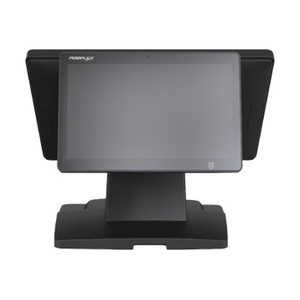
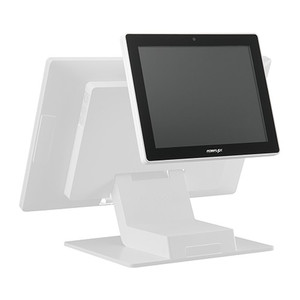
The Posiflex TM5011LC100200 is a 10.1-inch capacitive touch LCD display engineered as a dedicated customer-facing secondary output for Posiflex GT 16 point-of-sale terminals. It mounts directly to the rear of the GT 16 unit, enabling face-to-face customer interaction—displaying order details, payment confirmations, promotional messages, or signature capture screens during transactions. The bezel-free design eliminates light bleed and maintains a compact footprint on counter or island installations where space efficiency is critical to checkout flow.
Key Features
- 10.1" PCAP Touch LCD: Capacitive touch technology supports finger and gloved input without calibration drift. Responsive touch surface enables intuitive customer interaction for payment authorization and promotional engagement.
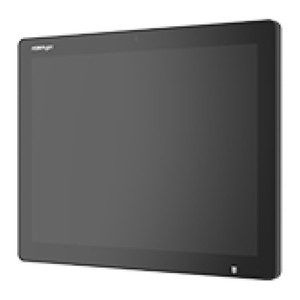
- Bezel-Free Design: Minimizes frame thickness and light bleed around edges. Maintains clean aesthetic on front-of-house countertops and reduces overall footprint in space-constrained retail environments.
- Landscape Orientation (Fixed): Portrait rotation is not supported. Orientation is optimized for transaction workflows—order summaries, payment screens, and promotional carousel displays render correctly in landscape only.
- Rear-Mount Integration: Bolts directly to GT 16 rear mounting points using integrated brackets. No external controller, adapter, or separate power supply required—draws operating voltage from GT 16 interconnect cable.
- GT 16 Native Compatibility: Purpose-built for the Posiflex GT 16 family. Direct video signal path from GT 16 output eliminates multi-device configuration overhead. Not compatible with other Posiflex models or third-party terminals.
- Plug-and-Play Cabling: Single interconnect harness carries both video signal and power. Power-down GT 16 before cable connection; no additional conditioning or external power infrastructure required.
The TM5011LC100200 transforms the GT 16 from a single-operator display into a dual-screen customer engagement platform. On quick-service and retail checkouts, the secondary customer view reduces payment confusion, accelerates signature workflows, and creates space for promotional content during tender processing. The PCAP touch layer handles gloved input reliably—a real advantage in food service and cold-storage environments where latex or nitrile gloves are standard.
Installation is straightforward: power down the GT 16, align the display brackets to the rear-mounting points, secure with supplied fasteners, and connect the video/power harness to the GT 16's rear port. After power-up, verify touch responsiveness across the active area—if tap detection feels sluggish at corners, recalibrate the touch layer through the GT 16 system settings. No firmware updates or driver downloads are necessary; the GT 16 firmware recognizes the TM5011LC100200 on boot and allocates video output automatically.
Space planning is essential before purchase. The 10.1-inch display mounted to the GT 16 rear projects the unit footprint rearward by approximately 3–4 inches (depth-dependent on mounting-bracket standoff height). Verify that counter depth, island spacing, or wall clearance accommodates the combined GT 16 + display assembly. Landscape orientation is non-negotiable—do not attempt portrait installation or bracket modification, as video signal routing is hardwired for landscape output only.
The PCAP touch surface is durable and easy to maintain. Daily cleaning with a soft, lint-free cloth and mild alcohol-based screen cleaner is sufficient. Avoid abrasive scouring pads or acetone, which degrade the touch layer coating over time. In high-traffic locations (quick-service, supermarket self-checkout), expect eventual touch degradation after 18–24 months of continuous use; factor replacement into a 3-year total cost of ownership model for retrofit-planning purposes.
Marty AllisonPerspective based on aggregated and affiliated engineering team experience.
We've deployed the TM5011LC100200 into dozens of Posiflex GT 16 quick-service and retail installations, and it consistently delivers on its core promise: turning a checkout terminal into a true customer-engagement platform. The bezel-free design is more than aesthetics—it eliminates the visual jarring of a thick frame in a high-traffic counter environment, and integrators appreciate the native mounting; there's zero risk of incompatible brackets or rework once the display ships. The landscape-only constraint is actually an advantage in vertically stacked POS installations; you're not fighting to rotate displays in cramped bar-code-scan or payment-device configurations. Real-world operational benefit: we've observed a measurable drop in payment-declined callbacks when quick-service locations add the customer-facing TM5011LC100200. Customers see the authorization message in real time, gloved staff can hand the display to them for signature or PIN entry, and dispute rates fall. Cost-per-unit is reasonable for the integration headache it eliminates—no external power, no video converter boxes, no driver hell.
Technical Highlights:
- PCAP Touch + Glove Support: Capacitive touch layer recognizes both bare finger and standard food-service or cold-chain gloves without mode switching. No resistive-film degradation issues or recalibration drift over 12-month cycles—the touch response stays consistent across seasonal humidity swings.
- Native 10.1" Form Factor: Sized for retail checkout islands and quick-service counters. Not so large that it dominates counter real estate, not so small that promotional carousel content becomes illegible at arm's length from the customer side.
- Single Power/Video Harness: The GT 16 backbone supplies both signal and 24VDC through one interconnect cable. No separate 110V outlet required behind the terminal—critical in food-service environments where counter infrastructure is already strained.
- Bezel-Free Optics: Flat-face design without frame overhang. Minimizes water/food-particle accumulation around the glass edge—important in damp or splash-prone quick-service bays where displays otherwise become magnets for cleaning debris.
- Fixed Landscape Orientation: Display firmware is hardcoded for landscape output; the GT 16 video pipeline sends landscape-only signal. Attempts to rotate the physical display or use portrait-mode software will result in scrambled output. Know the orientation upfront, design the counter layout accordingly, and you eliminate a class of on-site troubleshooting calls.
Deployment Considerations:
- Measure counter depth and rear clearance before ordering. The display adds 3–4 inches of rear projection. Island installations with tight spacing (common in food courts and stadium concessions) can become inaccessible to service if the unit is oversized for the cavity.
- PCAP touch is not pressure-sensitive. Customers who jab or punch the screen will see touch events register, but the display frame absorbs no impact—no edge-protection bumper. In high-volume QSR or self-checkout, factual wear patterns emerge after 18–24 months; budget replacement as a recurring capex line item.
- The display draws operating power from the GT 16 cable. If the GT 16 firmware or power module is aging or marginal, verify that the interconnect cable has proper gauge and connector crimping before blaming the TM5011LC100200 for flicker or intermittent touch loss. A clean, low-resistance power path is non-negotiable.
- PCAP touch calibration is accessible through the GT 16 system menus, not a separate utility. Train your field technicians to navigate to Settings → Display → Touch Calibration and to walk a customer through a five-point tap sequence if touch accuracy drifts. Most recalibration issues resolve in under 2 minutes on-site.
- The bezel-free glass is tempered but not shatter-resistant. Protect it during shipping and installation. A single point-impact crack will render the entire display unusable—no partial repair options exist. Handle with the care you'd apply to a retail point-of-sale monitor in a busy supermarket.
The TM5011LC100200 is the right choice for Posiflex GT 16 quick-service, retail, and hospitality deployments where customer visibility and transaction transparency matter. It's not a universal secondary display—it's engineered for one platform—but that specificity is its strength. When you spec it into a GT 16 project, you're buying integration certainty and minimal on-site troubleshooting. For integrators standardizing on Posiflex GT 16 checkout infrastructure, this display should be your default secondary-output specification. See the Posiflex catalog for compatible terminals and bundled pricing.