
TP-Link SG2210P vs TP-Link S4500-8GP2F: Specification Comparison
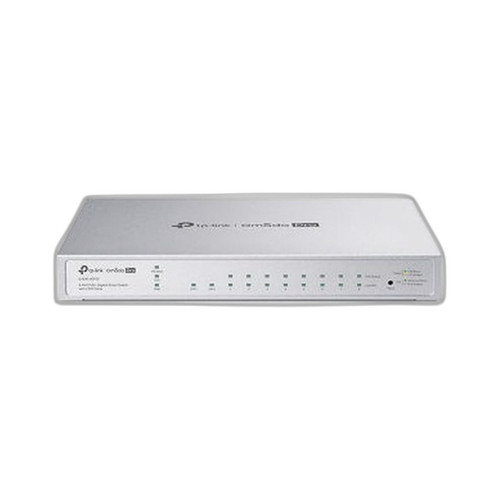
Both the TP-Link SG2210P and the S4500-8GP2F are 8-port Gigabit PoE+ smart switches from TP-Link's Omada ecosystem, each adding 2 SFP uplink slots for fiber aggregation. They target the same physical-security and SMB wiring-closet buyer who needs managed PoE switching for IP cameras, access control readers, or VoIP endpoints. This comparison evaluates PoE budget and per-port delivery, switching capacity and management depth, and physical/power integration — the three axes that most directly drive a purchasing decision at this switch class.

In This Guide
- Which switch delivers more usable PoE power and per-port flexibility?
- How do the two switches compare on throughput, memory, and Layer 2 feature depth?
- Which switch offers deeper management integration and better physical deployment options?
- Which should you choose: the SG2210P or the S4500-8GP2F?
- Side-by-Side Specs
- FAQ
Which switch delivers more usable PoE power and per-port flexibility?
The SG2210P specifies a 58 W PoE+ budget shared across all 8 ports, with a stated maximum of 30 W per port, and compliance with 802.3af/at. The S4500-8GP2F specs present conflicting figures: one field lists 'Budget 62 W / 61 W' while other fields repeat 58 W and 30 W per port. Because the spec source contains these internal contradictions, only the most frequently cited value (58 W) can be stated with confidence; the 62 W figure cannot be treated as verified.
Both switches support the same 802.3af/at standard, so per-port device compatibility is identical. At 58 W shared across 8 ports, either switch can realistically power 3–4 cameras drawing 12–15 W each before budget exhaustion. Neither spec lists per-port PoE scheduling or priority queuing beyond what 802.1p/DSCP QoS implies. Installers powering higher-draw devices such as PTZ cameras or heated domes near the 30 W cap should budget conservatively on both models.
How do the two switches compare on throughput, memory, and Layer 2 feature depth?
The S4500-8GP2F specifies a switching capacity of 16 Gbps (noted twice in the spec data, with a third figure of 20 Gbps also present — the inconsistency means only 16 Gbps can be stated reliably). It also lists 32 MB of storage/memory. The SG2210P spec does not include a switching capacity or memory figure.
On Layer 2 features, the SG2210P spec explicitly lists VLAN (802.1Q), STP/RSTP/MSTP, IGMP Snooping, QoS (802.1p/DSCP), ACL, 802.1x port authentication, and RADIUS/TACACS+ — a detailed feature set relevant to segmented camera VLANs and 802.1x-authenticated NVR ports. The S4500-8GP2F spec lists SNMP Trap/Inform and EEE (Energy Efficient Ethernet) under management, but does not enumerate VLAN, STP, IGMP, ACL, or 802.1x support in the provided data. Absence from the spec does not confirm absence of the feature, but it cannot be claimed.
Which switch offers deeper management integration and better physical deployment options?
Both switches are positioned within TP-Link's Omada SDN ecosystem, but the SG2210P is explicitly labeled 'Smart managed, Omada SDN compatible,' while the S4500-8GP2F is labeled 'Omada Pro' and 'Managed' — suggesting a higher management tier, though the provided specs do not detail what additional Pro-tier capabilities are included beyond SNMP.
On physical installation, the S4500-8GP2F spec lists both wall-mount and rack-mount options, with dimensions of 11.6 × 7.1 × 1.7 in and an external power adapter (53.5 VDC / 1.31 A). The SG2210P spec provides no mount-type, dimension, or power-supply detail. The S4500-8GP2F also lists a maximum range of 64 m (likely PoE extended mode) and single-mode fiber SFP compatibility — neither of which appears in the SG2210P spec. Installers planning rack-mount deployments or single-mode fiber uplinks have confirmed spec support only on the S4500-8GP2F.
Which should you choose: the SG2210P or the S4500-8GP2F?
Our take: The S4500-8GP2F is the stronger choice when physical installation flexibility, confirmed rack/wall-mount options, and single-mode SFP fiber uplinks are required. The S4500-8GP2F explicitly documents dual-mount support, external adapter power supply, 32 MB memory, SNMP management, and single-mode fiber compatibility — none of which appear in the SG2210P spec. However, the SG2210P is the stronger choice when Layer 2 security feature depth is the deciding factor: it is the only model with confirmed 802.1x port authentication, RADIUS/TACACS+ integration, ACL support, and full STP/RSTP/MSTP — critical for segmented camera VLANs and authenticated device access. PoE budget is effectively equal at 58 W / 802.3af/at on both. Buyers deploying into an enterprise-security stack requiring 802.1x and ACL should favor the SG2210P; those needing rack integration or single-mode fiber uplinks should favor the S4500-8GP2F.
Side-by-Side Comparison
Spec-for-spec, from manufacturer data.
| Specification | TP-Link SG2210P | TP-Link S4500-8GP2F |
|---|---|---|
| MPN | SG2210P | S4500-8GP2F |
| Series | Omada | Omada Pro |
| PoE Ports | 8 Gigabit PoE+ | 8 Gigabit PoE+ |
| SFP Uplink Slots | 2 | 2 |
| PoE Standard | 802.3af/at | 802.3af/at |
| PoE Budget | 58 W | 58 W (62 W also cited — unresolved) |
| Max PoE per Port | 30 W | 30 W |
| Switching Capacity | — | 16 Gbps (20 Gbps also cited — unresolved) |
| Memory | — | 32 MB |
| Fiber Type (SFP) | Gigabit SFP (type not specified) | Single Mode |
| Management | Smart managed, Omada SDN | Managed, SNMP Trap/Inform, EEE |
| 802.1x / RADIUS | Yes (802.1x, RADIUS/TACACS+) | — |
| VLAN / ACL / STP | 802.1Q, ACL, STP/RSTP/MSTP | — |
| IGMP Snooping | Yes | — |
| Mount Type | — | Wall; Rack |
| Dimensions | — | 11.6 × 7.1 × 1.7 in |
| Power Supply | — | 53.5 VDC / 1.31 A External Adapter |
Frequently Asked Questions
Which should you choose: the SG2210P or the S4500-8GP2F?
The S4500-8GP2F is the stronger choice when physical installation flexibility, confirmed rack/wall-mount options, and single-mode SFP fiber uplinks are required. The S4500-8GP2F explicitly documents dual-mount support, external adapter power supply, 32 MB memory, SNMP management, and single-mode fiber compatibility — none of which appear in the SG2210P spec. However, the SG2210P is the stronger choice when Layer 2 security feature depth is the deciding factor: it is the only model with confirmed 802.1x port authentication, RADIUS/TACACS+ integration, ACL support, and full STP/RSTP/MSTP — critical for segmented camera VLANs and authenticated device access. PoE budget is effectively equal at 58 W / 802.3af/at on both. Buyers deploying into an enterprise-security stack requiring 802.1x and ACL should favor the SG2210P; those needing rack integration or single-mode fiber uplinks should favor the S4500-8GP2F.
Is the SG2210P or S4500-8GP2F better for a VLAN-segmented IP camera deployment?
Based on the provided specs, the SG2210P is the better-documented choice for VLAN-segmented deployments. It explicitly lists 802.1Q VLAN, IGMP Snooping, ACL, 802.1x port authentication, and RADIUS/TACACS+ support — all relevant to isolating camera traffic and authenticating devices. The S4500-8GP2F spec does not enumerate these features in the available data, so their presence cannot be confirmed.
Can either switch be rack-mounted in a server cabinet?
Only the S4500-8GP2F has a confirmed rack-mount option in its spec data, which lists both wall and rack mounting with dimensions of 11.6 × 7.1 × 1.7 in. The SG2210P spec does not include mount type or physical dimensions, so rack-mount compatibility cannot be confirmed for that model.
Do both switches support single-mode fiber SFP uplinks?
The S4500-8GP2F spec lists single-mode fiber as the fiber type for its SFP slots. The SG2210P spec describes its SFP slots only as 'Gigabit SFP slots' without specifying supported fiber types, so single-mode compatibility cannot be confirmed for the SG2210P from the available spec data.
More Network Switch Comparisons
- Vivotek IHT-1271 vs TP-Link SG3210XHP-M2
- Vivotek IHT-1271 vs TP-Link S4500-8GP2F
- Vivotek IHT-1271 vs TP-Link SG1210P
- Vivotek IHT-1271 vs Allied Telesis AT-x530L-10GHXm-10
- Vivotek IHT-1271 vs Vivotek GEV-108A-130
- Vivotek IHT-1271 vs Vivotek IHT-1000
Network Switch Buying Guides
Get a Second Opinion on Your Camera Choice
Share your site layout, coverage goals, and budget. Our team will validate the camera selection, flag anything we would change, and recommend products that match the use case.