
TP-Link IES210GPP vs TP-Link DS110GMP: Specification Comparison
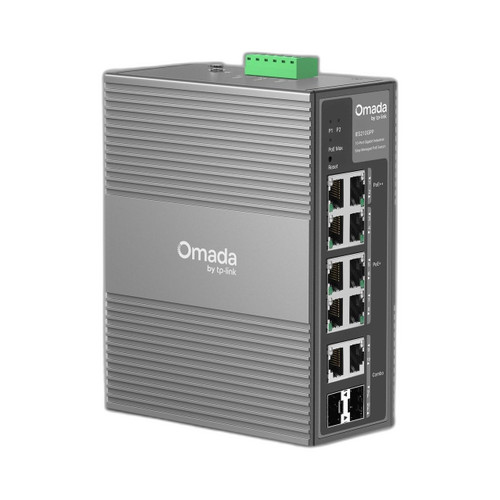
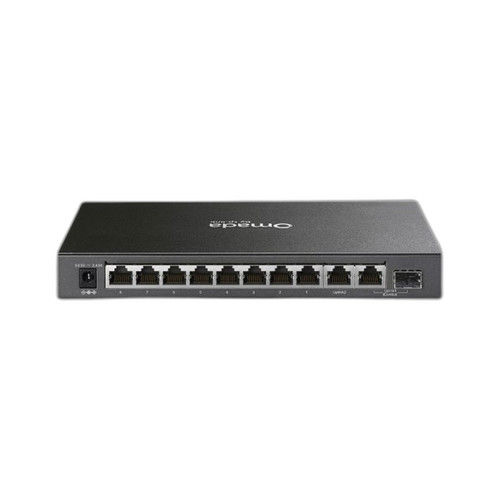
The IES210GPP and DS110GMP are both TP-Link Omada-line 10-port gigabit switches with PoE capability and a 20 Gbps switching fabric, making them surface-level cross-shop candidates. However, they diverge sharply on deployment environment, management tier, and PoE architecture. The IES210GPP is a DIN-rail-mounted, industrially rated managed switch built for harsh environments; the DS110GMP is a desktop unmanaged switch for office or light commercial use. Buyers choosing between them are typically deciding between an industrial edge deployment and a simple desktop installation.
In This Guide
Which switch delivers more usable PoE power and to how many devices?
The IES210GPP carries a 240 W total PoE budget across 8 powered ports: 6 ports rated at 802.3at (30 W each) and 2 ports supporting 802.3bt PoE++ at up to 95 W combined. That PoE++ capability allows it to power multi-sensor PTZ cameras, pan-tilt drives, and heated enclosure accessories that exceed the 30 W ceiling of standard PoE+. The two remaining ports are dedicated gigabit uplinks, and there are 2 SFP combo slots for fiber connectivity.
The DS110GMP provides 123 W across 8 PoE+ ports, all capped at 802.3at (30 W per port). It does not support 802.3bt PoE++. Its single SFP combo slot (shared with one RJ45 port) offers one fiber uplink option. The DS110GMP's 123 W budget can sustain approximately four to five 25 W cameras simultaneously before approaching thermal limits, whereas the IES210GPP's 240 W budget nearly doubles that headroom and adds the high-wattage port option for devices that demand it.
Which switch is built for harsh or outdoor-adjacent deployments?
The IES210GPP is rated for continuous operation from -40 °C to 75 °C (-40 °F to 167 °F), carries an IP40 enclosure rating, and specifies ±6 kV common-mode surge protection on Ethernet ports. It supports DIN-rail mounting, a 1+1 redundant power input topology, and is described as industrial-grade. These characteristics make it suitable for traffic cabinets, factory floors, outdoor enclosures, and any site where temperature swings, vibration, or electrical transients are concerns.
The DS110GMP is rated from 0 °C to 40 °C (32 °F to 104 °F) operating and -40 °C to 70 °C storage. No IP rating is specified in the provided data, and no surge protection specification is listed. Its form factor is desktop with wall-mount capability; DIN-rail mounting is not specified. Idle power draw is 7.93 W with no PoE load. The DS110GMP is suited to climate-controlled indoor environments such as offices, small retail spaces, or server closets where ambient conditions remain stable.
Which switch offers centralized management and advanced network control?
The IES210GPP is a fully managed switch with native Omada SDN controller integration, enabling centralized configuration, VLAN segmentation, QoS policy, port-level monitoring, and firmware management alongside other Omada-capable devices from a single dashboard. This is the same controller plane used by TP-Link Omada access points and routers, which is relevant for unified site deployments. The spec lists it as 'Managed (Omada).'
The DS110GMP is classified as unmanaged (plug-and-play) in its own specification data—notably, the product name includes 'Managed' but the spec fields consistently record it as unmanaged. It provides three hardware-selectable operating modes: Priority Mode (QoS priority on ports 1–2), Isolation Mode (traffic segmentation between ports), and PoE Auto Recovery (watchdog restart for locked PoE devices). These are physical switch-selectable features, not software-configurable policies, and there is no controller integration listed. Buyers requiring VLAN, SNMP, or remote policy management should note this distinction.
Which should you choose: the IES210GPP or the DS110GMP?
Our take: The IES210GPP is the stronger choice when the deployment site involves temperature extremes, electrical transients, high-wattage devices, or a need for centralized network management. Its -40 °C to 75 °C operating range versus the DS110GMP's 0 °C to 40 °C window is decisive for any outdoor cabinet or non-climate-controlled space. Its 240 W PoE budget is nearly double the DS110GMP's 123 W, and its two 802.3bt PoE++ ports support devices up to 95 W combined—a capability the DS110GMP entirely lacks. Full Omada SDN management enables VLAN and QoS policies; the DS110GMP offers only hardware-switch modes. Conversely, the DS110GMP is the appropriate fit for a benign indoor environment where plug-and-play simplicity, a smaller footprint, and a lower total cost of infrastructure matter more than environmental hardening or software-defined control.
Side-by-Side Comparison
Spec-for-spec, from manufacturer data.
| Specification | TP-Link IES210GPP | TP-Link DS110GMP |
|---|---|---|
| Product Type | Industrial Managed Switch | Desktop Unmanaged Switch |
| Total Ports | 10 | 10 |
| PoE Ports | 8 (6× PoE+, 2× PoE++) | 8 (all PoE+) |
| PoE Standard | 802.3af/at/bt (PoE++) | 802.3af/at (PoE+) |
| PoE Budget | 240 W | 123 W |
| Max Per-Port PoE | 95 W (PoE++ ports) | 30 W |
| SFP Slots | 2 combo (1000BASE-X) | 1 combo (SFP/RJ45) |
| Switching Capacity | 20 Gbps | 20 Gbps |
| Management | Managed (Omada SDN) | Unmanaged (hardware modes only) |
| Operating Temp | -40 °C to 75 °C | 0 °C to 40 °C |
| IP Rating | IP40 | — |
| Surge Protection | ±6 kV common mode (Ethernet) | — |
| DIN-Rail Mount | Yes | — |
| Redundant Power Input | 1+1 redundant | — |
| Idle Power Draw | 5.64–5.95 W (standby) | 7.93 W (no PoE load) |
| Memory | 64 Mbit Flash; 4 Mbit Packet Buffer | — |
Frequently Asked Questions
Which should you choose: the IES210GPP or the DS110GMP?
The IES210GPP is the stronger choice when the deployment site involves temperature extremes, electrical transients, high-wattage devices, or a need for centralized network management. Its -40 °C to 75 °C operating range versus the DS110GMP's 0 °C to 40 °C window is decisive for any outdoor cabinet or non-climate-controlled space. Its 240 W PoE budget is nearly double the DS110GMP's 123 W, and its two 802.3bt PoE++ ports support devices up to 95 W combined—a capability the DS110GMP entirely lacks. Full Omada SDN management enables VLAN and QoS policies; the DS110GMP offers only hardware-switch modes. Conversely, the DS110GMP is the appropriate fit for a benign indoor environment where plug-and-play simplicity, a smaller footprint, and a lower total cost of infrastructure matter more than environmental hardening or software-defined control.
Can the DS110GMP replace the IES210GPP in an outdoor camera cabinet?
No. The DS110GMP is rated only from 0 °C to 40 °C operating, which excludes most outdoor or unheated enclosure environments. The IES210GPP is rated from -40 °C to 75 °C and adds ±6 kV surge protection on Ethernet ports, making it the appropriate choice for outdoor-adjacent or industrial deployments.
Is the IES210GPP or DS110GMP better for powering PTZ cameras that draw more than 30 W?
The IES210GPP. It includes two 802.3bt PoE++ ports capable of delivering up to 95 W combined, which can accommodate high-draw PTZ cameras, pan-tilt actuators, or heated enclosures exceeding the 30 W PoE+ ceiling. The DS110GMP is limited to 802.3at (30 W per port) and does not support 802.3bt.
Which switch works with the Omada SDN controller for centralized site management?
Only the IES210GPP. Its specs explicitly list Omada SDN controller integration and classify it as a managed switch. The DS110GMP's spec data classifies it as unmanaged; its operating modes (Priority, Isolation, PoE Auto Recovery) are hardware-selected features, not software-managed policies, and no controller integration is listed in the provided specifications.
More Network Switch Comparisons
- TP-Link IES210GPP vs Transition Networks OCA-1AB201-NA
- TP-Link IES210GPP vs Transition Networks OCA-1BA1A0
- TP-Link IES210GPP vs Transition Networks OCA-1BA101
- TP-Link IES210GPP vs TP-Link SG1210PP
- TP-Link DS110GMP vs Transition Networks OCA-1AB201-NA
- TP-Link DS110GMP vs Transition Networks OCA-1BA1A0
Network Switch Buying Guides
Get a Second Opinion on Your Camera Choice
Share your site layout, coverage goals, and budget. Our team will validate the camera selection, flag anything we would change, and recommend products that match the use case.