
TP-Link DS108G vs TP-Link S4500-8GP: Specification Comparison
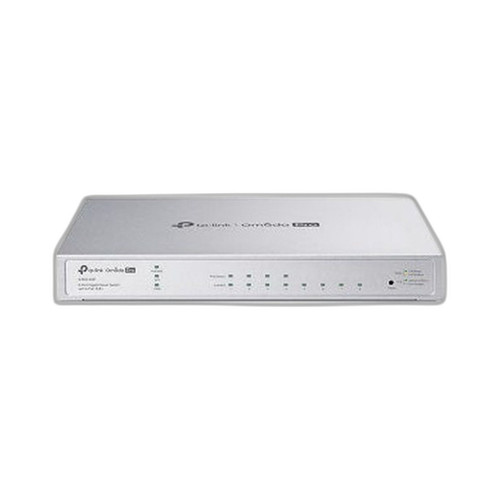
Both the TP-Link DS108G and the S4500-8GP are 8-port desktop/wall-mount switches aimed at small business and surveillance network installations. Despite sharing the same port count and TP-Link's Omada ecosystem branding, they target meaningfully different buyer profiles: the DS108G is an unmanaged 2.5G multi-gig switch designed for throughput-hungry edge connections, while the S4500-8GP is a managed L2+ gigabit smart switch with PoE+ capability. Buyers cross-shopping these should focus on port speed, PoE budget, and management depth.

In This Guide
Which switch delivers more per-port bandwidth and switching headroom?
The DS108G operates at up to 2.5 Gbps per port with auto-negotiation across 2.5G, 1G, and 100 Mbps, backed by a 40 Gbps switching capacity. This makes it well-suited to connecting Wi-Fi 6 access points, NAS devices, or any endpoint that can take advantage of multi-gigabit throughput beyond the standard 1G ceiling.
The S4500-8GP runs all 8 RJ45 ports at standard gigabit (1G/100M) speeds. Its switching capacity is listed as 16 Gbps in its primary spec fields, with a secondary figure of 20 Gbps appearing in some source fields — the 16 Gbps figure is used here as the primary reference. For camera fleets and IP phones where 1 Gbps per port is sufficient, this is not a practical limitation, but users with multi-gig uplinks or NAS aggregation needs will find the DS108G's 40 Gbps backplane and 2.5G ports decisively superior.
Which switch is the right fit for powering and managing IP devices?
The S4500-8GP provides 802.3af/at PoE+ on 4 of its 8 ports with a total budget of 62W, powered by an external 53.5 VDC/1.31 A adapter. This lets it directly power IP cameras, wireless APs, and VoIP phones without separate injectors — a meaningful cost and cabling advantage in surveillance or hospitality deployments.
The DS108G, while listed with a 'PoE' tag in some spec fields, does not have a specified PoE port count, PoE standard, or PoE budget in the provided specifications. Installers should not rely on PoE delivery from the DS108G based on available spec data. Its maximum power consumption is 8.679 W — consistent with a non-PoE switch — while the S4500-8GP draws up to 62W, reflecting active PoE load.
On management, the S4500-8GP is a full L2+ managed switch supporting SNMP Trap/Inform, 802.1X authentication, ACL, DoS defense, EEE (Energy Efficient Ethernet), and web/CLI management modes with 32 MB onboard storage. The DS108G is entirely unmanaged, relying on auto-negotiation and AUTO MDI/MDIX with no remote access, VLAN, or QoS controls available.
How do these switches differ in physical deployment and ecosystem integration?
The DS108G is a compact desktop unit measuring 6.2 × 4.0 × 1.0 in (158 × 100.7 × 25.4 mm) with wall-mount capability. It ships with rubber feet, a power adapter, and an installation guide, and carries FCC, CE, and RoHS certifications. Its small footprint suits wiring closets, media shelves, or under-desk deployments where rack space is unavailable.
The S4500-8GP is physically larger at 11.6 × 7.1 × 1.7 in and supports both wall and rack mounting, giving it flexibility for structured cabling environments. It also includes 2 SFP slots (fiber type: single mode per source data), extending uplink options beyond copper — a capability entirely absent on the DS108G. Neither switch is DIN-rail mountable based on available specs.
Both products fall under TP-Link's Omada ecosystem, but the S4500-8GP carries the 'Omada Pro' designation, implying deeper integration with Omada SDN controllers for centralized management. The DS108G, being unmanaged, participates in Omada networks only as a transparent edge device without controller visibility or policy enforcement.
Which should you choose: the DS108G or the S4500-8GP?
Our take: The S4500-8GP is the stronger choice when the deployment requires powered endpoints, network segmentation, or centralized management — its 62W PoE+ budget across 4 ports, L2+ feature set (802.1X, ACL, SNMP, VLAN), and dual SFP uplink slots make it the clear pick for IP camera fleets, access point backbones, or any site running Omada SDN. The DS108G is the stronger choice when raw per-port throughput is the priority: its 2.5 Gbps per-port speed and 40 Gbps switching capacity are 2.5× and 2.5× higher, respectively, than the S4500-8GP's 1G ports and 16 Gbps fabric. The DS108G is also significantly more compact (158 × 100.7 × 25.4 mm vs 11.6 × 7.1 × 1.7 in) and draws only 8.679 W versus the S4500-8GP's 62 W maximum. Choose the DS108G for multi-gig edge aggregation with NAS or Wi-Fi 6 APs; choose the S4500-8GP for managed, PoE-powered surveillance or enterprise-grade small LAN segments.
Side-by-Side Comparison
Spec-for-spec, from manufacturer data.
| Specification | TP-Link DS108G | TP-Link S4500-8GP |
|---|---|---|
| Product Type | Unmanaged Desktop Switch | Smart Gigabit Switch (L2+) |
| Managed | No (Unmanaged) | Yes (L2+) |
| Port Count (RJ45) | 8 | 8 |
| Port Speed | 2.5 Gbps (multi-gig) | 1 Gbps (gigabit) |
| Switching Capacity | 40 Gbps | 16 Gbps |
| PoE Support | Not specified in specs | 802.3af/at (PoE+) |
| PoE Budget | — | 62W |
| PoE Ports | — | 4 |
| SFP Uplink Slots | — | 2 (single mode) |
| Max Power Consumption | 8.679 W | 62W |
| Mount Type | Wall | Wall; Rack |
| Dimensions | 6.2 × 4.0 × 1.0 in | 11.6 × 7.1 × 1.7 in |
| Management Protocols | — | SNMP Trap/Inform, Web, CLI |
| Security Features | — | 802.1X, ACL, DoS Defense |
| Memory/Storage | — | 32 MB |
| Certifications | FCC, CE, RoHS | Not specified in specs |
Frequently Asked Questions
Which should you choose: the DS108G or the S4500-8GP?
The S4500-8GP is the stronger choice when the deployment requires powered endpoints, network segmentation, or centralized management — its 62W PoE+ budget across 4 ports, L2+ feature set (802.1X, ACL, SNMP, VLAN), and dual SFP uplink slots make it the clear pick for IP camera fleets, access point backbones, or any site running Omada SDN. The DS108G is the stronger choice when raw per-port throughput is the priority: its 2.5 Gbps per-port speed and 40 Gbps switching capacity are 2.5× and 2.5× higher, respectively, than the S4500-8GP's 1G ports and 16 Gbps fabric. The DS108G is also significantly more compact (158 × 100.7 × 25.4 mm vs 11.6 × 7.1 × 1.7 in) and draws only 8.679 W versus the S4500-8GP's 62 W maximum. Choose the DS108G for multi-gig edge aggregation with NAS or Wi-Fi 6 APs; choose the S4500-8GP for managed, PoE-powered surveillance or enterprise-grade small LAN segments.
Can the DS108G power my IP cameras directly like the S4500-8GP can?
Based on the provided specifications, the S4500-8GP has clearly documented PoE+ (802.3af/at) support on 4 ports with a 62W total budget. The DS108G does not have a specified PoE port count, PoE standard, or PoE budget in its spec data, and its 8.679W maximum power draw is inconsistent with active PoE delivery. Installers should not rely on the DS108G for powering cameras or APs without independently verifying PoE capability from TP-Link's official documentation.
Is the DS108G or S4500-8GP better for connecting Wi-Fi 6 access points?
The DS108G is better suited for connecting Wi-Fi 6 APs specifically because of its 2.5 Gbps per-port speed, which matches the multi-gig backhaul capability of Wi-Fi 6 and Wi-Fi 6E access points that exceed 1G throughput. The S4500-8GP's ports are capped at 1 Gbps, which can bottleneck a high-throughput AP. However, if the APs also need to be powered via PoE and managed via VLAN or QoS policies, the S4500-8GP's management and PoE features may outweigh the speed advantage.
Can I manage either of these switches remotely through Omada's SDN controller?
The S4500-8GP supports SNMP, web management, and CLI management modes and carries the 'Omada Pro' designation, indicating SDN controller compatibility for centralized policy management. The DS108G is unmanaged and does not support any remote management interface — it operates transparently on the network with no controller visibility. If central management, VLAN enforcement, or network-wide policy control is required, the S4500-8GP is the only option between these two.
More Network Switch Comparisons
- TP-Link SG2210XMP-M2 vs Ubiquiti USW-FLEX-2.5G-8
- TP-Link SG2210XMP-M2 vs Comnet CNGE8MS
- TP-Link SG2210XMP-M2 vs Lantronix S2220-1014-NA
- TP-Link SG2210XMP-M2 vs TP-Link S4500-8GP
- TP-Link SG2210XMP-M2 vs TP-Link SG2008P
- TP-Link S4500-8GP vs Ubiquiti USW-FLEX-2.5G-8
Network Switch Buying Guides
Get a Second Opinion on Your Camera Choice
Share your site layout, coverage goals, and budget. Our team will validate the camera selection, flag anything we would change, and recommend products that match the use case.