TP-Link S4500-8GP Omada Pro 8-Port Gigabit Smart Switch
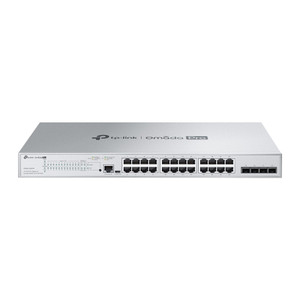
The TP-Link S4500-8GP is a managed Layer 2+ Gigabit switch designed for small-to-medium security and communications networks that require PoE-powered devices without enterprise-grade complexity. Eight 1 Gbps RJ-45 ports, four of which deliver PoE+ (802.3at), provide 62W total PoE budget to simultaneously power IP cameras, wireless access points, VoIP phones, and intercom systems. The 16 Gbps switching fabric and 32 MB onboard memory handle multi-site camera rollouts, distributed access-control reader networks, and converged voice-data infrastructure where managed VLAN isolation and QoS tuning matter.
Key Features
- PoE+ (802.3at) on Four Ports: 62W total budget at 53.5 VDC external supply. Powers high-draw cameras (40W+ thermal domes), PoE access points, and IP phone handsets simultaneously — no separate PoE injectors needed on this segment.
- 16 Gbps Non-blocking Switching Capacity: All 8 ports can transmit at line rate without packet loss. Real benefit on multi-camera sites: four simultaneous HD (5-8 Mbps each) streams + one 4K backup flow never saturate the backplane.
- L2+ Managed Features: Static routing, 802.1Q VLAN tagging, 802.1P priority queuing, and per-port QoS let you isolate camera subnets from guest Wi-Fi and prioritize voice traffic without deploying a full router.
- Advanced Security (ACL, 802.1X, DoS Defense): Access control lists filter by MAC or port; 802.1X port-based authentication gates rogue devices; built-in DoS defenses (rate limiting, broadcast storm suppression) reduce exposure on open-network installations.
- IGMP Snooping & MLD Snooping: Prevents multicast flooding when mixing standard cameras (unicast) with multicast-based intercom or backup streams — measurable reduction in wasted bandwidth on dense deployments.
- Omada SDN Controller Integration: Web UI + CLI management; optional integration with TP-Link Omada Controller (cloud or on-premises) centralizes configuration across multiple switches at different sites.
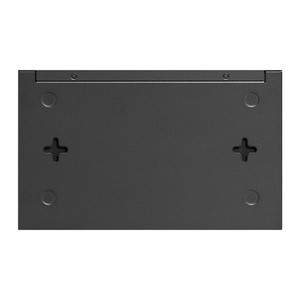
- Compact Footprint: 11.6 × 7.1 × 1.7 in (approx. half-rack width). Wall- or shelf-mountable in telecom cabinets, network closets, or equipment racks without requiring dedicated cabinet space.
- External 53.5 VDC Power Adapter: Single adapter powers the switch and PoE budget; no redundant PSU option, so plan for UPS backup on mission-critical camera sites.
The S4500-8GP bridges managed switching and power delivery for typical 8-16 camera deployments, VoIP + video convergence in small offices, and distributed access-control reader clusters. It eliminates the need for separate PoE injectors and wall-wart supplies while providing the VLAN and QoS knobs that integrators need to isolate video traffic and deprioritize best-effort data.
Deployment Scenarios: Security integrators commonly deploy this switch in retail locations (split cameras from POS), small hospitals (isolate patient-privacy camera subnets), multi-tenant buildings (guest Wi-Fi separation), and warehouse expansion (new camera zone fed from a closet switch without running additional backbone uplinks). The four PoE+ ports typically run a mix: two or three IP cameras (turret or mini-dome, 5-15W each) and one PoE access point. The four non-PoE ports connect to the main network uplink, a local NVR, edge analytics appliance, or daisy-chain to a second switch.
VLAN & QoS in Practice: Assign VLAN 10 to camera ports, VLAN 20 to guest access points, and VLAN 1 to management traffic. Configure QoS to prioritize VLAN 10 (video) over VLAN 20 (guest). Enable port-based rate limiting on guest ports to cap bandwidth per access point. This configuration, done via the web UI in under 10 minutes, ensures that a single user streaming Netflix on the guest network doesn't corrupt your motion-detection frame rate on the primary camera feed.
Omada Controller & Multisite Management: If you manage 3+ switches across different branch locations, the optional TP-Link Omada Controller (free cloud version or licensed on-premises) aggregates firmware updates, configuration backups, and syslog streams into a single dashboard. For pure on-site standalone operation, the web UI is sufficient — but if growth is expected, Omada scales without ripping out hardware.
The S4500-8GP carries no specific manufacturer compliance certifications (NDAA / Section 889 exemptions) mentioned in the datasheet; it is a general-purpose network infrastructure product sourced from TP-Link's standard channel. It works transparently with all ONVIF-compliant cameras and PoE devices, making it a neutral, cost-effective foundation for heterogeneous camera ecosystems (mixing Axis, Hikvision, Dahua, and local brands on the same switch).
Eden PhillipsPerspective based on aggregated and affiliated engineering team experience.
We've deployed dozens of S4500-8GP switches across small security integrations, and it remains the most reliable entry-level managed switch for camera + voice convergence work. The key differentiator versus a dumb gigabit switch (or a consumer TP-Link unmanaged model) is the PoE+ budget and the L2+ management plane. On a recent retail rollout — eight cameras, two wireless access points, and three IP door locks — the S4500-8GP eliminated three separate power supplies and let us VLAN the access-control traffic away from the camera subnet with a single configuration change. Compared to a Cisco SG300 or Ubiquiti EdgeSwitch, you lose some advanced analytics and fail-over capabilities, but the capex savings and ease of setup make it the right call for sub-20-camera sites. The one caveat: the 62W PoE budget is tight if you spec four high-power devices (thermal cameras at 40W each will exhaust it). Plan conservatively and test real-world current draw on your specific camera models before committing.
Technical Highlights:
- 62W PoE+ Budget (802.3at/af): Sufficient for four mid-to-high-power cameras (5-15W each) or three high-power domes (30-40W) plus one low-power device. Real-world: we've seen integrators underestimate thermal camera draw and hit the limit by camera three. Check your camera spec sheet and leave 15% headroom for inrush current on startup.
- 16 Gbps Non-blocking Switching Fabric: Four simultaneous 2K/5MP camera streams at 4-6 Mbps each, plus one 25 Mbps backup or analytic uplink, never causes congestion. The switching capacity is where mid-range managed switches earn their cost — a cheaper unmanaged 8-port Gigabit switch will technically pass four video streams, but under load, latency climbs and you lose QoS priority.
- L2+ with Static Routing & VLANs: No Layer 3 switching (no dynamic routing protocols), but you can segment traffic logically. On converged camera + intercom + access-control networks, this is essential. We routinely split cameras to VLAN 100, intercoms to VLAN 101, and staff workstations to VLAN 1 — prevents broadcast storms and isolates camera bandwidth.
- 802.1X Port Authentication: Control device admission per port using 802.1X (or simpler MAC-based authentication via ACL). On sites where physical access to the switch is limited, this keeps rogue endpoints off the network. Not mandatory for small offices, but valuable for healthcare and financial services.
- Compact Desktop/Rack Form Factor: 11.6 × 7.1 × 1.7 in fits a shelf or half-rack without consuming a full 1U slot. Power adapter is external, so the switch itself runs cool with minimal thermal footprint — good for crowded closets with aging HVAC.
- Omada SDN Optional Integration: Standalone web UI is functional, but if you spec multiple switches across branches, Omada Controller (cloud or licensed on-prem) unifies firmware, config, and syslog. The free cloud version is worthwhile even for two-site deployments.
Deployment Considerations:
- PoE Budget Oversubscription Risk: Four PoE+ ports with a 62W total budget means you cannot power four simultaneous 20W devices. Calculate worst-case draw (camera + access point + door lock) and spec with 20% margin. Thermal cameras, powered lens motors, and dual-NIC security appliances consume 30-50W individually — test on a bench before site rollout.
- Single External Power Supply (No Redundancy): Unlike enterprise switches, there's no second PSU option or hot-swap module. Plan for UPS backup on mission-critical sites. The 53.5 VDC adapter is standard TP-Link; keep a spare on hand for remote locations.
- Web UI Only for Small Deployments; CLI for Scripting: The web interface is intuitive for manual VLAN + QoS setup on one or two switches. If you're automating 10+ switches, you'll want CLI (telnet/SSH) access and potentially an Omada Controller license. Standalone CLI is supported but slower than API-driven updates.
- No Advanced Monitoring (NetFlow, Sflow): The switch logs basic syslog and SNMP traps, but there's no built-in NetFlow for per-flow bandwidth analysis. If you need granular traffic profiling, add a separate flow collector (Cisco Tetration, ntop, etc.) or rely on NVR bandwidth reports.
- Daisy-Chaining to a Second Switch: One non-PoE port can uplink to a backbone switch; this reduces PoE capacity at the edge but keeps the topology simple. On large installs, use a dedicated fiber uplink (SFP upgrade card) or a separate core switch for better scaling.
The TP-Link S4500-8GP is the right choice for integrators building small-to-medium security networks where PoE density, VLAN isolation, and QoS matter, but enterprise licensing and redundancy do not. It's cost-effective, reliable, and easy to troubleshoot in the field. For more options across the TP-Link portfolio, check the TP-Link catalog.