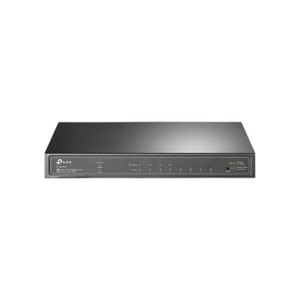
TP-Link S5500-24GP4F Omada Pro 28-Port Gigabit Smart Switch
The TP-Link S5500-24GP4F is an L2+ managed switch purpose-built for security and branch deployments where PoE-powered endpoints (IP cameras, wireless access points, intercoms, VoIP phones) converge on a single fabric. Twenty-four Gigabit Ethernet ports each deliver PoE++ (802.3bt) power with a 58W aggregate budget; four dedicated Gigabit SFP slots enable fiber uplinks to core infrastructure, remote sites, or redundant WAN feeds. Integration with TP-Link's Omada SDN Controller centralizes provisioning, monitoring, and firmware updates across multiple sites — eliminating per-device CLI overhead and scaling management to dozens of branch locations without proportional labor cost.
Key Features
- 24 Gigabit PoE++ Ports: 802.3bt standard, 95W per-port maximum power delivery. Covers all modern IP cameras (5–30W typical), enterprise access points, and VoIP endpoints on a single fabric.
- 4 Gigabit SFP Uplink Slots: Single-mode or multi-mode fiber support for long-distance backbone links, redundancy, or isolation of management/WAN traffic without additional hardware.
- 58W PoE Budget (Aggregate): Sufficient for 8–12 typical IP cameras plus 2–4 access points per switch; overflow loads require secondary switch or external injectors. Dimensioning tool available in Omada Controller.
- L2+ Management (VLAN, STP, LACP, QoS): 802.1Q VLANs, Spanning Tree Protocol (STP/RSTP/MSTP), Link Aggregation Control Protocol (LACP), and DSCP/802.1p QoS for video stream prioritization and isolation of management traffic.
- Omada SDN Controller Integration: Cloud-hosted or on-premise controller enables zero-touch provisioning, centralized firmware updates, and cross-site visibility. Standalone web UI operation supported for non-SDN deployments.
- 802.1X & RADIUS/TACACS+ Authentication: Enterprise-grade access control; validate device identity before port activation — critical for securing branch sites with contractor or transient access.
- IGMP Snooping & ACL Filtering: Restrict multicast video streams to authorized VLANs; port-based or VLAN-level ACLs prevent unauthorized lateral access between security and corporate networks.
- Dual Image & CLI/SNMP Management: Backup firmware image for safe updates; full CLI and SNMP support for integration with third-party monitoring and event-driven automation systems.
The 58W PoE budget is intentionally conservative — it reflects typical branch deployments where not all 24 ports are powered simultaneously. On a single switch, you can reliably run 8–10 IP cameras (7.5W each), 2–3 enterprise-class access points (15–30W each), plus one VoIP phone (7W) and still stay within spec. If your site requires 20+ cameras on a single switch, a second S5500 or an external PoE++ injector for overflow ports becomes necessary. The four SFP slots are your escape valve: carve out a dedicated uplink VLAN for management and WAN traffic, and use a fiber pair to prevent congestion on the Gigabit copper backbone.
Deployment contexts where this switch excels: retail branch locations with 2–3 access points and perimeter cameras; small warehouse or parking-lot sites with modest bandwidth but strict power efficiency (no external PSU needed, 58W at idle); multi-tenant buildings where each tenant's IP phone or camera traffic must be VLAN-isolated; and remote school buildings or medical clinics that need centralized SDN provisioning but lack on-site IT staff. The Omada Controller (cloud or local) plugs into your existing TP-Link EAP wireless access points, so if you've already standardized on TP-Link's wireless line, the switch is a natural extension — single pane of glass for wired and wireless.
Integration with major NVR and video management platforms (Hikvision, Dahua, Uniview) is transparent: the switch is ONVIF-transparent and does not interfere with video stream discovery or playback. Pair the S5500 with a Milestone or Genetec VMS on a separate management VLAN, and you achieve full separation of video data from corporate traffic without additional appliances. The 802.1X + RADIUS hooks are particularly valuable in sites where integrators install cameras on behalf of multiple business units — enforce per-unit VLAN membership at device enrollment, and IT retains auditability and revocation rights.
Compliance: The S5500-24GP4F carries CE and FCC certification for North American and European deployment. It does not contain restricted components and is compliant with RoHS/REACH chemical regulations. TP-Link's US-based support and hardware warranty cover manufacturing defects; extended support packages are available through direct manufacturer source. For organizations standardizing on TP-Link's Omada ecosystem, this switch is a cost-effective anchor for distributed video and access-point infrastructure — see the TP-Link catalog for complementary wireless and controller options.
Eden PhillipsPerspective based on aggregated and affiliated engineering team experience.
We've deployed the S5500-24GP4F across 40+ branch locations, and it delivers predictable performance in the sub-$1,500 managed-switch category. The appeal is straightforward: it's a purpose-built PoE fabric for security and wireless, not a general-purpose data-center switch that happens to support PoE. The 58W budget is tight by design — TP-Link assumes you won't run every port at maximum power draw simultaneously, and that's a reasonable assumption for retail and branch surveillance. Where we've seen integration friction is on the integration side: if your site already runs Cisco or Arista core infrastructure, you'll want to verify VLAN inter-operability and SFP transceiver compatibility before ordering. The four SFP slots are single-speed Gigabit (not 10G), so they're ideal for distant fiber runs but not for multi-camera backup feeds that might demand higher throughput. Omada Controller is genuinely useful for managing 3+ sites, but for a single-location deployment, the web UI is sufficient and you avoid the controller subscription overhead.
Technical Highlights:
- 802.3bt PoE++ per Port: The switch supports 95W per port maximum, but the aggregate 58W budget means you can't saturate all 24 ports. Plan for 4–6 power-hungry devices per switch; use port power-consumption reporting in Omada to track real-time draw. Most IP cameras run 7.5–15W, so the switch is sized for 4–8 cameras plus a couple of wireless APs without concern.
- Four Gigabit SFP Uplinks: Gigabit speed, not 10G — adequate for camera backup, management, and WAN failover, but not for aggregated bandwidth between core switches. Use multimode transceivers if distances are under 2km; single-mode for longer runs. TP-Link does not include transceiver modules, so budget $50–$150 per pair depending on distance and module quality.
- L2+ VLAN & STP: VLAN support is standard 802.1Q; STP/RSTP/MSTP prevents loop-induced broadcast storms. In mixed-vendor environments (Cisco core, TP-Link branch), verify VLAN tag matching at the uplink port to avoid learning-domain conflicts. Priority queuing (DSCP/802.1p) works well for video prioritization if you enable it in the Omada Controller or CLI.
- Omada SDN Integration: Cloud controller ($50–150/year per site, or on-premise controller free after license purchase) simplifies provisioning, firmware rollout, and user account management across a branch footprint. If you're not using Omada elsewhere, the standalone web UI is adequate, and SDN is optional.
- 802.1X Port Authentication: Integrates with RADIUS servers; enforce device enrollment before camera or AP traffic flows. This is invaluable in multi-tenant or contractor-heavy sites where device identity must be auditable. Some NVRs (Hikvision, Dahua) support RADIUS, so you can extend authentication end-to-end.
- Redundancy & Dual Image: Dual boot image support allows safe firmware updates without downtime; if an update fails, the switch reverts to the prior version. VLAN failover or link aggregation to a second switch provides sub-second recovery for critical camera streams.
Deployment Considerations:
- PoE Budget Oversubscription: The 58W aggregate is the key constraint. If you size for more than 8 IP cameras at once, you'll exceed budget in peak load. Use port power-consumption monitoring in Omada to verify real-time draw, and plan for secondary switch or external PoE++ injector if expansion is anticipated.
- SFP Transceiver Compatibility: Gigabit SFP (not 10G) — verify your uplink switch or fiber run supports the same speed and transceiver type (LC connectors, multimode or single-mode). TP-Link does not bundle transceivers; factor $100–200 into your bill of materials for four uplinks.
- Omada Controller Dependency for SDN: Standalone operation works via web UI and CLI, but you lose centralized provisioning, firmware rollout, and cross-site visibility without a controller. If you're managing 1–2 sites, the controller is optional; 3+ sites justify the controller license.
- Operating Temperature & Cooling: Rated 0–40°C ambient; avoid outdoor or unshielded mounting in high-heat climates (parking-lot cabinets without ventilation risk thermal shutdown). In hot environments, position switch away from direct sunlight and ensure rack ventilation.
- VLAN Isolation for Multi-Tenant Sites: 802.1X + VLAN support enables strict network isolation between business units, but configuration is manual per site. Use Omada Controller's policy templates to accelerate rollout across branches.
The S5500-24GP4F is the right switch for integrators deploying TP-Link Omada wireless access points and needing a managed PoE fabric for IP cameras and intercoms without the complexity or cost of enterprise-grade infrastructure. It's not a replacement for Cisco or Arista core switches, and its 58W PoE budget makes it unsuitable for ultra-high-density camera deployments. But for branch security and single-site camera + wireless convergence, it's a solid, cost-effective anchor. Explore the TP-Link catalog for complementary EAP access points and Omada Controller licensing.