
TP-Link SG2210XMP-M2 vs TP-Link S4500-8GP: Specification Comparison
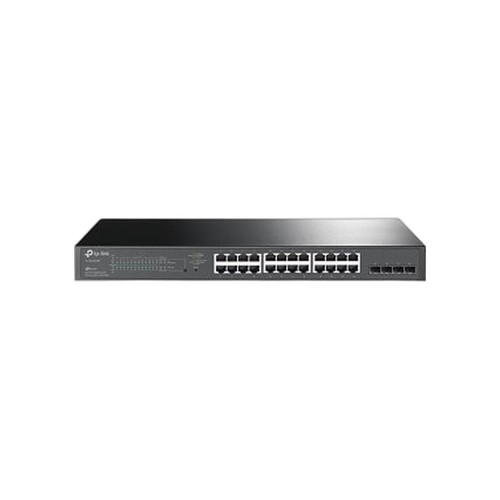
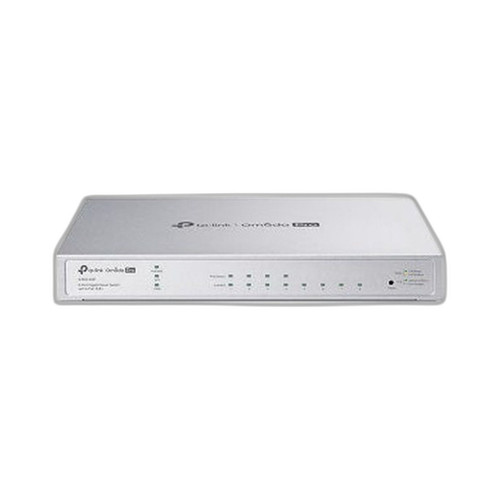
Both the TP-Link SG2210XMP-M2 and S4500-8GP are 8-port Omada-family managed PoE+ switches aimed at small-to-medium IP surveillance and wireless deployments. The comparison pits a multi-gig, high-throughput uplink switch with a 160 W PoE budget against a Gigabit-only smart switch with a 62 W budget. Buyers cross-shopping these will be weighing port speed and PoE headroom against cost-appropriate capacity for lighter camera or access-point loads. Both share the same flash storage and PoE standard, making the tradeoffs concrete and spec-driven.
In This Guide
- Which switch delivers more bandwidth per port and aggregate throughput?
- How do the PoE budgets and power supply ratings compare for camera and AP deployments?
- What management capabilities and platform integration does each switch provide?
- Which should you choose: the SG2210XMP-M2 or the S4500-8GP?
- Side-by-Side Specs
- FAQ
Which switch delivers more bandwidth per port and aggregate throughput?
The SG2210XMP-M2 provides 8 × 2.5GBASE-T access ports plus 2 × 10G SFP+ uplink slots, yielding a switching capacity of 80 Gbps and a forwarding rate of 59.52 Mpps. This is purpose-built for multi-gig edge deployments where high-resolution cameras, Wi-Fi 6/6E APs, or NVRs can saturate a standard 1 Gbps port.
The S4500-8GP operates at Gigabit speeds across its 8 access ports with 2 SFP uplink slots. Its switching capacity is listed in the specs as 16 Gbps (with a secondary figure of 20 Gbps also appearing in the spec data — both are sourced from the product spec sheet as provided). Forwarding rate is not specified for the S4500-8GP in the provided data. For standard IP camera and VoIP deployments where individual ports do not exceed 100 Mbps sustained, Gigabit switching is typically adequate. However, for 4K multichannel streams or multi-gig NVR uplinks, the SG2210XMP-M2's headroom is substantially greater.
How do the PoE budgets and power supply ratings compare for camera and AP deployments?
The SG2210XMP-M2 carries a 160 W PoE budget across all 8 ports at up to 30 W per port (802.3at/af), powered by a 53.5 VDC / 3.37 A adapter. Maximum system power consumption with full PoE load is specified at 193.3 W (220 V/50 Hz at 25 °C), with a 15 W standby draw. This budget supports eight simultaneous 802.3at devices — for example, eight PTZ cameras or high-power outdoor APs — without port prioritization.
The S4500-8GP offers a 62 W PoE budget (802.3at/af) from a lighter 53.5 VDC / 1.31 A adapter. The spec data shows a secondary PoE budget figure of 61 W alongside 62 W; both originate from the provided spec sheet and are noted here transparently. Maximum power consumption is listed at 62 W. This budget comfortably powers four to six standard 802.3af cameras (typically 12–15 W each) but will require port prioritization or load management when all 8 ports are occupied with higher-draw 802.3at devices. The SG2210XMP-M2 delivers more than 2.5× the PoE budget of the S4500-8GP.
What management capabilities and platform integration does each switch provide?
The SG2210XMP-M2 supports both standalone operation and full Omada SDN Controller management (cloud and on-premises). It is ONVIF-compatible per the provided specs — a notable differentiator for direct integration into IP camera management platforms. It supports wall, ceiling, and rack mounting, and its dimensions are 8.9 × 5.2 × 1.4 in (226 × 131.2 × 35 mm).
The S4500-8GP is described as a managed L2+ smart switch supporting web and CLI management modes. Its listed management features include SNMP Trap/Inform and EEE (Energy Efficient Ethernet), plus 802.1X port authentication, ACL, and DoS Defense. Wall and rack mounting are supported; dimensions are 11.6 × 7.1 × 1.7 in. ONVIF compatibility is not specified in the provided data for the S4500-8GP. Both units carry 32 MB flash storage; the SG2210XMP-M2 additionally specifies 256 MB DRAM while the S4500-8GP's RAM is not specified in the provided data. The S4500-8GP's security feature set (ACL, 802.1X, DoS Defense) is explicitly listed, whereas these are not enumerated in the SG2210XMP-M2's provided spec data.
Which should you choose: the SG2210XMP-M2 or the S4500-8GP?
Our take: The SG2210XMP-M2 is the stronger choice when camera or AP density, high-resolution video throughput, or multi-gig edge connectivity are the primary requirements. It delivers 2.58× the PoE budget (160 W vs. 62 W), 5× the switching capacity (80 Gbps vs. 16 Gbps), and 2.5GBASE-T port speeds versus Gigabit-only on the S4500-8GP — all material advantages for deployments running 4K/8MP cameras, Wi-Fi 6 APs, or multi-channel NVRs. ONVIF compatibility is specified for the SG2210XMP-M2 but absent from the S4500-8GP's provided specs, which matters for camera management integration. Conversely, the S4500-8GP has explicit L2+ security features (802.1X, ACL, DoS Defense) listed in its specs. The S4500-8GP is appropriate for lighter loads — four to six standard 802.3af cameras in a cost-constrained deployment where Gigabit throughput is sufficient. Platform qualifier: both integrate with TP-Link's Omada ecosystem.
Side-by-Side Comparison
Spec-for-spec, from manufacturer data.
| Specification | TP-Link SG2210XMP-M2 | TP-Link S4500-8GP |
|---|---|---|
| Product Line | Omada | Omada Pro |
| Access Port Count | 8 | 8 |
| Access Port Speed | 2.5GBASE-T | Gigabit (1G) |
| SFP Uplink Slots | 2 × 10G SFP+ | 2 × SFP (speed not specified in provided data) |
| Switching Capacity | 80 Gbps | 16 Gbps (20 Gbps also listed in spec data) |
| Forwarding Rate | 59.52 Mpps | — |
| PoE Standard | 802.3af/at | 802.3af/at |
| PoE Budget | 160 W | 62 W |
| Max PoE per Port | 30 W | Not specified in provided data |
| Max Power Consumption | 193.3 W (full PoE load) | 62 W |
| Power Supply | 53.5 VDC / 3.37 A adapter | 53.5 VDC / 1.31 A adapter |
| Flash Storage | 32 MB | 32 MB |
| DRAM | 256 MB | — |
| ONVIF | Yes | — |
| Management | Standalone or Omada SDN Controller (cloud/on-prem) | Web / CLI (L2+, SNMP) |
| Mount Types | Wall; Ceiling; Rack | Wall; Rack |
| Operating Temp | -5 °C to 40 °C (23 °F to 104 °F) | — |
| MTBF | 275,278 h @ 25 °C | — |
| Dimensions | 8.9 × 5.2 × 1.4 in (226 × 131.2 × 35 mm) | 11.6 × 7.1 × 1.7 in |
Frequently Asked Questions
Which should you choose: the SG2210XMP-M2 or the S4500-8GP?
The SG2210XMP-M2 is the stronger choice when camera or AP density, high-resolution video throughput, or multi-gig edge connectivity are the primary requirements. It delivers 2.58× the PoE budget (160 W vs. 62 W), 5× the switching capacity (80 Gbps vs. 16 Gbps), and 2.5GBASE-T port speeds versus Gigabit-only on the S4500-8GP — all material advantages for deployments running 4K/8MP cameras, Wi-Fi 6 APs, or multi-channel NVRs. ONVIF compatibility is specified for the SG2210XMP-M2 but absent from the S4500-8GP's provided specs, which matters for camera management integration. Conversely, the S4500-8GP has explicit L2+ security features (802.1X, ACL, DoS Defense) listed in its specs. The S4500-8GP is appropriate for lighter loads — four to six standard 802.3af cameras in a cost-constrained deployment where Gigabit throughput is sufficient. Platform qualifier: both integrate with TP-Link's Omada ecosystem.
Is the SG2210XMP-M2 or S4500-8GP better for powering multiple high-wattage PTZ cameras?
The SG2210XMP-M2 is the better fit. Its 160 W PoE budget at up to 30 W per port (802.3at) can simultaneously power up to eight high-draw PTZ or multi-sensor cameras. The S4500-8GP's 62 W budget limits sustained full-load 802.3at use to roughly four to five ports before prioritization is needed.
Can either switch handle multi-gig uplinks to a core switch or NVR?
Yes, but only the SG2210XMP-M2 provides multi-gig connectivity — its 2 × 10G SFP+ ports support single-mode fiber uplinks at 10 Gbps, and access ports run at 2.5GBASE-T. The S4500-8GP's SFP slots and access ports operate at Gigabit speeds; uplink capacity to a core switch is limited accordingly. For aggregating high-bitrate camera feeds, the SG2210XMP-M2's uplink headroom is substantially greater.
Which switch is better suited to a security-hardened network requiring port-level access control?
The S4500-8GP explicitly lists 802.1X port authentication, ACL, and DoS Defense in its provided specifications, making its security feature set clear for compliance or segmentation requirements. The SG2210XMP-M2's provided spec data does not enumerate these features, so buyers with strict access-control mandates should verify its security capabilities against the full datasheet before selecting it.
More Network Switch Comparisons
- TP-Link SG2210XMP-M2 vs Ubiquiti USW-FLEX-2.5G-8
- TP-Link SG2210XMP-M2 vs Comnet CNGE8MS
- TP-Link SG2210XMP-M2 vs Lantronix S2220-1014-NA
- TP-Link SG2210XMP-M2 vs TP-Link SG2008P
- TP-Link S4500-8GP vs Ubiquiti USW-FLEX-2.5G-8
- TP-Link S4500-8GP vs Comnet CNGE8MS
Network Switch Buying Guides
Get a Second Opinion on Your Camera Choice
Share your site layout, coverage goals, and budget. Our team will validate the camera selection, flag anything we would change, and recommend products that match the use case.