
TP-Link DS105G-M2 vs TP-Link ES205G: Specification Comparison
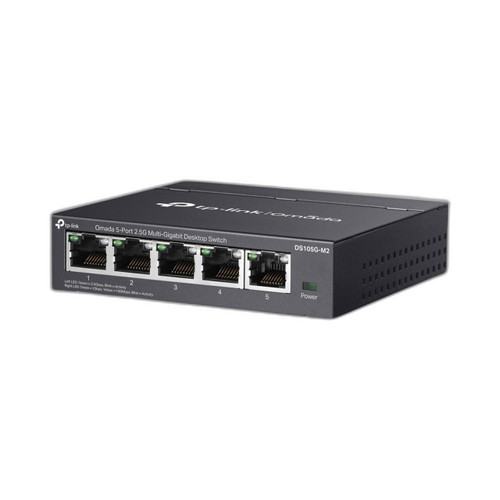
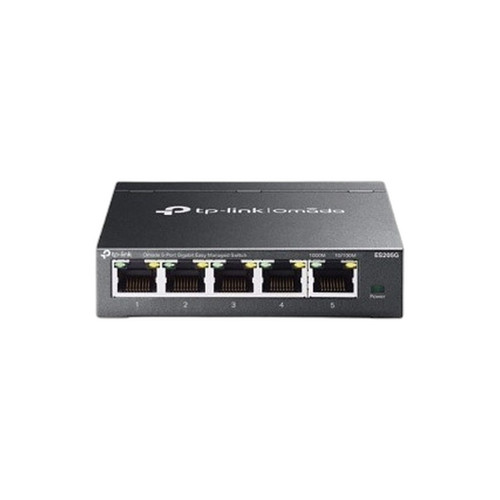
Both products are 5-port, non-PoE desktop/wall-mount switches from TP-Link's Omada line, making them direct cross-shop candidates for small-office or home-office network upgrades. The DS105G-M2 is an unmanaged 2.5G multi-gigabit switch targeting raw throughput, while the ES205G is a managed Gigabit switch targeting centralized control via Omada SDN. Buyers choosing between them are weighing whether faster unmanaged ports or software-defined management flexibility better serves their environment.
In This Guide
- Which switch delivers more bandwidth per port and higher aggregate throughput?
- Which switch offers more network visibility and centralized control?
- How do the two switches compare on physical footprint, power requirements, and operating environment?
- Which should you choose: the DS105G-M2 or the ES205G?
- Side-by-Side Specs
- FAQ
Which switch delivers more bandwidth per port and higher aggregate throughput?
The DS105G-M2 provides five 2.5 Gbps RJ-45 ports with a 25 Gbps non-blocking aggregate backplane, meaning each port can simultaneously sustain its full 2.5 Gbps rate without internal congestion. This is 2.5× the per-port speed of legacy Gigabit Ethernet.
The ES205G offers five 10/100/1000 Mbps RJ-45 ports with a 10 Gbps switching capacity and a forwarding rate of 7.4 Mpps. All five ports can sustain full 1 Gbps simultaneously, but the per-port ceiling is capped at 1 Gbps — one-quarter the DS105G-M2's per-port rate.
For environments with NAS units, modern Wi-Fi 6/6E APs, or workstations equipped with 2.5G NICs, the DS105G-M2's 25 Gbps backplane is a meaningful step up. For purely 1 Gbps endpoints, the ES205G's 10 Gbps capacity is sufficient without the higher-speed hardware overhead.
Which switch offers more network visibility and centralized control?
The ES205G is a fully managed switch with DHCP Client support and integration into the Omada SDN platform, enabling centralized configuration, monitoring, and policy enforcement alongside other Omada-managed devices. Its managed status permits features such as VLAN segmentation, traffic monitoring, and remote administration from a single controller interface.
The DS105G-M2 is unmanaged. It includes loop prevention monitoring (switchable) as its sole network-intelligence feature. There are no VLAN, QoS, or SDN controller capabilities. Configuration is limited to the physical loop-prevention toggle — no software interface is provided.
For IT teams deploying unified Omada SDN environments, the ES205G integrates into the same management plane as Omada APs and routers. The DS105G-M2 is a plug-and-play device with no controller presence, which suits deployments where simplicity and zero ongoing configuration are priorities.
How do the two switches compare on physical footprint, power requirements, and operating environment?
The ES205G specifies precise physical dimensions (3.9 × 3.9 × 1.0 in / 99.8 × 98 × 25 mm) and a defined power supply (5 VDC / 0.6 A). Its operating temperature range is 0 °C to 40 °C (32 °F to 104 °F), and it carries CE, FCC, and RoHS certifications. Memory is specified at 64 Mbit Flash and 4 Mbit Packet Buffer. Mount options include desktop and wall-mounting.
The DS105G-M2 specifies an operating temperature range of -5 °C to 40 °C (23 °F to 104 °F) — 5 °C lower cold-end tolerance than the ES205G — and a storage temperature range of -40 °C to 70 °C. Its mount type is listed as wall. Physical dimensions and power consumption figures are not provided in the available specifications.
The DS105G-M2's wider operating temperature floor (-5 °C vs 0 °C) may be relevant in lightly conditioned spaces such as server closets or garages. The ES205G's certifications (CE, FCC, RoHS) are stated explicitly; certifications for the DS105G-M2 are not listed in the provided specs.
Which should you choose: the DS105G-M2 or the ES205G?
Our take: The DS105G-M2 is the stronger choice when raw port throughput is the primary requirement and centralized management is not needed. Its 2.5 Gbps per-port speed and 25 Gbps non-blocking backplane are 2.5× and 2.5× greater, respectively, than the ES205G's 1 Gbps ports and 10 Gbps switching capacity — a decisive advantage for environments with 2.5G-capable endpoints such as modern NAS devices or Wi-Fi 6/6E access points. Conversely, the ES205G is the stronger choice when the deployment runs Omada SDN and requires managed features — VLAN, DHCP client, and centralized controller integration — that the unmanaged DS105G-M2 cannot provide at any configuration level. Buyers standardized on Omada SDN management should choose the ES205G for full platform visibility; buyers prioritizing throughput in a plug-and-play scenario should choose the DS105G-M2.
Side-by-Side Comparison
Spec-for-spec, from manufacturer data.
| Specification | TP-Link DS105G-M2 | TP-Link ES205G |
|---|---|---|
| Product Type | Unmanaged Desktop Switch | Managed Desktop Switch |
| Total Ports | 5 | 5 |
| Port Speed | 2.5 Gbps (Multi-Gigabit) | 10/100/1000 Mbps (1 Gbps) |
| Aggregate Backplane / Switching Capacity | 25 Gbps non-blocking | 10 Gbps |
| Forwarding Rate | — | 7.4 Mpps |
| SFP Slots | 0 | — |
| Managed | No | Yes |
| SDN Platform | — | Omada SDN |
| Management Features | Loop prevention (switchable) | DHCP Client; Omada controller |
| Connector Type | RJ-45 | RJ-45 |
| Mount Type | Wall | Desktop; Wall |
| Operating Temperature | -5°C to 40°C (23°F to 104°F) | 0°C to 40°C (32°F to 104°F) |
| Storage Temperature | -40°C to 70°C (-40°F to 158°F) | — |
| Power Supply | — | 5 VDC / 0.6 A |
| Memory | — | 64 Mbit Flash; 4 Mbit Packet Buffer |
| Certifications | — | CE, FCC, RoHS |
| Dimensions | — | 3.9 × 3.9 × 1.0 in (99.8 × 98 × 25 mm) |
Frequently Asked Questions
Which should you choose: the DS105G-M2 or the ES205G?
The DS105G-M2 is the stronger choice when raw port throughput is the primary requirement and centralized management is not needed. Its 2.5 Gbps per-port speed and 25 Gbps non-blocking backplane are 2.5× and 2.5× greater, respectively, than the ES205G's 1 Gbps ports and 10 Gbps switching capacity — a decisive advantage for environments with 2.5G-capable endpoints such as modern NAS devices or Wi-Fi 6/6E access points. Conversely, the ES205G is the stronger choice when the deployment runs Omada SDN and requires managed features — VLAN, DHCP client, and centralized controller integration — that the unmanaged DS105G-M2 cannot provide at any configuration level. Buyers standardized on Omada SDN management should choose the ES205G for full platform visibility; buyers prioritizing throughput in a plug-and-play scenario should choose the DS105G-M2.
Can either switch be managed through the Omada SDN controller?
Only the ES205G supports Omada SDN management. It is a fully managed switch with DHCP Client support and controller integration. The DS105G-M2 is unmanaged — it offers no software interface, VLAN capability, or SDN controller compatibility.
Will the DS105G-M2 actually deliver faster speeds than the ES205G in practice?
Yes, provided the connected devices support 2.5 Gbps links. The DS105G-M2 provides five 2.5 Gbps ports on a 25 Gbps non-blocking backplane. The ES205G is capped at 1 Gbps per port with a 10 Gbps switching capacity. If all endpoints are limited to 1 Gbps NICs, both switches deliver identical per-device throughput and the ES205G's capacity is sufficient.
Is either switch suitable for a mildly cool environment such as an unheated closet?
The DS105G-M2 has a specified operating temperature floor of -5 °C (23 °F), giving it a 5 °C lower cold-end tolerance compared to the ES205G's floor of 0 °C (32 °F). For spaces that may drop below freezing, the DS105G-M2 has the wider rated operating range based on the provided specifications.
More Network Switch Comparisons
- TP-Link SG2005P-PD vs Ubiquiti USW-FLEX-2.5G-5
- TP-Link SG2005P-PD vs TP-Link ES205G
- TP-Link SG2005P-PD vs TP-Link DS105G
- TP-Link ES205G vs Ubiquiti USW-FLEX-2.5G-5
- TP-Link ES205G vs TP-Link DS105G
- Ubiquiti USW-FLEX-2.5G-5 vs TP-Link DS105G
Network Switch Buying Guides
Get a Second Opinion on Your Camera Choice
Share your site layout, coverage goals, and budget. Our team will validate the camera selection, flag anything we would change, and recommend products that match the use case.