
TP-Link ES205G vs TP-Link DS105G: Specification Comparison
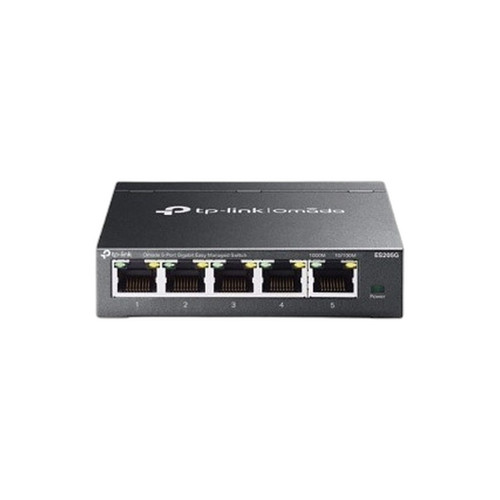
The TP-Link ES205G and DS105G are both 5-port Gigabit switches in TP-Link's Omada line, sharing identical port counts, switching capacity, physical dimensions, and operating temperature range. Where they diverge fundamentally is management: the ES205G is a fully managed switch with DHCP client support and Omada SDN integration, while the DS105G is a plug-and-play unmanaged desktop switch. This comparison evaluates which model best fits a given deployment based on management needs, power draw, and integration requirements.
In This Guide
- Which switch provides the management and integration capabilities your deployment requires?
- How do the two switches compare on power consumption and physical installation flexibility?
- Are there differences in switching throughput or onboard memory that affect real-world performance?
- Which should you choose: the ES205G or the DS105G?
- Side-by-Side Specs
- FAQ
Which switch provides the management and integration capabilities your deployment requires?
The ES205G is a managed switch with DHCP client support and full integration into TP-Link's Omada SDN platform, enabling centralized configuration, monitoring, and control alongside other Omada devices such as access points and routers. This makes it suitable for deployments where VLAN segmentation, port-level visibility, or unified network management is required.
The DS105G is an unmanaged, plug-and-play device with no management interface, no SDN integration, and no configurable features. It requires no setup and offers no control plane. For installations where simplicity and zero-configuration operation are the priority — aggregating cameras or access points at a single edge node — the DS105G delivers that without overhead. For any deployment requiring traffic segmentation, monitoring, or centralized policy, the DS105G provides no path forward.
How do the two switches compare on power consumption and physical installation flexibility?
The ES205G is rated at 5 VDC / 0.6 A supply input. Its power consumption figure in watts is not explicitly stated in the provided specs beyond the supply rating. The DS105G specifies a maximum power consumption of 3.1 W, which is the only direct wattage figure available across both products. Both units share the same compact form factor at 99.8 × 98 × 25 mm and the same operating temperature range of 0°C to 40°C (32°F to 104°F).
On mount type, the ES205G supports both wall-mounting and rack-mounting per its spec, while the DS105G is listed as wall-mount only with a desktop form factor. Installers needing rack integration in a structured wiring closet have a path only with the ES205G. Both carry FCC, CE, and RoHS certifications.
Are there differences in switching throughput or onboard memory that affect real-world performance?
Both switches share a 10 Gbps non-blocking switching capacity across their five 1 Gbps RJ45 ports, meaning neither introduces internal congestion under full line-rate traffic. The ES205G additionally specifies a forwarding rate of 7.4 Mpps (million packets per second), and onboard memory of 64 Mbit Flash and 4 Mbit Packet Buffer. The DS105G does not list a forwarding rate or memory specification in the provided data.
The ES205G's specified packet buffer (4 Mbit) and forwarding rate (7.4 Mpps) are relevant for environments with bursty traffic — such as simultaneous high-bitrate IP camera streams — where buffer depth affects frame loss under congestion. The DS105G's absence of these specs means those characteristics cannot be evaluated from the provided data alone.
Which should you choose: the ES205G or the DS105G?
Our take: The ES205G is the stronger choice when network visibility, traffic segmentation, or Omada SDN platform integration is a deployment requirement. The ES205G adds managed-switch capabilities — DHCP client, Omada SDN support, and rack-mount flexibility — that the DS105G entirely lacks. It also publishes a forwarding rate of 7.4 Mpps and a 4 Mbit packet buffer versus no equivalent spec disclosed for the DS105G. The DS105G's only concrete advantage in the provided specs is a stated maximum power consumption of 3.1 W; the ES205G's wattage is not directly specified beyond its 5 VDC / 0.6 A supply. For pure plug-and-play edge aggregation — camera drop points, mesh node uplinks — where zero configuration and minimal power draw are the sole criteria, the DS105G is appropriate. For any installation within an Omada-managed network, or where port-level control is needed, the ES205G is the correct selection.
Side-by-Side Comparison
Spec-for-spec, from manufacturer data.
| Specification | TP-Link ES205G | TP-Link DS105G |
|---|---|---|
| Product Type | Managed Switch | Unmanaged Desktop Switch |
| Managed | Yes | No |
| Omada SDN Support | Yes | No |
| Ports | 5 × 10/100/1000Mbps RJ45 | 5 × 1 Gbps RJ45 |
| Switching Capacity | 10 Gbps | 10 Gbps |
| Forwarding Rate | 7.4 Mpps | — |
| Packet Buffer | 4 Mbit | — |
| Flash Memory | 64 Mbit | — |
| Max Power Consumption | — | 3.1 W |
| Power Supply Input | 5 VDC / 0.6 A | — |
| Mount Type | Wall; Rack | Wall |
| Dimensions | 99.8 × 98 × 25 mm | 99.8 × 97.8 × 25 mm |
| Operating Temp | 0°C to 40°C (32°F to 104°F) | 0°C to 40°C (32°F to 104°F) |
| Certifications | CE, FCC, RoHS | FCC, CE, RoHS |
| Setup | Managed / DHCP Client | Plug-and-play |
| Package Contents | — | Switch, Power Adapter, Installation Guide |
Frequently Asked Questions
Which should you choose: the ES205G or the DS105G?
The ES205G is the stronger choice when network visibility, traffic segmentation, or Omada SDN platform integration is a deployment requirement. The ES205G adds managed-switch capabilities — DHCP client, Omada SDN support, and rack-mount flexibility — that the DS105G entirely lacks. It also publishes a forwarding rate of 7.4 Mpps and a 4 Mbit packet buffer versus no equivalent spec disclosed for the DS105G. The DS105G's only concrete advantage in the provided specs is a stated maximum power consumption of 3.1 W; the ES205G's wattage is not directly specified beyond its 5 VDC / 0.6 A supply. For pure plug-and-play edge aggregation — camera drop points, mesh node uplinks — where zero configuration and minimal power draw are the sole criteria, the DS105G is appropriate. For any installation within an Omada-managed network, or where port-level control is needed, the ES205G is the correct selection.
Can either switch be managed remotely through the Omada controller?
Only the ES205G supports Omada SDN management, allowing it to be configured and monitored through TP-Link's Omada controller platform. The DS105G is unmanaged and plug-and-play only — it has no management interface and cannot be added to an Omada controller.
Is the ES205G or DS105G better for a small IP camera installation with no IT staff on site?
If no configuration or ongoing management is needed, the DS105G's plug-and-play operation requires no setup. However, if the installation is part of a larger Omada network, or if VLAN isolation between cameras and other devices is required, the ES205G is necessary. The DS105G offers no traffic segmentation capability.
Can both switches be rack-mounted in a wiring closet?
The ES205G specifies both wall-mount and rack-mount installation. The DS105G is listed as wall-mount only with a desktop form factor. Rack integration in a structured wiring closet is only documented for the ES205G based on the provided specifications.
More Network Switch Comparisons
- TP-Link SG2005P-PD vs Ubiquiti USW-FLEX-2.5G-5
- TP-Link SG2005P-PD vs TP-Link ES205G
- TP-Link SG2005P-PD vs TP-Link DS105G
- TP-Link ES205G vs Ubiquiti USW-FLEX-2.5G-5
- Ubiquiti USW-FLEX-2.5G-5 vs TP-Link DS105G
- Ubiquiti USW-FLEX-2.5G-5 vs TP-Link DS105G-M2
Network Switch Buying Guides
Get a Second Opinion on Your Camera Choice
Share your site layout, coverage goals, and budget. Our team will validate the camera selection, flag anything we would change, and recommend products that match the use case.