
NETGEAR GS510TPP-100NAS vs NETGEAR GS108EP-100NAS: Specification Comparison
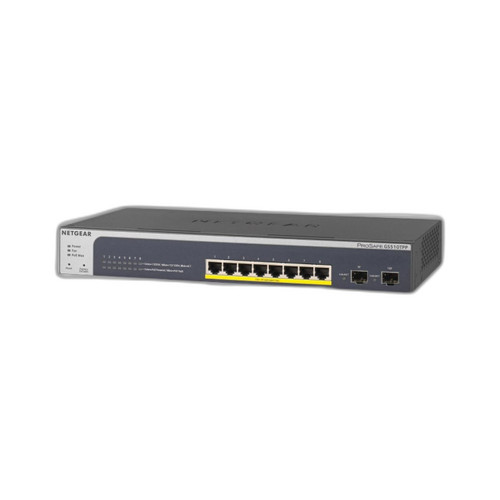
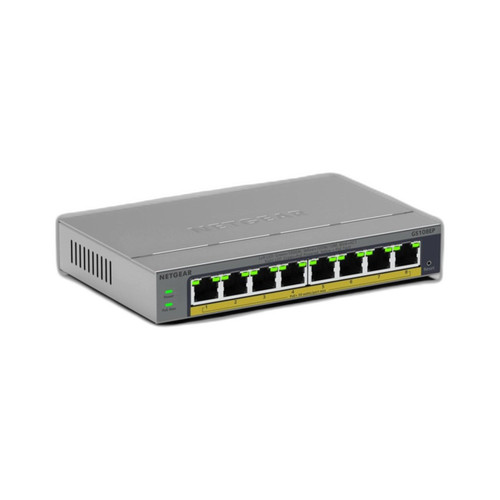
Both the NETGEAR GS510TPP-100NAS and GS108EP-100NAS are 8-port Gigabit PoE+ switches in plastic enclosures targeting small-to-medium IP security and networking deployments. The core comparison turns on management capability, confirmed power budget, and switching throughput. Buyers evaluating these two will typically be choosing between a smart-managed switch with granular traffic control and an unmanaged plug-and-play alternative for simpler, faster deployments.
In This Guide
- Which switch gives you more control over traffic prioritization and network segmentation?
- How do the PoE power budgets and per-port delivery compare across all 8 ports?
- Which switch offers higher switching fabric capacity for simultaneous multi-camera streams?
- Which should you choose: the GS510TPP-100NAS or the GS108EP-100NAS?
- Side-by-Side Specs
- FAQ
Which switch gives you more control over traffic prioritization and network segmentation?
The GS510TPP-100NAS is a smart-managed switch with a Web GUI, CLI, QoS, and VLAN support. These features allow installers to isolate surveillance VLANs, prioritize camera and NVR traffic with QoS policies, and administer the switch remotely without on-site visits. For multi-camera deployments where traffic segregation or bandwidth shaping matters, this management layer is a practical necessity.
The GS108EP-100NAS is explicitly unmanaged with no CLI, no web GUI, and no SNMP. There is no VLAN support and no QoS configuration. Traffic is forwarded by MAC address without any installer-configurable prioritization. This is a zero-configuration device: plug in and go, with no login credentials, no firmware policy, and no remote access. The trade-off is speed of deployment versus lack of long-term operational control.
How do the PoE power budgets and per-port delivery compare across all 8 ports?
The GS510TPP-100NAS carries a confirmed 240W total PoE power budget with PoE+ (802.3at) delivery of up to 30W per port across all 8 ports. The spec also references PoE++ (802.3bt) capability. The 240W budget is sufficient to run all 8 ports simultaneously at full 30W draw, which is a meaningful guarantee for dense camera or AP deployments.
The GS108EP-100NAS specifies PoE+ (IEEE 802.3at) at up to 30W per port across all 8 ports, and the spec sheet also lists PoE++ (802.3bt). However, the total PoE power budget is not confirmed in the provided specifications — the entry reads 'See manufacturer datasheet for total PoE budget.' Buyers must verify the aggregate budget independently before assuming all 8 ports can run at full draw simultaneously.
Which switch offers higher switching fabric capacity for simultaneous multi-camera streams?
The GS510TPP-100NAS is specified at 1000 Mbps (1 Gbps) per port with a smart-managed architecture. A total internal switching fabric figure is not explicitly stated in the provided specifications beyond the per-port speed.
The GS108EP-100NAS is specified with a 10 Gbps switching capacity (switching fabric). With 8 x 1 Gbps ports, a 10 Gbps non-blocking fabric provides sufficient headroom for full wire-rate forwarding across all ports simultaneously. This is a concrete, favorable throughput figure for the unmanaged model, though the GS510TPP-100NAS lacks a directly comparable aggregate fabric number in the provided specs.
Which should you choose: the GS510TPP-100NAS or the GS108EP-100NAS?
Our take: The GS510TPP-100NAS is the stronger choice when traffic management, VLAN segmentation, and a confirmed total PoE budget are required. It provides a documented 240W aggregate PoE budget — enough for all 8 ports at full 30W simultaneously — while the GS108EP-100NAS leaves total PoE budget unconfirmed in the provided specs, introducing deployment risk. The GS510TPP-100NAS also delivers Web GUI, CLI, QoS, and VLAN support absent entirely from the GS108EP-100NAS, which is strictly unmanaged with no configuration interface whatsoever. Conversely, the GS108EP-100NAS states a 10 Gbps switching fabric explicitly; no equivalent aggregate fabric figure appears in the GS510TPP-100NAS specs. For managed surveillance networks, multi-tenant environments, or any installation requiring traffic isolation, the GS510TPP-100NAS is the appropriate selection. The GS108EP-100NAS suits simple, single-segment deployments where zero-configuration speed and lower operational complexity outweigh the need for network control.
Side-by-Side Comparison
Spec-for-spec, from manufacturer data.
| Specification | NETGEAR GS510TPP-100NAS | NETGEAR GS108EP-100NAS |
|---|---|---|
| SKU | GS510TPP-100NAS | GS108EP-100NAS |
| Port Count | 8 | 8 |
| Port Speed | 1 Gbps per port | 1 Gbps per port |
| PoE Standard | PoE+ (802.3at, 30W per port); PoE++ (802.3bt) also listed | PoE+ (802.3at, 30W per port); PoE++ (802.3bt) also listed |
| Total PoE Budget | 240W | Not specified in provided specs |
| Switching Fabric | Not specified in provided specs | 10 Gbps |
| Management | Smart-managed (Web GUI, CLI, QoS, VLAN) | Unmanaged (no CLI, no web GUI, no SNMP) |
| VLAN Support | Yes | No |
| QoS Support | Yes | No |
| Enclosure | Plastic | Plastic |
| Mounting | Wall; Ceiling | Wall; Ceiling |
| Connector Type | RJ45 | — |
| Warranty | 5 years | 5 years |
| Form Factor | Compact desktop/wall-mount | Unmanaged switch, plastic housing |
| Product Type | Switch | Switch |
Frequently Asked Questions
Which should you choose: the GS510TPP-100NAS or the GS108EP-100NAS?
The GS510TPP-100NAS is the stronger choice when traffic management, VLAN segmentation, and a confirmed total PoE budget are required. It provides a documented 240W aggregate PoE budget — enough for all 8 ports at full 30W simultaneously — while the GS108EP-100NAS leaves total PoE budget unconfirmed in the provided specs, introducing deployment risk. The GS510TPP-100NAS also delivers Web GUI, CLI, QoS, and VLAN support absent entirely from the GS108EP-100NAS, which is strictly unmanaged with no configuration interface whatsoever. Conversely, the GS108EP-100NAS states a 10 Gbps switching fabric explicitly; no equivalent aggregate fabric figure appears in the GS510TPP-100NAS specs. For managed surveillance networks, multi-tenant environments, or any installation requiring traffic isolation, the GS510TPP-100NAS is the appropriate selection. The GS108EP-100NAS suits simple, single-segment deployments where zero-configuration speed and lower operational complexity outweigh the need for network control.
Is the GS510TPP-100NAS or GS108EP-100NAS better for a managed IP camera installation with VLANs?
The GS510TPP-100NAS is the correct choice. It supports VLAN configuration, QoS, Web GUI, and CLI — none of which are available on the GS108EP-100NAS, which is strictly unmanaged and does not support VLANs or any traffic prioritization.
Can both switches power all 8 PoE+ cameras at the same time?
The GS510TPP-100NAS has a confirmed 240W total PoE budget, which covers all 8 ports at the maximum 30W per port simultaneously. The GS108EP-100NAS specifies 30W per port but does not provide a confirmed aggregate budget in the available specifications — buyers should verify the total budget in the manufacturer datasheet before assuming simultaneous full-draw on all 8 ports.
Which switch is easier to deploy in a small branch office with no on-site IT support?
The GS108EP-100NAS requires zero configuration — no login, no setup, no firmware policy. It is plug-and-play by design. The GS510TPP-100NAS is a smart-managed switch that requires initial configuration through a Web GUI or CLI to take advantage of its VLAN and QoS features. For a site with no IT support and a simple flat network, the GS108EP-100NAS deploys faster, though it provides no remote management or traffic control after installation.
More Network Switch Comparisons
- Vivotek IHT-1271 vs TP-Link SG3210XHP-M2
- Vivotek IHT-1271 vs TP-Link S4500-8GP2F
- Vivotek IHT-1271 vs TP-Link SG1210P
- Vivotek IHT-1271 vs Allied Telesis AT-x530L-10GHXm-10
- Vivotek IHT-1271 vs Vivotek GEV-108A-130
- Vivotek IHT-1271 vs Vivotek IHT-1000
Network Switch Buying Guides
Get a Second Opinion on Your Camera Choice
Share your site layout, coverage goals, and budget. Our team will validate the camera selection, flag anything we would change, and recommend products that match the use case.