
Wasp WPL408 vs Wasp WPL408: Specification Comparison
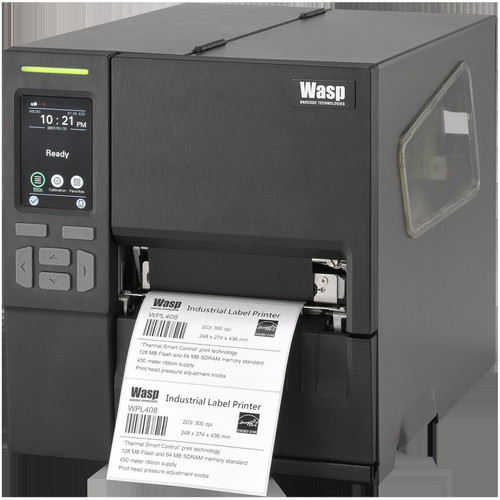
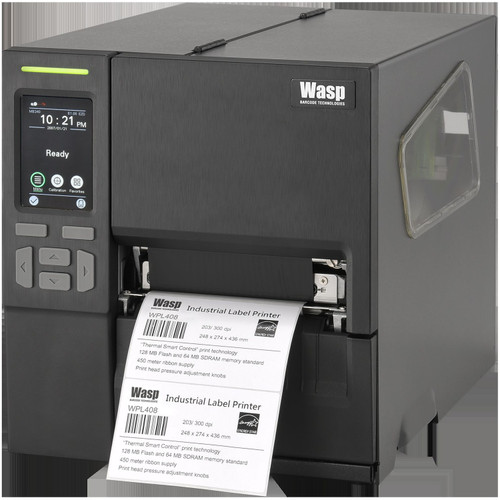
Both products are Wasp WPL408 industrial barcode printers — the same base unit sharing identical core hardware. Product A (SKU 633809007170) is the standard configuration, while Product B (SKU 633809007699) adds an integrated label peeler. Buyers choosing between these two are not selecting different printers; they are selecting a workflow accessory. This comparison covers the three dimensions most relevant to industrial label printing: print performance and media handling, connectivity and interface options, and physical deployment considerations including the peeler distinction.
In This Guide
- Do the WPL408 models differ in print speed, resolution, or media handling capability?
- Are there any differences in connectivity or interface options between the two configurations?
- What physical and workflow differences does the integrated peeler on Product B introduce?
- Which should you choose: the WPL408 or the WPL408?
- Side-by-Side Specs
- FAQ
Do the WPL408 models differ in print speed, resolution, or media handling capability?
Both units are spec-identical on every core print parameter. Print method is Thermal Transfer and Direct Thermal on both. Print speed is 10 ips on both. Resolution is 203 dpi on both. Maximum print width is 4.25 inches on both. Paper (media) width range is 1.6 to 4.3 inches on both. Ribbon length is 1,474 feet on both. Processor is a 32-bit RISC CPU on both, backed by 128 MB Flash and 128 MB SDRAM on both.
Product A's spec sheet lists label length as '1,000 inches' while Product B lists '1 to 3 inches (25.4–76.2 mm).' These are inconsistent values between the two spec sheets for the same model; neither figure should be used as a differentiator, as they appear to reflect a data entry inconsistency rather than a hardware difference. No spec provided for either unit indicates any print performance advantage for one over the other.
Are there any differences in connectivity or interface options between the two configurations?
Both units list RS-232, USB 2.0, USB Host, and Ethernet 10/100 Mbps as standard wired interfaces. Both list WiFi as available. The distinction is in how WiFi is described: Product A's spec sheet calls it a 'WiFi slot,' implying an optional module, while Product B specifies 'optional 802.11 a/b/g/n WiFi.' Product B's spec is more precise on the WiFi standard (802.11 a/b/g/n); Product A does not specify the 802.11 generation.
Display is identical on both: a 3.5-inch color HVGA LCD touchscreen. Product A additionally notes '6 buttons' as part of the display spec; Product B does not mention button count. Both units share the same Ethernet rate of 10/100 Mbps. No connectivity feature is exclusive to either SKU based on the provided specifications.
What physical and workflow differences does the integrated peeler on Product B introduce?
This is the sole functional differentiator between the two SKUs. Product B (SKU 633809007699) includes an integrated label peeler, as stated in its product name and confirmed in Card Bullet 3: 'Integrated peeler automates label separation, reducing manual handling on shipping lines.' Product A (SKU 633809007170) does not reference a peeler anywhere in its provided specifications.
Both units share identical physical dimensions: 9.76 inches wide × 10.79 inches high × 17.17 inches deep, and identical weight of 20.28 lbs. Product A describes its form factor as 'Box'; Product B describes its form factor as 'Compact Industrial Printer.' Neither unit's spec sheet documents a power supply rating, operating temperature range for active use (only storage is noted: -40 to 140°F / -40 to 60°C, 10–90% non-condensing), or drop/ingress protection ratings.
Which should you choose: the WPL408 or the WPL408?
Our take: The WPL408 with peeler (SKU 633809007699) is the stronger choice when the deployment involves high-volume, continuous label runs where manual label separation creates a workflow bottleneck — the integrated peeler is the only hardware difference between these two SKUs. Every core print spec is identical: 10 ips print speed, 203 dpi resolution, 4.25-inch max print width, 128 MB Flash / 128 MB SDRAM, and a 32-bit RISC CPU. Connectivity is functionally equivalent on both, with RS-232, USB 2.0, USB Host, and Ethernet 10/100 standard, and WiFi available as an option. Choose Product B for shipping lines or label-intensive operations where automated peeling reduces operator touchpoints. Choose Product A where the peeler is unnecessary — such as batch or offline print jobs — and where avoiding the peeler mechanism reduces maintenance surface area.
Side-by-Side Comparison
Spec-for-spec, from manufacturer data.
| Specification | Wasp WPL408 | Wasp WPL408 |
|---|---|---|
| SKU | 633809007170 | 633809007699 |
| Model / Configuration | WPL408 Standard | WPL408 with Integrated Peeler |
| Print Method | Thermal Transfer & Direct Thermal | Thermal Transfer / Direct Thermal |
| Print Speed | 10 ips | 10 ips |
| Resolution | 203 dpi | 203 dpi |
| Max Print Width | 4.25 in | 4.25 in |
| Media (Paper) Width | 1.6 in – 4.3 in | 1.6 in – 4.3 in |
| Ribbon Length | 1,474 ft | 1,474 ft (450 m) |
| Processor | 32-bit RISC CPU | 32-bit RISC CPU |
| Memory | 128 MB Flash, 128 MB SDRAM | 128 MB Flash, 128 MB SDRAM |
| Display | 3.5 in color HVGA LCD touchscreen, 6 buttons | 3.5 in color HVGA LCD touchscreen |
| Wired Interfaces | USB 2.0, RS-232, USB Host, Ethernet 10/100 Mbps | USB 2.0, RS-232, USB Host, Ethernet 10/100 Mbps |
| WiFi | WiFi slot (standard not specified) | Optional 802.11 a/b/g/n |
| Integrated Peeler | — | Yes |
| Weight | 20.28 lbs | 20.28 lbs (9.2 kg) |
| Dimensions (W × H × D) | 9.76 in × 10.79 in × 17.17 in | 9.76 in × 10.79 in × 17.17 in |
Frequently Asked Questions
Which should you choose: the WPL408 or the WPL408?
The WPL408 with peeler (SKU 633809007699) is the stronger choice when the deployment involves high-volume, continuous label runs where manual label separation creates a workflow bottleneck — the integrated peeler is the only hardware difference between these two SKUs. Every core print spec is identical: 10 ips print speed, 203 dpi resolution, 4.25-inch max print width, 128 MB Flash / 128 MB SDRAM, and a 32-bit RISC CPU. Connectivity is functionally equivalent on both, with RS-232, USB 2.0, USB Host, and Ethernet 10/100 standard, and WiFi available as an option. Choose Product B for shipping lines or label-intensive operations where automated peeling reduces operator touchpoints. Choose Product A where the peeler is unnecessary — such as batch or offline print jobs — and where avoiding the peeler mechanism reduces maintenance surface area.
Is there any difference in print quality or speed between the standard WPL408 and the WPL408 with peeler?
No. Both units are specified at 10 ips print speed and 203 dpi resolution, with identical processor, memory, print width, and ribbon length. The peeler is a media-handling accessory and does not affect print engine performance per the provided specifications.
Does the WPL408 with peeler (SKU 633809007699) support WiFi, and is it the same as the standard model?
Both models list WiFi as available. Product B specifies 'optional 802.11 a/b/g/n WiFi,' while Product A refers to a 'WiFi slot' without specifying the 802.11 standard. Both treat WiFi as optional rather than built-in. Buyers requiring WiFi should confirm module availability with the supplier for either SKU.
Are the two WPL408 models the same physical size and weight?
Yes. Both units are specified at 9.76 in (W) × 10.79 in (H) × 17.17 in (D) and 20.28 lbs. No dimensional difference is indicated in the provided specifications, meaning the peeler does not alter the documented footprint or weight figures.
More Label Printer Comparisons
- Honeywell PX940 vs Sato WWCLP3B01-WAR
- Honeywell PX940 vs Sato WWCLP3801-NAR
- Honeywell PX940 vs Sato WWCLP3801-WAR
- Honeywell PX940 vs Wasp WPL408
- Honeywell PX940 vs Honeywell PX4654-020
- Honeywell PX940 vs Honeywell PX6654-000
Label Printer Buying Guides
Get a Second Opinion on Your Camera Choice
Share your site layout, coverage goals, and budget. Our team will validate the camera selection, flag anything we would change, and recommend products that match the use case.