
Ubiquiti USW-PRO-48-POE vs NETGEAR GS348PP-100NAS: Specification Comparison
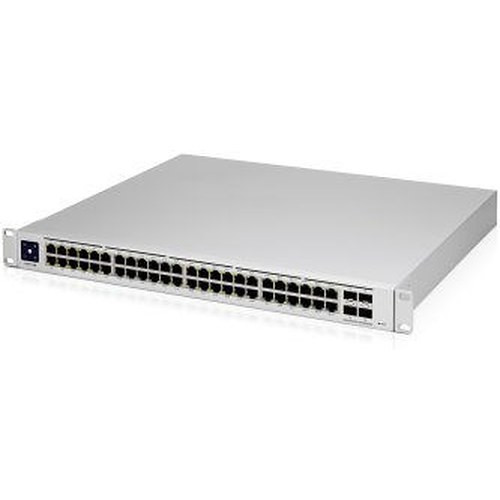
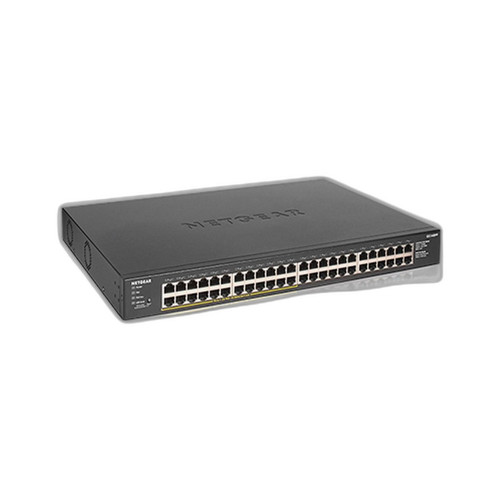
Both the Ubiquiti USW-PRO-48-POE and the NETGEAR GS348PP-100NAS are 48-port Gigabit PoE switches positioned for IP camera deployments and structured wiring closets. They share the same port density and PoE output capability, making them a legitimate cross-shop for installers sizing a surveillance or converged-access layer. The comparison turns on PoE budget, management depth, uplink bandwidth, and form factor — all of which differ materially between the two units.
In This Guide
- Which switch delivers more PoE headroom and how is power distributed across ports?
- How do switching capacity, uplink speed, and physical installation requirements compare?
- What management depth and network segmentation capability does each switch offer?
- Which should you choose: the USW-PRO-48-POE or the GS348PP-100NAS?
- Side-by-Side Specs
- FAQ
Which switch delivers more PoE headroom and how is power distributed across ports?
The USW-PRO-48-POE specifies a 660W total PoE budget (600W dedicated PoE output plus 60W independent), with 40 ports rated at PoE+ (802.3at, 32W each) and 8 ports rated at PoE++ (802.3bt, 64W each). This tiered allocation lets installers hang high-draw devices — PTZ cameras, Wi-Fi 6 APs, thin clients — on the PoE++ ports without a separate injector or midspan.
The GS348PP-100NAS specifies a 380W PoE budget with PoE+ (802.3at) support. The spec sheet also lists PoE++ (802.3bt) under the '_Poe Power' field, but the detailed '_PoE' spec explicitly states 'PoE+ (802.3at), 380W budget,' and the Card_Bullet_1 references only 24 PoE+ ports at 380W. The PoE++ entry appears inconsistent with the rest of the provided spec data; buyers should verify with the manufacturer datasheet before relying on 802.3bt delivery. The 380W budget is 280W less than the USW-PRO-48-POE's 660W total.
How do switching capacity, uplink speed, and physical installation requirements compare?
The USW-PRO-48-POE provides four 10G SFP+ uplink ports alongside the 48 Gigabit access ports, with a stated switching capacity of 176 Gbps aggregate (88 Gbps non-blocking) and a forwarding rate of 131 Mpps. At full port utilization — all 48 access ports active simultaneously — the 10G uplinks provide meaningful backhaul capacity without a bottleneck. The unit is a 1U rackmount chassis weighing 16.3 lbs, suited to standard 19-inch rack installation.
The GS348PP-100NAS specifies 48 Gigabit ports. No uplink speed beyond Gigabit, switching capacity, or forwarding rate is provided in the supplied specs. The mounting options listed are wall and ceiling, and the housing is plastic — there is no rack-mount specification provided. The product type is listed as unmanaged. Installers requiring rack deployment or higher-speed uplinks should note these absences in the available spec data.
What management depth and network segmentation capability does each switch offer?
The USW-PRO-48-POE is a managed Layer 2/3 switch supporting up to 1,000 VLANs, static routing, DHCP, and VLAN routing. Management interfaces include Web UI, SSH, SNMP, REST API, and the UniFi Controller platform. This makes it viable for multi-segment deployments — isolating camera VLANs, voice VLANs, and corporate data on the same switch — and allows remote monitoring and configuration.
The GS348PP-100NAS is specified as unmanaged. No VLAN configuration, SNMP, CLI, or management software is listed in the provided specs. The 'Bandwidth: Management Yes' field in the raw spec data appears to be a data-entry artifact inconsistent with the confirmed 'Management: Unmanaged' and 'Form_Factor: Unmanaged Switch' fields. For deployments requiring network segmentation, QoS, or centralized monitoring, the absence of management features is a firm constraint.
Which should you choose: the USW-PRO-48-POE or the GS348PP-100NAS?
Our take: The USW-PRO-48-POE is the stronger choice when management depth, PoE headroom, and uplink bandwidth are decision criteria. It delivers a 660W PoE budget versus the GS348PP-100NAS's 380W — a 280W advantage that directly translates to more or higher-draw devices per switch. Its four 10G SFP+ uplinks versus no sub-10G uplink specification on the NETGEAR prevent backhaul saturation in dense camera or AP deployments. Layer 2/3 management with 1,000 VLAN support versus an unmanaged architecture means the Ubiquiti unit can segment traffic, enforce QoS, and integrate into a monitored network fabric. The GS348PP-100NAS is appropriate only where zero-configuration plug-and-play, lower upfront cost, and a simpler physical installation (wall or ceiling mount, plastic enclosure) are the overriding requirements — typically small, flat, single-segment deployments where network management is not needed.
Side-by-Side Comparison
Spec-for-spec, from manufacturer data.
| Specification | Ubiquiti USW-PRO-48-POE | NETGEAR GS348PP-100NAS |
|---|---|---|
| Port Count | 48 Gigabit + 4× 10G SFP+ | 48 Gigabit |
| PoE Total Budget | 660W (600W PoE + 60W independent) | 380W |
| PoE Standard (Access Ports) | PoE+ (32W) and PoE++ (64W) | PoE+ (802.3at) per detailed spec; PoE++ listed inconsistently |
| PoE++ Port Count | 8 ports at up to 64W each | Not confirmed in provided specs |
| Uplink Ports | 4× 10G SFP+ | Not specified |
| Switching Capacity | 176 Gbps aggregate / 88 Gbps non-blocking | — |
| Forwarding Rate | 131 Mpps | — |
| Management | Managed Layer 2/3 (Web UI, SSH, SNMP, REST API, UniFi Controller) | Unmanaged |
| VLAN Support | 1,000 VLANs | — |
| Routing | Static routes, DHCP, VLAN routing | — |
| Form Factor | 1U Rackmount | Wall / Ceiling mount (no rack spec provided) |
| Housing | Not specified in provided specs | Plastic |
| Weight | 16.3 lbs | — |
| Warranty | Manufacturer Warranty (duration not specified) | 5 years |
| Product Family / Platform | UniFi Switching | — |
| Country of Origin | CN | — |
Frequently Asked Questions
Which should you choose: the USW-PRO-48-POE or the GS348PP-100NAS?
The USW-PRO-48-POE is the stronger choice when management depth, PoE headroom, and uplink bandwidth are decision criteria. It delivers a 660W PoE budget versus the GS348PP-100NAS's 380W — a 280W advantage that directly translates to more or higher-draw devices per switch. Its four 10G SFP+ uplinks versus no sub-10G uplink specification on the NETGEAR prevent backhaul saturation in dense camera or AP deployments. Layer 2/3 management with 1,000 VLAN support versus an unmanaged architecture means the Ubiquiti unit can segment traffic, enforce QoS, and integrate into a monitored network fabric. The GS348PP-100NAS is appropriate only where zero-configuration plug-and-play, lower upfront cost, and a simpler physical installation (wall or ceiling mount, plastic enclosure) are the overriding requirements — typically small, flat, single-segment deployments where network management is not needed.
Is the USW-PRO-48-POE or GS348PP-100NAS better for larger surveillance deployments?
The USW-PRO-48-POE is the stronger fit for larger deployments. Its 660W PoE budget (versus 380W on the GS348PP-100NAS) supports more simultaneous high-draw cameras, and its four 10G SFP+ uplinks prevent backhaul congestion as port utilization grows. The managed Layer 2/3 feature set also allows VLAN segmentation and centralized monitoring — both important at scale.
Can I use the GS348PP-100NAS with PoE++ devices like PTZ cameras or Wi-Fi 6 APs?
The GS348PP-100NAS lists PoE++ (802.3bt) in one spec field, but the detailed PoE spec explicitly states PoE+ (802.3at) at 380W. This inconsistency in the provided spec data means PoE++ support cannot be confirmed from these specs alone. Buyers should verify with the manufacturer datasheet. The USW-PRO-48-POE explicitly specifies 8 PoE++ ports at up to 64W each.
Does the GS348PP-100NAS support VLANs for separating camera traffic from corporate data?
No. The GS348PP-100NAS is specified as an unmanaged switch, meaning VLAN configuration, QoS, and traffic segmentation are not available. If camera-to-data network isolation is required, the USW-PRO-48-POE — which supports up to 1,000 VLANs and Layer 2/3 routing — is the appropriate choice.
More Network Switch Comparisons
- NETGEAR GS748PP-100NAS vs Ubiquiti USW-48-POE
- NETGEAR GS748PP-100NAS vs Ubiquiti USW-PRO-MAX-48-POE
- NETGEAR GS748PP-100NAS vs Ubiquiti USW-ENTERPRISE-48-POE
- NETGEAR GS748PP-100NAS vs Ubiquiti ES-48-500W
- NETGEAR GS748PP-100NAS vs NETGEAR GS348PP-100NAS
- Ubiquiti USW-48-POE vs NETGEAR GS348PP-100NAS
Network Switch Buying Guides
Get a Second Opinion on Your Camera Choice
Share your site layout, coverage goals, and budget. Our team will validate the camera selection, flag anything we would change, and recommend products that match the use case.