
Transition Networks SM24TBT2DPB-NA vs Transition Networks S4224: Specification Comparison
Both the Transition Networks SM24TBT2DPB-NA and S4224 are 24-port Gigabit Ethernet switches from the same manufacturer, placing them in the same port-count and speed class. However, they are designed for fundamentally different deployment scenarios: the SM24TBT2DPB-NA is a managed Layer 2 rack-mount switch targeting enterprise and structured-cabling environments, while the S4224 is an unmanaged industrial DIN-rail switch with multi-mode fiber capability and industrial temperature tolerance. Buyers evaluating both are weighing management and flexibility against ruggedness and simplified deployment.
In This Guide
- Which switch gives you the traffic control and segmentation needed for mixed IP-security deployments?
- Which switch is built for the physical environment and infrastructure of your installation site?
- Which switch supports the cabling infrastructure and physical reach your deployment requires?
- Which should you choose: the SM24TBT2DPB-NA or the S4224?
- Side-by-Side Specs
- FAQ
Which switch gives you the traffic control and segmentation needed for mixed IP-security deployments?
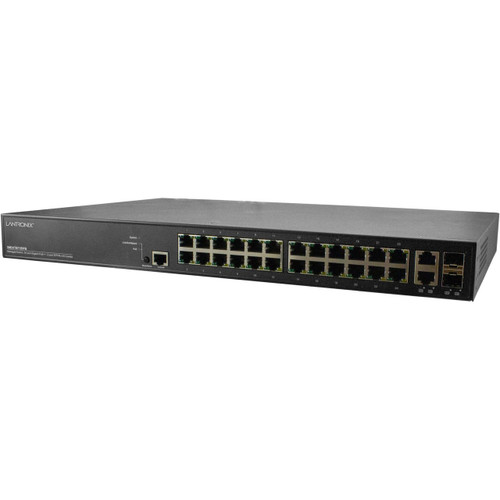
The SM24TBT2DPB-NA is a managed switch, meaning it supports Layer 2 features such as VLAN segmentation, which allows installers to isolate camera traffic, access control systems, and guest or corporate networks onto separate logical segments across its 24 RJ-45 Gigabit ports. This level of control is essential in enterprise or multi-tenant environments where traffic isolation, quality of service, or port-level security policies are required.
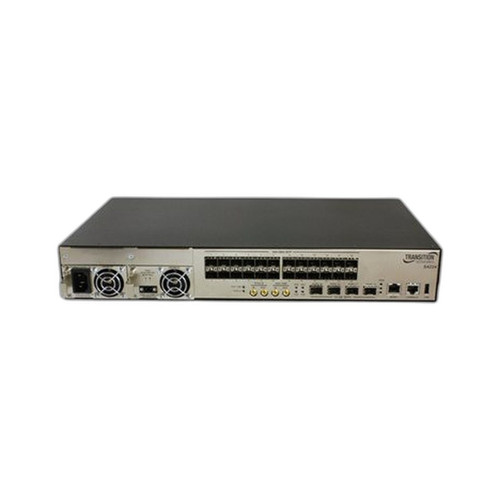
The S4224 is explicitly unmanaged, operating as a plug-and-play device with no configuration interface. It provides 24 Gigabit Ethernet ports with no VLAN, QoS, or port management capabilities. For deployments where simplicity and zero IT overhead are priorities—such as remote edge nodes or single-purpose camera runs—this is an operational advantage. However, it is not a substitute where traffic segmentation or managed port control is a requirement. The management dimension clearly differentiates these two products.
Which switch is built for the physical environment and infrastructure of your installation site?
The SM24TBT2DPB-NA ships with 19-inch rack-mount brackets and is designed for standard equipment rack installations alongside NVRs, servers, and patch panels. Its operating temperature range is not specified in the provided data, so buyers must verify suitability for non-climate-controlled spaces before deployment.
The S4224 is DIN-rail mounted, making it compatible with industrial enclosures, control panels, and field cabinets where rack space is unavailable. Critically, it carries an industrial temperature rating—exact range not specified in the provided data—making it suitable for environments that experience temperature extremes such as manufacturing floors, transportation infrastructure, or outdoor enclosures. For any installation outside a controlled server room or IDF closet, the S4224's industrial rating and DIN-rail form factor are significant structural advantages the SM24TBT2DPB-NA cannot match based on available specs.
Which switch supports the cabling infrastructure and physical reach your deployment requires?
The SM24TBT2DPB-NA provides 24 RJ-45 copper Gigabit ports. No fiber uplink or SFP slot is specified in the provided data, limiting connectivity to copper runs with standard 100-meter Cat5e/Cat6 reach. This suits structured-cabling environments with existing copper infrastructure and co-located equipment.
The S4224 adds multi-mode fiber connectivity with a specified maximum range of 1,000 meters. This dramatically extends the reachable distance beyond copper's 100-meter limit and eliminates electromagnetic interference susceptibility—a critical factor in industrial environments with heavy electrical machinery, VFDs, or other EMI sources. For deployments spanning large campuses, warehouses, or inter-building runs, the S4224's fiber capability addresses a real infrastructure constraint that the SM24TBT2DPB-NA does not resolve based on available specifications.
Which should you choose: the SM24TBT2DPB-NA or the S4224?
Our take: The SM24TBT2DPB-NA is the stronger choice when the deployment requires Layer 2 management, VLAN segmentation, and rack-mount integration in a controlled enterprise or security-operations environment. Its managed architecture enables traffic isolation across camera, access control, and IT segments—a capability the S4224 entirely lacks. By contrast, the S4224 is the correct choice for industrial or field deployments: it carries an industrial temperature rating (not present on the SM24TBT2DPB-NA per available specs), mounts on DIN rail for control-cabinet integration, and extends fiber connectivity to 1,000 meters versus the SM24TBT2DPB-NA's copper-only, unspecified-reach design. The S4224 also carries a lifetime warranty; no warranty term is specified for the SM24TBT2DPB-NA. These are not interchangeable products—select the SM24TBT2DPB-NA for managed enterprise environments and the S4224 for unmanaged industrial or extended-reach fiber runs.
Side-by-Side Comparison
Spec-for-spec, from manufacturer data.
| Specification | Transition Networks SM24TBT2DPB-NA | Transition Networks S4224 |
|---|---|---|
| Product Type | Switch | Switch |
| Managed | Yes (Layer 2) | No (Unmanaged) |
| Total Ports | 24 | 24 |
| Port Speed | Gigabit | Gigabit |
| Port Media | RJ-45 Copper | Gigabit Ethernet + Multi-Mode Fiber |
| Max Fiber Reach | — | 1,000 m |
| VLAN Support | Yes | — |
| Mount Type | 19" Rack Mount | DIN Rail |
| Operating Environment | Not specified | Industrial temperature-rated |
| Configuration Required | Yes | No (plug-and-play) |
| Included Accessories | 19" rack-mount brackets, PS-AC-920 | — |
| Warranty | Not specified | Lifetime |
| Datasheet Available | — | Yes (/content/product-datasheets/S4224.pdf) |
| SKU | SM24TBT2DPB-NA | S4224 |
Frequently Asked Questions
Which should you choose: the SM24TBT2DPB-NA or the S4224?
The SM24TBT2DPB-NA is the stronger choice when the deployment requires Layer 2 management, VLAN segmentation, and rack-mount integration in a controlled enterprise or security-operations environment. Its managed architecture enables traffic isolation across camera, access control, and IT segments—a capability the S4224 entirely lacks. By contrast, the S4224 is the correct choice for industrial or field deployments: it carries an industrial temperature rating (not present on the SM24TBT2DPB-NA per available specs), mounts on DIN rail for control-cabinet integration, and extends fiber connectivity to 1,000 meters versus the SM24TBT2DPB-NA's copper-only, unspecified-reach design. The S4224 also carries a lifetime warranty; no warranty term is specified for the SM24TBT2DPB-NA. These are not interchangeable products—select the SM24TBT2DPB-NA for managed enterprise environments and the S4224 for unmanaged industrial or extended-reach fiber runs.
Can the SM24TBT2DPB-NA or S4224 create separate VLANs for cameras and access control?
Only the SM24TBT2DPB-NA supports VLANs—it is a managed switch. The S4224 is unmanaged and has no VLAN capability whatsoever. If traffic segmentation between camera, access control, or corporate networks is a requirement, the S4224 cannot fulfill it.
Which switch is better suited for a factory floor or outdoor industrial enclosure?
The S4224 is the appropriate choice. It carries an industrial temperature rating and mounts on DIN rail, making it compatible with industrial control cabinets and harsh-environment enclosures. The SM24TBT2DPB-NA is a rack-mount unit with no industrial temperature rating specified in the available data.
Does either switch support fiber uplinks for longer cable runs?
Yes—the S4224 supports multi-mode fiber connectivity up to 1,000 meters per its specifications. The SM24TBT2DPB-NA is documented only with RJ-45 copper ports; no fiber uplink or SFP capability is listed in the available specifications.
More Network Switch Comparisons
- TP-Link S5500-24GP4XF vs NETGEAR GS728TP-300NAS
- TP-Link S5500-24GP4XF vs Comnet CNGE24FX12TX12MSPOE
- TP-Link S5500-24GP4XF vs Ubiquiti USW-24
- TP-Link S5500-24GP4XF vs Ubiquiti USW-ENTERPRISEXG-24
- TP-Link S5500-24GP4XF vs TP-Link SL2428P
- TP-Link S5500-24GP4XF vs TP-Link SG3428XPP-M2
Network Switch Buying Guides
Get a Second Opinion on Your Camera Choice
Share your site layout, coverage goals, and budget. Our team will validate the camera selection, flag anything we would change, and recommend products that match the use case.