
TP-Link S5500-24GP4XF vs Ubiquiti USW-ENTERPRISEXG-24: Specification Comparison
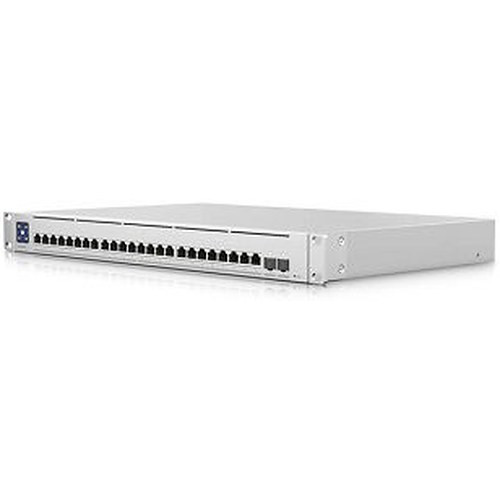
Both the TP-Link S5500-24GP4XF and the Ubiquiti USW-ENTERPRISEXG-24 are rack-mount, 24-port managed switches targeting enterprise and professional surveillance or unified networking environments. However, they serve fundamentally different port-speed tiers: the TP-Link delivers 24 x 1GbE PoE+ access ports with 4 x 10G SFP+ uplinks, while the Ubiquiti provides 24 x 10GbE RJ45 access ports with 2 x 25G SFP28 uplinks. A buyer cross-shopping these is choosing between a PoE-capable gigabit-access aggregator and a PoE-absent 10GbE-access distribution switch.

In This Guide
- What port speeds and switching capacity does each switch actually deliver?
- Which switch supports PoE, and how do their power budgets and operating environments compare?
- How do the two switches differ in management capabilities and ecosystem integration?
- Which should you choose: the S5500-24GP4XF or the USW-ENTERPRISEXG-24?
- Side-by-Side Specs
- FAQ
What port speeds and switching capacity does each switch actually deliver?
The TP-Link S5500-24GP4XF provides 24 x 1GbE RJ45 access ports and 4 x 10GbE SFP+ uplink/stack ports, for a total of 28 ports. Its switching capacity is listed as 160 Gbps (with a second figure of 320 Gbps appearing in the raw spec data; the lower 160 Gbps figure is taken as the conservative baseline). The forwarding rate is not specified in the provided data.
The Ubiquiti USW-ENTERPRISEXG-24 provides 24 x 10GbE RJ45 access ports and 2 x 25GbE SFP28 uplink ports, for a total of 26 ports. Its switching capacity is specified at 580 Gbps with a forwarding rate of 432 Mpps — neither metric is provided for the TP-Link. The Ubiquiti's access tier is a full order of magnitude faster per port (10GbE vs 1GbE), making it the appropriate choice wherever endpoints themselves require multi-gigabit connectivity, such as high-density 4K/8K IP camera encoders, NVRs with multiple 10G NICs, or workstations running real-time video analytics.
Which switch supports PoE, and how do their power budgets and operating environments compare?
The TP-Link S5500-24GP4XF supports IEEE 802.3af/at (PoE/PoE+) on its 24 RJ45 ports with a total PoE budget of 240 W and a maximum system power draw of 384 W. This makes it capable of powering up to 24 PoE+ devices such as IP cameras, wireless access points, or VoIP phones directly from the switch — eliminating the need for separate injectors or midspans. Dynamic PoE allocation is noted in the product bullets.
The Ubiquiti USW-ENTERPRISEXG-24 does not provide PoE on any port according to the supplied specifications. Its total power consumption is 100 W, reflecting the absence of a PoE subsystem. Any endpoints requiring power-over-Ethernet must be served by separate PoE injectors or a PoE-capable upstream switch.
On operating temperature, the TP-Link is rated 0 °C to 45 °C; the Ubiquiti is rated -5 °C to 40 °C. The Ubiquiti tolerates slightly colder ambient conditions while the TP-Link supports a slightly higher upper thermal limit. Both are 1U rack-mount designs.
How do the two switches differ in management capabilities and ecosystem integration?
The TP-Link S5500-24GP4XF is an L2+ managed switch supporting CLI, SNMP v1/v2c/v3, RMON, static routing, 802.1Q/QinQ VLAN, STP/RSTP/MSTP, IGMP snooping, ACL, 802.1X port authentication, and LACP. It integrates into the TP-Link Omada Pro ecosystem, which provides centralized controller-based management. Memory is specified at 32 MB flash; storage is 32 MB.
The Ubiquiti USW-ENTERPRISEXG-24 is a Layer 3 managed switch (supporting managed routing beyond the L2+ designation of the TP-Link) with management via SNMP, CLI, Web UI, and native UniFi Network integration. It is NDAA-compliant per the provided specifications — a procurement-relevant attribute for U.S. federal, state, and regulated-sector buyers. The TP-Link spec sheet does not state NDAA compliance status. Certifications for the Ubiquiti include CE, FCC, IC, and Anatel. The TP-Link's certification list is not provided in the supplied data.
Which should you choose: the S5500-24GP4XF or the USW-ENTERPRISEXG-24?
Our take: The S5500-24GP4XF is the stronger choice when the deployment requires PoE+ power delivery to cameras, access points, or VoIP endpoints at gigabit speeds, while the USW-ENTERPRISEXG-24 is the stronger choice when access-layer endpoints themselves demand 10GbE connectivity and PoE is handled elsewhere. Three concrete spec deltas define the split: (1) PoE budget — 240 W on the TP-Link versus zero PoE on the Ubiquiti; (2) access port speed — 1GbE on the TP-Link versus 10GbE on the Ubiquiti; (3) switching capacity — 160 Gbps (TP-Link) versus 580 Gbps (Ubiquiti). Platform matters: the TP-Link lives inside the Omada Pro ecosystem; the Ubiquiti is native to UniFi and carries an NDAA-compliant designation absent from the TP-Link's supplied specs. These are not interchangeable substitutes — select based on whether powered gigabit access or unpowered 10GbE access is the deployment requirement.
Side-by-Side Comparison
Spec-for-spec, from manufacturer data.
| Specification | TP-Link S5500-24GP4XF | Ubiquiti USW-ENTERPRISEXG-24 |
|---|---|---|
| Access Port Count | 24 x 1GbE RJ45 | 24 x 10GbE RJ45 |
| Uplink / Expansion Ports | 4 x 10GbE SFP+ | 2 x 25GbE SFP28 |
| Total Ports | 28 | 26 |
| Switching Capacity | 160 Gbps | 580 Gbps |
| Forwarding Rate | — | 432 Mpps |
| PoE Standard | 802.3af/at (PoE+) | None |
| PoE Budget | 240 W | — |
| Max Power Draw | 384 W | 100 W |
| Management Layer | L2+ Managed | Layer 3 Managed |
| Management Protocols | CLI, SNMP v1/v2c/v3, RMON | SNMP, CLI, Web UI, UniFi |
| Ecosystem | Omada Pro | UniFi Network |
| NDAA Compliant | — | Yes |
| Operating Temperature | 0 °C to 45 °C | -5 °C to 40 °C |
| Power Input | 100–240 V AC, 50/60 Hz | 100–240 V AC |
| Form Factor | 1U Rack-mount | 1U Rack-mount |
| Enclosure Material | — | SGCC Steel |
Frequently Asked Questions
Which should you choose: the S5500-24GP4XF or the USW-ENTERPRISEXG-24?
The S5500-24GP4XF is the stronger choice when the deployment requires PoE+ power delivery to cameras, access points, or VoIP endpoints at gigabit speeds, while the USW-ENTERPRISEXG-24 is the stronger choice when access-layer endpoints themselves demand 10GbE connectivity and PoE is handled elsewhere. Three concrete spec deltas define the split: (1) PoE budget — 240 W on the TP-Link versus zero PoE on the Ubiquiti; (2) access port speed — 1GbE on the TP-Link versus 10GbE on the Ubiquiti; (3) switching capacity — 160 Gbps (TP-Link) versus 580 Gbps (Ubiquiti). Platform matters: the TP-Link lives inside the Omada Pro ecosystem; the Ubiquiti is native to UniFi and carries an NDAA-compliant designation absent from the TP-Link's supplied specs. These are not interchangeable substitutes — select based on whether powered gigabit access or unpowered 10GbE access is the deployment requirement.
Is the S5500-24GP4XF or the USW-ENTERPRISEXG-24 better for powering IP cameras directly from the switch?
The S5500-24GP4XF is the only option between these two that can power cameras directly. It provides 802.3af/at PoE+ across all 24 RJ45 ports with a 240 W total PoE budget. The USW-ENTERPRISEXG-24 has no PoE capability per its supplied specifications, so cameras requiring PoE would need separate injectors or a different switch in that role.
Which switch is better suited for a high-density 4K or 8K IP camera deployment with multi-gigabit bandwidth demands?
The USW-ENTERPRISEXG-24 is better suited for multi-gigabit bandwidth demands. Its 24 x 10GbE RJ45 access ports, 580 Gbps switching capacity, and 432 Mpps forwarding rate (none of which the TP-Link matches at the access tier) are designed for endpoints that saturate or approach gigabit throughput. The S5500-24GP4XF's access ports are capped at 1GbE, which is adequate for most current IP cameras but becomes a bottleneck if endpoints or aggregated flows exceed that limit.
Does either switch meet NDAA compliance requirements for government or regulated-sector procurement?
The USW-ENTERPRISEXG-24 is listed as NDAA Compliant in its supplied specifications. The S5500-24GP4XF's provided spec data does not include any NDAA compliance statement. Buyers subject to NDAA Section 889 or similar restrictions should verify current compliance status directly with each manufacturer before procurement, as listed specifications represent the data available at time of comparison.
More Network Switch Comparisons
- TP-Link S5500-24GP4XF vs NETGEAR GS728TP-300NAS
- TP-Link S5500-24GP4XF vs Comnet CNGE24FX12TX12MSPOE
- TP-Link S5500-24GP4XF vs Ubiquiti USW-24
- TP-Link S5500-24GP4XF vs TP-Link SL2428P
- TP-Link S5500-24GP4XF vs TP-Link SG3428XPP-M2
- TP-Link SL2428P vs NETGEAR GS728TP-300NAS
Network Switch Buying Guides
Get a Second Opinion on Your Camera Choice
Share your site layout, coverage goals, and budget. Our team will validate the camera selection, flag anything we would change, and recommend products that match the use case.