
TP-Link SL2428P vs NETGEAR GS728TP-300NAS: Specification Comparison
Both the TP-Link SL2428P and the NETGEAR GS728TP-300NAS are 24-port managed PoE+ switches aimed at installers deploying IP cameras, wireless access points, and access-control hardware on a shared network infrastructure. The comparison covers three decision-critical axes for this product class: port speed, PoE budget and per-port delivery; switching throughput and management depth; and physical build, power envelope, and operating environment — the factors that determine fit for a given site.
In This Guide
Which switch delivers more usable PoE power, and at what port speed?
The SL2428P provides 24 access ports rated at 10/100 Mbps and 4 Gigabit uplink ports (2× RJ45 + 2× Combo RJ45/SFP). Its PoE budget is 250 W total, with up to 30 W per port under 802.3af/at (PoE+). That 250 W pool can simultaneously power more devices before hitting the budget ceiling.
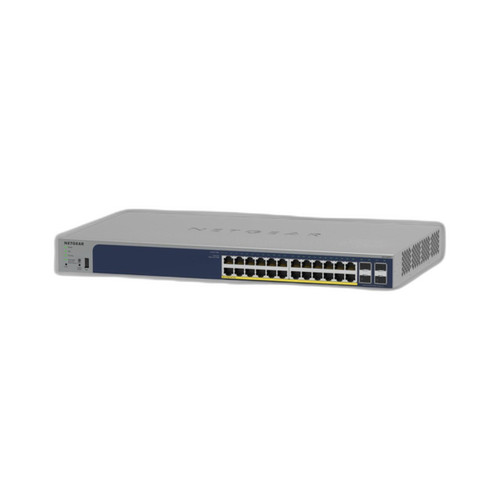
The GS728TP-300NAS specifies 24 ports at Gigabit speed with a 190 W total PoE+ budget also capped at 30 W per port under 802.3at. Its spec sheet lists PoE++ (802.3bt) under one field but 'PoE+ (802.3at) 190 W' under the authoritative PoE field; the 802.3bt claim is internally inconsistent with the 190 W budget and the 30 W per-port figure, so it cannot be confirmed from the provided data.
Net result on power: the SL2428P offers 60 W more total budget (250 W vs. 190 W), which translates to roughly four to five additional 13 W cameras running simultaneously. On port speed the GS728TP-300NAS has a clear edge, delivering full Gigabit to all 24 access ports versus the SL2428P's 100 Mbps access ports — relevant for high-bitrate multi-sensor cameras or future video analytics workloads.
How do switching fabric throughput and management depth compare?
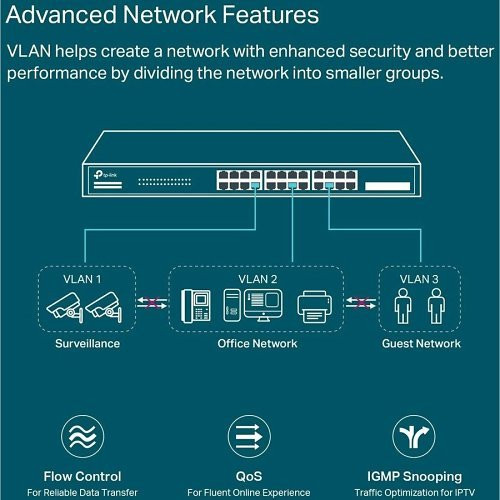
The SL2428P has a 12.8 Gbps switching capacity and a 9.52 Mpps forwarding rate. Feature depth is extensive: VLAN, STP/RSTP/MSTP, IGMP Snooping, QoS (802.1p/DSCP), ACL, LACP, Static Routing, Jumbo Frames (9 KB), 802.1X with RADIUS/TACACS+ authentication, CLI, SNMP, RMON, standalone web GUI, and cloud management via the Omada SDN controller. Memory is specified at 32 MB Flash and 256 MB DRAM.
The GS728TP-300NAS specifies a 48 Gbps switching fabric — nearly four times the SL2428P's — alongside smart-managed operation via web GUI and SNMP, plus VLAN support. No forwarding rate, memory size, ACL depth, CLI availability, or authentication protocol details are provided in the supplied specs.
For surveillance VLANs and QoS prioritization of real-time video streams, both switches cover the basics. The SL2428P's Omada cloud integration is a concrete differentiator for multi-site or centrally managed deployments. The GS728TP-300NAS's 48 Gbps fabric provides substantially more headroom for high-density Gigabit traffic, but the management feature set cannot be fully verified from the available data.
Which switch is better suited to the physical installation environment?
The SL2428P specifies dimensions of 440 × 180 × 44 mm (1U rack form factor), with mounting options for wall, ceiling, or rack. Operating temperature range is −5 °C to 50 °C (23 °F to 122 °F). Power input is 100–240 V AC, 50/60 Hz. Standby consumption is 8.9 W; maximum draw including full 250 W PoE load is 250 W. The enclosure material is not specified.
The GS728TP-300NAS specifies wall and ceiling mounting; rack mounting is not listed. The enclosure is plastic. Operating temperature range and AC input voltage are not provided in the supplied specs. Total wattage is listed as 190 W. No standby consumption figure is given.
For rack-mount data-room or IDF closet installations, the SL2428P's explicitly confirmed rack-mount option is an advantage. The GS728TP-300NAS's plastic enclosure and absence of a listed rack-mount option suggest a more distributed edge deployment profile. The SL2428P's documented operating temperature range (−5 °C to 50 °C) provides a verified environmental envelope; the GS728TP-300NAS offers no equivalent confirmed figure.
Which should you choose: the SL2428P or the GS728TP-300NAS?
Our take: The SL2428P is the stronger choice when PoE power budget and centralized cloud management are the primary constraints. It delivers 250 W total PoE+ versus the GS728TP-300NAS's 190 W — a 60 W advantage supporting roughly four to five additional 13 W cameras — and backs that with a fully documented management stack including Omada SDN, CLI, RADIUS/TACACS+, SNMP, and RMON, plus a confirmed rack-mount form factor. The GS728TP-300NAS counters with a 48 Gbps switching fabric (versus 12.8 Gbps) and full Gigabit speed on all 24 access ports (versus 100 Mbps on the SL2428P's access ports), making it more capable for high-bitrate camera streams or data-dense mixed workloads. Choose the SL2428P for camera-heavy PoE deployments managed via Omada or where rack mounting is required; choose the GS728TP-300NAS where all-Gigabit access ports and higher fabric throughput matter more than PoE budget depth, accepting that several management and environmental specs are unconfirmed from the available data.
Side-by-Side Comparison
Spec-for-spec, from manufacturer data.
| Specification | TP-Link SL2428P | NETGEAR GS728TP-300NAS |
|---|---|---|
| Product Type | 24-Port 10/100 + 4-Port Gigabit PoE+ Managed Switch | 24-Port Gigabit Smart PoE+ Switch |
| Access Port Speed | 24× 10/100 Mbps | 24× 1000 Mbps (Gigabit) |
| Uplink Ports | 2× Gigabit RJ45 + 2× Combo RJ45/SFP | — |
| SFP Slots | 2× Combo Gigabit RJ45/SFP | — |
| Total PoE Budget | 250 W | 190 W |
| PoE Standard | 802.3af/at (PoE+) | 802.3at (PoE+) per authoritative spec field |
| Max PoE Per Port | 30 W | 30 W |
| Switching Capacity | 12.8 Gbps | 48 Gbps |
| Forwarding Rate | 9.52 Mpps | — |
| Management | Omada Cloud, Web GUI, CLI, SNMP, RMON | Smart-managed; Web GUI; SNMP |
| Authentication | 802.1X, RADIUS/TACACS+ | — |
| Memory | 32 MB Flash, 256 MB DRAM | — |
| Mounting | Wall; Ceiling; Rack | Wall; Ceiling |
| Enclosure Material | — | Plastic |
| Operating Temperature | −5°C to 50°C (23°F to 122°F) | — |
| AC Input | 100–240 V AC, 50/60 Hz | — |
Frequently Asked Questions
Which should you choose: the SL2428P or the GS728TP-300NAS?
The SL2428P is the stronger choice when PoE power budget and centralized cloud management are the primary constraints. It delivers 250 W total PoE+ versus the GS728TP-300NAS's 190 W — a 60 W advantage supporting roughly four to five additional 13 W cameras — and backs that with a fully documented management stack including Omada SDN, CLI, RADIUS/TACACS+, SNMP, and RMON, plus a confirmed rack-mount form factor. The GS728TP-300NAS counters with a 48 Gbps switching fabric (versus 12.8 Gbps) and full Gigabit speed on all 24 access ports (versus 100 Mbps on the SL2428P's access ports), making it more capable for high-bitrate camera streams or data-dense mixed workloads. Choose the SL2428P for camera-heavy PoE deployments managed via Omada or where rack mounting is required; choose the GS728TP-300NAS where all-Gigabit access ports and higher fabric throughput matter more than PoE budget depth, accepting that several management and environmental specs are unconfirmed from the available data.
Is the SL2428P or GS728TP-300NAS better for powering a large number of IP cameras?
The SL2428P provides a larger total PoE budget — 250 W versus the GS728TP-300NAS's 190 W — so it can simultaneously power more cameras before hitting the budget ceiling. At a typical 13 W per camera, the SL2428P supports roughly 19 cameras at full draw versus approximately 14 on the GS728TP-300NAS, both at the 30 W per-port maximum under 802.3at.
Does either switch support cloud or centralized multi-site management?
The SL2428P explicitly supports cloud management via TP-Link's Omada SDN platform, as well as CLI, SNMP, RMON, and standalone web GUI. The GS728TP-300NAS is described as smart-managed with a web GUI and SNMP; no cloud or SDN management platform is specified in the provided data.
Which switch is the right fit for a rack-mount IDF closet installation?
The SL2428P specifies wall, ceiling, and rack mounting and has a standard 1U rack form factor (440 × 180 × 44 mm). The GS728TP-300NAS lists only wall and ceiling mounting options; rack mounting is not confirmed in the supplied specifications. For a rack-mount closet deployment, the SL2428P is the verifiable choice.
More Network Switch Comparisons
- TP-Link S5500-24GP4XF vs NETGEAR GS728TP-300NAS
- TP-Link S5500-24GP4XF vs Comnet CNGE24FX12TX12MSPOE
- TP-Link S5500-24GP4XF vs Ubiquiti USW-24
- TP-Link S5500-24GP4XF vs Ubiquiti USW-ENTERPRISEXG-24
- TP-Link S5500-24GP4XF vs TP-Link SL2428P
- TP-Link S5500-24GP4XF vs TP-Link SG3428XPP-M2
Network Switch Buying Guides
Get a Second Opinion on Your Camera Choice
Share your site layout, coverage goals, and budget. Our team will validate the camera selection, flag anything we would change, and recommend products that match the use case.