
TP-Link S5500-24GP4XF vs Ubiquiti USW-24: Specification Comparison
Both the TP-Link S5500-24GP4XF and the Ubiquiti USW-24 are 1U rack-mount, 24-port Gigabit managed switches targeting mid-scale IP security, access-point, and enterprise edge deployments. The TP-Link adds four 10GbE SFP+ uplinks and a 240 W PoE+ budget, while the Ubiquiti is a non-PoE switch with a leaner 52 Gbps fabric. Buyers choosing between them are typically weighing uplink speed and power delivery requirements against switching throughput needs, ecosystem integration preferences, and power budget constraints.

In This Guide
Which switch delivers more uplink speed and switching capacity?
The TP-Link S5500-24GP4XF provides 28 total ports: 24 Gigabit RJ45 ports plus 4 × 10GbE SFP+ uplink slots, yielding a switching capacity of 160 Gbps. The four 10GbE SFP+ slots allow aggregation or uplinks to a core switch at ten times the speed of a standard Gigabit port.
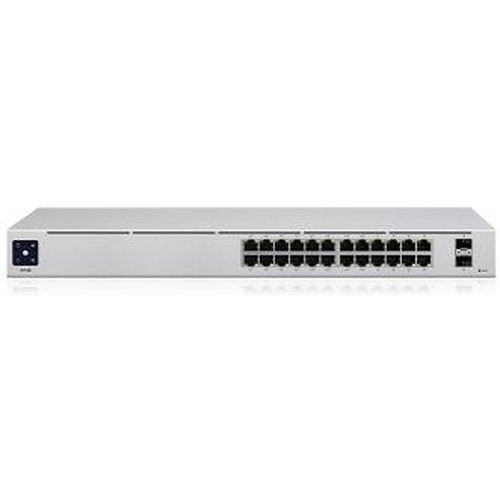
The Ubiquiti USW-24 provides 24 Gigabit Ethernet ports with no additional SFP+ uplinks specified in the provided data. Its switching fabric is rated at 52 Gbps with a non-blocking throughput of 26 Gbps and a forwarding rate of 39 Mpps. No 10GbE uplink capability is listed in the USW-24 specifications.
For deployments requiring high-speed aggregation or uplinks to a 10GbE core, the S5500-24GP4XF holds a clear structural advantage. For pure 24-port Gigabit edge switching without uplink requirements, the USW-24's 52 Gbps / 39 Mpps figures are sufficient; however, its fabric is notably smaller than the TP-Link's 160 Gbps.
Which switch is the right choice when powering cameras, APs, or VoIP endpoints?
The TP-Link S5500-24GP4XF supports IEEE 802.3af/at (PoE/PoE+) on its 24 RJ45 ports with a total PoE budget of 240 W and a maximum system power draw of 384 W. This supports up to 30 W per port under 802.3at, enabling deployment of high-wattage cameras, outdoor APs, and VoIP phones. Dynamic PoE allocation is listed as a feature.
The Ubiquiti USW-24 is specified with a typical power consumption of 25 W and a 36 W internal power supply. The provided specifications list 'Power: PoE' and 'Power Watts: 30W', but no PoE budget, PoE standard, or per-port PoE delivery is confirmed in the provided spec data. The USW-24 is primarily characterized across official data as a non-PoE switch; buyers requiring PoE delivery should verify this independently before purchasing.
If powering edge devices such as IP cameras or wireless APs is a requirement, the S5500-24GP4XF's explicitly documented 240 W PoE+ budget across 24 ports is the substantiated choice. The USW-24's PoE capability is not confirmed by the provided specifications.
How do these switches differ in management capabilities and ecosystem fit?
The TP-Link S5500-24GP4XF is managed via the Omada Pro platform and supports CLI, SNMP v1/v2c/v3, and RMON. Layer 2+ features include static routing, 802.1Q and QinQ VLANs, STP/RSTP/MSTP, IGMP snooping, ACL, 802.1X port authentication, and LACP. It carries 32 MB of storage memory.
The Ubiquiti USW-24 is managed via the UniFi controller ecosystem. It supports up to 1,000 VLANs. No CLI, SNMP version support, ACL, 802.1X, or Layer 3 static routing features are listed in the provided specifications. Management is listed as Ethernet-based. The USW-24 carries an NDAA compliance designation; no NDAA compliance status is listed for the S5500-24GP4XF in the provided data.
Buyers already invested in the Ubiquiti UniFi ecosystem will benefit from the USW-24's native controller integration and its 1,000-VLAN ceiling. Those requiring granular SNMP-based monitoring, 802.1X port security, ACL enforcement, or Layer 2+ static routing will find the S5500-24GP4XF's documented feature set more complete. NDAA compliance is confirmed only for the USW-24.
Which should you choose: the S5500-24GP4XF or the USW-24?
Our take: The S5500-24GP4XF is the stronger choice when PoE+ power delivery, 10GbE uplinks, or advanced Layer 2+ management are required. Concretely: it provides a documented 240 W PoE+ budget versus no confirmed PoE budget on the USW-24; it delivers 160 Gbps switching capacity versus 52 Gbps on the USW-24; and it adds four 10GbE SFP+ uplink slots not present in the USW-24's specifications. The USW-24 holds advantages where NDAA compliance is mandated—confirmed for the USW-24, not listed for the S5500-24GP4XF—and where organizations are standardized on the UniFi controller platform with needs for up to 1,000 VLANs in a low-power (25 W typical) footprint. Choose the USW-24 for NDAA-sensitive, UniFi-native, non-PoE edge switching; choose the S5500-24GP4XF for camera-dense or AP-heavy deployments demanding powered ports and high-speed aggregation under the Omada Pro platform.
Side-by-Side Comparison
Spec-for-spec, from manufacturer data.
| Specification | TP-Link S5500-24GP4XF | Ubiquiti USW-24 |
|---|---|---|
| Total Ports | 28 (24× GbE RJ45 + 4× SFP+) | 24× GbE Ethernet |
| 10GbE Uplinks | 4× SFP+ (10GbE) | — |
| Switching Capacity | 160 Gbps | 52 Gbps |
| Non-Blocking Throughput | — | 26 Gbps |
| Forwarding Rate | — | 39 Mpps |
| PoE Standard | IEEE 802.3af/at (PoE/PoE+) | Not confirmed in provided specs |
| PoE Budget | 240 W | — |
| Max Power Draw | 384 W | 25 W (typical) |
| Internal Power Supply | 100–240V AC, 50/60 Hz | 36 W (100–240V AC, 50/60 Hz) |
| Management Platform | Omada Pro (CLI, SNMP v1/v2c/v3, RMON) | UniFi Controller |
| Layer | L2+ Managed (static routing, ACL, 802.1X, LACP) | Managed (VLAN, up to 1,000 VLANs) |
| VLAN Support | 802.1Q / QinQ | Up to 1,000 VLANs |
| Operating Temperature | 0°C to 45°C | -5°C to 45°C |
| Form Factor | 1U Rack Mount | 1U Rack Mount |
| NDAA Compliant | — | Yes |
| Memory/Storage | 32 MB | — |
Frequently Asked Questions
Which should you choose: the S5500-24GP4XF or the USW-24?
The S5500-24GP4XF is the stronger choice when PoE+ power delivery, 10GbE uplinks, or advanced Layer 2+ management are required. Concretely: it provides a documented 240 W PoE+ budget versus no confirmed PoE budget on the USW-24; it delivers 160 Gbps switching capacity versus 52 Gbps on the USW-24; and it adds four 10GbE SFP+ uplink slots not present in the USW-24's specifications. The USW-24 holds advantages where NDAA compliance is mandated—confirmed for the USW-24, not listed for the S5500-24GP4XF—and where organizations are standardized on the UniFi controller platform with needs for up to 1,000 VLANs in a low-power (25 W typical) footprint. Choose the USW-24 for NDAA-sensitive, UniFi-native, non-PoE edge switching; choose the S5500-24GP4XF for camera-dense or AP-heavy deployments demanding powered ports and high-speed aggregation under the Omada Pro platform.
Is the S5500-24GP4XF or USW-24 better for powering IP cameras and access points?
Based on the provided specifications, the S5500-24GP4XF is the documented choice for powering edge devices. It explicitly supports IEEE 802.3af/at PoE+ with a 240 W total budget across 24 ports. The USW-24's PoE capability is not confirmed in the provided spec data—its internal power supply is rated at only 36 W—so buyers should verify PoE support directly with Ubiquiti before relying on it to power cameras or APs.
Does the USW-24 support NDAA compliance, and what about the S5500-24GP4XF?
Yes, the USW-24 is listed as NDAA compliant in the provided specifications. No NDAA compliance status is listed for the S5500-24GP4XF in the provided data. Buyers with federal, government, or NDAA-mandated procurement requirements should confirm compliance status for the TP-Link unit through official TP-Link documentation before purchasing.
Which switch is better suited for larger or multi-switch deployments requiring fast uplinks?
The S5500-24GP4XF is better suited for deployments requiring high-speed uplinks. It provides four 10GbE SFP+ slots that can connect to a core switch or aggregation layer at up to 10 Gbps per port, and its 160 Gbps switching fabric supports denser traffic loads. The USW-24 provides no 10GbE uplink capability in the provided specifications and has a 52 Gbps fabric, making it more appropriate for standalone edge switching at smaller scale or where UniFi ecosystem integration is the primary driver.
More Network Switch Comparisons
- TP-Link S5500-24GP4XF vs NETGEAR GS728TP-300NAS
- TP-Link S5500-24GP4XF vs Comnet CNGE24FX12TX12MSPOE
- TP-Link S5500-24GP4XF vs Ubiquiti USW-ENTERPRISEXG-24
- TP-Link S5500-24GP4XF vs TP-Link SL2428P
- TP-Link S5500-24GP4XF vs TP-Link SG3428XPP-M2
- TP-Link SL2428P vs NETGEAR GS728TP-300NAS
Network Switch Buying Guides
Get a Second Opinion on Your Camera Choice
Share your site layout, coverage goals, and budget. Our team will validate the camera selection, flag anything we would change, and recommend products that match the use case.