
Transition Networks OCA-1AB201-NA vs Transition Networks OCA-1BA101: Specification Comparison
Both the Transition Networks OCA-1AB201-NA and OCA-1BA101 are 10-port Gigabit DIN rail-mountable switches designed for outdoor and hardened cabinet deployments, making them direct cross-shop candidates for physical security installers building edge network infrastructure. The critical differentiator is management capability: the OCA-1AB201-NA is a managed switch bundled as a cabinet assembly, while the OCA-1BA101 is an unmanaged plug-and-play unit with single-mode fiber support. This comparison covers management and configuration depth, physical form factor and deployment context, and connectivity options.
In This Guide
- Which switch gives installers more control over traffic and configuration?
- How do the physical form factor and deployment packaging differ between these two switches?
- Which switch offers more versatile connectivity options for backbone and edge links?
- Which should you choose: the OCA-1AB201-NA or the OCA-1BA101?
- Side-by-Side Specs
- FAQ
Which switch gives installers more control over traffic and configuration?
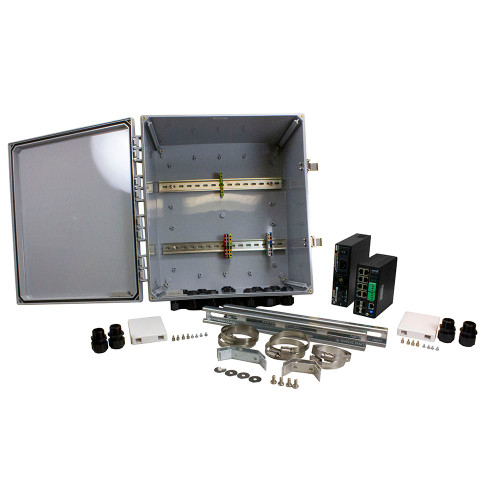
The OCA-1AB201-NA is a managed switch, providing port-level configuration, VLAN segmentation, port mirroring, and QoS capabilities per its spec data. These features allow installers to isolate camera VLANs, prioritize access-control traffic, and mirror ports for network diagnostics without a site visit. For multi-tenant or large-scale deployments where traffic segmentation is required, these tools directly reduce ongoing operational overhead at remote cabinet locations.
The OCA-1BA101 is explicitly unmanaged, operating as a plug-and-play device with no CLI, no VLAN support, and no QoS configuration noted in its specifications. It requires zero commissioning time at the switch level, which is an advantage in straightforward point-to-point or flat-network deployments. However, it offers no mechanism for traffic isolation or remote diagnostics at the switch layer. Management capability is absent by design, not by omission.
How do the physical form factor and deployment packaging differ between these two switches?
The OCA-1AB201-NA is specified as a 'cabinet bundle assembly' with dimensions of 10.0 x 18.0 x 16.0 inches and a weight of 1.0 lb. The DIN rail mount is confirmed. The cabinet bundle form factor implies the switch ships integrated within or alongside an enclosure assembly, which can reduce field labor for outdoor cabinet builds. Weight as listed (1.0 lb) should be verified against the datasheet, as a 10 x 18 x 16 inch assembly would typically exceed 1 lb; this may reflect the switch module alone rather than the full cabinet bundle.
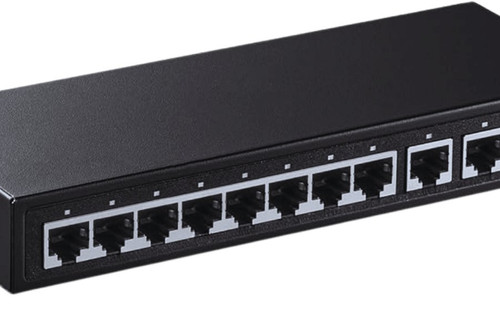
The OCA-1BA101 is specified as DIN rail mountable and is described as compatible with cabinet, DIN rail, and 19-inch rack installations per its enriched spec data. No physical dimensions or weight are provided in the available specifications. Its compact DIN rail form factor is consistent with standard IEC 60715 35mm rail installations inside third-party enclosures. The absence of a bundled cabinet means installers source and size the enclosure independently, offering more flexibility but requiring additional procurement steps.
Which switch offers more versatile connectivity options for backbone and edge links?
The OCA-1BA101 specifies single-mode fiber support, a significant connectivity differentiator for deployments requiring long-distance backbone runs—single-mode fiber can support distances well beyond copper's 100-meter limit and eliminates ground-loop risk between buildings. This makes it well-suited for campus perimeters, parking structures, or multi-building security rings where fiber is the backbone medium. The specific fiber port type (SFP, fixed SC/LC, count of fiber vs. copper ports) is not detailed in the available specifications.
The OCA-1AB201-NA does not list fiber connectivity of any type in its available specifications. All 10 ports are described as Gigabit, consistent with copper RJ-45 interfaces, though the datasheet should be consulted to confirm whether any SFP or fiber uplink slots are present. For deployments confined to a single building or cabinet cluster within copper reach, the absence of fiber is not a limitation. However, for multi-building or long-run installations, this is a notable gap relative to the OCA-1BA101.
Which should you choose: the OCA-1AB201-NA or the OCA-1BA101?
Our take: The OCA-1AB201-NA is the stronger choice when the deployment demands traffic segmentation, remote management, and a pre-integrated cabinet assembly—its managed feature set (VLAN, QoS, port mirroring) directly supports multi-camera or multi-tenant security infrastructure, and its 10 x 18 x 16 inch cabinet bundle form factor reduces field integration labor. The OCA-1BA101 is the stronger choice when single-mode fiber backbone connectivity is required, the network topology is flat and unmanaged, or the installer is supplying their own enclosure—its fiber support extends viable link distances beyond the OCA-1AB201-NA's copper-only specification. Both carry Gigabit speeds across 10 ports, outdoor ratings, DIN rail mounts, and lifetime warranties, so those dimensions do not differentiate. Platform qualifier: specify the OCA-1AB201-NA for managed, copper-centric edge cabinets; specify the OCA-1BA101 for fiber-backbone, plug-and-play outdoor nodes.
Side-by-Side Comparison
Spec-for-spec, from manufacturer data.
| Specification | Transition Networks OCA-1AB201-NA | Transition Networks OCA-1BA101 |
|---|---|---|
| Product Type | Switch | Switch |
| Management | Managed | Unmanaged |
| Port Count | 10 | 10 |
| Speed | Gigabit | Gigabit |
| Fiber Support | — | Single-mode |
| DIN Rail Mount | Yes | Yes |
| Form Factor | Cabinet bundle assembly | DIN rail mountable |
| Rack Compatible | — | Yes (19-inch rack noted) |
| Environment Rating | Outdoor | Outdoor |
| Operating Temp | Industrial | — |
| Warranty | Lifetime | Lifetime |
| Dimensions | 10.0 x 18.0 x 16.0 in | — |
| Weight | 1.0 lb | — |
| VLAN / QoS / Port Mirroring | Yes (managed) | — |
| SKU | OCA-1AB201-NA | OCA-1BA101 |
Frequently Asked Questions
Which should you choose: the OCA-1AB201-NA or the OCA-1BA101?
The OCA-1AB201-NA is the stronger choice when the deployment demands traffic segmentation, remote management, and a pre-integrated cabinet assembly—its managed feature set (VLAN, QoS, port mirroring) directly supports multi-camera or multi-tenant security infrastructure, and its 10 x 18 x 16 inch cabinet bundle form factor reduces field integration labor. The OCA-1BA101 is the stronger choice when single-mode fiber backbone connectivity is required, the network topology is flat and unmanaged, or the installer is supplying their own enclosure—its fiber support extends viable link distances beyond the OCA-1AB201-NA's copper-only specification. Both carry Gigabit speeds across 10 ports, outdoor ratings, DIN rail mounts, and lifetime warranties, so those dimensions do not differentiate. Platform qualifier: specify the OCA-1AB201-NA for managed, copper-centric edge cabinets; specify the OCA-1BA101 for fiber-backbone, plug-and-play outdoor nodes.
Is the OCA-1AB201-NA or OCA-1BA101 better for a multi-camera deployment where I need to isolate VLANs for cameras and access control?
The OCA-1AB201-NA is the appropriate choice. It is a managed switch with port-level configuration, VLAN support, and QoS per its specifications. The OCA-1BA101 is unmanaged and provides no VLAN or traffic-segmentation capability.
Which switch supports fiber uplinks for runs between buildings?
The OCA-1BA101 specifies single-mode fiber support, making it suited for long-distance backbone links between buildings. The OCA-1AB201-NA has no fiber connectivity listed in its available specifications; confirm via its datasheet before specifying for fiber runs.
Do both switches carry a lifetime warranty and outdoor rating?
Yes. Both the OCA-1AB201-NA and OCA-1BA101 specify a lifetime warranty and an outdoor environment rating. Neither specification distinguishes between the two on these criteria, so warranty and environmental hardening are not differentiating factors in this comparison.
More Network Switch Comparisons
- TP-Link IES210GPP vs Transition Networks OCA-1AB201-NA
- TP-Link IES210GPP vs Transition Networks OCA-1BA1A0
- TP-Link IES210GPP vs Transition Networks OCA-1BA101
- TP-Link IES210GPP vs TP-Link DS110GMP
- TP-Link IES210GPP vs TP-Link SG1210PP
- TP-Link DS110GMP vs Transition Networks OCA-1AB201-NA
Network Switch Buying Guides
Get a Second Opinion on Your Camera Choice
Share your site layout, coverage goals, and budget. Our team will validate the camera selection, flag anything we would change, and recommend products that match the use case.