
TP-Link SG3428XPP-M2 vs NETGEAR GS728TP-300NAS: Specification Comparison
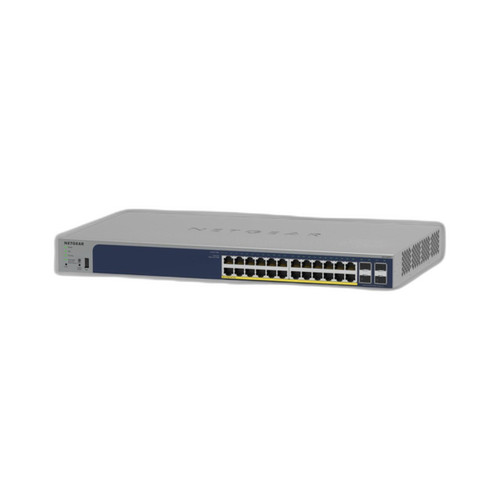
Both the TP-Link SG3428XPP-M2 and the NETGEAR GS728TP-300NAS are 24-port managed PoE switches designed for network infrastructure deployments—cameras, access points, intercoms, and similar powered devices. The TP-Link delivers multi-gigabit copper speeds (2.5G per port) with a substantially higher PoE budget, while the NETGEAR offers standard gigabit copper at a lower power envelope. Buyers evaluating these two models are typically choosing between higher-bandwidth density and greater PoE headroom versus a more conventional gigabit smart-switch footprint.

In This Guide
- Which switch provides more bandwidth per port and total switching capacity?
- Which switch can power more or higher-draw PoE devices simultaneously?
- How do the management capabilities and platform integration compare for security and AV deployments?
- Which should you choose: the SG3428XPP-M2 or the GS728TP-300NAS?
- Side-by-Side Specs
- FAQ
Which switch provides more bandwidth per port and total switching capacity?
The TP-Link SG3428XPP-M2 equips all 24 copper ports at 2.5 Gbps each—2.5× the per-port bandwidth of standard gigabit—plus four 10 Gbps SFP+ uplink slots. Its rated switching capacity is 200 Gbps at 148.80 Mpps. The NETGEAR GS728TP-300NAS runs all 24 copper ports at 1 Gbps; its rated throughput is 48 Gbps. No SFP+ slot count or uplink speed is provided in the NETGEAR specification set, so a direct uplink comparison cannot be made. For deployments where cameras, access points, or NVRs are beginning to exceed gigabit utilization—4K multi-sensor cameras, Wi-Fi 6/6E APs, or high-channel-count recorders—the TP-Link's per-port headroom is a concrete, spec-documented advantage.
Which switch can power more or higher-draw PoE devices simultaneously?
The TP-Link SG3428XPP-M2 carries a 770 W total PoE budget and supports 802.3af/at/bt (PoE++) on all 24 copper ports, with each port capable of delivering up to 90 W individually. Its maximum power consumption is stated as 500 W. The NETGEAR GS728TP-300NAS is specified with a 190 W PoE+ budget and lists 802.3at (PoE+) as its primary standard, capped at 30 W per port; the spec sheet also references 802.3bt (PoE++), but no per-port wattage above 30 W is confirmed in the provided data. At 770 W versus 190 W, the TP-Link supports roughly four times the aggregate powered load—relevant for deployments mixing high-draw devices such as 802.3bt pan-tilt-zoom cameras, heated enclosures, or Wi-Fi 6E access points alongside standard PoE cameras.
How do the management capabilities and platform integration compare for security and AV deployments?
The TP-Link SG3428XPP-M2 operates under the Omada SDN ecosystem, supporting cloud-managed or standalone modes, and is confirmed ONVIF-compatible. Its feature set includes Static Routing, VLAN, ACL, QoS, IGMP Snooping, OAM, and DDM—useful for segmenting surveillance traffic and managing multicast video streams. It is rated for rack, wall, or ceiling mounting. The NETGEAR GS728TP-300NAS is described as smart-managed, with Web GUI and SNMP access, VLAN support, and wall or ceiling mounting. ONVIF compatibility, ACL support, and cloud management are not specified for the NETGEAR in the provided data. Buyers who require centralized multi-site management or tight NVR/camera platform integration will find the TP-Link's Omada controller and explicit ONVIF declaration more directly documented.
Which should you choose: the SG3428XPP-M2 or the GS728TP-300NAS?
Our take: The SG3428XPP-M2 is the stronger choice when deploying high-density or high-draw PoE devices and when per-port bandwidth beyond gigabit is needed today or anticipated soon. The three most consequential spec deltas are: (1) PoE budget—770 W versus 190 W, a 4× advantage that allows the TP-Link to power a full 24-port load of mid-draw cameras without budget exhaustion; (2) per-port speed—2.5 Gbps versus 1 Gbps copper, meaningful for 4K multi-sensor cameras, high-channel NVRs, or next-generation APs feeding into the switch; and (3) switching fabric—200 Gbps versus 48 Gbps, ensuring non-blocking throughput as port utilization grows. The NETGEAR GS728TP-300NAS remains a viable option for traditional gigabit deployments with lighter PoE loads—particularly where a 190 W budget is sufficient and smart-managed Web GUI/SNMP control satisfies management requirements without a cloud controller dependency.
Side-by-Side Comparison
Spec-for-spec, from manufacturer data.
| Specification | TP-Link SG3428XPP-M2 | NETGEAR GS728TP-300NAS |
|---|---|---|
| Product Type | L2+ Managed Switch, 1U Rackmount | Smart Managed Switch |
| Copper Port Count | 24 | 24 |
| Copper Port Speed | 2.5 Gbps (2.5GBASE-T) | 1 Gbps (Gigabit) |
| Uplink Slots | 4× 10 Gbps SFP+ | — |
| Switching Capacity | 200 Gbps | 48 Gbps |
| Forwarding Rate | 148.80 Mpps | — |
| PoE Standard | 802.3af/at/bt (PoE++) | 802.3at (PoE+); 802.3bt listed |
| Max PoE Budget | 770 W | 190 W |
| Max Per-Port PoE | 90 W | 30 W |
| Max Power Consumption | 500 W | 190 W |
| Management | Omada SDN; cloud or standalone | Web GUI; SNMP; smart-managed |
| ONVIF | Yes | — |
| VLAN Support | Yes | Yes |
| Mounting Options | Rack; Wall; Ceiling | Wall; Ceiling |
| Operating Temp | –5°C to +45°C (23°F to 113°F) | — |
| Flash / DRAM | 32 MB Flash / 256 MB DRAM | — |
Frequently Asked Questions
Which should you choose: the SG3428XPP-M2 or the GS728TP-300NAS?
The SG3428XPP-M2 is the stronger choice when deploying high-density or high-draw PoE devices and when per-port bandwidth beyond gigabit is needed today or anticipated soon. The three most consequential spec deltas are: (1) PoE budget—770 W versus 190 W, a 4× advantage that allows the TP-Link to power a full 24-port load of mid-draw cameras without budget exhaustion; (2) per-port speed—2.5 Gbps versus 1 Gbps copper, meaningful for 4K multi-sensor cameras, high-channel NVRs, or next-generation APs feeding into the switch; and (3) switching fabric—200 Gbps versus 48 Gbps, ensuring non-blocking throughput as port utilization grows. The NETGEAR GS728TP-300NAS remains a viable option for traditional gigabit deployments with lighter PoE loads—particularly where a 190 W budget is sufficient and smart-managed Web GUI/SNMP control satisfies management requirements without a cloud controller dependency.
Is the SG3428XPP-M2 or GS728TP-300NAS better for powering a full 24-camera installation?
Based on the provided specifications, the SG3428XPP-M2 is substantially better positioned for a full 24-camera deployment. Its 770 W PoE budget means that even at 24 ports running 30 W cameras simultaneously (720 W aggregate), there is headroom remaining. The GS728TP-300NAS provides 190 W total, which the NETGEAR's own card bullets estimate supports roughly 12–15 cameras at typical 13–15 W draw. For a 24-camera site, the NETGEAR would require a second switch or power injectors to cover the full port count.
Can either switch support 802.3bt PoE++ devices like high-end PTZ cameras or heated enclosures?
The SG3428XPP-M2 explicitly states 802.3bt (PoE++) support on all 24 copper ports with up to 90 W per port, which is the full Class 8 PoE++ ceiling. The GS728TP-300NAS lists 802.3bt in its PoE Power field but the confirmed PoE standard in the PoE and Power Budget fields is 802.3at (PoE+) at 30 W per port maximum. The provided specifications do not confirm per-port PoE++ delivery for the NETGEAR, so buyers requiring guaranteed 60–90 W per-port output should rely on the TP-Link's documented spec.
Which switch is easier to manage across multiple sites or integrate into an existing Omada or NETGEAR network?
The SG3428XPP-M2 is purpose-built for the TP-Link Omada SDN platform, supporting both cloud-managed and standalone modes from the provided specs. If your infrastructure is already Omada-based (controllers, APs, routers), the SG3428XPP-M2 integrates directly into that ecosystem. The GS728TP-300NAS offers smart-managed control via Web GUI and SNMP, which is standard across most vendor-neutral NMS tools, but no cloud controller or dedicated multi-site management platform is specified in the provided data. If you are building a NETGEAR-centric network, verify NETGEAR Insight compatibility separately, as it is not confirmed in the specs provided here.
More Network Switch Comparisons
- TP-Link S5500-24GP4XF vs NETGEAR GS728TP-300NAS
- TP-Link S5500-24GP4XF vs Comnet CNGE24FX12TX12MSPOE
- TP-Link S5500-24GP4XF vs Ubiquiti USW-24
- TP-Link S5500-24GP4XF vs Ubiquiti USW-ENTERPRISEXG-24
- TP-Link S5500-24GP4XF vs TP-Link SL2428P
- TP-Link S5500-24GP4XF vs TP-Link SG3428XPP-M2
Network Switch Buying Guides
Get a Second Opinion on Your Camera Choice
Share your site layout, coverage goals, and budget. Our team will validate the camera selection, flag anything we would change, and recommend products that match the use case.