
TP-Link SG2206MP vs TP-Link DS106GPP: Specification Comparison
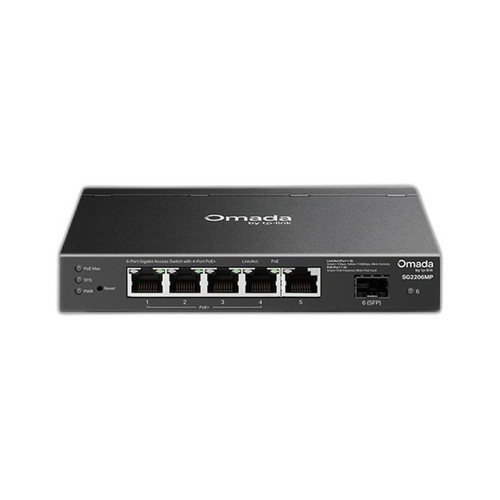
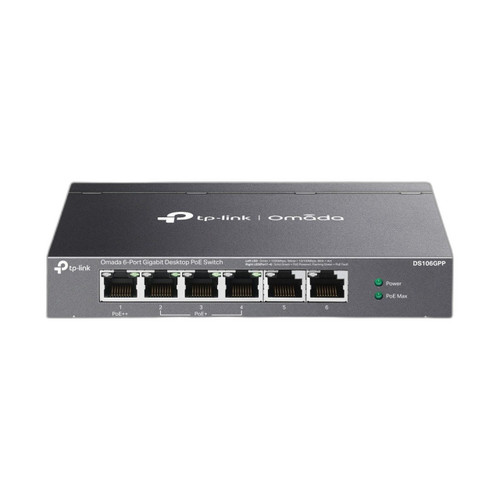
The TP-Link SG2206MP and DS106GPP are both 6-port gigabit PoE switches aimed at edge deployments powering IP cameras, access control panels, and similar security devices. The SG2206MP is a smart-managed switch with four PoE+ ports and a 90W shared budget, while the DS106GPP is an unmanaged desktop switch with PoE++ concentrated on a small number of ports and a 64W budget but with an extended 250m PoE range mode. This comparison examines how each fits typical physical-security installer needs across power delivery, management capability, and physical deployment flexibility.
In This Guide
- Which switch delivers more usable PoE power and how is it distributed?
- Which switch offers more control and what management features are available?
- How do the physical form factor and deployment options differ between these two switches?
- Which should you choose: the SG2206MP or the DS106GPP?
- Side-by-Side Specs
- FAQ
Which switch delivers more usable PoE power and how is it distributed?
The SG2206MP provides a 90W total PoE budget across four ports rated at 30W per port (802.3at+/PoE+). All four PoE ports share the 90W pool, so simultaneous full-draw loads must be budgeted accordingly. The switch supports PoE++ (802.3bt) per the listed spec, though the per-port ceiling of 30W is consistent with PoE+ (802.3at) rather than the 90W single-port maximum of 802.3bt — installers should confirm per-port maximums before deploying high-draw PTZ or thermal cameras.
The DS106GPP carries a 64W total PoE budget. Card Bullet 1 states Port 1 alone delivers 60–90W for thermal or PTZ cameras, and Bullets 2–3 indicate Ports 2–4 deliver up to 60W PoE+ each. The listed wattage/power consumption figure of 64W and PoE budget of 64W appear to represent the total device draw including PoE output, so the effective PoE delivery ceiling is 64W shared across active PoE ports. The DS106GPP also supports PoE++ (802.3bt) on at least Port 1. The SG2206MP edges out the DS106GPP on total declared PoE budget (90W vs 64W) and supports more simultaneous PoE devices across four dedicated ports versus the DS106GPP's tiered port allocation.
Which switch offers more control and what management features are available?
The SG2206MP is smart-managed and integrates with TP-Link's Omada SDN platform. Smart-managed switches provide VLAN configuration, QoS, port mirroring, storm control, and centralized cloud or controller-based management — capabilities relevant to segmenting camera VLANs from corporate traffic and to remote monitoring of PoE port status. A dual-core 880MHz processor is specified, suggesting headroom for policy enforcement at line rate.
The DS106GPP is unmanaged. Its management field references an 'Options - Portfolio' description mentioning L3, L2+ and Budget tiers, but the dedicated 'managed' field explicitly states Unmanaged and the product type is a desktop switch with no login interface. Operating modes listed — Extend Mode (250m PoE), Port Isolation, Auto Recovery — are hardware-toggle functions, not software-configurable management. Port Isolation and Auto Recovery are useful security-deployment features but do not substitute for VLAN or QoS control. Buyers who need camera VLAN segmentation or central Omada controller integration must choose the SG2206MP; buyers who need plug-and-play simplicity with no configuration overhead may find the DS106GPP sufficient.
How do the physical form factor and deployment options differ between these two switches?
The SG2206MP supports wall, ceiling, and rack mounting and is noted as DIN Rail compatible. Its maximum cable reach is 100m, which is the standard IEEE 802.3 Ethernet limit. Power consumption is 15W (excluding PoE output), indicating a compact thermal envelope suitable for enclosed spaces or junction boxes. The dual mount flexibility — including DIN Rail — makes it viable for panel-room installations alongside access control hardware.
The DS106GPP supports wall, pole, and rack mounting in a desktop form factor. Its headline physical differentiator is Extend Mode, which stretches PoE delivery to 250m (820 ft) at reduced speed — roughly 2.5× the standard 100m reach. Pole-mount support is listed, which combined with the 250m range makes the DS106GPP relevant for parking lots, perimeter fencing, or campus edge nodes where pulling fiber or conduit to a closer switch is not cost-effective. Power consumption is 64W (device total). DIN Rail compatibility is not specified for the DS106GPP.
Which should you choose: the SG2206MP or the DS106GPP?
Our take: The SG2206MP is the stronger choice when the deployment requires centralized management, camera VLAN segmentation, or Omada SDN integration — its 90W PoE budget exceeds the DS106GPP's 64W by 26W, it provides four managed PoE ports versus the DS106GPP's tiered unmanaged allocation, and its DIN Rail compatibility suits panel-room installations. The DS106GPP is the correct pick when cable runs exceed 100m: its Extend Mode reaches 250m (820 ft), more than double the SG2206MP's 100m ceiling, making it the only viable option for perimeter pole mounts or remote parking-structure cameras without intermediate closets. Platform matters: sites already standardized on Omada SDN benefit only from the SG2206MP; standalone edge nodes with single high-wattage cameras (PTZ or thermal on Port 1 at up to 90W) can use the DS106GPP without any controller dependency.
Side-by-Side Comparison
Spec-for-spec, from manufacturer data.
| Specification | TP-Link SG2206MP | TP-Link DS106GPP |
|---|---|---|
| Switch Type | Smart Managed | Unmanaged |
| Ports (Total) | 6 | 6 |
| PoE Ports | 4 | 4 (Ports 1–4, tiered) |
| PoE Standard | PoE++ (802.3bt) | PoE++ (802.3bt) |
| Total PoE Budget | 90W | 64W |
| Max Per-Port PoE | 30W (per spec) | 90W on Port 1; 60W on Ports 2–4 |
| Port Speed | 1 Gbps | 1 Gbps |
| Max Cable Reach | 100m | 250m (820 ft) in Extend Mode |
| Management Platform | Omada SDN | None (hardware toggles only) |
| Operating Modes | — | Extend Mode, Port Isolation, Auto Recovery |
| Mount Types | Wall, Ceiling, Rack | Wall, Pole, Rack |
| DIN Rail Compatible | Yes | Not specified |
| Power Consumption (device) | 15W | 64W (device total incl. PoE) |
| Processor | Dual-core 880MHz | Not specified |
| Form Factor | Rack / Wall / Ceiling mount | Desktop |
| Operating Temperature | Industrial grade | Not specified |
Frequently Asked Questions
Which should you choose: the SG2206MP or the DS106GPP?
The SG2206MP is the stronger choice when the deployment requires centralized management, camera VLAN segmentation, or Omada SDN integration — its 90W PoE budget exceeds the DS106GPP's 64W by 26W, it provides four managed PoE ports versus the DS106GPP's tiered unmanaged allocation, and its DIN Rail compatibility suits panel-room installations. The DS106GPP is the correct pick when cable runs exceed 100m: its Extend Mode reaches 250m (820 ft), more than double the SG2206MP's 100m ceiling, making it the only viable option for perimeter pole mounts or remote parking-structure cameras without intermediate closets. Platform matters: sites already standardized on Omada SDN benefit only from the SG2206MP; standalone edge nodes with single high-wattage cameras (PTZ or thermal on Port 1 at up to 90W) can use the DS106GPP without any controller dependency.
Can either switch power a high-wattage PTZ camera drawing 60W or more?
The DS106GPP explicitly supports 60–90W on Port 1 via PoE++ (802.3bt). The SG2206MP lists PoE++ (802.3bt) support but specifies 30W per port, which aligns with PoE+ (802.3at). Installers powering cameras above 30W should verify the SG2206MP's per-port maximum with TP-Link before deploying; the DS106GPP's Port 1 is the confirmed high-wattage option between the two.
Do I need a controller or software to use either switch?
The DS106GPP is fully unmanaged — it works out of the box with no software, login, or controller. The SG2206MP is smart-managed and can be used standalone via a web GUI or integrated into TP-Link's Omada SDN with a hardware or software controller for centralized policy management. Neither switch requires a paid subscription based on the provided specifications.
Which switch is better for outdoor or long-run camera installations?
The DS106GPP's Extend Mode supports PoE cable runs up to 250m (820 ft), which is the critical spec for outdoor perimeter or parking-lot cameras where trenching conduit to a closer IDF is impractical. It also lists pole-mount support. The SG2206MP is limited to a standard 100m cable reach and does not list pole-mount as a supported installation method, so it is better suited to indoor IDFs or structured-cabling environments within normal Ethernet distance limits.
More Network Switch Comparisons
- TP-Link SG2206MP vs Lantronix IES-5200-LRT
- TP-Link SG2206MP vs Lantronix SISPM1040-362-LRT-L1Y3
- TP-Link SG2206MP vs Transition Networks SISPM1040-362-LRT
- TP-Link DS106GPP vs Lantronix IES-5200-LRT
- TP-Link DS106GPP vs Lantronix SISPM1040-362-LRT-L1Y3
- TP-Link DS106GPP vs Transition Networks SISPM1040-362-LRT
Network Switch Buying Guides
Get a Second Opinion on Your Camera Choice
Share your site layout, coverage goals, and budget. Our team will validate the camera selection, flag anything we would change, and recommend products that match the use case.