
TP-Link SG105MPE vs TP-Link SG2005P-PD: Specification Comparison
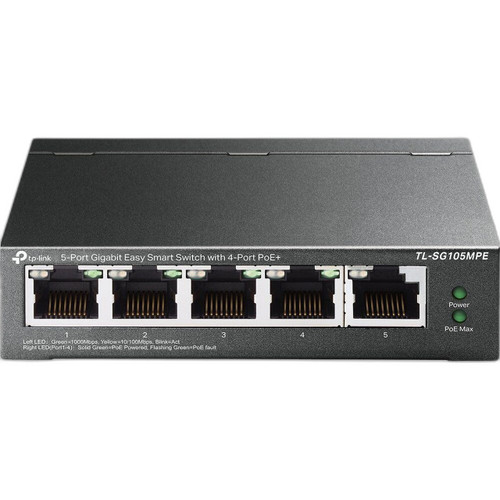
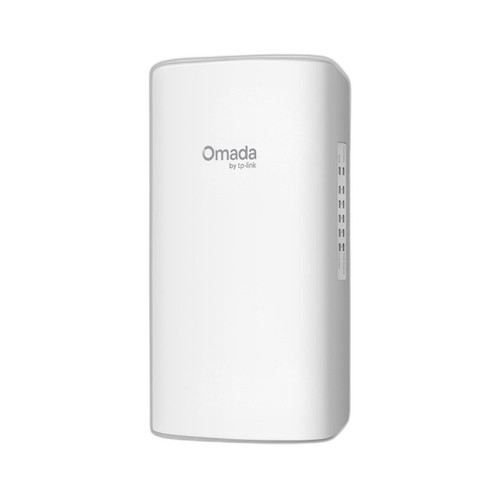
Both products are 5-port gigabit switches from TP-Link, but they serve meaningfully different deployment contexts: the TL-SG105MPE is a desktop/wall-mount Easy Smart PoE+ switch designed to source power to connected devices, while the SG2005P-PD is an Omada SDN-managed switch that is itself powered by an upstream PoE++ source and distributes that power downstream. Buyers cross-shopping these are typically evaluating a compact PoE switch for a small camera deployment, where power architecture, management depth, environmental rating, and PoE budget are the critical decision axes.
In This Guide
- Which switch delivers more usable PoE power, and how does each get powered?
- How do the two switches differ in management capability and switching throughput?
- Which switch is rated for outdoor or harsh-environment installations?
- Which should you choose: the SG105MPE or the SG2005P-PD?
- Side-by-Side Specs
- FAQ
Which switch delivers more usable PoE power, and how does each get powered?
The TL-SG105MPE draws from a conventional AC power supply and provides a 120 W PoE+ budget across 4 ports, making it a standalone power source for connected devices. At 30 W per port, it can realistically drive 4 cameras simultaneously without external PoE infrastructure.
The SG2005P-PD inverts this model: it is entirely powered via a single 802.3af/at/bt (PoE++) input on port 5 and distributes that harvested power to ports 1–4. Usable output budget is input-dependent: 64 W from a 90 W Type 4 (802.3bt) source, 44 W from a 60 W Type 3 source, 19 W from an 802.3at source, or only 6 W from an 802.3af source. There is no AC adapter; the upstream switch or injector determines maximum downstream capacity.
For installations where an AC outlet is available and maximum PoE headroom is the priority, the SG105MPE's 120 W budget is superior. The SG2005P-PD's cascaded architecture is purpose-built for locations where only a PoE cable can be run—eliminating the need for local AC power entirely.
How do the two switches differ in management capability and switching throughput?
The TL-SG105MPE is classed as 'Easy Smart'—a simplified, browser-based management tier that covers basic VLAN, QoS, and port mirroring but does not support full SDN integration, SNMP Trap/Inform, 802.1X authentication, RADIUS/TACACS+, ACL, or static routing. No throughput or forwarding rate figures are provided in the supplied specifications.
The SG2005P-PD is a full Omada SDN-managed switch (also operable in standalone mode) with a specified switching capacity of 10 Gbps and a forwarding rate of 7.44 Mpps. It supports SNMP Trap/Inform, 802.1X with RADIUS/TACACS+, ACL, QoS, VLAN, static routing, and IEEE 802.1az EEE. Memory is documented at 256 MB DRAM and 32 MB Flash.
For deployments requiring centralized controller management, network segmentation via ACL, or 802.1X port authentication—common in enterprise or multi-site surveillance networks—the SG2005P-PD's Omada SDN stack is materially more capable. The SG105MPE is adequate for simple, small-office installations where advanced policy enforcement is not required.
Which switch is rated for outdoor or harsh-environment installations?
The TL-SG105MPE is specified for desktop or wall mounting with a standard indoor form factor. No IP ingress-protection rating is listed in the provided specifications, and no operating temperature range is documented.
The SG2005P-PD carries an IP66 rating for dust-tight and high-pressure water jet resistance, an operating temperature range of −40 °C to +60 °C (−40 °F to +140 °F), wall and pole mounting options, and a compact form factor (4.1 × 1.6 × 7.3 in, 0.82 lbs) suited to outdoor enclosure or pole-top deployment. It also lists a 200 m PoE passthrough range figure and lightning connector protection. Certifications include CE, FCC, and RoHS.
The SG2005P-PD is unambiguously the outdoor-capable unit. The SG105MPE has no documented environmental hardening and should be treated as an indoor device only, based on the specifications provided.
Which should you choose: the SG105MPE or the SG2005P-PD?
Our take: The SG105MPE is the stronger choice when the installation is indoors, an AC power source is available at the switch location, and maximizing PoE budget with minimal management complexity is the goal. It delivers 120 W across 4 PoE+ ports—nearly double the 64 W ceiling of the SG2005P-PD under ideal (90 W bt) input conditions—without depending on any upstream PoE infrastructure. The SG2005P-PD is the correct selection when the switch must be deployed outdoors or in a harsh environment (IP66, −40 °C to +60 °C), when no local AC power is available and the only available cable is a PoE++ uplink, or when the deployment requires Omada SDN management, 802.1X/RADIUS authentication, ACL, or static routing. Its 10 Gbps switching capacity and 7.44 Mpps forwarding rate are documented; equivalent figures are absent for the SG105MPE. Choose by power source availability and environmental exposure first, then management requirements.
Side-by-Side Comparison
Spec-for-spec, from manufacturer data.
| Specification | TP-Link SG105MPE | TP-Link SG2005P-PD |
|---|---|---|
| Product Class | Easy Smart PoE+ Switch | Omada SDN Managed PoE Switch |
| Total Ports | 5 | 5 |
| Port Speed | Gigabit | Gigabit (10/100/1000 Mbps) |
| PoE Output Ports | 4 (PoE+) | 4 (Ports 1–4, PoE+) |
| PoE Input (How Powered) | AC mains | 802.3af/at/bt PoE on Port 5 only |
| PoE Budget (Output) | 120 W | 64 W (90 W bt in) / 44 W (60 W Type 3) / 19 W (at) / 6 W (af) |
| PoE Standard (Input) | — | 802.3bt (PoE++) |
| Switching Capacity | Not specified | 10 Gbps |
| Forwarding Rate | Not specified | 7.44 Mpps |
| Management Level | Easy Smart (browser-based) | Omada SDN / standalone |
| 802.1X / RADIUS / TACACS+ | Not specified | Yes |
| ACL / Static Routing | Not specified | Yes |
| SNMP | Not specified | SNMP Trap/Inform |
| IP Rating | Not specified | IP66 |
| Operating Temperature | Not specified | −40 °C to +60 °C |
| Mount Options | Wall / Desktop | Wall / Pole |
Frequently Asked Questions
Which should you choose: the SG105MPE or the SG2005P-PD?
The SG105MPE is the stronger choice when the installation is indoors, an AC power source is available at the switch location, and maximizing PoE budget with minimal management complexity is the goal. It delivers 120 W across 4 PoE+ ports—nearly double the 64 W ceiling of the SG2005P-PD under ideal (90 W bt) input conditions—without depending on any upstream PoE infrastructure. The SG2005P-PD is the correct selection when the switch must be deployed outdoors or in a harsh environment (IP66, −40 °C to +60 °C), when no local AC power is available and the only available cable is a PoE++ uplink, or when the deployment requires Omada SDN management, 802.1X/RADIUS authentication, ACL, or static routing. Its 10 Gbps switching capacity and 7.44 Mpps forwarding rate are documented; equivalent figures are absent for the SG105MPE. Choose by power source availability and environmental exposure first, then management requirements.
Can the SG2005P-PD power the same number of cameras as the SG105MPE?
Not necessarily. The SG105MPE provides a fixed 120 W PoE+ budget from AC power, which can drive 4 ports at up to 30 W each. The SG2005P-PD's available output budget depends entirely on the upstream PoE source: 64 W maximum with a 90 W 802.3bt input, dropping to 44 W (60 W Type 3 source), 19 W (802.3at source), or only 6 W (802.3af source). Without a high-wattage upstream injector or switch, the SG2005P-PD's usable camera count is significantly lower.
Is the SG2005P-PD suitable for mounting inside an outdoor junction box on a pole?
Yes, based on the provided specifications. The SG2005P-PD carries an IP66 rating, operates from −40 °C to +60 °C, weighs 0.82 lbs, and supports both wall and pole mounting. It draws all power through a single PoE++ input cable, eliminating the need to route AC power to the enclosure. The SG105MPE has no documented IP rating or operating temperature range and is not specified for outdoor use.
Does either switch support integration with a centralized network management platform?
The SG2005P-PD supports Omada SDN (Software Defined Networking) with controller-based or standalone operation, SNMP Trap/Inform, 802.1X authentication via RADIUS/TACACS+, ACL, QoS, VLAN, and static routing—making it compatible with enterprise and multi-site management platforms. The TL-SG105MPE is classified as 'Easy Smart,' a simplified browser-based management tier; no SDN, SNMP, or 802.1X support is listed in the provided specifications.
More Network Switch Comparisons
- TP-Link SG2005P-PD vs Ubiquiti USW-FLEX-2.5G-5
- TP-Link SG2005P-PD vs TP-Link ES205G
- TP-Link SG2005P-PD vs TP-Link DS105G
- TP-Link ES205G vs Ubiquiti USW-FLEX-2.5G-5
- TP-Link ES205G vs TP-Link DS105G
- Ubiquiti USW-FLEX-2.5G-5 vs TP-Link DS105G
Network Switch Buying Guides
Get a Second Opinion on Your Camera Choice
Share your site layout, coverage goals, and budget. Our team will validate the camera selection, flag anything we would change, and recommend products that match the use case.