
TP-Link SG105-M2 vs TP-Link ES205G: Specification Comparison
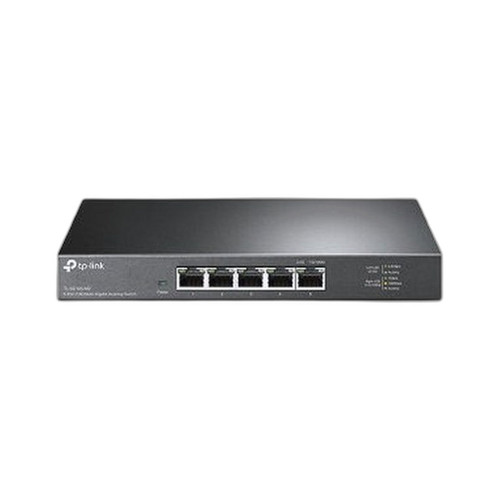
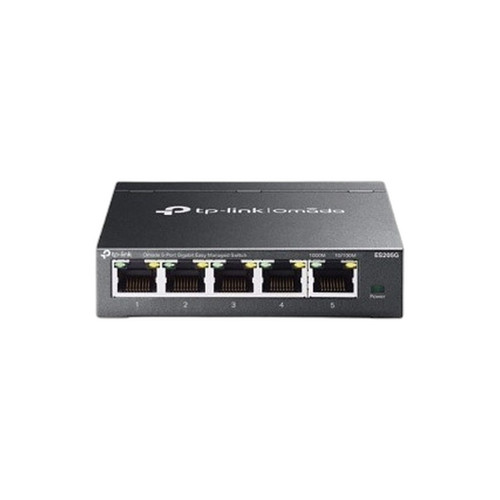
Both products are 5-port desktop Ethernet switches from TP-Link, and a buyer evaluating compact edge or small-office switching would reasonably compare them. However, they occupy clearly different tiers: the TL-SG105-M2 is an unmanaged 2.5G multi-gigabit switch optimized for raw throughput, while the ES205G is a managed 1G switch integrated into TP-Link's Omada SDN platform. A buyer choosing between unmanaged simplicity at higher line-rate versus centralized management at standard gigabit speed is the core trade-off this comparison addresses.
In This Guide
- Which switch delivers more bandwidth per port and total switching capacity?
- Which switch offers traffic control, VLAN segmentation, and remote visibility?
- How do the two switches compare on power requirements, physical footprint, and mounting flexibility?
- Which should you choose: the SG105-M2 or the ES205G?
- Side-by-Side Specs
- FAQ
Which switch delivers more bandwidth per port and total switching capacity?
The TL-SG105-M2 runs each of its five ports at 2.5 Gbps, yielding a total switching capacity of 25 Gbps (a second source in the spec lists 40 Gbps, which may reflect a different hardware revision — only the lower confirmed 25 Gbps figure is cited here). The ES205G tops out at 1 Gbps per port with a 10 Gbps switching capacity and a forwarding rate of 7.4 Mpps. On a per-port basis the SG105-M2 provides 2.5× the line rate of the ES205G.
For workloads involving NAS access, high-resolution IP camera streams, or workstations with 2.5G NICs, the SG105-M2's port speed advantage is directly usable. The ES205G's 10 Gbps non-blocking fabric is sufficient for standard 1G traffic across all five ports simultaneously, but it cannot accommodate any 2.5G or faster endpoints. No forwarding-rate (Mpps) figure is published in the SG105-M2 spec; the ES205G's 7.4 Mpps is on record.
Which switch offers traffic control, VLAN segmentation, and remote visibility?
The ES205G is a managed switch under TP-Link's Omada SDN platform. Its spec confirms DHCP Client management capability and Omada SDN central control, enabling policy-based configuration, monitoring, and — when combined with an Omada controller — unified management alongside other Omada-family APs and routers. The SG105-M2 is explicitly unmanaged: no VLAN, no QoS, no SNMP, no remote CLI or GUI. Configuration is plug-and-play only.
For deployments where network segmentation (camera VLANs, voice VLANs, guest isolation) or auditable change management is required, the ES205G is the only option of the two. The SG105-M2 is appropriate where simplicity and zero-configuration operation are preferred, or where the upstream switch already handles VLANs and the SG105-M2 functions as an untagged access-tier device.
How do the two switches compare on power requirements, physical footprint, and mounting flexibility?
The SG105-M2 is powered by a 12 V / 1 A (or 12 V / 1.5 A, depending on revision) DC adapter and measures 209 × 126 × 26 mm (one revision: 226 × 131 × 35 mm). It supports wall mounting. The ES205G uses a lighter 5 VDC / 0.6 A adapter and is significantly more compact at 99.8 × 98 × 25 mm; it supports both desktop/wall mounting and rack mounting according to its spec.
The ES205G's rack-mount option gives it more installation flexibility in structured cabling environments. Neither switch is specified as PoE-capable at the port output level despite both showing 'Power: PoE' in the raw data — no PoE budget, PSE wattage, or per-port PoE delivery spec is provided for either unit, so PoE sourcing capability cannot be confirmed from the available specifications. Both share identical operating temperature ranges of 0 °C to 40 °C. The ES205G lists CE, FCC, and RoHS certifications; no certification data is present in the SG105-M2 spec.
Which should you choose: the SG105-M2 or the ES205G?
Our take: The SG105-M2 is the stronger choice when maximum port throughput is the priority and centralized management is not required. Its 2.5 Gbps per-port speed versus the ES205G's 1 Gbps delivers 2.5× the line rate per port, and its 25 Gbps switching capacity is 2.5× the ES205G's 10 Gbps — a meaningful gap for NAS, high-bitrate camera backhaul, or workstations equipped with 2.5G NICs. Conversely, the ES205G is the only option of the two when VLAN segmentation, Omada SDN integration, or rack mounting is required; it also draws substantially less power (5 V / 0.6 A vs. 12 V / 1–1.5 A) and occupies a smaller footprint. Buyers already invested in the Omada ecosystem who need managed switching at standard gigabit should select the ES205G; buyers who need raw multi-gigabit speed at an unmanaged edge should select the SG105-M2.
Side-by-Side Comparison
Spec-for-spec, from manufacturer data.
| Specification | TP-Link SG105-M2 | TP-Link ES205G |
|---|---|---|
| Product Type | Unmanaged Desktop Switch | Managed Switch |
| Managed | No | Yes |
| Management Platform | — | Omada SDN |
| Ports | 5 | 5 |
| Port Speed | 2.5 Gbps (Multi-Gigabit) | 1 Gbps |
| Interface Standard | — | 10/100/1000 Mbps RJ45 ×5 |
| Switching Capacity | 25 Gbps (40 Gbps per alt. source) | 10 Gbps |
| Forwarding Rate | — | 7.4 Mpps |
| Power Supply | 12 V / 1 A or 1.5 A adapter | 5 VDC / 0.6 A |
| Dimensions (W×D×H) | 209×126×26 mm (alt: 226×131×35 mm) | 99.8×98×25 mm |
| Mount Type | Wall | Desktop / Wall / Rack |
| Operating Temp | 0 °C to 40 °C | 0 °C to 40 °C |
| Storage / Flash | — | 64 Mbit Flash |
| Packet Buffer | — | 4 Mbit |
| Certifications | — | CE, FCC, RoHS |
| Fanless | Yes (per card bullet) | — |
Frequently Asked Questions
Which should you choose: the SG105-M2 or the ES205G?
The SG105-M2 is the stronger choice when maximum port throughput is the priority and centralized management is not required. Its 2.5 Gbps per-port speed versus the ES205G's 1 Gbps delivers 2.5× the line rate per port, and its 25 Gbps switching capacity is 2.5× the ES205G's 10 Gbps — a meaningful gap for NAS, high-bitrate camera backhaul, or workstations equipped with 2.5G NICs. Conversely, the ES205G is the only option of the two when VLAN segmentation, Omada SDN integration, or rack mounting is required; it also draws substantially less power (5 V / 0.6 A vs. 12 V / 1–1.5 A) and occupies a smaller footprint. Buyers already invested in the Omada ecosystem who need managed switching at standard gigabit should select the ES205G; buyers who need raw multi-gigabit speed at an unmanaged edge should select the SG105-M2.
Can either switch power PoE cameras or access points?
Neither switch has a confirmed PoE power-sourcing (PSE) specification in the provided data. Both products show 'Power: PoE' as a raw tag, but no per-port PoE budget, maximum wattage, or IEEE 802.3af/at/bt compliance is listed for either unit. Do not assume PoE output capability without consulting the full official datasheet for each model.
Is the ES205G or the SG105-M2 better suited for a small security camera deployment?
If the cameras use standard 1G Ethernet and the deployment requires VLAN isolation between camera traffic and office data, the ES205G's managed feature set (Omada SDN, DHCP Client) makes it the more appropriate choice. If cameras or recording appliances have 2.5G uplinks and management is handled upstream, the SG105-M2's higher port speed reduces congestion. Neither unit's PoE sourcing capability is confirmed by spec, so a separate PoE injector or PoE switch may be needed regardless.
Which switch fits better in a rack-mounted network cabinet?
Only the ES205G lists rack mounting as a supported installation method. The SG105-M2 spec identifies wall mounting only. If rack installation is a requirement, the ES205G is the only viable option of the two based on available specifications.
More Network Switch Comparisons
- TP-Link SG2005P-PD vs Ubiquiti USW-FLEX-2.5G-5
- TP-Link SG2005P-PD vs TP-Link ES205G
- TP-Link SG2005P-PD vs TP-Link DS105G
- TP-Link ES205G vs Ubiquiti USW-FLEX-2.5G-5
- TP-Link ES205G vs TP-Link DS105G
- Ubiquiti USW-FLEX-2.5G-5 vs TP-Link DS105G
Network Switch Buying Guides
Get a Second Opinion on Your Camera Choice
Share your site layout, coverage goals, and budget. Our team will validate the camera selection, flag anything we would change, and recommend products that match the use case.