
TP-Link SG1008MP vs Lantronix S2220-1014-NA: Specification Comparison
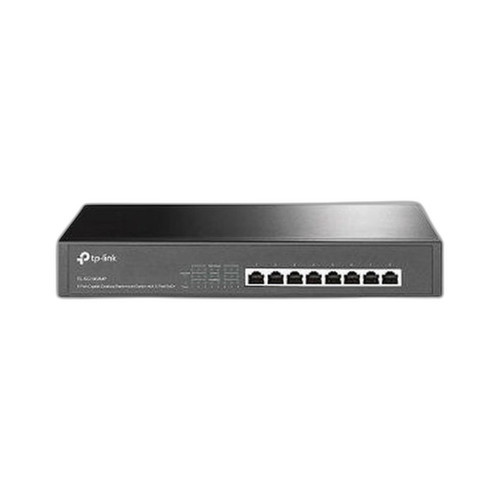
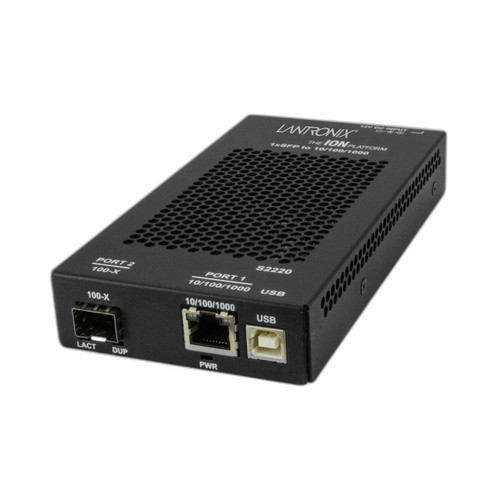
Both the TP-Link TL-SG1008MP and the Lantronix S2220-1014-NA are 8-port Gigabit switches positioned for physical-security infrastructure, but they serve meaningfully different roles. The TL-SG1008MP is an unmanaged PoE+ switch designed to power edge devices such as IP cameras and access control readers directly from the switch. The S2220-1014-NA is a Layer 2 managed switch with fiber uplink capability but no PoE output. This comparison helps B2B installers and IT buyers decide which fits their specific closet or edge-distribution requirement.
In This Guide
- Which switch can power edge devices directly, and what are the per-port limits?
- Which switch offers network segmentation, traffic prioritization, and remote monitoring?
- What physical uplink options and maximum reach does each switch support?
- Which should you choose: the SG1008MP or the S2220-1014-NA?
- Side-by-Side Specs
- FAQ
Which switch can power edge devices directly, and what are the per-port limits?
The TL-SG1008MP provides PoE+ output on its ports with a stated per-port budget of 30 W (802.3at+). The product data also references 802.3bt (PoE++), though the per-port figure given is 30 W, which aligns with 802.3at. An extended PoE range of up to 250 m is listed, enabling distant camera or reader endpoints without an additional injector. The S2220-1014-NA provides no PoE output on any port; it is a purely passive switching platform from a power-delivery standpoint. Buyers who need to eliminate separate injectors or midspans for IP cameras, intercoms, or wireless APs must select the TL-SG1008MP. Buyers whose endpoints are separately powered have no PoE requirement to satisfy.
Which switch offers network segmentation, traffic prioritization, and remote monitoring?
The S2220-1014-NA is a Layer 2 managed switch. Its listed management features include VLAN support, traffic prioritization, and remote monitoring, accessible via RJ45 copper and SC fiber connector interfaces. This makes it suitable for deployments where camera or access-control VLANs must be isolated from corporate traffic, or where QoS policies are required. The TL-SG1008MP is explicitly unmanaged. Its listed management entry references a provisioning and Wi-Fi 6 management app, but these features are not consistent with the stated unmanaged classification and may reflect a data entry error; no VLAN, QoS, or remote monitoring capability is confirmed in the spec set. Installers requiring port-level segmentation must account for this difference.
What physical uplink options and maximum reach does each switch support?
The S2220-1014-NA includes a 100BASE-LX10 single-mode fiber uplink via SC connector with a stated maximum range of 10 km, making it appropriate for inter-building runs or connections to a head-end fiber backbone without a media converter. Its copper ports operate at 10/100/1000BASE-T. The TL-SG1008MP operates at 1000 Mbps on copper only; no fiber uplink or SFP slot is listed in its specifications. Its extended PoE reach of 250 m over copper is its distance advantage at the edge, not at the uplink layer. Form factor for the TL-SG1008MP is listed as desktop or rackmount (wall and rack). Mounting options for the S2220-1014-NA are not stated in the provided data.
Which should you choose: the SG1008MP or the S2220-1014-NA?
Our take: The TL-SG1008MP is the stronger choice when the primary requirement is powering IP cameras, intercoms, or access-control readers directly from the switch without separate injectors, particularly at edge locations up to 250 m from the closet. The S2220-1014-NA is the stronger choice when network segmentation, traffic prioritization, and a fiber backbone uplink are the deciding factors. Key spec deltas: (1) PoE output — TL-SG1008MP delivers 30 W per port; S2220-1014-NA delivers 0 W. (2) Management — S2220-1014-NA provides Layer 2 VLAN and QoS control; TL-SG1008MP has none confirmed. (3) Fiber reach — S2220-1014-NA supports 100BASE-LX10 single-mode to 10 km; TL-SG1008MP has no fiber uplink. A security installer building a camera edge-distribution tier with self-powered endpoints in a managed network will often need both: the TL-SG1008MP at the edge and a managed switch like the S2220-1014-NA aggregating upstream.
Side-by-Side Comparison
Spec-for-spec, from manufacturer data.
| Specification | TP-Link SG1008MP | Lantronix S2220-1014-NA |
|---|---|---|
| Switch Type | Unmanaged PoE+ | Layer 2 Managed |
| Copper Ports | 8 x Gigabit | 8 x 10/100/1000BASE-T |
| PoE Output | Yes — 30 W per port (802.3at+) | None |
| PoE Standard Referenced | 802.3bt (PoE++) | — |
| Extended PoE Reach | Up to 250 m | — |
| Fiber Uplink | — | 100BASE-LX10 single-mode, SC connector |
| Max Fiber Range | — | 10 km |
| VLAN Support | — | Yes |
| Traffic Prioritization / QoS | — | Yes |
| Remote Monitoring | — | Yes |
| Management Interface | Unmanaged (app reference unconfirmed) | Layer 2 managed |
| Connector Types | RJ45 | RJ45 and SC |
| Mount Options | Wall; Rack | Not stated |
| Warranty | — | 2-Year |
| Product Type (stated) | 8-Port Gigabit PoE+ Switch | 8-Port Managed Gigabit Switch |
Frequently Asked Questions
Which should you choose: the SG1008MP or the S2220-1014-NA?
The TL-SG1008MP is the stronger choice when the primary requirement is powering IP cameras, intercoms, or access-control readers directly from the switch without separate injectors, particularly at edge locations up to 250 m from the closet. The S2220-1014-NA is the stronger choice when network segmentation, traffic prioritization, and a fiber backbone uplink are the deciding factors. Key spec deltas: (1) PoE output — TL-SG1008MP delivers 30 W per port; S2220-1014-NA delivers 0 W. (2) Management — S2220-1014-NA provides Layer 2 VLAN and QoS control; TL-SG1008MP has none confirmed. (3) Fiber reach — S2220-1014-NA supports 100BASE-LX10 single-mode to 10 km; TL-SG1008MP has no fiber uplink. A security installer building a camera edge-distribution tier with self-powered endpoints in a managed network will often need both: the TL-SG1008MP at the edge and a managed switch like the S2220-1014-NA aggregating upstream.
Can the TL-SG1008MP or S2220-1014-NA power IP cameras without a separate injector?
Only the TL-SG1008MP provides PoE output, rated at 30 W per port (802.3at+). The S2220-1014-NA has no PoE capability on any port, so cameras or other powered devices connected to it would require separate PoE injectors or midspans.
Which switch supports VLANs to keep camera traffic isolated from the corporate network?
The S2220-1014-NA is a Layer 2 managed switch with explicit VLAN support and traffic prioritization listed in its specifications. The TL-SG1008MP is unmanaged and has no confirmed VLAN or QoS capability.
Does either switch support a fiber uplink for connecting to a building backbone or remote IDF?
Yes — the S2220-1014-NA includes a 100BASE-LX10 single-mode fiber port via SC connector with a stated reach of 10 km, suitable for inter-building or head-end fiber runs. The TL-SG1008MP has no fiber uplink or SFP slot listed in its specifications.
More Network Switch Comparisons
- TP-Link SG2210XMP-M2 vs Ubiquiti USW-FLEX-2.5G-8
- TP-Link SG2210XMP-M2 vs Comnet CNGE8MS
- TP-Link SG2210XMP-M2 vs Lantronix S2220-1014-NA
- TP-Link SG2210XMP-M2 vs TP-Link S4500-8GP
- TP-Link SG2210XMP-M2 vs TP-Link SG2008P
- TP-Link S4500-8GP vs Ubiquiti USW-FLEX-2.5G-8
Network Switch Buying Guides
Get a Second Opinion on Your Camera Choice
Share your site layout, coverage goals, and budget. Our team will validate the camera selection, flag anything we would change, and recommend products that match the use case.