
TP-Link DS1024G vs TP-Link SL2428P: Specification Comparison
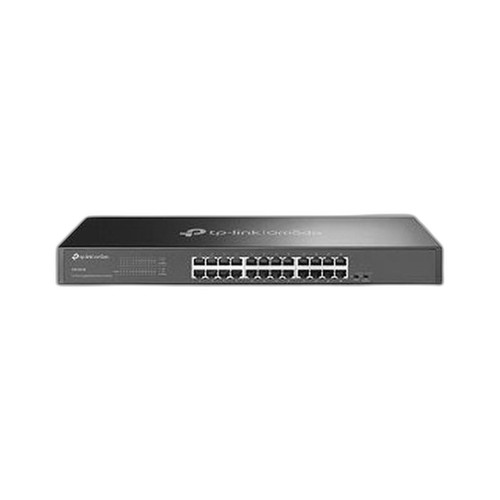
The TP-Link DS1024G (SKU DS1024G) and TP-Link SL2428P (SKU SL2428P) are both 24-port rackmount managed switches from TP-Link's Omada line, sized for wiring closets and IDF deployments in IP physical-security networks. The DS1024G delivers all-gigabit data ports at 48 Gbps fabric capacity with low 13.46W draw, while the SL2428P trades per-port speed for a 250W PoE+ budget and richer management stack. This comparison covers port speeds and fabric throughput, PoE capability and power budgeting, and management depth and security-protocol support.
In This Guide
- Which switch delivers more bandwidth per port and across the fabric?
- Which switch can actually power IP cameras and access-control devices over Ethernet?
- Which switch provides deeper management, security protocols, and integration with surveillance platforms?
- Which should you choose: the DS1024G or the SL2428P?
- Side-by-Side Specs
- FAQ
Which switch delivers more bandwidth per port and across the fabric?
The DS1024G equips all 24 access ports at 10/100/1000 Mbps (Gigabit), yielding a non-blocking switching fabric of 48 Gbps and a packet-forwarding rate of 35.7 Mpps. Every connected device — camera, NVR, access controller — operates at up to 1 Gbps. This is significant for 4K and multi-stream IP cameras that can each generate 8–25 Mbps of sustained traffic, where headroom matters at the aggregation layer.
The SL2428P's 24 access ports are limited to 10/100 Mbps (Fast Ethernet), with only 4 uplink ports running at Gigabit speeds (2× RJ45 and 2× Combo RJ45/SFP). Its switching capacity is 12.8 Gbps at 9.52 Mpps. For most 1080p or lower-resolution IP cameras — typically 2–6 Mbps each — 100 Mbps per port is sufficient, but high-resolution or multi-sensor cameras that saturate 100 Mbps could be bottlenecked. The Gigabit uplinks do allow aggregated traffic to exit the switch at 1 Gbps toward an upstream core.
Summary: the DS1024G provides roughly 3.75× the switching capacity (48 Gbps vs. 12.8 Gbps) and per-port speeds 10× higher on access ports (1000 Mbps vs. 100 Mbps). Buyers running modern high-resolution cameras or planning for bandwidth growth should weight this dimension heavily.
Which switch can actually power IP cameras and access-control devices over Ethernet?
The SL2428P is explicitly specified with IEEE 802.3af/at (PoE+) support across its 24 access ports, with a total PoE budget of 250W and up to 30W per port. At 250W total, it can realistically power 20–25 typical IP cameras (drawing 10–15W each under 802.3af) or a mix of PTZ cameras and access controllers drawing up to 30W per device under 802.3at. The 250W PoE load is reflected in a maximum power consumption of 250W under full PoE draw, with a 8.9W standby baseline.
The DS1024G carries a 'PoE' tag in one specification field, but its maximum power consumption is listed as 13.46W — physically incompatible with powering any meaningful PoE load. A single 802.3af device draws up to 15.4W, which alone would exceed the DS1024G's entire power envelope. This spec is contradicted within the source data, and PoE capability for the DS1024G cannot be confirmed. Buyers should treat the DS1024G as non-PoE pending vendor clarification and plan for separate PoE injectors or midspan units if endpoint power is required.
For any deployment where cameras, door controllers, or intercoms must be powered over Ethernet — the dominant architecture in modern physical security — the SL2428P's 250W PoE+ budget is a decisive functional differentiator. The DS1024G's PoE status is unconfirmed by its power specification.
Which switch provides deeper management, security protocols, and integration with surveillance platforms?
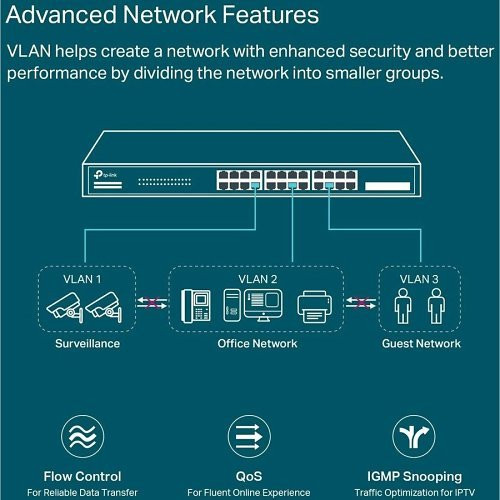
The SL2428P is explicitly managed via TP-Link Omada cloud management, standalone web GUI, CLI, SNMP, and RMON. Its Layer 2/3 feature set includes VLAN (802.1Q), STP/RSTP/MSTP, IGMP Snooping, QoS via 802.1p and DSCP, ACL, LACP (link aggregation), Static Routing, and Jumbo Frame support up to 9KB. Security access is enforced via 802.1x port authentication with RADIUS and TACACS+ backend support. ONVIF compliance is explicitly listed, enabling direct integration with ONVIF-capable VMS and NVR platforms for network topology discovery. Memory resources are 32MB Flash and 256MB DRAM.
The DS1024G's management posture is contradicted in its source data: one field labels it 'Managed' while another calls it an 'Unmanaged Rackmount Switch.' The most detailed operational features documented are Isolation Mode (ports 1–22) and Loop Prevention (ports 1–24), with an 8K MAC address table. No VLAN, SNMP, QoS, ACL, STP, IGMP Snooping, CLI, or cloud-management capabilities are specified. These are rudimentary features compared to the SL2428P's stack. ONVIF support is not listed for the DS1024G.
For enterprise or multi-site deployments requiring network segmentation (VLAN per camera group), storm control, IGMP multicast optimization for video streams, or centralized Omada cloud management, the SL2428P's documented feature set satisfies those requirements with specified protocols. The DS1024G's management depth cannot be confirmed from available specifications.
Which should you choose: the DS1024G or the SL2428P?
Our take: Choose the SL2428P for any deployment where IP cameras or access-control devices must be powered over Ethernet: its 250W PoE+ budget (up to 30W per port, 802.3af/at) is a confirmed, deployment-ready capability that the DS1024G cannot match — the DS1024G's 13.46W maximum power draw makes its 'PoE' tag unconfirmable. Choose the DS1024G if every edge device is externally powered and per-port bandwidth is the priority: its 24 all-Gigabit access ports and 48 Gbps switching fabric outperform the SL2428P's 100 Mbps access ports and 12.8 Gbps fabric by a factor of roughly 3.75×. The SL2428P's documented management stack — VLAN, SNMP, 802.1x/RADIUS, IGMP Snooping, ONVIF, Omada cloud — is substantially deeper than the DS1024G's specified feature set. For PoE-powered camera networks with managed VLAN and multicast requirements, the SL2428P is the specified-fit product; for externally-powered deployments demanding all-Gigabit edge bandwidth, the DS1024G is the stronger fabric choice.
Side-by-Side Comparison
Spec-for-spec, from manufacturer data.
| Specification | TP-Link DS1024G | TP-Link SL2428P |
|---|---|---|
| Total Ports | 24 | 28 (24 access + 4 uplink) |
| Access Port Speeds | 24× 10/100/1000 Mbps (Gigabit) | 24× 10/100 Mbps (Fast Ethernet) |
| Gigabit Uplink Ports | All 24 ports are Gigabit | 4× Gigabit (2× RJ45 + 2× Combo RJ45/SFP) |
| SFP Slots | — | 2× Combo Gigabit RJ45/SFP |
| Switching Capacity | 48 Gbps | 12.8 Gbps |
| Forwarding Rate | 35.7 Mpps | 9.52 Mpps |
| PoE Standard | Not confirmed by power spec (tag says PoE; 13.46W max draw contradicts) | 802.3af/at (PoE+) |
| PoE Budget Per Port | Not confirmed | Up to 30W |
| Total PoE Budget | Not confirmed | 250W |
| Power Consumption (max) | 13.46W | 250W (full PoE load); 8.9W standby |
| Management Interfaces | Not fully specified (Isolation Mode + Loop Prevention documented; managed vs. unmanaged contradicted in source) | Omada cloud, web GUI, CLI, SNMP, RMON |
| ONVIF Support | — | Yes |
| Security / Auth Protocols | — | 802.1x, RADIUS, TACACS+ |
| Operating Temp Range | 0°C to 40°C (32°F to 104°F) | −5°C to 50°C (23°F to 122°F) |
| Dimensions (W×D×H) | 440 × 140 × 44 mm (17.3 × 5.5 × 1.7 in) | 440 × 180 × 44 mm (17.3 × 7.1 × 1.7 in) |
| Mount Options | Rack | Wall, Ceiling, Rack |
| MAC Address Table | 8K | — |
| Memory | — | 32 MB Flash, 256 MB DRAM |
Frequently Asked Questions
Which should you choose: the DS1024G or the SL2428P?
Choose the SL2428P for any deployment where IP cameras or access-control devices must be powered over Ethernet: its 250W PoE+ budget (up to 30W per port, 802.3af/at) is a confirmed, deployment-ready capability that the DS1024G cannot match — the DS1024G's 13.46W maximum power draw makes its 'PoE' tag unconfirmable. Choose the DS1024G if every edge device is externally powered and per-port bandwidth is the priority: its 24 all-Gigabit access ports and 48 Gbps switching fabric outperform the SL2428P's 100 Mbps access ports and 12.8 Gbps fabric by a factor of roughly 3.75×. The SL2428P's documented management stack — VLAN, SNMP, 802.1x/RADIUS, IGMP Snooping, ONVIF, Omada cloud — is substantially deeper than the DS1024G's specified feature set. For PoE-powered camera networks with managed VLAN and multicast requirements, the SL2428P is the specified-fit product; for externally-powered deployments demanding all-Gigabit edge bandwidth, the DS1024G is the stronger fabric choice.
Can the DS1024G power my IP cameras without separate PoE injectors?
Based on available specifications, this cannot be confirmed. The DS1024G lists 'PoE' in one spec field, but its maximum power consumption is only 13.46W — less than the 15.4W draw of a single 802.3af-compliant device. This is an internal contradiction in the source data. Until TP-Link clarifies, plan for external PoE injectors or a midspan PoE unit. The SL2428P, by contrast, has a confirmed 250W PoE+ budget with up to 30W per port.
Which switch should I use for a 16-camera 1080p IP system where cameras are already on separate power supplies?
If all cameras are externally powered, the DS1024G's 24 all-Gigabit ports and 48 Gbps non-blocking fabric provide more bandwidth headroom for 1080p and potential 4K upgrades. However, buyers should independently verify its management capabilities before deployment, as the source specs contradict each other on managed vs. unmanaged status. If VLAN segmentation, IGMP Snooping for multicast video, or SNMP monitoring are required, the SL2428P's documented feature set is the confirmed option.
Does the SL2428P integrate with my ONVIF-compatible NVR or VMS?
Yes — ONVIF support is explicitly listed in the SL2428P's specifications, which enables network topology discovery and device integration with ONVIF-compliant VMS and NVR platforms. The DS1024G does not list ONVIF support in its available specifications.
More Network Switch Comparisons
- TP-Link S5500-24GP4XF vs NETGEAR GS728TP-300NAS
- TP-Link S5500-24GP4XF vs Comnet CNGE24FX12TX12MSPOE
- TP-Link S5500-24GP4XF vs Ubiquiti USW-24
- TP-Link S5500-24GP4XF vs Ubiquiti USW-ENTERPRISEXG-24
- TP-Link S5500-24GP4XF vs TP-Link SL2428P
- TP-Link S5500-24GP4XF vs TP-Link SG3428XPP-M2
Network Switch Buying Guides
Get a Second Opinion on Your Camera Choice
Share your site layout, coverage goals, and budget. Our team will validate the camera selection, flag anything we would change, and recommend products that match the use case.