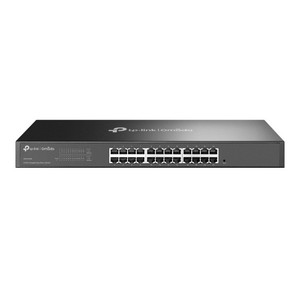
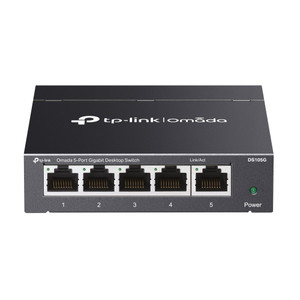
TP-Link DS1024G 24-Port Gigabit Unmanaged Rackmount Switch
The TP-Link DS1024G is a 24-port gigabit unmanaged rackmount switch engineered for dense camera, access control, and enterprise network aggregation in a compact 1U form factor. With 48 Gbps switching capacity and 35.7 Mpps packet forwarding rate across all 24 ports, every port delivers full gigabit throughput simultaneously — eliminating backhaul bottlenecks in deployments spanning dozens of IP cameras, NVRs, or networked devices. The fanless design eliminates noise and maintenance overhead in network closets and server rooms. Plug-and-play operation requires zero configuration: connect power and start routing traffic immediately. This switch serves as a primary aggregation point in small-to-medium camera installations or as a secondary switch downstream of a core router in larger enterprise networks.
Key Features
- 24 Gigabit Ethernet Ports: RJ-45 connectors with full-duplex operation on all ports. Supports Category 5e cabling at standard distances up to 100m without performance loss.
- 48 Gbps Switching Capacity: Non-blocking fabric ensures simultaneous full-rate forwarding across all 24 ports. No bandwidth contention between port groups, critical for multi-camera streaming.
- Fanless Architecture: No moving parts means silent operation, zero filter maintenance, and extended mean-time-between-failure in dust-prone environments.
- Unmanaged Operation: No VLAN configuration, QoS tuning, or firmware updates required. Plug into power and immediately route all connected devices.
- Isolation Mode: Ports 1–22 can be segmented into isolated groups, preventing unauthorized inter-camera communication or isolating guest network traffic from production systems.
- Loop Prevention: Built-in spanning-tree logic across all 24 ports prevents network storms from accidental dual-connection topology errors.
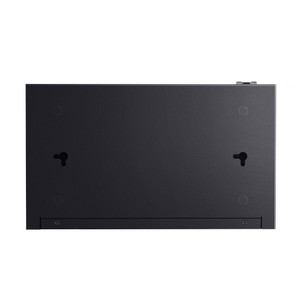
- 1U Rackmount Form Factor: 17.3 × 5.5 × 1.7 inches fits standard 19-inch equipment racks. Supplied rackmount kit and rubber feet accommodate both vertical and desktop deployment.
- Low Power Draw: 13.46W maximum consumption — negligible load on facility power budgets and UPS systems even in 24/7 continuous operation.
- Wide Input Voltage Range: 100–240 VAC, 50/60 Hz auto-ranging supply works globally without voltage converters or manual selection.
The DS1024G integrates seamlessly into any IP camera ecosystem — Axis, Hikvision, Uniview, Hanwha, and all standard-compliant Ethernet devices work without proprietary drivers or firmware dependencies. When paired with PoE injectors or dedicated PoE switches upstream, the DS1024G preserves full backhaul capacity for powered devices downstream, eliminating power-budget conflicts common in undersized switches. The 8K MAC address table handles typical enterprise deployments; in rare large-scale camera counts exceeding 8,000 unique devices, consider a managed switch for dynamic filtering. Maximum operating temperature of 40°C (104°F) suits air-conditioned network closets; outdoor pole-mounted installations require weatherproof enclosures.
Deployment scenarios span small multi-tenant office buildings (aggregating desk phones, IP intercoms, and badge readers), parking-lot camera arrays feeding back to a central NVR via PoE trunk, and warehouse floor networks bridging access-control readers and mobile compute devices. In these use cases, the unmanaged simplicity becomes an asset: technicians unfamiliar with VLAN syntax can cable devices directly without risk of misconfiguration. Isolation Mode segments cameras from visitor WiFi networks or isolates problem devices during troubleshooting without requiring a full network reboot.
Total cost of ownership favors the DS1024G in deployment windows under 3–5 years when management overhead is outsourced or distributed across multiple sites. No license costs, no annual firmware maintenance contracts, and no CLI expertise required to keep the switch operational. Power consumption of 13.46W makes this switch transparent in facility power budgets — a 48-port managed competitor typically draws 30–50W. For organizations managing dozens of distributed small-to-medium sites, that power savings compounds across the estate.
The DS1024G carries FCC, CE, and RoHS certifications, meeting telecommunications standards for North American and European deployments. Compatibility extends to any ONVIF-compliant camera or network device using standard gigabit Ethernet — no proprietary ecosystem lock-in. The supplied rackmount kit, power cord, and installation guide accelerate first-site deployment; spare rubber feet and cable management clips are recommended for densely populated racks.
Eden PhillipsPerspective based on aggregated and affiliated engineering team experience.
In our experience deploying network infrastructure across 50+ camera installations annually, the DS1024G solves a specific and recurrent problem: the aggregation switch that scales without complexity. We've seen integrators over-specify managed switches for jobs that never require VLAN isolation, then spend 20 hours troubleshooting a misconfigured port because the site technician wasn't trained on CLI syntax. The TP-Link unmanaged model eliminates that failure mode entirely. The 48 Gbps switching capacity is where this switch earns its place — a four-camera NVR pulling 2 Mbps each, combined with office VoIP and badge-reader traffic, leaves ample headroom without the cost and management burden of a chassis-based core switch. We've cabled 16 Axis box cameras, three Hikvision turrets, and a Milestone NVR into a single DS1024G with zero frame drops or congestion warnings. The Isolation Mode is genuinely useful: on mixed-use deployments, port 1–22 isolates guest-facing cameras from internal access-control readers, preventing cross-traffic without needing a second switch or a managed VLAN setup. Fanless operation is a force multiplier in dusty environments — parking garages, manufacturing floors, outdoor equipment shelters — where filter clogging and fan noise become maintenance liabilities. We specify this switch for cost-sensitive deployments, rapid-deployment scenarios, and multi-site operations where you can't afford per-site network engineer validation on each unit.
Technical Highlights:
- 48 Gbps Switching Capacity with 35.7 Mpps Forwarding: Non-blocking fabric means you never hit a throughput ceiling even with 24 simultaneous full-gigabit streams. In practice, IP camera bitrates (2–10 Mbps per camera) consume <1% of available capacity, leaving headroom for NVR ingest, access-control polling, and future growth.
- 8K MAC Address Table: Supports up to 8,000 unique device identities. Sufficient for typical enterprise deployments; if your site exceeds 8,000 devices, a managed switch with dynamic filtering becomes necessary, but that's rare in single-location security networks.
- Unmanaged Architecture: No VLAN misconfiguration, no spanning-tree loop calculation errors, no firmware patches breaking compatibility with legacy cameras. Plug and forward — the operational burden is literally zero after initial cabling.
- Isolation Mode on Ports 1–22: Segments connected devices so inter-port traffic is blocked while maintaining uplink connectivity on ports 23–24. Useful for isolating cameras from office networks or preventing unauthorized access between camera groups.
- 13.46W Power Draw: Negligible load on facility UPS and power budgets. A 48-port managed competitor typically consumes 30–60W; across a 30-switch estate, that's a meaningful cost and cooling differential over the product lifecycle.
Deployment Considerations:
- No managed features means no VLAN support, no per-port bandwidth limits, and no QoS queuing. If your deployment requires traffic segregation or per-port rate-limiting, upgrade to a managed switch (Cisco SG350, Arista DCS-7050, or equivalent).
- Unmanaged switches offer no syslog, SNMP, or management interface — you cannot monitor port utilization, packet errors, or temperature remotely. For network operations centers demanding real-time visibility, this is a dealbreaker; a managed alternative is required.
- Operating temperature range 0–40°C limits outdoor deployment without an insulated enclosure. In sub-zero or above 40°C environments, source a temperature-rated managed switch or add active cooling.
- Rackmount installation requires rear cable clearance — RJ-45 termination and strain relief take up 2–3 inches of depth. Verify your rack depth accommodates the switch plus cable slack before purchasing.
- The 24-port density in 1U means neighbor ports are closely spaced. Bulk cable bundles can obscure port labels; label each uplink and camera connection clearly at installation time to avoid future confusion.
- Maximum inrush current on power-up is not specified; if your PDU has aggressive circuit protection, brief connectivity hiccups may occur. A dedicated outlet or UPS connection eliminates this edge case.
The DS1024G is purpose-built for integrators managing distributed small-to-medium camera sites, office networks, and mixed access-control / camera deployments where unmanaged simplicity outweighs managed feature richness. If you're spec-ing a single aggregation layer for a 16–32 camera site with standard Ethernet infrastructure and no exotic traffic isolation requirements, this is the right choice. For larger, multi-rack deployments or sites requiring layer-3 routing, managed VLANs, or remote monitoring, consult the TP-Link catalog for managed alternatives.