
TP-Link DS1024G vs TP-Link S5500-24GP4XF: Specification Comparison
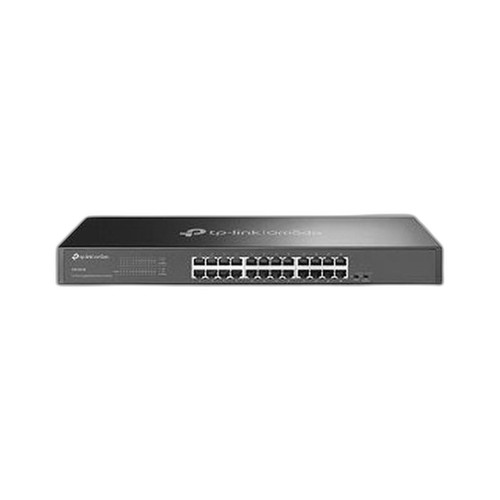
Both products are TP-Link rack-mount Gigabit switches in the 24-port RJ45 form factor, positioned within the Omada/OmadaPro ecosystem — a category installers and IT buyers routinely cross-shop when sizing out access-layer switching for IP camera systems, wireless APs, or general LAN infrastructure. The DS1024G is a 24-port unmanaged Gigabit switch with no PoE; the S5500-24GP4XF is a 24-port L2+ managed Gigabit switch with 4× 10GE SFP+ uplinks and 240 W PoE+. The comparison centres on port density, PoE delivery, and management depth.

In This Guide
- How do port count, uplink speed, and switching capacity compare?
- Which switch delivers Power over Ethernet, and how do their power envelopes differ?
- What management capabilities and integration options does each switch support?
- Which should you choose: the DS1024G or the S5500-24GP4XF?
- Side-by-Side Specs
- FAQ
How do port count, uplink speed, and switching capacity compare?
The DS1024G provides 24× 10/100/1000 Mbps RJ45 ports with no dedicated uplink interfaces. Its switching capacity is 48 Gbps — a non-blocking fabric for 24 Gigabit ports — and its packet-forwarding rate is 35.7 Mpps. The specs list no SFP or 10GE connectivity.
The S5500-24GP4XF offers the same 24× Gigabit RJ45 ports but adds 4× SFP+ slots supporting 10GE uplinks (single-mode and multimode fiber per the spec). Its switching capacity is listed as 160 Gbps (one spec field also cites 320 Gbps — that figure is not confirmed by a second source in the provided specs, so 160 Gbps is used here). No packet-forwarding rate is given in the provided specs for the S5500-24GP4XF.
For deployments that need high-bandwidth uplinks to a core switch or NVR, the S5500-24GP4XF's 10GE SFP+ ports are a material advantage. The DS1024G is constrained to Gigabit on all 24 ports with no expansion path listed in its specs.
Which switch delivers Power over Ethernet, and how do their power envelopes differ?
The S5500-24GP4XF supports IEEE 802.3af/at (PoE+) with a 240 W PoE budget and a total maximum power consumption of 384 W. All 24 RJ45 ports are PoE-capable, and the spec notes dynamic PoE allocation. At 240 W across 24 ports, the per-port average is 10 W, though 802.3at allows up to 30 W per port subject to budget limits.
The DS1024G's spec includes 'PoE' as a listed feature, but no PoE budget, no IEEE 802.3 PoE standard, and no per-port wattage are provided in the supplied specifications. Its maximum power consumption is listed at 13.46 W — far below what any meaningful PoE delivery would require. Buyers should not rely on the DS1024G for powering PoE devices based on the available spec data.
For any deployment powering IP cameras, wireless APs, or VoIP phones, the S5500-24GP4XF's 240 W documented budget is the only verified option between the two.
What management capabilities and integration options does each switch support?
The DS1024G's specs list it as 'Managed: Yes' in one field but 'Managed: Unmanaged' and 'Product Type: Unmanaged Rackmount Switch' in others — an internal contradiction in the provided data. Its documented operating modes are limited to Isolation Mode (ports 1–22) and Loop Prevention (ports 1–24), with an 8K MAC address table. No CLI, SNMP, VLAN, STP, or ACL capabilities are listed.
The S5500-24GP4XF is explicitly classified as L2+ Managed. Its documented operating modes include CLI, SNMP v1/v2c/v3, RMON, 802.1Q VLAN, QinQ, STP/RSTP/MSTP, IGMP snooping, ACL, 802.1X port authentication, and LACP. Memory is 32 MB. These are standard enterprise access-layer management features.
For any deployment requiring segmentation, spanning-tree redundancy, IGMP for multicast video, or 802.1X device authentication, the S5500-24GP4XF is the only qualified option based on the provided specs. The DS1024G, regardless of the 'Managed: Yes' label in one field, lacks documented management feature support.
Which should you choose: the DS1024G or the S5500-24GP4XF?
Our take: The S5500-24GP4XF is the stronger choice when the deployment requires PoE power delivery, 10GE uplinks, or Layer 2+ management. Its switching capacity of 160 Gbps is 3.3× the DS1024G's 48 Gbps; its 240 W PoE+ budget supports up to 24 powered devices where the DS1024G's 13.46 W max consumption rules out meaningful PoE; and its 4× SFP+ ports provide 10GE uplinks absent entirely from the DS1024G. The DS1024G, by contrast, draws only 13.46 W and carries no PoE budget, making it appropriate solely as a non-PoE access switch in cost-sensitive or low-power environments. Note: the DS1024G's specs contain a direct contradiction — one field says 'Managed: Yes,' another says 'Unmanaged' — so buyers should verify management capability directly with TP-Link documentation before ordering. Both units are 1U rack-mount and share the same 24-port RJ45 Gigabit front panel.
Side-by-Side Comparison
Spec-for-spec, from manufacturer data.
| Specification | TP-Link DS1024G | TP-Link S5500-24GP4XF |
|---|---|---|
| Product Type | Unmanaged Rackmount Switch (per spec) | L2+ Managed Switch |
| RJ45 Gigabit Ports | 24 | 24 |
| 10GE Uplink Ports (SFP+) | — | 4 |
| SFP Slots | — | 4 (SFP+) |
| Switching Capacity | 48 Gbps | 160 Gbps |
| Packet Forwarding Rate | 35.7 Mpps | — |
| PoE Standard | Not specified | IEEE 802.3af/at (PoE+) |
| PoE Budget | — | 240 W |
| Max Power Consumption | 13.46 W | 384 W |
| Management | Loop Prevention; Port Isolation only | CLI, SNMP v1/v2c/v3, VLAN, STP/RSTP/MSTP, IGMP, ACL, 802.1X, LACP |
| MAC Address Table | 8K | — |
| Memory | — | 32 MB |
| Dimensions (W × D × H) | 17.3 × 5.5 × 1.7 in | 17.3 × 7.1 × 1.7 in |
| Operating Temperature | 0–40°C | 0–45°C |
| Power Supply Input | 100–240 VAC, 50/60 Hz | 100–240 VAC, 50/60 Hz |
| Certifications | FCC, CE, RoHS | — |
Frequently Asked Questions
Which should you choose: the DS1024G or the S5500-24GP4XF?
The S5500-24GP4XF is the stronger choice when the deployment requires PoE power delivery, 10GE uplinks, or Layer 2+ management. Its switching capacity of 160 Gbps is 3.3× the DS1024G's 48 Gbps; its 240 W PoE+ budget supports up to 24 powered devices where the DS1024G's 13.46 W max consumption rules out meaningful PoE; and its 4× SFP+ ports provide 10GE uplinks absent entirely from the DS1024G. The DS1024G, by contrast, draws only 13.46 W and carries no PoE budget, making it appropriate solely as a non-PoE access switch in cost-sensitive or low-power environments. Note: the DS1024G's specs contain a direct contradiction — one field says 'Managed: Yes,' another says 'Unmanaged' — so buyers should verify management capability directly with TP-Link documentation before ordering. Both units are 1U rack-mount and share the same 24-port RJ45 Gigabit front panel.
Can either switch power IP cameras or wireless access points directly?
Based on the provided specs, only the S5500-24GP4XF is documented for PoE delivery — it supports IEEE 802.3af/at with a 240 W budget across its 24 Gigabit ports. The DS1024G lists 'PoE' as a feature but has a maximum power consumption of 13.46 W and no documented PoE budget or standard, so it should not be relied upon to power PoE devices without further verification from TP-Link.
Is the DS1024G or S5500-24GP4XF better for larger or more complex deployments?
The S5500-24GP4XF is the documented choice for larger deployments. It provides 4× 10GE SFP+ uplinks for high-bandwidth aggregation, L2+ management with VLAN, MSTP, ACL, and 802.1X, and a 160 Gbps switching fabric. The DS1024G offers 48 Gbps switching, no uplink ports beyond its 24 Gigabit RJ45s, and only loop prevention and port isolation as documented operating modes.
Do both switches fit in a standard 19-inch rack, and how deep are they?
Both are 1U rack-mount units with the same 17.3-inch (440 mm) width and 1.7-inch (44 mm) height. They differ in depth: the DS1024G is 5.5 inches (140 mm) deep, while the S5500-24GP4XF is 7.1 inches (180 mm) deep per its primary dimension spec. Installers with shallow rack enclosures should verify clearance for the S5500-24GP4XF.
More Network Switch Comparisons
- TP-Link S5500-24GP4XF vs NETGEAR GS728TP-300NAS
- TP-Link S5500-24GP4XF vs Comnet CNGE24FX12TX12MSPOE
- TP-Link S5500-24GP4XF vs Ubiquiti USW-24
- TP-Link S5500-24GP4XF vs Ubiquiti USW-ENTERPRISEXG-24
- TP-Link S5500-24GP4XF vs TP-Link SL2428P
- TP-Link S5500-24GP4XF vs TP-Link SG3428XPP-M2
Network Switch Buying Guides
Get a Second Opinion on Your Camera Choice
Share your site layout, coverage goals, and budget. Our team will validate the camera selection, flag anything we would change, and recommend products that match the use case.