
Sato WWCLP2201-NAR vs Honeywell PX940: Specification Comparison
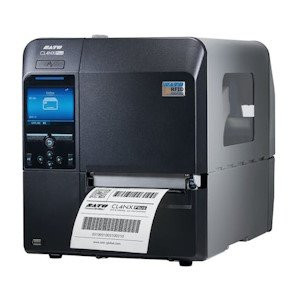
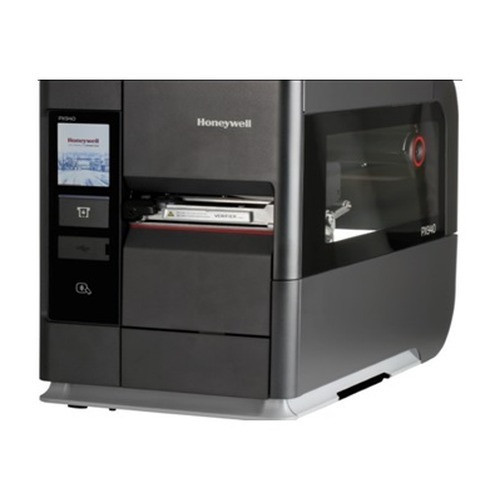
Both the Sato WWCLP2201-NAR and the Honeywell PX940 (PX940V3H110060202) are industrial-class direct thermal and thermal transfer label printers targeting warehouse, manufacturing, and compliance labeling environments. They share a comparable print-width envelope, dual thermal print modes, color touchscreen displays, and ruggedized builds. Key differentiators include print resolution, integrated barcode verification, processor architecture, label-finishing automation, and weight — all factors a system integrator or IT buyer would evaluate before committing to a deployment.
In This Guide
- Which printer delivers higher resolution and throughput for barcode-intensive labeling?
- Which unit supports automated quality control and label finishing at the point of print?
- How do the two printers compare on connectivity, operating environment, and physical footprint?
- Which should you choose: the WWCLP2201-NAR or the PX940?
- Side-by-Side Specs
- FAQ
Which printer delivers higher resolution and throughput for barcode-intensive labeling?
The Sato WWCLP2201-NAR is specified at 305 DPI with a print speed of 14 ips. The Honeywell PX940V3H110060202 is specified at 203 DPI with a speed range of 25–350 mm/s (approximately 1–14 ips) at that resolution. On resolution alone, the Sato holds a 50% DPI advantage (305 vs. 203), which is meaningful for high-density 2D barcodes, small fonts, and pharmaceutical or compliance labels where scannable symbol quality is critical.
Maximum print width is nearly identical: 4.09 in for the Sato versus 4.16 in (105.7 mm) for the Honeywell at 203 DPI. The Sato specifies a wider media range — 0.87 in minimum to 5.04 in maximum — while the Honeywell's minimum media width is not stated in the provided specifications.
Ribbon capacity differs substantially: the Sato accepts ribbons up to 1,968 ft (600 m), while the Honeywell accommodates up to 1,476 ft (450 m). The Sato's larger ribbon capacity means fewer changeovers in high-volume runs. The Honeywell's maximum media roll diameter of 8.38 in (213 mm) compares to the Sato's 10 in (254 mm), giving the Sato an edge in media roll capacity as well.
Which unit supports automated quality control and label finishing at the point of print?
The Honeywell PX940V3H110060202 includes an integrated barcode verifier that reads both 1D symbologies to ISO/IEC 15416 and 2D symbologies to ISO/IEC 15415 — a critical differentiator for regulated industries (pharma serialization, GS1-compliant retail, aerospace part marking) where every printed label must be confirmed scannable before it leaves the printer.
The Sato WWCLP2201-NAR does not list an integrated barcode verifier in its specifications. Buyers who require point-of-print verification with the Sato would need an external, separately purchased verifier unit.
On label finishing, the Honeywell specifies an integrated rewinder, peeler, and label taken sensor. The Sato's provided specifications do not list equivalent integrated finishing options. The Honeywell also runs Android OS on a dual-core ARM Cortex-A9 1 GHz processor with 1 GB DDR3 SDRAM, enabling on-device application logic and emulation of ZPL II, ZSim2, Direct Protocol, Fingerprint, and Intermec protocols. The Sato specifies 2 GB Flash, 256 MB SDRAM, and 100 MB user storage, but its processor and OS are not stated in the provided specifications.
How do the two printers compare on connectivity, operating environment, and physical footprint?
Connectivity on the Sato WWCLP2201-NAR includes Ethernet, Wi-Fi, and USB. The specs also reference Bluetooth in one section, though the structured specification field lists only Ethernet, Wi-Fi, and USB — buyers should confirm Bluetooth support with the Sato datasheet before specifying. The Honeywell PX940V3H110060202 specifies Ethernet, Bluetooth Low Energy (LE, for Print Set MC only per the user guide note), USB, and 802.11 a/b/g/n/ac Wi-Fi.
Both units share an identical operating temperature range of 5°C to 40°C (41°F to 104°F). The Honeywell additionally specifies a storage temperature range of -20°C to 70°C (-4°F to 158°F); the Sato's storage temperature is not stated in the provided specifications.
The physical footprint and weight diverge significantly. The Sato measures 10.66 × 17.99 × 12.63 in and weighs 33 lbs (15 kg). The Honeywell measures 10.3 × 19.9 × 15.7 in and weighs 51.8 lbs (23.5 kg) with the verifier module installed. Both units accept AC 100–240V, 50/60Hz power. Display size is identical at 3.5 in color touch LCD on both models. The Honeywell's Ribbon Configuration supports both Ink-In and Ink-Out on a 3 in core; this detail is not specified for the Sato.
Which should you choose: the WWCLP2201-NAR or the PX940?
Our take: The WWCLP2201-NAR is the stronger choice when higher print resolution is the primary requirement and an external or offline verification workflow is acceptable — its 305 DPI output (vs. the PX940's 203 DPI) produces denser, more legible barcodes and small-text labels without speed trade-off, and its larger ribbon (1,968 ft vs. 1,476 ft) and media roll (10 in vs. 8.38 in) capacity reduce changeover frequency in sustained high-volume runs. The PX940V3H110060202 is the stronger choice when point-of-print barcode verification to ISO/IEC 15415/15416 is a compliance mandate, when automated label finishing (integrated rewinder, peeler, label taken sensor) is needed to reduce operator intervention, or when on-device Android application logic and broad emulation (ZPL II, Fingerprint, Intermec) are required for multi-platform integration. At 51.8 lbs versus 33 lbs, the Honeywell's additional weight should be factored into bench or stand capacity planning.
Side-by-Side Comparison
Spec-for-spec, from manufacturer data.
| Specification | Sato WWCLP2201-NAR | Honeywell PX940 |
|---|---|---|
| Print Method | Direct Thermal / Thermal Transfer | Direct Thermal / Thermal Transfer |
| Print Resolution | 305 DPI | 203 DPI |
| Print Speed | 14 ips | 25–350 mm/s (approx. 1–14 ips) at 203 DPI |
| Max Print Width | 4.09 in | 4.16 in (105.7 mm) at 203 DPI |
| Min Media Width | 0.87 in | — |
| Max Media Width | 5.04 in | — |
| Max Media Roll Diameter | 10 in (254 mm) | 8.38 in (213 mm) |
| Max Ribbon Length | 1,968 ft (600 m) | 1,476 ft (450 m) |
| Integrated Barcode Verifier | — | 1D (ISO/IEC 15416) and 2D (ISO/IEC 15415) |
| Label Finishing | — | Rewinder, peeler, label taken sensor |
| Display | 3.5 in Full-Color LCD | 3.5 in Color Touch LCD |
| Connectivity | Ethernet, Wi-Fi, USB | Ethernet, 802.11 a/b/g/n/ac Wi-Fi, Bluetooth LE, USB |
| Processor / OS | — / — | Dual-core ARM Cortex-A9 1 GHz / Android |
| Memory | 2 GB Flash, 256 MB SDRAM, 100 MB user storage | 1 GB DDR3 SDRAM, 256 MB Flash |
| Operating Temperature | 5°C to 40°C (41°F to 104°F) | 5°C to 40°C (41°F to 104°F) |
| Weight | 33 lbs (15 kg) | 51.8 lbs (23.5 kg) with verifier |
| Dimensions (W × D × H) | 10.66 × 17.99 × 12.63 in | 10.3 × 19.9 × 15.7 in |
| Power | AC 100–240V, 50/60Hz | AC (US Power Cord included) |
| Warranty | 1-year | — |
Frequently Asked Questions
Which should you choose: the WWCLP2201-NAR or the PX940?
The WWCLP2201-NAR is the stronger choice when higher print resolution is the primary requirement and an external or offline verification workflow is acceptable — its 305 DPI output (vs. the PX940's 203 DPI) produces denser, more legible barcodes and small-text labels without speed trade-off, and its larger ribbon (1,968 ft vs. 1,476 ft) and media roll (10 in vs. 8.38 in) capacity reduce changeover frequency in sustained high-volume runs. The PX940V3H110060202 is the stronger choice when point-of-print barcode verification to ISO/IEC 15415/15416 is a compliance mandate, when automated label finishing (integrated rewinder, peeler, label taken sensor) is needed to reduce operator intervention, or when on-device Android application logic and broad emulation (ZPL II, Fingerprint, Intermec) are required for multi-platform integration. At 51.8 lbs versus 33 lbs, the Honeywell's additional weight should be factored into bench or stand capacity planning.
Which printer is better suited for pharmaceutical or regulated-industry label compliance?
The Honeywell PX940V3H110060202 has a clear advantage for regulated industries: its integrated barcode verifier checks every label against ISO/IEC 15416 (1D) and ISO/IEC 15415 (2D) standards at the point of print, which is often required for serialization and track-and-trace programs. The Sato WWCLP2201-NAR does not list an integrated verifier in its specifications, so compliance verification would require a separate external device.
Is the Sato WWCLP2201-NAR or the Honeywell PX940 better for high-volume warehouse label runs with minimal operator intervention?
For raw throughput and media capacity, the Sato WWCLP2201-NAR holds an edge: its 10 in maximum media roll diameter and 1,968 ft ribbon capacity exceed the Honeywell's 8.38 in and 1,476 ft respectively, meaning longer runs before changeover. However, the Honeywell includes an integrated rewinder and peeler that automate label finishing and reduce operator handling per roll. The right choice depends on whether the priority is longer unattended run time (Sato) or automated label dispensing and finishing (Honeywell).
Can both printers operate on the same network infrastructure, and do they support wireless connectivity?
Both printers support Ethernet and Wi-Fi connectivity, so either can be deployed on standard wired or wireless LAN infrastructure. The Honeywell PX940V3H110060202 specifies 802.11 a/b/g/n/ac Wi-Fi and Bluetooth LE. The Sato WWCLP2201-NAR lists Ethernet, Wi-Fi, and USB in its primary specification fields; Bluetooth is referenced in supplementary spec text but not confirmed in the structured fields — verify with the Sato datasheet before specifying Bluetooth-dependent workflows.
More Label Printer Comparisons
- Honeywell PX940 vs Sato WWCLP3B01-WAR
- Honeywell PX940 vs Sato WWCLP3801-NAR
- Honeywell PX940 vs Sato WWCLP3801-WAR
- Honeywell PX940 vs Wasp WPL408
- Honeywell PX940 vs Honeywell PX4654-020
- Honeywell PX940 vs Honeywell PX6654-000
Label Printer Buying Guides
Get a Second Opinion on Your Camera Choice
Share your site layout, coverage goals, and budget. Our team will validate the camera selection, flag anything we would change, and recommend products that match the use case.