
Epson U295 vs Brother RJ4230B: Specification Comparison
Both the Epson TM-U295 and Brother RJ4230B are receipt printers, but they serve fundamentally different deployment models. The TM-U295 is a countertop impact (dot-matrix) printer designed for fixed POS stations requiring multi-part carbonless form printing via wired Serial RS-232. The RJ4230B is a mobile direct-thermal printer built for field personnel printing receipts, labels, and tags wirelessly over Bluetooth. This comparison examines print technology and output capability, connectivity and deployment model, and media versatility to help buyers choose the right unit for their environment.
In This Guide
Which print technology and output speed best fit the workload?
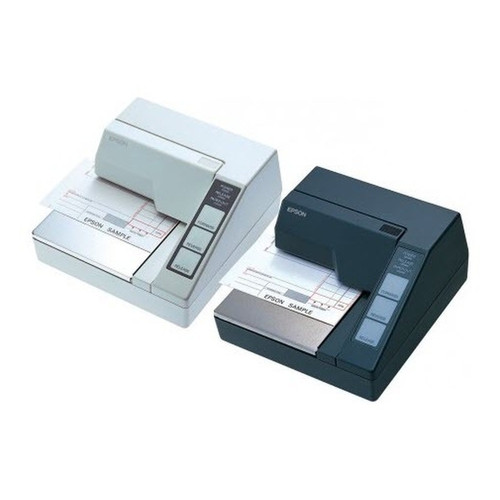
The Epson TM-U295 uses dot-matrix impact printing at 2.1 lines per second with a resolution of 16.2 cpi (characters per inch). Its impact mechanism physically strikes an inked ribbon against multi-part carbonless paper, producing simultaneous duplicate and triplicate copies in a single pass — a capability direct-thermal printers cannot replicate. This makes it irreplaceable for transactions requiring carbon-copy documentation such as service orders, invoices, or regulated receipts.
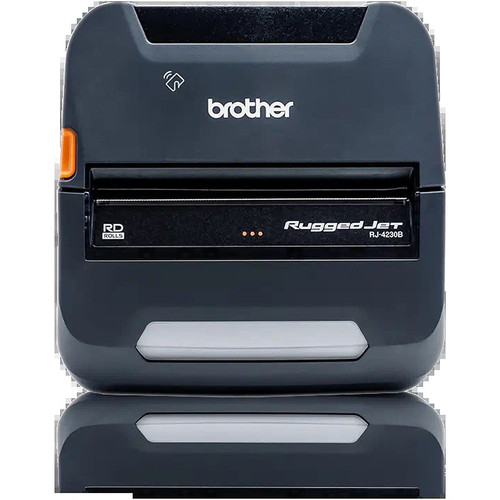
The Brother RJ4230B uses direct thermal printing at 5 inches per second with a resolution of 203 dpi. It requires no ribbon or ink cartridge; heat activates the thermal coating on the media. At 203 dpi it produces significantly sharper text and barcodes than the TM-U295's 16.2 cpi dot-matrix output. However, direct thermal prints are sensitive to heat, UV exposure, and abrasion, and the technology cannot produce multi-part copies. Speed-wise, the RJ4230B's 5 ips is substantially faster than the TM-U295's 2.1 lines/sec, though the two metrics are not directly unit-equivalent.
How do connectivity and form factor determine where each printer can be deployed?
The Epson TM-U295 connects exclusively via Serial RS-232, a wired interface. It is a countertop unit weighing 4.15 lb with dimensions of 235 × 279 × 190 mm, designed to sit at a fixed POS counter. It runs on AC 110–240V power with no internal battery. Deployment requires a host with an RS-232 port or a serial-to-USB adapter and a dedicated power outlet. This limits it strictly to stationary, infrastructure-dependent environments.
The Brother RJ4230B is a mobile printer supporting USB, Bluetooth 4.2, and Apple MFi certification. Bluetooth 4.2 with MFi enables native pairing with iOS devices without third-party apps — a meaningful advantage for field sales, delivery, or inspection workflows. The form factor is handheld/mobile; no AC tether is required during operation. No battery capacity spec is provided in the supplied data, but the mobile form factor implies internal battery operation. The RJ4230B supports ZPL and CPCL programming languages and carries 256 MB RAM for storing templates, fonts, and graphics for offline use.
What media types does each printer support, and how does that shape use-case fit?
The Epson TM-U295 supports receipt stock and slip stock, specifically 2–3 part carbonless forms. Its media handling is narrow by design: the impact mechanism exists solely to produce multi-copy paper documents. Print width is not specified in the provided data. It does not support labels or tags.
The Brother RJ4230B supports receipts, labels, and tags up to 4 inches wide. This tri-media capability makes it suitable for warehouse picking, retail shelf labeling, field service ticketing, and delivery confirmation in addition to customer receipts. The 4-inch print width accommodates standard 4×6 shipping labels. No multi-part carbonless support is possible with direct thermal technology. Media versatility is a clear RJ4230B advantage for operations that need a single device to handle multiple output types.
Which should you choose: the U295 or the RJ4230B?
Our take: The TM-U295 is the stronger choice when the workflow requires multi-part carbonless form printing at a fixed, wired POS counter — no direct-thermal printer can replicate simultaneous carbon copies. The RJ4230B is the stronger choice for mobile field deployments where wireless connectivity, label/tag printing, and higher image resolution matter. Key spec deltas: print resolution is 203 dpi (RJ4230B) versus 16.2 cpi (TM-U295), making the Brother significantly sharper for barcodes and fine text; the RJ4230B supports three media types (receipts, labels, tags) versus the TM-U295's receipt/slip-only output; and connectivity spans USB plus Bluetooth 4.2 with MFi (RJ4230B) against Serial RS-232 only (TM-U295). Buyers running legacy RS-232 POS systems that mandate carbonless copies should select the TM-U295. Buyers deploying mobile iOS/Android field teams or needing label output should select the RJ4230B.
Side-by-Side Comparison
Spec-for-spec, from manufacturer data.
| Specification | Epson U295 | Brother RJ4230B |
|---|---|---|
| Product Type | Impact Receipt Printer | Direct Thermal Mobile Printer |
| Form Factor | Countertop | Mobile |
| Print Method | Dot-matrix impact | Direct thermal |
| Print Speed | 2.1 lines/sec | 5 ips |
| Print Resolution | 16.2 cpi | 203 dpi |
| Print Width | — | 4 inches |
| Media Types | Receipts, slip stock (2–3 part carbonless) | Receipts, labels, tags |
| Connectivity | Serial RS-232 | USB, Bluetooth 4.2, Apple MFi |
| Wireless | None | Bluetooth 4.2 |
| RAM | — | 256 MB |
| Programming Languages | — | ZPL, CPCL |
| Display | — | LCD |
| Power | AC 110–240V | — |
| Weight | 4.15 lb | — |
| Dimensions | 235 × 279 × 190 mm | — |
| Warranty | 1 year | Manufacturer warranty (duration not specified) |
Frequently Asked Questions
Which should you choose: the U295 or the RJ4230B?
The TM-U295 is the stronger choice when the workflow requires multi-part carbonless form printing at a fixed, wired POS counter — no direct-thermal printer can replicate simultaneous carbon copies. The RJ4230B is the stronger choice for mobile field deployments where wireless connectivity, label/tag printing, and higher image resolution matter. Key spec deltas: print resolution is 203 dpi (RJ4230B) versus 16.2 cpi (TM-U295), making the Brother significantly sharper for barcodes and fine text; the RJ4230B supports three media types (receipts, labels, tags) versus the TM-U295's receipt/slip-only output; and connectivity spans USB plus Bluetooth 4.2 with MFi (RJ4230B) against Serial RS-232 only (TM-U295). Buyers running legacy RS-232 POS systems that mandate carbonless copies should select the TM-U295. Buyers deploying mobile iOS/Android field teams or needing label output should select the RJ4230B.
Can either printer produce duplicate or triplicate copies of a receipt?
Only the Epson TM-U295 can do this. Its dot-matrix impact mechanism strikes through multi-part carbonless paper to produce 2–3 simultaneous copies in one pass. The Brother RJ4230B uses direct thermal printing, which applies heat to a single-layer thermal media and cannot produce carbon copies.
Which printer works with an iPad or Android tablet used by a field technician?
The Brother RJ4230B. It supports Bluetooth 4.2 with Apple MFi certification for native iOS pairing, and USB for Android or Windows hosts. The Epson TM-U295 uses Serial RS-232 only and is designed for fixed countertop deployment; it has no wireless capability and is not suitable for mobile tablet-based workflows.
Which printer can also print shipping labels or asset tags?
The Brother RJ4230B supports receipts, labels, and tags up to 4 inches wide, and its 256 MB RAM with ZPL and CPCL language support allows storing label templates for offline use. The Epson TM-U295 is limited to receipt and slip stock and does not support label or tag media.
More Label Printer Comparisons
- Epson C31CK00A9991 vs Brother RJ4230B
- Epson C31CK00A9991 vs Star Micronics TSP1043D
- Epson C31CK00A9991 vs Epson C31CJ99A9981
- Epson C31CK00A9991 vs Epson C31CJ57012
- Epson C31CJ99A9981 vs Brother RJ4230B
- Epson C31CJ99A9981 vs Star Micronics TSP1043D
Label Printer Buying Guides
Get a Second Opinion on Your Camera Choice
Share your site layout, coverage goals, and budget. Our team will validate the camera selection, flag anything we would change, and recommend products that match the use case.