
Epson C31CK00A9991 vs Brother RJ4230B: Specification Comparison
Both the Epson TM-P80II (C31CK00A9991) and Brother RuggedJet RJ4230B are direct thermal mobile receipt printers aimed at field and point-of-sale deployments where cordless, compact printing is required. The Epson is a 3-inch receipt-focused mobile printer with Bluetooth and a battery cradle form factor, while the Brother is a 4-inch mobile printer supporting receipts, labels, and tags with Bluetooth 4.2, Apple MFi certification, and onboard RAM for template storage. Both use direct thermal print technology at 203 dpi, making them cross-shoppable for mobile POS and field-service buyers.

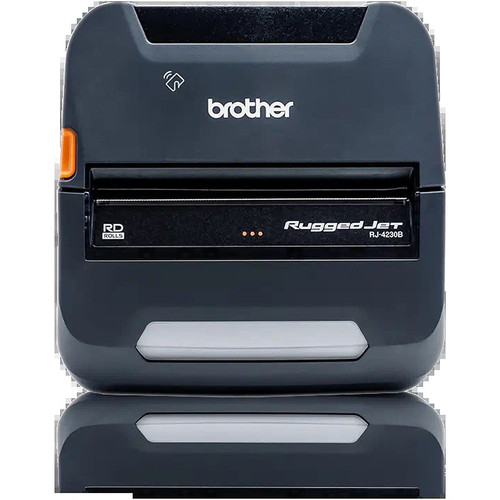
In This Guide
- Which printer is faster, and does the media width match your output requirements?
- How do connectivity options and platform compatibility differ between these two printers?
- Which printer offers greater output versatility and onboard intelligence for field or multi-use deployments?
- Which should you choose: the C31CK00A9991 or the RJ4230B?
- Side-by-Side Specs
- FAQ
Which printer is faster, and does the media width match your output requirements?
The Epson C31CK00A9991 prints at 236.2 inches per minute (approximately 3.94 ips) on 3-inch media, while the Brother RJ4230B prints at 5 ips on 4-inch media. The Brother's 5 ips rate exceeds the Epson's converted speed and it also supports a wider 4-inch media path, enabling full 4×6-inch label and receipt formats. Both units resolve at 203 dpi monochrome, so print clarity is equivalent.
Buyers printing standard receipt widths (3 inches) will find the Epson's media width sufficient for POS receipts. Those who also need to print 4-inch labels, tags, or wider receipts—common in warehousing, logistics, or field service—will require the Brother's 4-inch media path, which the Epson cannot match.
How do connectivity options and platform compatibility differ between these two printers?
The Epson C31CK00A9991 offers Bluetooth wireless plus a wired interface; specific Bluetooth version and Apple MFi certification are not stated in the provided specs. The Brother RJ4230B specifies Bluetooth 4.2 with Apple MFi certification and USB, enabling native certified connectivity to iOS, Android, and Windows devices without third-party workarounds.
For deployments running iOS point-of-sale applications, the Brother's MFi certification is a meaningful differentiator—Apple requires MFi-certified accessories for guaranteed Bluetooth compatibility. The Epson's Bluetooth version and MFi status are not documented in the provided specifications, so iOS compatibility cannot be confirmed from spec data alone.
Which printer offers greater output versatility and onboard intelligence for field or multi-use deployments?
The Brother RJ4230B supports receipts, labels, and tags, and includes 256 MB RAM for storing ZPL and CPCL templates, fonts, and graphics for offline field use. It also supports ZPL and CPCL programming languages, making it compatible with a wide range of label and receipt software ecosystems. An LCD display is also specified.
The Epson C31CK00A9991 is specified for receipts only. No onboard RAM capacity, programming language support, or display is listed in its provided specifications. Its battery cradle form factor is noted, and it is positioned for multi-terminal retail POS scenarios. Buyers needing label and tag printing, onboard template storage, or ZPL/CPCL software compatibility will find the Brother the only option of the two based on available specs.
Which should you choose: the C31CK00A9991 or the RJ4230B?
Our take: The RJ4230B is the stronger choice when output versatility, iOS MFi compatibility, and onboard template storage are required. The Brother prints on a wider 4-inch media path versus the Epson's 3 inches, supports receipts, labels, and tags versus receipts only, and carries 256 MB RAM for offline ZPL and CPCL template storage—a spec entirely absent from the Epson's documentation. The Brother also specifies Bluetooth 4.2 with Apple MFi certification, while the Epson's Bluetooth version and MFi status are not documented. The Epson C31CK00A9991 is the appropriate choice for narrow-format (3-inch) receipt-only POS environments where a battery cradle form factor is needed and iOS MFi certification is not a deployment requirement; its 236.2 ipm rated speed should be verified against the Brother's 5 ips in a common unit before treating speed as a differentiator.
Side-by-Side Comparison
Spec-for-spec, from manufacturer data.
| Specification | Epson C31CK00A9991 | Brother RJ4230B |
|---|---|---|
| Print Method | Direct Thermal | Direct Thermal |
| Print Resolution | 203 dpi | 203 dpi |
| Print Speed | 236.2 ipm (~3.94 ips) | 5 ips |
| Print Width | 3" | 4" |
| Paper / Media Width | 3" | 4" |
| Media Types Supported | Receipts | Receipts, Labels, Tags |
| Connectivity | Bluetooth, Wired | Bluetooth 4.2, USB |
| Apple MFi Certification | — | Yes |
| Bluetooth Version | — | 4.2 |
| Programming Languages | — | ZPL, CPCL |
| RAM | — | 256 MB |
| Display | — | LCD |
| Form Factor | Mobile Cradle | Mobile |
| Warranty | 1-year | Manufacturer Warranty (duration not specified) |
| Ribbon Required | No | No |
| Compatible Use Case | Point-of-Sale (POS) | Field receipts, labels, tags |
Frequently Asked Questions
Which should you choose: the C31CK00A9991 or the RJ4230B?
The RJ4230B is the stronger choice when output versatility, iOS MFi compatibility, and onboard template storage are required. The Brother prints on a wider 4-inch media path versus the Epson's 3 inches, supports receipts, labels, and tags versus receipts only, and carries 256 MB RAM for offline ZPL and CPCL template storage—a spec entirely absent from the Epson's documentation. The Brother also specifies Bluetooth 4.2 with Apple MFi certification, while the Epson's Bluetooth version and MFi status are not documented. The Epson C31CK00A9991 is the appropriate choice for narrow-format (3-inch) receipt-only POS environments where a battery cradle form factor is needed and iOS MFi certification is not a deployment requirement; its 236.2 ipm rated speed should be verified against the Brother's 5 ips in a common unit before treating speed as a differentiator.
Can either printer handle label printing, or are both receipt-only?
Only the Brother RJ4230B supports labels and tags in addition to receipts, as stated in its media type specifications. The Epson C31CK00A9991 is specified for receipts only based on the provided specs.
Is the Brother RJ4230B or the Epson C31CK00A9991 compatible with iPhones and iPads out of the box?
The Brother RJ4230B specifies Apple MFi certification with Bluetooth 4.2, which provides certified native iOS connectivity. The Epson C31CK00A9991's provided specifications do not state an MFi certification or Bluetooth version, so iOS compatibility cannot be confirmed from the available spec data.
Which printer has more onboard memory for storing templates or graphics?
The Brother RJ4230B specifies 256 MB RAM for storing ZPL and CPCL templates, fonts, and graphics. The Epson C31CK00A9991's specifications do not list any onboard RAM or template storage capacity.
More Label Printer Comparisons
- Epson C31CK00A9991 vs Star Micronics TSP1043D
- Epson C31CK00A9991 vs Epson C31CJ99A9981
- Epson C31CK00A9991 vs Epson C31CJ57012
- Epson C31CJ99A9981 vs Brother RJ4230B
- Epson C31CJ99A9981 vs Star Micronics TSP1043D
- Epson C31CJ99A9981 vs Epson C31CJ57012
Label Printer Buying Guides
Get a Second Opinion on Your Camera Choice
Share your site layout, coverage goals, and budget. Our team will validate the camera selection, flag anything we would change, and recommend products that match the use case.