
Epson C31CJ99A9981 vs Brother RJ4230B: Specification Comparison
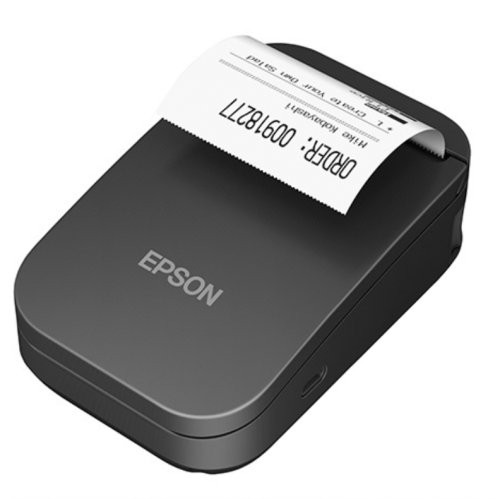
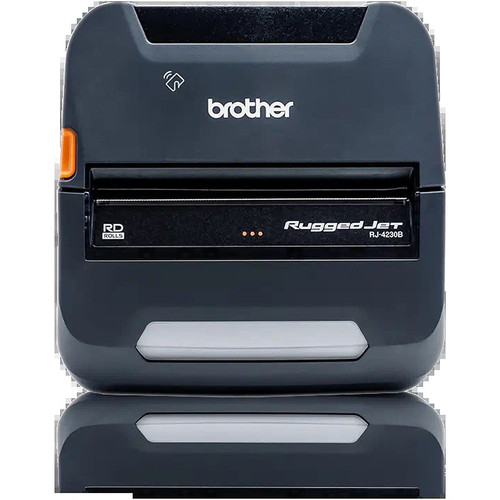
Both the Epson C31CJ99A9981 P20II and the Brother RJ4230B RuggedJet are direct thermal mobile receipt printers targeting field service and point-of-sale deployments. The comparison spans print speed and output quality, connectivity and platform compatibility, and media versatility — the three axes that drive purchase decisions in mobile printing. The Epson is a 2-inch Wi-Fi/multi-interface unit; the Brother is a 4-inch Bluetooth-primary mobile printer with label capability. Buyers choosing between them are weighing print width, wireless protocol, and media flexibility against deployment environment requirements.
In This Guide
Which printer delivers faster output at higher resolution?
The Epson C31CJ99A9981 prints at 500 mm/s (approximately 19.7 ips), which is substantially faster than the Brother RJ4230B's rated 5 ips (127 mm/s). For high-volume retail or hospitality queues where throughput matters, the Epson's speed advantage is significant — roughly 4× faster by the rated figures.
The Brother RJ4230B spec sheet lists a print resolution of 203 dpi. The Epson C31CJ99A9981 spec data provided does not state a dpi resolution figure, so a direct resolution comparison cannot be made from available specifications. Buyers requiring a confirmed dpi spec should consult the Epson datasheet at /content/product-datasheets/C31CJ99A9981.pdf.
The Epson spec cites a reliability rating of 10 million printing lines, which is a meaningful durability benchmark for high-cycle environments. No equivalent reliability figure is provided in the Brother RJ4230B specifications.
Which printer offers broader wireless and platform compatibility?
The Epson C31CJ99A9981 supports Wi-Fi, USB, Ethernet, Serial, and Parallel interfaces — a wide multi-protocol suite suited to fixed or semi-fixed POS installations that may need network or legacy serial integration. The spec notes RoHS compliance and a security mode for Wi-Fi, though the specific security protocol (e.g., WPA2) is not detailed in the provided data.
The Brother RJ4230B connects via Bluetooth 4.2 with Apple MFi certification, plus USB. MFi certification means native iOS compatibility without additional driver workarounds — a meaningful advantage in iPad or iPhone-driven field workflows. The RJ4230B also supports Android and Windows per spec. No Ethernet or Wi-Fi interface is listed for the Brother.
For deployments requiring network-based printing or integration with fixed POS terminals, the Epson's Ethernet and Wi-Fi options provide more infrastructure flexibility. For purely mobile, device-paired deployments — especially iOS-centric ones — the Brother's Bluetooth 4.2 MFi path is simpler to provision.
Which printer handles a wider range of media types and widths?
The Epson C31CJ99A9981 supports a 2-inch paper width and is specified for receipt media only. It includes an integrated cutter, which is useful for unattended or countertop receipt printing. Its form factor is listed as cradle-compatible, suggesting it can be docked for stationary use.
The Brother RJ4230B supports a 4-inch print width and is specified for receipts, labels, and tags. It also supports ZPL and CPCL programming languages, enabling template-driven label printing and compatibility with Zebra-format label workflows. The 256 MB RAM allows on-device storage of fonts, graphics, and templates for offline field use.
For operations requiring only standard narrow receipt output, the Epson's 2-inch format matches common retail roll stock. For field workflows that combine receipts with 4×6 shipping labels, asset tags, or compliance labels, the Brother's 4-inch width and label language support make it the more versatile media platform. The Brother's lack of a cutter spec (not stated) versus the Epson's confirmed integrated cutter is a practical distinction for receipt finishing.
Which should you choose: the C31CJ99A9981 or the RJ4230B?
Our take: The C31CJ99A9981 is the stronger choice when raw throughput, multi-protocol infrastructure connectivity, and narrow-receipt-only volume deployments are the priority. At 500 mm/s versus the RJ4230B's 5 ips, the Epson prints roughly 4× faster — a material difference in high-queue retail or hospitality. It also offers Ethernet, Serial, and Parallel interfaces alongside Wi-Fi, suiting fixed or hybrid POS environments. However, the RJ4230B holds clear advantages for mobile field operations: its Bluetooth 4.2 with Apple MFi certification enables cable-free iOS pairing without driver complexity, its 4-inch print width covers labels and tags that the Epson's 2-inch format cannot, and 256 MB RAM with ZPL/CPCL support enables offline template printing. Choose the Epson for high-speed, infrastructure-connected receipt printing; choose the Brother for multi-media mobile field work, especially on iOS platforms.
Side-by-Side Comparison
Spec-for-spec, from manufacturer data.
| Specification | Epson C31CJ99A9981 | Brother RJ4230B |
|---|---|---|
| Product Type | Receipt Printer | Receipt Printer |
| Print Width | 2 inches | 4 inches |
| Print Speed | 500 mm/s (~19.7 ips) | 5 ips (~127 mm/s) |
| Print Method | Thermal line | Direct thermal (no ribbon) |
| Print Resolution | — | 203 dpi |
| Media Types | Receipts | Receipts, Labels, Tags |
| Connectivity | Wi-Fi, USB, Ethernet, Serial, Parallel | Bluetooth 4.2 (MFi), USB |
| Apple MFi Certified | — | Yes |
| Programming Languages | — | ZPL, CPCL |
| RAM | — | 256 MB |
| Display | — | LCD |
| Integrated Cutter | Yes | — |
| Form Factor | Cradle-compatible | Mobile |
| Reliability Rating | 10 million printing lines | — |
| Warranty | 1-year limited | Manufacturer warranty (duration not specified) |
| RoHS Compliant | Yes | — |
Frequently Asked Questions
Which should you choose: the C31CJ99A9981 or the RJ4230B?
The C31CJ99A9981 is the stronger choice when raw throughput, multi-protocol infrastructure connectivity, and narrow-receipt-only volume deployments are the priority. At 500 mm/s versus the RJ4230B's 5 ips, the Epson prints roughly 4× faster — a material difference in high-queue retail or hospitality. It also offers Ethernet, Serial, and Parallel interfaces alongside Wi-Fi, suiting fixed or hybrid POS environments. However, the RJ4230B holds clear advantages for mobile field operations: its Bluetooth 4.2 with Apple MFi certification enables cable-free iOS pairing without driver complexity, its 4-inch print width covers labels and tags that the Epson's 2-inch format cannot, and 256 MB RAM with ZPL/CPCL support enables offline template printing. Choose the Epson for high-speed, infrastructure-connected receipt printing; choose the Brother for multi-media mobile field work, especially on iOS platforms.
Is the C31CJ99A9981 or RJ4230B better for an iPad-based mobile POS setup?
The Brother RJ4230B is better suited for iPad-based mobile POS. Its Bluetooth 4.2 with Apple MFi certification provides native iOS connectivity without additional driver configuration. The Epson C31CJ99A9981 connects via Wi-Fi, USB, Ethernet, Serial, and Parallel — none of which include a stated MFi certification in the provided specs — making wireless pairing to iOS devices potentially more complex depending on network infrastructure.
Can either printer handle label printing in addition to receipts?
Yes, but only the Brother RJ4230B. Its specifications list labels and tags as supported media types alongside receipts, and it supports ZPL and CPCL programming languages for template-driven label output at a 4-inch print width. The Epson C31CJ99A9981 is specified for receipt media only at a 2-inch width, and no label media or label language support is listed in the provided specifications.
Which printer is faster for high-volume receipt printing at a busy checkout?
The Epson C31CJ99A9981 is significantly faster. Its rated print speed is 500 mm/s, compared to the Brother RJ4230B's rated 5 ips (approximately 127 mm/s). For sustained high-volume checkout environments where queue throughput is critical, the Epson's speed advantage — roughly 4× by rated specs — is a decisive factor. The Epson also includes an integrated cutter and a stated reliability rating of 10 million printing lines, supporting high-cycle fixed-location use.
More Label Printer Comparisons
- Epson C31CK00A9991 vs Brother RJ4230B
- Epson C31CK00A9991 vs Star Micronics TSP1043D
- Epson C31CK00A9991 vs Epson C31CJ99A9981
- Epson C31CK00A9991 vs Epson C31CJ57012
- Epson C31CJ99A9981 vs Star Micronics TSP1043D
- Epson C31CJ99A9981 vs Epson C31CJ57012
Label Printer Buying Guides
Get a Second Opinion on Your Camera Choice
Share your site layout, coverage goals, and budget. Our team will validate the camera selection, flag anything we would change, and recommend products that match the use case.