
Zebra ZT42163-T010000Z vs Zebra ZT41142-T0100A0Z: Specification Comparison
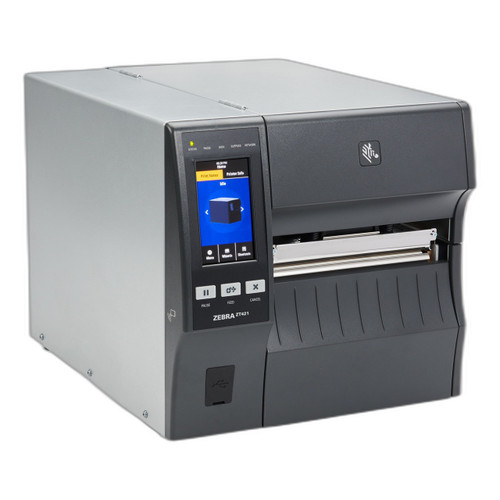
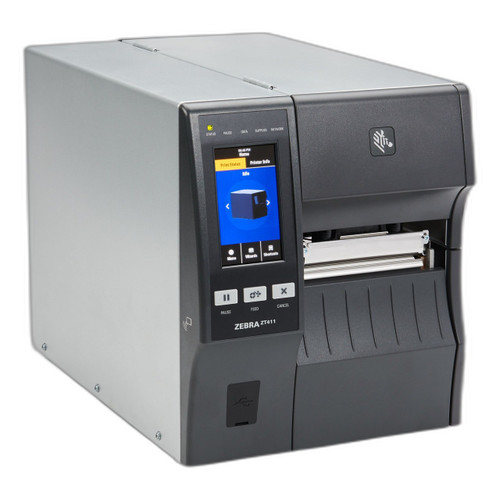
Both the Zebra ZT42163-T010000Z and ZT41142-T0100A0Z are industrial desktop thermal printers sharing the same ZT400/ZT600 series platform, identical connectivity stacks, and the same 14 ips maximum print speed. The primary differentiator a buyer must evaluate is print width — 6 inches versus 4 inches — along with resolution defaults, weight, and the presence of RFID encoding on the 4-inch model. This comparison is intended for warehouse, manufacturing, and logistics operations selecting between these two units for label printing workloads.
In This Guide
- Which printer handles the label width and resolution your application requires?
- What connectivity and encoding capabilities does each model provide?
- How do physical footprint, memory, and barcode format support compare between these models?
- Which should you choose: the ZT42163-T010000Z or the ZT41142-T0100A0Z?
- Side-by-Side Specs
- FAQ
Which printer handles the label width and resolution your application requires?
The ZT42163-T010000Z offers a 6-inch maximum print width, making it the appropriate choice for wide-format labels such as shipping carton labels, compliance labels, or pallet tags that exceed 4 inches. Its datasheet lists a 300 dpi default resolution, and the spec field confirms 203, 300, and 600 dpi options are available across configurations.
The ZT41142-T0100A0Z is rated for a 4-inch maximum print width — the standard width for most warehouse pick labels, shipping labels, and compliance tags. Its datasheet lists 203 dpi as the default resolution, with the same 203, 300, and 600 dpi options listed in the spec field. Buyers who do not require labels wider than 4 inches do not need the added footprint or weight of the 6-inch unit.
What connectivity and encoding capabilities does each model provide?
Both models share an identical connectivity stack per their specs: Ethernet, Wi-Fi, and Bluetooth 4.1 with MFi certification. Both include standard USB and Serial interfaces per their package contents. Neither model's connectivity configuration creates a differentiator between the two for network integration purposes.
The ZT41142-T0100A0Z specs list an integrated RFID encoding capability — a feature absent from the ZT42163-T010000Z spec set. For operations that require simultaneous barcode printing and RFID inlay encoding (e.g., EPC Gen2 RFID labels for retail or pharmaceutical compliance), the 4-inch model covers that workflow. The 6-inch model has no RFID encoding spec listed.
How do physical footprint, memory, and barcode format support compare between these models?
The ZT42163-T010000Z is listed at 40 lb (18.14 kg). No memory specification is provided for this model in the supplied data.
The ZT41142-T0100A0Z has a weight spec listed as 36 lbs./16.33 kg and 40 lbs./18.14 kg — two values appear in the spec field, likely reflecting configurations with and without optional modules. The 4-inch model also lists 256 MB SDRAM memory, including support for documentation, source code, programming languages, templates, and more. No equivalent memory figure is provided for the ZT42163-T010000Z. Both models support identical barcode symbologies per spec: Code 128, Code 39, UPC, EAN, QR Code, Data Matrix, and PDF417 in both 1D and 2D categories.
Which should you choose: the ZT42163-T010000Z or the ZT41142-T0100A0Z?
Our take: The ZT42163-T010000Z is the stronger choice when the application demands labels wider than 4 inches or requires a 300 dpi default resolution out of the box. Its 6-inch print width is the decisive spec delta for carton, pallet, or wide-format compliance labels — a dimension the ZT41142-T0100A0Z's 4-inch path cannot accommodate. The 6-inch model also defaults to 300 dpi versus the 4-inch model's 203 dpi default, relevant for high-density barcodes or fine-print requirements. Conversely, the ZT41142-T0100A0Z is the correct selection when RFID inlay encoding is required alongside barcode printing — that capability is listed in its spec and absent from the 6-inch model entirely. The 4-inch unit also lists 256 MB SDRAM, a memory spec not provided for the ZT42163-T010000Z. Both models carry a 1-year warranty and share identical connectivity and symbology support. Platform choice should be driven first by required label width and then by RFID need.
Side-by-Side Comparison
Spec-for-spec, from manufacturer data.
| Specification | Zebra ZT42163-T010000Z | Zebra ZT41142-T0100A0Z |
|---|---|---|
| Product Type | Industrial Thermal Printer | Industrial Thermal Printer |
| Print Width (Maximum) | 6 inches | 4 inches |
| Default Resolution | 300 dpi | 203 dpi |
| Available Resolutions | 203, 300, 600 dpi | 203, 300, 600 dpi |
| Print Speed (Maximum) | 14 ips | 14 ips |
| Connectivity | Ethernet, Wi-Fi, Bluetooth 4.1 (MFi) | Ethernet, Wi-Fi, Bluetooth 4.1 (MFi) |
| USB / Serial | Yes (standard) | Yes (standard) |
| RFID Encoding | — | Integrated |
| Scan Engine | 2D | 2D |
| 1D Symbologies | Code 128, Code 39, UPC, EAN | Code 128, Code 39, UPC, EAN |
| 2D Symbologies | QR Code, Data Matrix, PDF417 | QR Code, Data Matrix, PDF417 |
| Memory | — | 256 MB SDRAM |
| Weight | 40 lb (18.14 kg) | 36–40 lb (16.33–18.14 kg) |
| Warranty | 1 year | 1 year |
| Form Factor | Desktop/Fixed | Desktop/Fixed |
| Bluetooth Version | Bluetooth 4.1 with MFi | Bluetooth 4.1 with MFi |
Frequently Asked Questions
Which should you choose: the ZT42163-T010000Z or the ZT41142-T0100A0Z?
The ZT42163-T010000Z is the stronger choice when the application demands labels wider than 4 inches or requires a 300 dpi default resolution out of the box. Its 6-inch print width is the decisive spec delta for carton, pallet, or wide-format compliance labels — a dimension the ZT41142-T0100A0Z's 4-inch path cannot accommodate. The 6-inch model also defaults to 300 dpi versus the 4-inch model's 203 dpi default, relevant for high-density barcodes or fine-print requirements. Conversely, the ZT41142-T0100A0Z is the correct selection when RFID inlay encoding is required alongside barcode printing — that capability is listed in its spec and absent from the 6-inch model entirely. The 4-inch unit also lists 256 MB SDRAM, a memory spec not provided for the ZT42163-T010000Z. Both models carry a 1-year warranty and share identical connectivity and symbology support. Platform choice should be driven first by required label width and then by RFID need.
Is the ZT42163-T010000Z or ZT41142-T0100A0Z better for large carton and pallet labeling?
The ZT42163-T010000Z is the correct choice for that workflow. It supports a 6-inch maximum print width, which accommodates the wider label stock commonly used on cartons and pallets. The ZT41142-T0100A0Z is limited to a 4-inch print width and cannot print those wider formats.
Does either printer support RFID encoding?
Yes — the ZT41142-T0100A0Z (4-inch model) lists integrated RFID encoding capability in its specifications. The ZT42163-T010000Z (6-inch model) does not list any RFID encoding capability in the provided spec data.
Are the connectivity options different between the ZT42163-T010000Z and ZT41142-T0100A0Z?
No. Both models list identical connectivity per their specifications: Ethernet, Wi-Fi, Bluetooth 4.1 with MFi, USB, and Serial. Neither model has a connectivity advantage over the other; the selection decision should be based on print width and RFID requirements instead.
More Label Printer Comparisons
- Honeywell PX940 vs Sato WWCLP3B01-WAR
- Honeywell PX940 vs Sato WWCLP3801-NAR
- Honeywell PX940 vs Sato WWCLP3801-WAR
- Honeywell PX940 vs Wasp WPL408
- Honeywell PX940 vs Honeywell PX4654-020
- Honeywell PX940 vs Honeywell PX6654-000
Label Printer Buying Guides
Get a Second Opinion on Your Camera Choice
Share your site layout, coverage goals, and budget. Our team will validate the camera selection, flag anything we would change, and recommend products that match the use case.