
Zebra ZT41142-T310000Z vs Zebra ZT41142-T0100A0Z: Specification Comparison
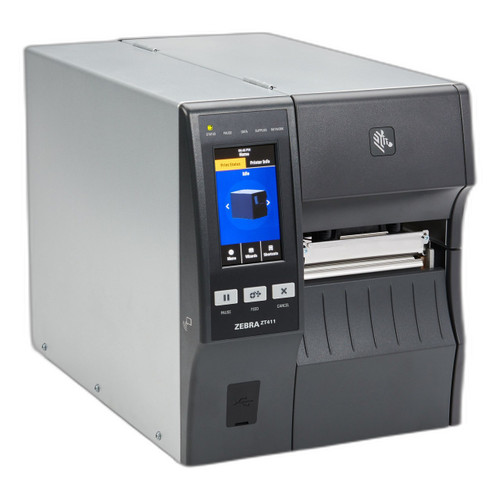
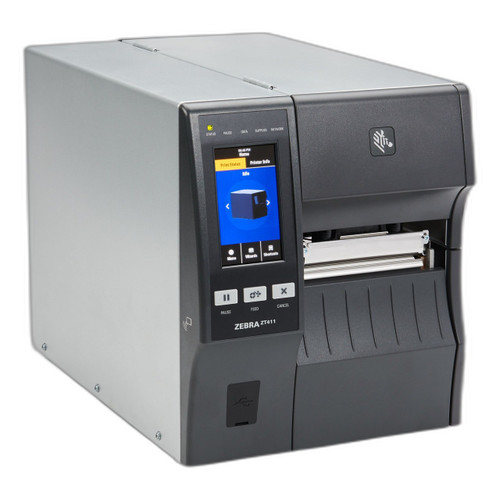
Both the ZT41142-T310000Z and ZT41142-T0100A0Z are Zebra ZT411-series 4-inch industrial desktop thermal printers sharing the same print engine, barcode symbology set, and Bluetooth 4.1 MFi connectivity. They occupy the same product class and would be cross-shopped by warehouse, manufacturing, and distribution-center buyers evaluating a high-volume label printing station. The key differentiators surfaced by the provided specifications are resolution ceiling, RFID capability, memory, weight, and the precise connectivity stack included in each configuration.
In This Guide
- Which model delivers higher print resolution and what does that mean for label quality?
- How do the connectivity and RFID options differ between these two configurations?
- What do the memory and physical specs indicate about deployment fit for each model?
- Which should you choose: the ZT41142-T310000Z or the ZT41142-T0100A0Z?
- Side-by-Side Specs
- FAQ
Which model delivers higher print resolution and what does that mean for label quality?
Both printers share an identical rated print speed of 14 ips and a native base resolution of 203 dpi. However, the ZT41142-T310000Z specifies selectable resolution of 203, 300, and 600 dpi, meaning a single unit can produce standard shipping barcodes at 203 dpi and switch to 600 dpi for fine-pitch QR codes or small-text compliance labels without changing hardware. The ZT41142-T0100A0Z specs list only 203 dpi as its stated resolution; the 300/600 dpi figures appear in a shared spec field but the model-specific datasheet field cites 203 dpi exclusively, so buyers requiring confirmed higher-resolution output should treat 203 dpi as the verified ceiling for the T0100A0Z. Print width is 4 inches maximum on both units.
How do the connectivity and RFID options differ between these two configurations?
The ZT41142-T310000Z is specified with Ethernet 10/100, Bluetooth 4.1 MFi, and Wi-Fi. Its package contents confirm USB, Serial, Ethernet, and Bluetooth interfaces. No RFID capability is listed in its specifications. The ZT41142-T0100A0Z carries the same Ethernet, Wi-Fi, and Bluetooth 4.1 MFi stack and additionally specifies integrated RFID encoding capability — a meaningful differentiator for operations that need to simultaneously print and encode RFID smart labels in a single pass. Both models include USB and Serial per their package contents. Buyers whose workflows do not require RFID will find the connectivity stacks functionally equivalent; those encoding RFID labels will find only the T0100A0Z covers that requirement from the provided specs.
What do the memory and physical specs indicate about deployment fit for each model?
The ZT41142-T0100A0Z specifies 256 MB SDRAM, which supports storing label formats, fonts, programming languages, templates, and source code on-device — useful for standalone or disconnected print operations. No memory specification is provided for the ZT41142-T310000Z. On weight, the two units differ substantially: the T310000Z is specified at 48.7 lb (22.09 kg), while the T0100A0Z is specified at 36 lb / 16.33 kg (with a second figure of 40 lb / 18.14 kg noted, likely shipping weight). The T310000Z's mount type is not specified; the T0100A0Z lists rack as mount type. The T310000Z specifies an integrated peel-and-takeup mechanism; this feature is not listed in the T0100A0Z specs. Both carry a 1-year warranty.
Which should you choose: the ZT41142-T310000Z or the ZT41142-T0100A0Z?
Our take: The ZT41142-T310000Z is the stronger choice when confirmed multi-resolution output and an integrated peel-and-takeup mechanism are required, as it specifies selectable 203/300/600 dpi versus a spec-confirmed 203 dpi on the T0100A0Z, and it explicitly includes a peel-and-takeup feature not listed for its counterpart. Conversely, the ZT41142-T0100A0Z is the clear choice when RFID label encoding is part of the workflow, as it is the only model with integrated RFID encoding capability per the provided specs. The T0100A0Z also specifies 256 MB SDRAM — enabling richer on-device storage — and comes in lighter at 36 lb versus 48.7 lb for the T310000Z. Buyers running pure barcode label operations at 203 dpi with no RFID need should evaluate the T310000Z for its confirmed resolution headroom; facilities encoding RFID smart labels must select the T0100A0Z, as no RFID spec exists for the T310000Z.
Side-by-Side Comparison
Spec-for-spec, from manufacturer data.
| Specification | Zebra ZT41142-T310000Z | Zebra ZT41142-T0100A0Z |
|---|---|---|
| Product Class | 4-Inch Industrial Thermal Printer | 4-Inch Industrial Thermal Printer |
| Print Speed | 14 ips | 14 ips |
| Native Resolution | 203 dpi (up to 600 dpi selectable) | 203 dpi (per model-specific spec) |
| Print Width | 4 inches maximum | 4 inches maximum |
| Print Technology | Direct Thermal | Thermal (direct thermal not explicitly stated in model spec) |
| Ethernet | 10/100 | Ethernet (speed not specified) |
| Wi-Fi | Yes | Yes |
| Bluetooth | Bluetooth 4.1 MFi | Bluetooth 4.1 MFi |
| RFID Encoding | — | Integrated |
| Memory | — | 256 MB SDRAM |
| Peel-and-Takeup | Integrated | — |
| 1D Symbologies | Code 128, Code 39, UPC, EAN | Code 128, Code 39, UPC, EAN |
| 2D Symbologies | QR Code, Data Matrix, PDF417 | QR Code, Data Matrix, PDF417 |
| Weight | 48.7 lb (22.09 kg) | 36 lb / 16.33 kg |
| Mount Type | — | Rack |
| Warranty | 1-year | 1-year |
Frequently Asked Questions
Which should you choose: the ZT41142-T310000Z or the ZT41142-T0100A0Z?
The ZT41142-T310000Z is the stronger choice when confirmed multi-resolution output and an integrated peel-and-takeup mechanism are required, as it specifies selectable 203/300/600 dpi versus a spec-confirmed 203 dpi on the T0100A0Z, and it explicitly includes a peel-and-takeup feature not listed for its counterpart. Conversely, the ZT41142-T0100A0Z is the clear choice when RFID label encoding is part of the workflow, as it is the only model with integrated RFID encoding capability per the provided specs. The T0100A0Z also specifies 256 MB SDRAM — enabling richer on-device storage — and comes in lighter at 36 lb versus 48.7 lb for the T310000Z. Buyers running pure barcode label operations at 203 dpi with no RFID need should evaluate the T310000Z for its confirmed resolution headroom; facilities encoding RFID smart labels must select the T0100A0Z, as no RFID spec exists for the T310000Z.
Does either the ZT41142-T310000Z or ZT41142-T0100A0Z support RFID label encoding?
Yes, but only the ZT41142-T0100A0Z. Its specifications explicitly list integrated RFID encoding capability. The ZT41142-T310000Z specifications do not mention RFID, so that capability cannot be confirmed for that model.
Is the print resolution the same on both the ZT41142-T310000Z and ZT41142-T0100A0Z?
Not with certainty. The ZT41142-T310000Z specifies selectable 203, 300, and 600 dpi. The ZT41142-T0100A0Z's model-specific datasheet field lists 203 dpi; while a shared spec field references 300 and 600 dpi, the per-model source only confirms 203 dpi for the T0100A0Z. Buyers requiring 300 or 600 dpi output should verify against Zebra's official datasheet for the T0100A0Z before purchasing.
Which model is better suited for high-volume standalone label printing with on-device format storage?
The ZT41142-T0100A0Z specifies 256 MB SDRAM, which supports storing label templates, fonts, and programming assets on the device — an advantage for standalone or disconnected environments. No memory specification is provided for the ZT41142-T310000Z, so a direct comparison cannot be made on that dimension. The T310000Z does specify an integrated peel-and-takeup mechanism, which benefits high-throughput peel-and-apply operations not explicitly covered by the T0100A0Z specs.
More Label Printer Comparisons
- Honeywell PX940 vs Sato WWCLP3B01-WAR
- Honeywell PX940 vs Sato WWCLP3801-NAR
- Honeywell PX940 vs Sato WWCLP3801-WAR
- Honeywell PX940 vs Wasp WPL408
- Honeywell PX940 vs Honeywell PX4654-020
- Honeywell PX940 vs Honeywell PX6654-000
Label Printer Buying Guides
Get a Second Opinion on Your Camera Choice
Share your site layout, coverage goals, and budget. Our team will validate the camera selection, flag anything we would change, and recommend products that match the use case.