
TP-Link SX3832 vs Ubiquiti USW-ENTERPRISEXG-24: Specification Comparison
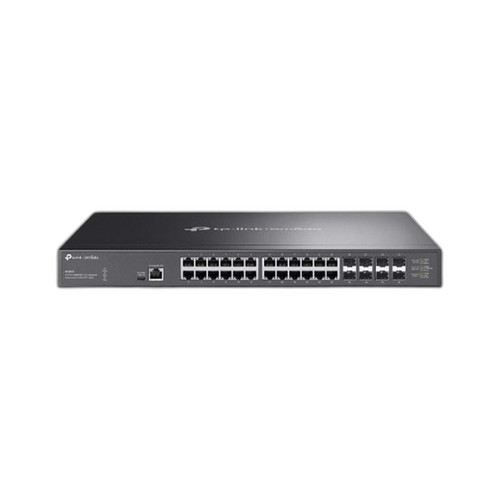
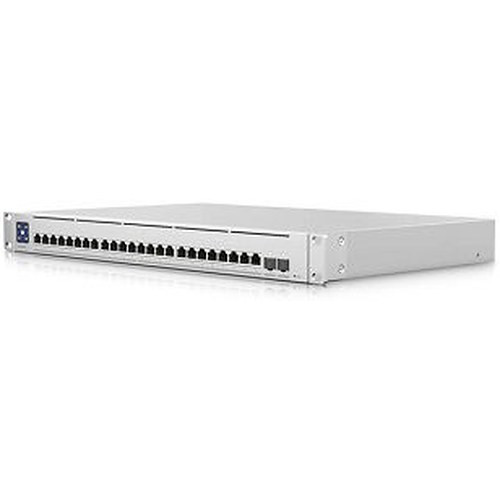
Both the TP-Link SX3832 and Ubiquiti USW-ENTERPRISEXG-24 are 1U rack-mount, 24-port 10GbE RJ45 managed switches targeted at high-density 10G copper deployments — a class commonly cross-shopped for IP surveillance backbones, enterprise access layers, and high-throughput LAN segments. The SX3832 operates at L2+ with 8 SFP+ uplinks and integrates into TP-Link's Omada SDN ecosystem, while the USW-ENTERPRISEXG-24 delivers full Layer 3 managed routing with 2 × 25G SFP28 uplinks and fits the Ubiquiti UniFi platform. Both are non-PoE switches sharing the same 24 × 10GBASE-T RJ45 port count.
In This Guide
- Which switch delivers more backplane headroom and uplink bandwidth for high-density 10G environments?
- How do power draw, operating temperature range, and build materials compare for data-center or closet installations?
- Which switch's management layer and network-OS integration better fits enterprise or surveillance-specific deployments?
- Which should you choose: the SX3832 or the USW-ENTERPRISEXG-24?
- Side-by-Side Specs
- FAQ
Which switch delivers more backplane headroom and uplink bandwidth for high-density 10G environments?
The TP-Link SX3832 is specified at 640 Gbps switching capacity and 240 Mpps forwarding rate. It provides 8 × SFP+ slots accepting 1G or 10G fiber transceivers, giving a maximum aggregate uplink capacity of 80 Gbps at 10G. The RJ45 ports are rated to 30 meters at 10GBASE-T per spec.
The Ubiquiti USW-ENTERPRISEXG-24 is specified at 580 Gbps switching capacity and 432 Mpps forwarding rate. Its uplink tier is 2 × 25G SFP28, capping aggregate uplink bandwidth at 50 Gbps but at a higher per-port rate of 25G per lane. The SX3832 leads on raw switching capacity by 60 Gbps; the USW-ENTERPRISEXG-24 leads on forwarding rate by 192 Mpps. Uplink port count favors the SX3832 (8 ports vs. 2), while uplink per-port speed favors the Ubiquiti (25G vs. 10G).
How do power draw, operating temperature range, and build materials compare for data-center or closet installations?
The TP-Link SX3832 draws 104.9 W at 110 V/60 Hz and 106.5 W at 220 V/50 Hz per spec, with a single AC input rated 100–240 V. Its enclosure material is not specified in the provided data. It operates from −5 °C to +50 °C (23 °F to 122 °F), giving a 55 °C operational span.
The Ubiquiti USW-ENTERPRISEXG-24 is rated at 100 W maximum power consumption with dual AC/DC input capability (100–240 V AC). Its enclosure is specified as SGCC steel. It operates from −5 °C to +40 °C (23 °F to 104 °F), a narrower 45 °C operational span. The SX3832 tolerates 10 °C more heat at the top end, relevant in poorly cooled closets. The Ubiquiti's dual AC/DC input provides a redundant power path not listed for the SX3832. Both share the same lower temperature bound of −5 °C.
Which switch's management layer and network-OS integration better fits enterprise or surveillance-specific deployments?
The TP-Link SX3832 is an L2+ managed switch, meaning it supports advanced Layer 2 features (VLANs, RSTP, IGMP snooping, link aggregation) and limited Layer 3 static routing, but not full dynamic routing protocols. Management modes listed in the spec include SNMP Trap/Inform, password recovery, and Omada SDN — operable in standalone mode or via Omada cloud or on-premises controller. This integrates natively with other Omada-ecosystem devices.
The Ubiquiti USW-ENTERPRISEXG-24 is a full Layer 3 managed switch, supporting dynamic routing in addition to all standard L2 features. Management is via SNMP, CLI, Web UI, and native UniFi Network integration, binding it to the UniFi controller ecosystem. Certifications listed for the Ubiquiti include CE, FCC, IC, and Anatel; the SX3832's certifications are not enumerated in the provided spec data. NDAA compliance is explicitly stated for the Ubiquiti; the SX3832 spec does not address NDAA status.
Which should you choose: the SX3832 or the USW-ENTERPRISEXG-24?
Our take: The USW-ENTERPRISEXG-24 is the stronger choice when a buyer needs full Layer 3 dynamic routing, a higher forwarding rate, dual AC/DC power redundancy, and NDAA-compliant hardware within the UniFi ecosystem. Concretely: forwarding rate is 432 Mpps vs. 240 Mpps; the Ubiquiti supports Layer 3 routing where the SX3832 is L2+ only; and the Ubiquiti carries explicit NDAA compliance while the SX3832 spec is silent on that point. The SX3832 holds advantages in switching capacity (640 Gbps vs. 580 Gbps), uplink port count (8 × SFP+ vs. 2 × SFP28), and upper operating temperature (50 °C vs. 40 °C). Choose the SX3832 for Omada-centric deployments requiring more uplink ports and a wider thermal tolerance. Choose the USW-ENTERPRISEXG-24 for UniFi-managed networks where full L3 routing, higher packet-processing rate, and power redundancy are priorities.
Side-by-Side Comparison
Spec-for-spec, from manufacturer data.
| Specification | TP-Link SX3832 | Ubiquiti USW-ENTERPRISEXG-24 |
|---|---|---|
| Product Type | 24-Port 10GBASE-T L2+ Managed Switch | 24-Port 10GbE Layer 3 Managed Switch |
| RJ45 Data Ports | 24 × 10GBASE-T (RJ45) | 24 × 10GbE (RJ45) |
| Uplink / SFP Slots | 8 × 1/10GE SFP+ | 2 × 25G SFP28 |
| Switching Capacity | 640 Gbps | 580 Gbps |
| Forwarding Rate | 240 Mpps | 432 Mpps |
| Management Layer | L2+ | Layer 3 (full managed routing) |
| Management Platforms | Omada SDN (cloud / on-prem / standalone) | UniFi Network (SNMP, CLI, Web UI) |
| Power Consumption | 104.9 W @ 110V / 106.5 W @ 220V | 100 W (max) |
| Power Input | 100–240 V AC (single) | 100–240 V AC/DC (dual input) |
| Operating Temperature | −5 °C to +50 °C (23 °F to 122 °F) | −5 °C to +40 °C (23 °F to 104 °F) |
| Dimensions | 440 × 220 × 44 mm (17.3 × 8.6 × 1.7 in) | 442 × 285 × 44 mm |
| Weight | — | 4.5 kg (9.9 lb) without brackets |
| Enclosure Material | — | SGCC steel |
| Flash / DRAM Memory | 32 MB Flash / 512 MB DRAM | — |
| NDAA Compliant | — | Yes |
| Certifications | — | CE, FCC, IC, Anatel |
Frequently Asked Questions
Which should you choose: the SX3832 or the USW-ENTERPRISEXG-24?
The USW-ENTERPRISEXG-24 is the stronger choice when a buyer needs full Layer 3 dynamic routing, a higher forwarding rate, dual AC/DC power redundancy, and NDAA-compliant hardware within the UniFi ecosystem. Concretely: forwarding rate is 432 Mpps vs. 240 Mpps; the Ubiquiti supports Layer 3 routing where the SX3832 is L2+ only; and the Ubiquiti carries explicit NDAA compliance while the SX3832 spec is silent on that point. The SX3832 holds advantages in switching capacity (640 Gbps vs. 580 Gbps), uplink port count (8 × SFP+ vs. 2 × SFP28), and upper operating temperature (50 °C vs. 40 °C). Choose the SX3832 for Omada-centric deployments requiring more uplink ports and a wider thermal tolerance. Choose the USW-ENTERPRISEXG-24 for UniFi-managed networks where full L3 routing, higher packet-processing rate, and power redundancy are priorities.
Is the SX3832 or the USW-ENTERPRISEXG-24 better for a large IP camera deployment requiring VLAN segmentation and multicast control?
Both switches support VLAN and IGMP snooping as L2 capabilities. The USW-ENTERPRISEXG-24 adds full Layer 3 routing for inter-VLAN routing without an external router, which is advantageous in larger segmented surveillance networks. The SX3832's L2+ capability covers static inter-VLAN routing but not dynamic routing protocols. If the deployment relies on a dedicated router for inter-VLAN traffic, either switch is suitable at the access layer; if the switch itself must route between VLANs dynamically, the Ubiquiti is the specified option.
Which switch has more fiber uplink flexibility — the SX3832 or the USW-ENTERPRISEXG-24?
The SX3832 provides 8 × SFP+ slots accepting 1G or 10G transceivers, including single-mode fiber per spec. The USW-ENTERPRISEXG-24 provides 2 × SFP28 uplinks rated at 25G. The SX3832 offers significantly more uplink port count and accepts standard 10G SFP+ transceivers; the USW-ENTERPRISEXG-24 uplinks run at 25G per port, which requires 25G-capable SFP28 transceivers and upstream 25G ports. Neither switch's uplink transceiver compatibility list beyond these specifics is provided in the spec data.
Which switch is rated for warmer ambient temperatures in a non-air-conditioned wiring closet?
The TP-Link SX3832 is specified to operate up to 50 °C (122 °F), while the Ubiquiti USW-ENTERPRISEXG-24 is rated to 40 °C (104 °F). The SX3832 has a 10 °C higher upper operating temperature limit per the provided specifications, making it the better-documented choice for installations where ambient temperatures may exceed 40 °C.
More Network Switch Comparisons
- TP-Link S5500-24GP4XF vs NETGEAR GS728TP-300NAS
- TP-Link S5500-24GP4XF vs Comnet CNGE24FX12TX12MSPOE
- TP-Link S5500-24GP4XF vs Ubiquiti USW-24
- TP-Link S5500-24GP4XF vs Ubiquiti USW-ENTERPRISEXG-24
- TP-Link S5500-24GP4XF vs TP-Link SL2428P
- TP-Link S5500-24GP4XF vs TP-Link SG3428XPP-M2
Network Switch Buying Guides
Get a Second Opinion on Your Camera Choice
Share your site layout, coverage goals, and budget. Our team will validate the camera selection, flag anything we would change, and recommend products that match the use case.