
TP-Link SG6428X vs NETGEAR GS728TP-300NAS: Specification Comparison
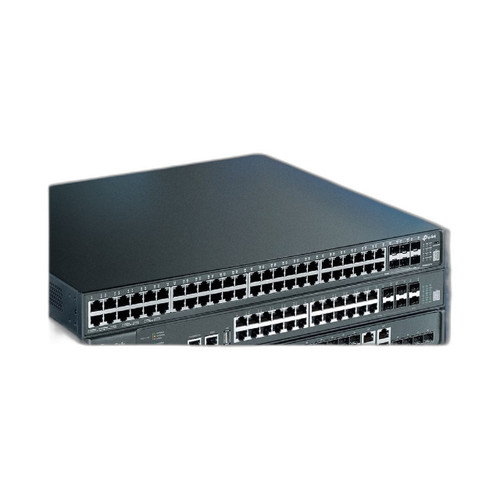
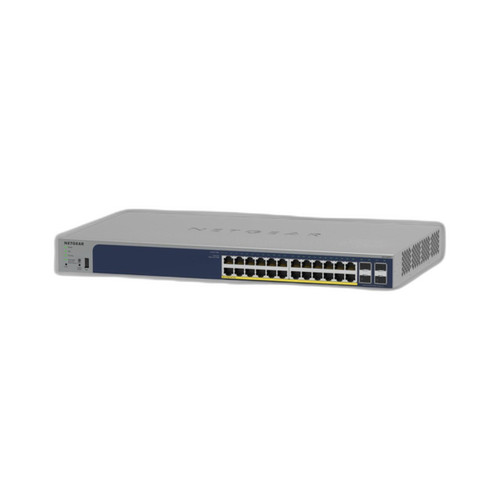
Both the TP-Link SG6428X and the NETGEAR GS728TP-300NAS are 24-port gigabit switches targeting enterprise-edge and SMB network deployments where PoE-powered devices — IP cameras, access points, VoIP phones — are the primary loads. The SG6428X is a full Layer 3 stackable switch with 10GbE uplinks and a deep routing feature set. The GS728TP-300NAS is a smart-managed Layer 2 switch with a simpler feature profile. This comparison examines port capacity and throughput, PoE budget and power architecture, and management depth and integration.
In This Guide
- Which switch delivers more bandwidth and uplink headroom for growing deployments?
- Which switch can power more PoE devices and what is the per-port and total power ceiling?
- Which switch offers deeper management, routing capability, and ecosystem integration?
- Which should you choose: the SG6428X or the GS728TP-300NAS?
- Side-by-Side Specs
- FAQ
Which switch delivers more bandwidth and uplink headroom for growing deployments?
The SG6428X provides 24 gigabit RJ45 ports plus 4×10GE SFP+ uplink slots, yielding a switching capacity of 128 Gbps on a non-blocking fabric. The four 10GbE SFP+ ports allow direct fiber or DAC connections to a core switch or server at ten times the speed of a standard gigabit uplink, and the switch supports stacking — meaning multiple units can be logically combined to scale port count without adding separate management instances.
The GS728TP-300NAS provides 24 gigabit RJ45 ports and a stated switching throughput of 48 Gbps. Uplink port count and speed are not specified in the provided data, so buyers cannot confirm 10GbE or SFP+ availability from these specs alone. The 48 Gbps fabric is adequate for access-layer traffic at 1G per port but offers no confirmed high-speed uplink path. Stacking capability is not stated.
For deployments where uplink bandwidth, fiber connectivity, or future stacking matter, the SG6428X's 128 Gbps capacity and confirmed 4×10GE SFP+ slots represent a measurable architectural advantage over the GS728TP-300NAS's 48 Gbps with unconfirmed uplink spec.
Which switch can power more PoE devices and what is the per-port and total power ceiling?
The SG6428X supports 802.3af/at (PoE/PoE+) on its 24 gigabit ports and carries a stated total PoE budget of 1,440 W. It also lists perpetual PoE (power maintained during switch reboot) and fast PoE (immediate power delivery on link-up) as supported features. Per-port maximum under 802.3at is 30 W.
The GS728TP-300NAS supports 802.3at PoE+ (the provided specs list both PoE++ and PoE+ in different fields; the 190 W budget figure is consistent with a PoE+ implementation, not PoE++, so PoE+ at 802.3at/30 W per port is treated as the reliable spec). Total PoE budget is 190 W across all 24 ports. Per-port maximum under 802.3at is 30 W.
The budget difference is substantial: 1,440 W vs 190 W. A deployment running 24 cameras at 15 W each requires 360 W minimum — within the SG6428X's budget but nearly double the GS728TP-300NAS's ceiling. The NETGEAR switch can realistically power roughly 12–15 devices at typical 13–15 W draws before hitting its budget limit. The TP-Link switch can power all 24 ports simultaneously at or near full PoE+ load without budget contention.
Which switch offers deeper management, routing capability, and ecosystem integration?
The SG6428X is a Layer 3 managed switch. Its management interfaces include CLI, SNMP v1/v2c/v3, RMON, and a dedicated out-of-band management port (1×RJ45). Routing protocols supported are RIP, OSPF, VRRP, ECMP, PIM-SM/DM, Static Routing, and PBR — a full enterprise L3 feature set. It integrates with TP-Link's Omada SDN controller platform, enabling centralized management of switches, access points, and gateways under a single pane of glass. Processor is a dual-core ARM at 1.5 GHz with 8 GB eMMC storage, supporting the full software stack.
The GS728TP-300NAS is described in the provided specs as smart-managed with a Web GUI and SNMP. VLAN support is confirmed. The 'Managed: Unmanaged' field appears to be a data error given the other management fields; smart-managed (Layer 2) is the credible classification. Layer 3 routing protocols are not listed. A dedicated management port is not specified. Integration with NETGEAR's Insight or ProSAFE management platforms is not stated in the provided data.
For IT teams needing inter-VLAN routing, dynamic routing protocols, or centralized SDN management across a multi-device campus, the SG6428X's L3 capability and Omada ecosystem are meaningfully broader. The GS728TP-300NAS suits simpler environments where web-GUI VLAN segmentation and SNMP monitoring cover all requirements.
Which should you choose: the SG6428X or the GS728TP-300NAS?
Our take: The SG6428X is the stronger choice when PoE budget, uplink speed, and Layer 3 routing depth are decision criteria. On PoE budget alone the gap is decisive: 1,440 W vs 190 W means the SG6428X can power all 24 ports at full PoE+ load simultaneously, while the GS728TP-300NAS is constrained to roughly half its ports at typical camera draw. Switching capacity is 128 Gbps vs 48 Gbps, and the SG6428X adds four confirmed 10GbE SFP+ uplinks versus no confirmed high-speed uplink on the NETGEAR. Management depth extends to full L3 routing (OSPF, VRRP, PBR) and Omada SDN, versus smart-managed Layer 2 only. The GS728TP-300NAS is appropriate for small, cost-sensitive deployments with fewer than 12–15 PoE devices and no requirement for inter-VLAN routing or high-speed uplinks. The SG6428X targets larger access-layer or distribution-layer roles within an Omada-managed network.
Side-by-Side Comparison
Spec-for-spec, from manufacturer data.
| Specification | TP-Link SG6428X | NETGEAR GS728TP-300NAS |
|---|---|---|
| Port Count (RJ45) | 24 × Gigabit RJ45 | 24 × Gigabit RJ45 |
| Uplink Ports | 4 × 10GE SFP+ | — |
| Switching Capacity | 128 Gbps | 48 Gbps |
| PoE Standard | 802.3af/at (PoE+) | 802.3at (PoE+) |
| Total PoE Budget | 1,440 W | 190 W |
| Perpetual / Fast PoE | Yes (both listed) | — |
| Management Level | Layer 3 Managed | Smart-Managed (Layer 2) |
| Routing Protocols | RIP, OSPF, VRRP, ECMP, PIM-SM/DM, Static, PBR | — |
| SNMP Support | v1/v2c/v3 + RMON | SNMP (version not specified) |
| VLAN Support | Yes | Yes |
| Dedicated Mgmt Port | 1 × RJ45 | — |
| Stacking Support | Yes | — |
| Processor | Dual-core ARM 1.5 GHz | — |
| Storage | 2×4 MB NOR + 8 GB eMMC | — |
| Operating Temperature | -5 °C to 45 °C (23 °F to 113 °F) | — |
| Mount Type | Rack | — |
Frequently Asked Questions
Which should you choose: the SG6428X or the GS728TP-300NAS?
The SG6428X is the stronger choice when PoE budget, uplink speed, and Layer 3 routing depth are decision criteria. On PoE budget alone the gap is decisive: 1,440 W vs 190 W means the SG6428X can power all 24 ports at full PoE+ load simultaneously, while the GS728TP-300NAS is constrained to roughly half its ports at typical camera draw. Switching capacity is 128 Gbps vs 48 Gbps, and the SG6428X adds four confirmed 10GbE SFP+ uplinks versus no confirmed high-speed uplink on the NETGEAR. Management depth extends to full L3 routing (OSPF, VRRP, PBR) and Omada SDN, versus smart-managed Layer 2 only. The GS728TP-300NAS is appropriate for small, cost-sensitive deployments with fewer than 12–15 PoE devices and no requirement for inter-VLAN routing or high-speed uplinks. The SG6428X targets larger access-layer or distribution-layer roles within an Omada-managed network.
Is the SG6428X or GS728TP-300NAS better for powering a full floor of IP cameras?
The SG6428X is the clear choice for high-density camera deployments. Its 1,440 W PoE budget can sustain all 24 ports at full 802.3at load simultaneously. The GS728TP-300NAS's 190 W budget limits practical PoE device count to roughly 12–15 cameras at 13–15 W each before the budget ceiling is reached.
Can either switch handle inter-VLAN routing without an external router?
Yes, but only the SG6428X. It is a Layer 3 switch with support for static routing, RIP, OSPF, VRRP, ECMP, and PBR, allowing it to route traffic between VLANs natively. The GS728TP-300NAS is a smart-managed Layer 2 switch; inter-VLAN routing is not listed in its provided specifications and would require an external router or firewall.
Which switch is easier to manage remotely across multiple sites?
The SG6428X integrates with TP-Link's Omada SDN platform, which provides centralized cloud or on-premises management of switches, access points, and gateways from a single controller interface — well-suited for multi-site deployments. The GS728TP-300NAS offers web GUI and SNMP management; centralized multi-site management capability is not specified in the provided data.
More Network Switch Comparisons
- TP-Link S5500-24GP4XF vs NETGEAR GS728TP-300NAS
- TP-Link S5500-24GP4XF vs Comnet CNGE24FX12TX12MSPOE
- TP-Link S5500-24GP4XF vs Ubiquiti USW-24
- TP-Link S5500-24GP4XF vs Ubiquiti USW-ENTERPRISEXG-24
- TP-Link S5500-24GP4XF vs TP-Link SL2428P
- TP-Link S5500-24GP4XF vs TP-Link SG3428XPP-M2
Network Switch Buying Guides
Get a Second Opinion on Your Camera Choice
Share your site layout, coverage goals, and budget. Our team will validate the camera selection, flag anything we would change, and recommend products that match the use case.