
TP-Link SG3428X-M2 vs Ubiquiti USW-ENTERPRISEXG-24: Specification Comparison
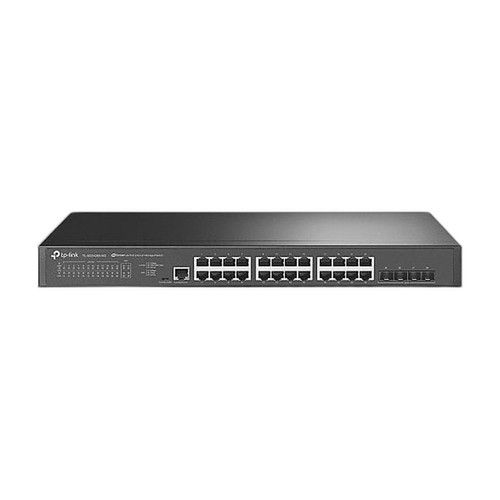
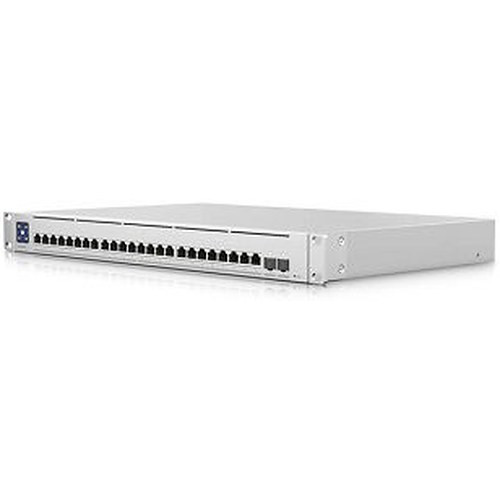
Both the TP-Link SG3428X-M2 and the Ubiquiti USW-ENTERPRISEXG-24 are 1U rack-mount, non-PoE managed switches in the 24-port enterprise access/aggregation tier. The TP-Link delivers 24 × 2.5GBASE-T ports with 4 × 10G SFP+ uplinks under an L2+ SDN framework, while the Ubiquiti provides 24 × 10GbE RJ45 ports with 2 × 25G SFP28 uplinks under a Layer 3 routed architecture. A buyer choosing between them is weighing per-port access speed, uplink bandwidth, routing capability, and ecosystem fit.
In This Guide
- Which switch delivers more bandwidth at the access layer and on the uplinks?
- Which switch supports more advanced Layer 3 routing and management integration?
- How do the two switches compare on power draw, physical footprint, and operating environment?
- Which should you choose: the SG3428X-M2 or the USW-ENTERPRISEXG-24?
- Side-by-Side Specs
- FAQ
Which switch delivers more bandwidth at the access layer and on the uplinks?
The TP-Link SG3428X-M2 provides 24 × 2.5GBASE-T RJ45 access ports rated at 2.5 Gbps per port, reaching up to 100 m on Cat6A. Its four uplink slots are 10G SFP+ (supporting 10GBASE-SR/LR single-mode or multi-mode fiber). Total switching capacity is 200 Gbps with a forwarding rate of 148.8 Mpps.
The Ubiquiti USW-ENTERPRISEXG-24 provides 24 × 10GbE RJ45 access ports, delivering four times the per-port access bandwidth of the TP-Link. Uplinks are 2 × 25G SFP28, offering higher aggregate uplink throughput than the TP-Link's 4 × 10G SFP+. Switching capacity is 580 Gbps at 432 Mpps forwarding rate — 2.9× the TP-Link's switching fabric.
For deployments where endpoints (cameras, workstations, NVRs) already support or will benefit from 10GbE connectivity, the Ubiquiti's access ports are materially faster. Where endpoints are limited to 1GbE or 2.5GbE, the TP-Link's access speed is sufficient and its four SFP+ uplinks offer more physical uplink port count, though at lower individual port speed.
Which switch supports more advanced Layer 3 routing and management integration?
The TP-Link SG3428X-M2 is an L2+ managed switch. L2+ typically includes static routing and basic inter-VLAN routing but does not provide full dynamic routing protocol support (OSPF, BGP, etc.). It integrates with TP-Link's Omada SDN controller (cloud or on-premises) and supports standalone management via web UI, CLI, and SNMP. Authentication is handled via 802.1X with RADIUS/TACACS+.
The Ubiquiti USW-ENTERPRISEXG-24 is specified as a Layer 3 managed switch with routing capability. Its management is specified as Ethernet-based with SNMP, CLI, and Web UI, and integrates with the UniFi Network platform. The spec does not detail specific dynamic routing protocols supported. NDAA compliance is confirmed for the Ubiquiti; no NDAA compliance data is provided for the TP-Link in the supplied specs.
Buyers running multi-VLAN routed cores or needing inter-VLAN routing without a separate router will find the Ubiquiti's Layer 3 designation more suitable. Both units support SNMP and web/CLI management. Omada and UniFi are mutually exclusive ecosystems — existing controller investment is a primary decision driver.
How do the two switches compare on power draw, physical footprint, and operating environment?
The TP-Link SG3428X-M2 is rated at 37.9 W maximum power consumption (220 V/50 Hz) and 14.9 W at standby, with a single internal AC power supply (100–240 V). Physical dimensions are 440 × 180 × 44 mm. Flash memory is 32 MB; DRAM is 256 MB. No operating temperature range is specified in the supplied data.
The Ubiquiti USW-ENTERPRISEXG-24 is rated at 100 W maximum power consumption — 2.6× that of the TP-Link — with a dual AC/DC input power supply (100–240 VAC). Dimensions are 442 × 285 × 44 mm; the Ubiquiti is 105 mm deeper, which may matter in shallow rack enclosures. Chassis is SGCC steel; weight without brackets is 4.5 kg (9.9 lb). Operating temperature is specified at -5 to 40 °C. No operating temperature is provided for the TP-Link.
The TP-Link's lower power draw reduces heat load and operating cost in high-density deployments. The Ubiquiti's dual AC/DC input provides a resilience advantage for critical infrastructure environments. The Ubiquiti's greater chassis depth should be verified against rack depth constraints before procurement.
Which should you choose: the SG3428X-M2 or the USW-ENTERPRISEXG-24?
Our take: The USW-ENTERPRISEXG-24 is the stronger choice when endpoints require 10GbE access speeds, full Layer 3 inter-VLAN routing is needed at the switch level, and the deployment is built on or planned for the UniFi ecosystem. It delivers 24 × 10GbE access ports versus the SG3428X-M2's 24 × 2.5GbE — a 4× per-port bandwidth advantage — and a 580 Gbps switching fabric versus 200 Gbps. The SG3428X-M2 is the stronger choice when endpoints operate at 2.5GbE or below, four physical 10G SFP+ uplink ports are preferable to two 25G SFP28 uplinks, and the Omada SDN controller is already in use. The TP-Link also draws 37.9 W maximum versus the Ubiquiti's 100 W, yielding meaningful power and cooling savings at scale. Platform lock-in — Omada versus UniFi — should be treated as a hard constraint in any existing managed network environment.
Side-by-Side Comparison
Spec-for-spec, from manufacturer data.
| Specification | TP-Link SG3428X-M2 | Ubiquiti USW-ENTERPRISEXG-24 |
|---|---|---|
| Product Type | L2+ Managed Switch | Layer 3 Managed Switch |
| Access Ports | 24 × 2.5GBASE-T RJ45 | 24 × 10GbE RJ45 |
| Uplink Ports | 4 × 10G SFP+ | 2 × 25G SFP28 |
| Switching Capacity | 200 Gbps | 580 Gbps |
| Forwarding Rate | 148.8 Mpps | 432 Mpps |
| Max Power Consumption | 37.9 W | 100 W |
| Standby Power | 14.9 W | — |
| Power Input | 100–240 V AC (single) | 100–240 V AC/DC (dual input) |
| Dimensions (mm) | 440 × 180 × 44 | 442 × 285 × 44 |
| Weight | — | 4.5 kg (9.9 lb) |
| Flash / DRAM | 32 MB / 256 MB | — |
| Management Platforms | Omada SDN (cloud/on-prem), Web, CLI, SNMP | UniFi Network, Web, CLI, SNMP |
| Authentication | 802.1X, RADIUS/TACACS+ | — |
| Operating Temperature | — | -5 to 40 °C |
| NDAA Compliant | — | Yes |
| Form Factor | 1U Rack | 1U Rack |
Frequently Asked Questions
Which should you choose: the SG3428X-M2 or the USW-ENTERPRISEXG-24?
The USW-ENTERPRISEXG-24 is the stronger choice when endpoints require 10GbE access speeds, full Layer 3 inter-VLAN routing is needed at the switch level, and the deployment is built on or planned for the UniFi ecosystem. It delivers 24 × 10GbE access ports versus the SG3428X-M2's 24 × 2.5GbE — a 4× per-port bandwidth advantage — and a 580 Gbps switching fabric versus 200 Gbps. The SG3428X-M2 is the stronger choice when endpoints operate at 2.5GbE or below, four physical 10G SFP+ uplink ports are preferable to two 25G SFP28 uplinks, and the Omada SDN controller is already in use. The TP-Link also draws 37.9 W maximum versus the Ubiquiti's 100 W, yielding meaningful power and cooling savings at scale. Platform lock-in — Omada versus UniFi — should be treated as a hard constraint in any existing managed network environment.
Is the SG3428X-M2 or USW-ENTERPRISEXG-24 better for high-density IP camera deployments?
That depends on the camera's network interface. If cameras support 10GbE (rare in current IP camera product lines), the USW-ENTERPRISEXG-24's 24 × 10GbE access ports eliminate any access-layer bottleneck. For the far more common scenario of cameras running at 1GbE or 2.5GbE, the SG3428X-M2's 2.5GBASE-T ports provide headroom above 1G at lower cost and power draw. For NVR or server uplinks requiring maximum throughput, the Ubiquiti's 25G SFP28 uplinks outperform the TP-Link's 10G SFP+ uplinks.
Can either switch operate as a Layer 3 router to handle inter-VLAN traffic without a separate router?
The Ubiquiti USW-ENTERPRISEXG-24 is specified as a Layer 3 switch with managed routing capability, which supports inter-VLAN routing at the switch level. The TP-Link SG3428X-M2 is specified as L2+, which typically includes static inter-VLAN routing but not full dynamic routing protocol support. If your design requires dynamic routing protocols (OSPF, BGP), neither switch's supplied specification confirms that capability — consult the respective datasheets for protocol-level detail before specifying.
Which switch is better suited for a rack with limited depth?
The TP-Link SG3428X-M2 is 180 mm deep versus the Ubiquiti USW-ENTERPRISEXG-24 at 285 mm deep — a difference of 105 mm. In shallow-depth wall-mount racks or cabinets with rear cable management that restricts usable depth, the TP-Link has a clear physical advantage. Both units are 1U (44 mm) in height. Verify available rack depth against the Ubiquiti's 285 mm chassis before ordering.
More Network Switch Comparisons
- TP-Link S5500-24GP4XF vs NETGEAR GS728TP-300NAS
- TP-Link S5500-24GP4XF vs Comnet CNGE24FX12TX12MSPOE
- TP-Link S5500-24GP4XF vs Ubiquiti USW-24
- TP-Link S5500-24GP4XF vs Ubiquiti USW-ENTERPRISEXG-24
- TP-Link S5500-24GP4XF vs TP-Link SL2428P
- TP-Link S5500-24GP4XF vs TP-Link SG3428XPP-M2
Network Switch Buying Guides
Get a Second Opinion on Your Camera Choice
Share your site layout, coverage goals, and budget. Our team will validate the camera selection, flag anything we would change, and recommend products that match the use case.