
TP-Link SG3428X-M2 vs Ubiquiti USW-24: Specification Comparison
Both the TP-Link SG3428X-M2 and the Ubiquiti USW-24 are unmanaged-access-tier, non-PoE, 24-port Layer 2+ managed network switches in a 1U rack form factor, targeting mid-scale LAN deployments for IP cameras, access points, and endpoint aggregation. The comparison is directly relevant for buyers evaluating port-speed tier, switching fabric headroom, uplink flexibility, and SDN ecosystem fit before committing to a wired infrastructure platform.
In This Guide
- Which switch delivers more bandwidth per port and aggregate fabric headroom?
- How do the two switches compare on power draw, physical dimensions, and operating environment?
- How do the management platforms and ecosystem integration differ between these two switches?
- Which should you choose: the SG3428X-M2 or the USW-24?
- Side-by-Side Specs
- FAQ
Which switch delivers more bandwidth per port and aggregate fabric headroom?
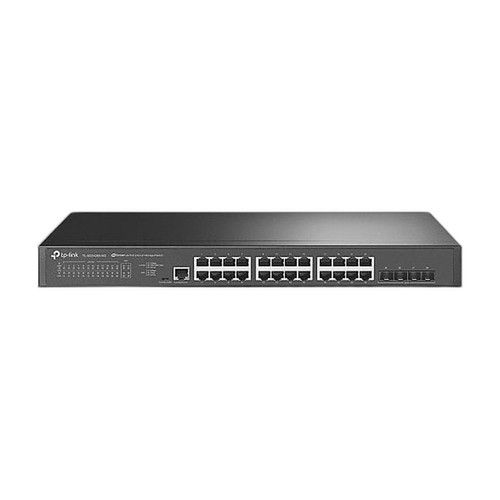
The SG3428X-M2 ships with 24 × 2.5GBASE-T RJ45 ports running at 2.5 Gbps each over Cat6A cabling up to 100 m, yielding a total access-tier bandwidth of 60 Gbps across downlink ports alone. Its switching capacity is rated at 200 Gbps with a forwarding rate of 148.8 Mpps. Four 10G SFP+ uplink slots—supporting both 10GBASE-SR (multimode) and 10GBASE-LR (single-mode) transceivers—provide 40 Gbps of uplink headroom for backbone aggregation.
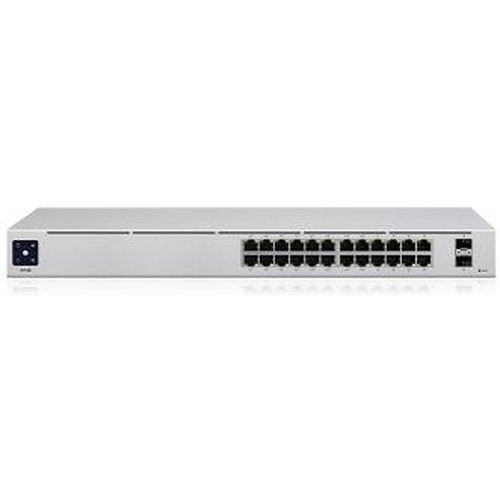
The USW-24 provides 24 × 1 Gbps Ethernet ports, aggregating 24 Gbps of access bandwidth. Its switching fabric is rated at 52 Gbps with a forwarding rate of 39 Mpps and a non-blocking throughput of 26 Gbps. Uplink port count and speed are not specified in the provided data.
On raw fabric figures, the SG3428X-M2 is 3.8× wider (200 Gbps vs. 52 Gbps) and 3.8× faster in packet forwarding (148.8 Mpps vs. 39 Mpps). Per-port access speed is 2.5× higher. For environments running high-resolution multi-stream IP cameras, Wi-Fi 6/6E APs, or NAS appliances that saturate gigabit links, the TP-Link unit carries substantially more headroom.
How do the two switches compare on power draw, physical dimensions, and operating environment?
The SG3428X-M2 consumes 37.9 W maximum at 220 V/50 Hz and 37.7 W at 110 V/60 Hz, with a 14.9 W standby figure. Its chassis measures 440 × 180 × 44 mm (1U). Flash memory is 32 MB and DRAM is 256 MB. Power input is universal 100–240 V~ 50/60 Hz. No operating temperature range is provided in the supplied specifications.
The USW-24 is rated at 25 W typical power consumption and includes an internal 36 W AC/DC supply, also accepting 100–240 V AC 50/60 Hz. Its chassis measures 442 × 200 × 44 mm and weighs 2.7 kg without mounting brackets. Enclosure material is SGCC steel. The specified operating temperature range is −5 to 45 °C (23 to 113 °F). NDAA compliance is confirmed for the USW-24; this status is not stated for the SG3428X-M2 in the provided data.
Both units occupy a standard 1U rack slot. The USW-24 draws roughly 12–13 W less at peak than the SG3428X-M2, a meaningful difference when deploying many switches in a power-constrained rack or remote IDF closet. The USW-24 also carries a confirmed operating temperature specification and NDAA compliance declaration; neither is present in the TP-Link provided data. Buyers in federal or regulated environments should note that gap.
How do the management platforms and ecosystem integration differ between these two switches?
The SG3428X-M2 operates either standalone—via web GUI, CLI, or SNMP—or under TP-Link's Omada SDN controller, available as a cloud-hosted or on-premises software/hardware controller. Management features documented in the specifications include 802.1X port-based access control and RADIUS/TACACS+ authentication. The switch carries the Omada branding, meaning it integrates with other Omada-certified APs, routers, and switches within a unified topology view. VLAN count limit is not stated in the provided specifications.
The USW-24 is managed through Ubiquiti's UniFi controller platform and supports up to 1,000 VLANs. Management interface is listed as Ethernet. Specific authentication protocols (802.1X, RADIUS) are not enumerated in the provided specifications. The UniFi ecosystem is widely deployed across SMB, education, healthcare, and multi-tenant environments and supports deep integration with UniFi video (UNVR), UniFi Access, and UniFi Talk.
The two switches represent competing but structurally similar SDN controller models. Omada and UniFi each require their respective controller for full feature access; neither integrates natively with the other. Buyers already invested in one ecosystem face non-trivial migration cost to switch vendors. The USW-24 explicitly documents 1,000-VLAN support—useful for dense multi-tenant segmentation—while the SG3428X-M2's VLAN ceiling is not stated. ONVIF compatibility is listed for the SG3428X-M2 but is absent from the USW-24 specification set, which may matter for IP security system managers seeking unified device discovery.
Which should you choose: the SG3428X-M2 or the USW-24?
Our take: The SG3428X-M2 is the stronger choice when port throughput, uplink capacity, or future-proofing against bandwidth-intensive endpoints are the primary drivers. Its 2.5GBASE-T access ports deliver 2.5× the per-port bandwidth of the USW-24's gigabit ports, its 200 Gbps switching fabric is 3.8× larger (vs. 52 Gbps), and its four 10G SFP+ uplinks provide a documented 40 Gbps backbone path versus no stated uplink spec for the USW-24. Conversely, the USW-24 draws approximately 12–13 W less at peak (25 W vs. 37.9 W), carries a confirmed NDAA compliance declaration, and offers explicit 1,000-VLAN support—advantages for power-constrained, federally regulated, or multi-tenant deployments. Platform loyalty is the decisive qualifier: the SG3428X-M2 suits Omada-ecosystem builds, the USW-24 suits UniFi-ecosystem builds, and neither integrates with the other's controller.
Side-by-Side Comparison
Spec-for-spec, from manufacturer data.
| Specification | TP-Link SG3428X-M2 | Ubiquiti USW-24 |
|---|---|---|
| Product Type | 24-Port 2.5GBASE-T L2+ Managed Switch | 24-Port Gigabit Managed Switch |
| Access Port Speed | 2.5 Gbps (2.5GBASE-T RJ45) | 1 Gbps (Gigabit Ethernet) |
| Access Port Count | 24 × 2.5GBASE-T RJ45 | 24 × Gigabit Ethernet |
| Uplink Slots | 4 × 10G SFP+ | — |
| Switching Capacity | 200 Gbps | 52 Gbps |
| Forwarding Rate | 148.8 Mpps | 39 Mpps |
| Non-Blocking Throughput | — | 26 Gbps |
| Max VLAN Count | — | 1,000 |
| Max Port Reach (Copper) | 100 m (Cat6A, 2.5GBASE-T) | — |
| Power Consumption (Max) | 37.9 W | 25 W (typical) |
| Internal Power Supply | 100–240 V~ 50/60 Hz | 36 W internal, 100–240 V AC |
| Dimensions (mm) | 440 × 180 × 44 | 442 × 200 × 44 |
| Flash / DRAM | 32 MB Flash / 256 MB DRAM | — |
| Management Platform | Omada SDN (cloud/on-prem) or standalone | UniFi controller |
| NDAA Compliant | — | Yes |
| Operating Temperature | — | -5 to 45 °C |
Frequently Asked Questions
Which should you choose: the SG3428X-M2 or the USW-24?
The SG3428X-M2 is the stronger choice when port throughput, uplink capacity, or future-proofing against bandwidth-intensive endpoints are the primary drivers. Its 2.5GBASE-T access ports deliver 2.5× the per-port bandwidth of the USW-24's gigabit ports, its 200 Gbps switching fabric is 3.8× larger (vs. 52 Gbps), and its four 10G SFP+ uplinks provide a documented 40 Gbps backbone path versus no stated uplink spec for the USW-24. Conversely, the USW-24 draws approximately 12–13 W less at peak (25 W vs. 37.9 W), carries a confirmed NDAA compliance declaration, and offers explicit 1,000-VLAN support—advantages for power-constrained, federally regulated, or multi-tenant deployments. Platform loyalty is the decisive qualifier: the SG3428X-M2 suits Omada-ecosystem builds, the USW-24 suits UniFi-ecosystem builds, and neither integrates with the other's controller.
Is the SG3428X-M2 or USW-24 better for larger deployments with many IP cameras and Wi-Fi 6 access points?
Based on the provided specifications, the SG3428X-M2 is better suited to bandwidth-dense deployments. Its 2.5GBASE-T ports run at 2.5 Gbps per port versus 1 Gbps on the USW-24, and its 200 Gbps switching capacity with 148.8 Mpps forwarding rate provides substantially more headroom than the USW-24's 52 Gbps fabric and 39 Mpps forwarding rate. However, if the deployment is already built on UniFi infrastructure, the USW-24 integrates natively into that ecosystem without introducing a second controller platform.
Which switch is better for a government or NDAA-sensitive project?
The USW-24 has NDAA compliance explicitly stated in its provided specifications. The SG3428X-M2's provided specifications do not include an NDAA compliance declaration. Buyers on federal contracts or programs requiring NDAA Section 889 compliance should verify the SG3428X-M2's status directly with TP-Link before specifying it, or default to the USW-24 based on the documented data provided here.
Can I use either switch if I am not running a cloud controller?
Yes for both, based on the provided specifications. The SG3428X-M2 supports standalone operation via web GUI, CLI, and SNMP without requiring the Omada controller. The USW-24's specifications list Ethernet-based management, consistent with local controller or standalone access, though the extent of standalone feature availability is not detailed in the provided data. For full SDN feature sets—including centralized topology, firmware management, and analytics—both units benefit from their respective controllers (Omada for TP-Link, UniFi for Ubiquiti).
More Network Switch Comparisons
- TP-Link S5500-24GP4XF vs NETGEAR GS728TP-300NAS
- TP-Link S5500-24GP4XF vs Comnet CNGE24FX12TX12MSPOE
- TP-Link S5500-24GP4XF vs Ubiquiti USW-24
- TP-Link S5500-24GP4XF vs Ubiquiti USW-ENTERPRISEXG-24
- TP-Link S5500-24GP4XF vs TP-Link SL2428P
- TP-Link S5500-24GP4XF vs TP-Link SG3428XPP-M2
Network Switch Buying Guides
Get a Second Opinion on Your Camera Choice
Share your site layout, coverage goals, and budget. Our team will validate the camera selection, flag anything we would change, and recommend products that match the use case.