
TP-Link SG105-M2 vs Ubiquiti USW-FLEX-2.5G-5: Specification Comparison
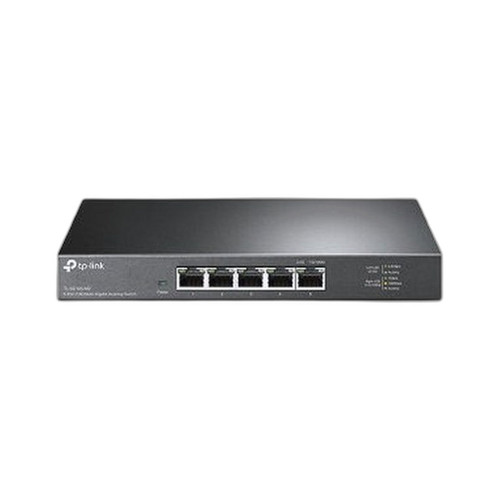
Both the TP-Link TL-SG105-M2 and the Ubiquiti USW-FLEX-2.5G-5 are 5-port 2.5G Multi-Gigabit desktop switches occupying the same price-class segment, making them a natural cross-shop for installers and IT buyers looking to push beyond 1G at the edge without a full rack-mount investment. The key differentiator axis is management depth versus simplicity: the TP-Link is fully unmanaged, while the Ubiquiti offers Layer 2+ management, VLAN segmentation, and UniFi ecosystem integration. Power input flexibility and operating-environment ratings also diverge meaningfully.

In This Guide
- Which switch delivers better port density, throughput, and network management capability?
- How do the two switches differ in power input options and operating-environment tolerance?
- Which switch is better suited to managed deployments, compliance requirements, and ecosystem fit?
- Which should you choose: the SG105-M2 or the USW-FLEX-2.5G-5?
- Side-by-Side Specs
- FAQ
Which switch delivers better port density, throughput, and network management capability?
Both units provide five 2.5G ports and a matching 25 Gbps switching capacity, so raw port count and aggregate bandwidth are identical on paper. The Ubiquiti USW-FLEX-2.5G-5 specifies a non-blocking throughput of 12.5 Gbps and a forwarding rate of 19 Mpps, confirming full wire-speed operation across all five ports simultaneously. The TL-SG105-M2 lists switching capacity as '25 Gbps 40 Gbps' (two values appear in the source spec, likely reflecting different datasheet revisions); no forwarding-rate figure is provided for it.
Management capability is where the two diverge sharply. The TL-SG105-M2 is unmanaged: zero VLAN support, no traffic prioritization, no remote visibility. The USW-FLEX-2.5G-5 is Layer 2+ managed with 256 VLANs supported, a 4,000-entry MAC table, and integration into Ubiquiti's UniFi controller platform for centralized policy and monitoring. For environments requiring network segmentation—IoT isolation, camera VLANs, QoS for VoIP—only the Ubiquiti qualifies.
How do the two switches differ in power input options and operating-environment tolerance?
Power input is a meaningful differentiator. The TL-SG105-M2 uses a conventional 12 V DC barrel adapter (1 A or 1.5 A depending on variant); it requires a local AC outlet and an adapter brick. The USW-FLEX-2.5G-5 accepts USB Type-C at 5 V/1 A (4.8–5.2 V range) or 802.3af PoE input, with a power budget of 5 W on AC/DC and 6.4 W when powered via PoE. That PoE input option means the Ubiquiti can be deployed cable-only at an edge location—no AC circuit needed—which is highly relevant for outdoor enclosures, remote closets, or solar-backed sites.
Thermal tolerance also differs. The TL-SG105-M2 is rated 0 °C to 40 °C operating (storage −40 °C to 70 °C), suiting controlled indoor spaces only. The USW-FLEX-2.5G-5 is rated −20 °C to 45 °C operating—a 20-degree cold-side advantage that makes it suitable for unheated enclosures, parking structures, or northern-climate edge deployments where ambient can briefly dip below freezing. Neither unit specifies an IP ingress-protection rating in the provided specs.
Which switch is better suited to managed deployments, compliance requirements, and ecosystem fit?
For unmanaged, plug-and-play simplicity—workgroup file sharing, home lab, or a small office with a flat network—the TL-SG105-M2 requires zero configuration and has no software dependency. Its fanless design (noted in card bullets) suits quiet office environments. No NDAA compliance status is stated in the provided specs.
The USW-FLEX-2.5G-5 carries explicit NDAA compliance and holds CE, FCC, IC, and Anatel certifications. NDAA compliance is a hard procurement gate for U.S. federal, state, and critical-infrastructure projects. Its Layer 2+ management via UniFi makes it a native fit for UniFi-based LAN/wireless deployments. For mixed-speed device environments, its auto-negotiation (2.5G/1G/100M/10M) is documented in specs; the TL-SG105-M2's multi-gigabit auto-negotiation behavior is implied by 'Multi-Gigabit' branding but not enumerated in the provided spec set. Enclosure material (polycarbonate) is specified only for the Ubiquiti; the TP-Link enclosure material is not stated in provided specs.
Which should you choose: the SG105-M2 or the USW-FLEX-2.5G-5?
Our take: The USW-FLEX-2.5G-5 is the stronger choice when the deployment requires network management, multi-environment resilience, or NDAA-compliant procurement. Concretely: it operates down to −20 °C versus the TL-SG105-M2's 0 °C floor—a 20-degree cold-side advantage; it supports 256 VLANs and Layer 2+ management versus zero on the unmanaged TP-Link; and it accepts PoE input (6.4 W budget) or USB-C, eliminating the AC-adapter dependency that constrains the TL-SG105-M2. Both share a 25 Gbps switching fabric and five 2.5G ports, so raw throughput is not a differentiator. The TL-SG105-M2 is the rational pick for a flat, unmanaged workgroup where zero configuration overhead and a conventional 12 V power supply are acceptable, and where the site is a climate-controlled interior. Buyers on a UniFi platform, government/federal procurement, or any edge location subject to sub-zero ambient temperatures should select the Ubiquiti.
Side-by-Side Comparison
Spec-for-spec, from manufacturer data.
| Specification | TP-Link SG105-M2 | Ubiquiti USW-FLEX-2.5G-5 |
|---|---|---|
| Product Type | Unmanaged Desktop Switch | Managed Desktop Switch (Layer 2+) |
| Ports | 5 × 2.5G | 5 × 2.5G (2.5G/1G/100M/10M auto) |
| Switching Capacity | 25 Gbps (40 Gbps also listed in spec) | 25 Gbps |
| Non-Blocking Throughput | — | 12.5 Gbps |
| Forwarding Rate | — | 19 Mpps |
| VLAN Support | None (unmanaged) | 256 VLANs |
| MAC Table | — | 4,000 entries |
| Management | None | UniFi Controller (Layer 2+) |
| Power Input | 12 V DC barrel adapter (1 A or 1.5 A) | USB-C 5V/1A or 802.3af PoE input |
| Power Consumption | — | 5 W (AC/DC); 6.4 W (PoE input) |
| Operating Temperature | 0 °C to 40 °C | −20 °C to 45 °C |
| Storage Temperature | −40 °C to 70 °C | — |
| Dimensions (W × D × H) | 209 × 126 × 26 mm (or 226 × 131 × 35 mm per spec) | 117.1 × 90 × 21.2 mm |
| Weight | — | 206 g (7.3 oz) |
| NDAA Compliant | — | Yes |
| Certifications | — | CE, FCC, IC, Anatel |
Frequently Asked Questions
Which should you choose: the SG105-M2 or the USW-FLEX-2.5G-5?
The USW-FLEX-2.5G-5 is the stronger choice when the deployment requires network management, multi-environment resilience, or NDAA-compliant procurement. Concretely: it operates down to −20 °C versus the TL-SG105-M2's 0 °C floor—a 20-degree cold-side advantage; it supports 256 VLANs and Layer 2+ management versus zero on the unmanaged TP-Link; and it accepts PoE input (6.4 W budget) or USB-C, eliminating the AC-adapter dependency that constrains the TL-SG105-M2. Both share a 25 Gbps switching fabric and five 2.5G ports, so raw throughput is not a differentiator. The TL-SG105-M2 is the rational pick for a flat, unmanaged workgroup where zero configuration overhead and a conventional 12 V power supply are acceptable, and where the site is a climate-controlled interior. Buyers on a UniFi platform, government/federal procurement, or any edge location subject to sub-zero ambient temperatures should select the Ubiquiti.
Can I use either switch in an unheated outdoor enclosure in winter?
Only the USW-FLEX-2.5G-5 is rated for sub-zero operation (−20 °C). The TL-SG105-M2's operating minimum is 0 °C, so it is not specified for unheated spaces that can drop below freezing. Neither unit lists an IP ingress-protection rating in the provided specs, so neither should be assumed weatherproof without a suitable enclosure.
Does the TL-SG105-M2 or the USW-FLEX-2.5G-5 support VLANs for camera network segmentation?
Only the USW-FLEX-2.5G-5 supports VLANs—256 of them—via its Layer 2+ managed feature set and UniFi controller integration. The TL-SG105-M2 is unmanaged and provides no VLAN capability whatsoever. If camera VLAN isolation is a requirement, the Ubiquiti is the only option of the two.
Which switch is suitable for a U.S. federal or NDAA-restricted project?
The USW-FLEX-2.5G-5 is explicitly listed as NDAA compliant in the provided specs. No NDAA compliance status is stated for the TL-SG105-M2 in its provided spec data, so it cannot be confirmed compliant for NDAA-gated procurement based on the available information.
More Network Switch Comparisons
- TP-Link SG2005P-PD vs Ubiquiti USW-FLEX-2.5G-5
- TP-Link SG2005P-PD vs TP-Link ES205G
- TP-Link SG2005P-PD vs TP-Link DS105G
- TP-Link ES205G vs Ubiquiti USW-FLEX-2.5G-5
- TP-Link ES205G vs TP-Link DS105G
- Ubiquiti USW-FLEX-2.5G-5 vs TP-Link DS105G
Network Switch Buying Guides
Get a Second Opinion on Your Camera Choice
Share your site layout, coverage goals, and budget. Our team will validate the camera selection, flag anything we would change, and recommend products that match the use case.