
Sato W2312-400NB-EX1 vs Sato W2312-400CN-EX1: Specification Comparison
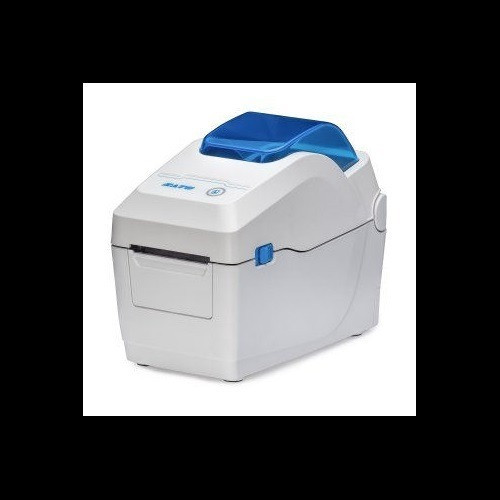
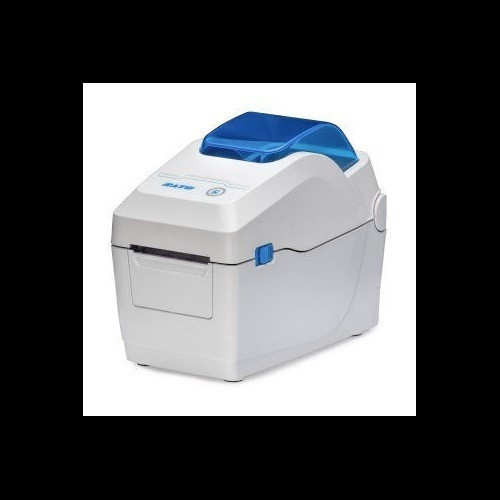
Both the Sato WS2 W2312-400NB-EX1 and W2312-400CN-EX1 are 300 dpi direct thermal desktop label printers sharing the same core engine: 7 ips print speed, 2.2-inch maximum print width, and identical connectivity (USB 2.0, Ethernet, Wi-Fi, Bluetooth). This comparison is for buyers evaluating which WS2 variant fits their workflow—one ships with a built-in cutter and a richer documented spec set, while the other's differentiating hardware details are not fully disclosed in the available specifications.
In This Guide
- How do the two printers differ in media handling and physical setup?
- What do the display, memory, and operating environment specs tell a buyer about day-to-day usability?
- How do power requirements, physical footprint, and weight compare for installation and portability?
- Which should you choose: the W2312-400NB-EX1 or the W2312-400CN-EX1?
- Side-by-Side Specs
- FAQ
How do the two printers differ in media handling and physical setup?
Both printers support direct thermal printing—no ribbon required—and accept rolls up to 5 inches in outer diameter. The W2312-400CN-EX1 specifies a media width range of 0.5 to 2.83 inches and a 1-inch media core; these parameters are not documented in the provided specs for the W2312-400NB-EX1.
A notable hardware difference: the W2312-400CN-EX1 includes an integrated cutter and features tool-free printhead replacement, both of which are not listed for the W2312-400NB-EX1. For operations handling high volumes of cut labels or requiring fast printhead swaps to minimize downtime, these are functional differentiators worth weighing.
Both units are desktop-mounted and Windows-compatible. The W2312-400CN-EX1 also supports ribbon media up to 984 ft (300 m) in length, though both are rated as direct thermal (ribbon-free); the W2312-400NB-EX1 has no ribbon spec listed, consistent with its direct-thermal-only positioning.
What do the display, memory, and operating environment specs tell a buyer about day-to-day usability?
The W2312-400CN-EX1 is documented with a 2.4-inch color LCD display, 256 MB flash memory, 128 MB SDRAM, and 128 MB user storage. None of these parameters appear in the spec set for the W2312-400NB-EX1, so a direct comparison cannot be made on those points.
Operating temperature for the W2312-400CN-EX1 is specified at 41°F to 104°F (5°C to 40°C)—a range typical of office and light warehouse environments. The W2312-400NB-EX1 has no operating temperature listed in the provided data.
The W2312-400NB-EX1's Card_Bullet_3 reference mentions a '2.4-inch color LCD' for media-change guidance, which aligns with the CN-EX1's documented display. However, since this detail appears only in marketing copy and not in the NB-EX1's structured specs, it cannot be treated as a confirmed specification for comparison purposes.
How do power requirements, physical footprint, and weight compare for installation and portability?
The W2312-400CN-EX1 specifies AC 100–240V, 50/60Hz universal input, making it suitable for international deployments without a step-down transformer. It weighs 3.5 lbs (1.6 kg) and measures 6.3 x 7.5 x 6.5 inches—compact enough for counter or shelf placement.
The W2312-400NB-EX1 has no power input, weight, or physical dimensions listed in its provided specification data. Buyers cannot make a confirmed size or electrical comparison between the two models based on the available specs alone.
Both units carry a 1-year warranty and share the same form factor designation (Desktop). For deployments requiring verified power compatibility or space planning, the CN-EX1's documented physical specs provide a clearer procurement baseline.
Which should you choose: the W2312-400NB-EX1 or the W2312-400CN-EX1?
Our take: The W2312-400CN-EX1 is the stronger choice when buyers need a documented, fully specified unit—it delivers identical print performance (300 dpi, 7 ips, 2.2-inch width) while adding three concrete hardware advantages: an integrated cutter, tool-free printhead replacement, and confirmed memory (256 MB flash / 128 MB SDRAM / 128 MB user storage). Its 6.3 x 7.5 x 6.5-inch footprint, 3.5 lb weight, and universal 100–240V input are all documented for space planning and international use. The W2312-400NB-EX1 matches it on core throughput and connectivity but lacks confirmed specs for dimensions, weight, power input, memory, cutter, and operating temperature—buyers should request its full datasheet before committing. If cutter-free, ribbon-free simplicity is the sole requirement and verified specs for ancillary parameters are not critical, the NB-EX1 warrants further investigation via its datasheet.
Side-by-Side Comparison
Spec-for-spec, from manufacturer data.
| Specification | Sato W2312-400NB-EX1 | Sato W2312-400CN-EX1 |
|---|---|---|
| Print Method | Direct Thermal | Direct Thermal |
| Print Resolution | 300 dpi | 300 dpi |
| Print Speed | 7 ips | 7 ips |
| Max Print Width | 2.2 inches | 2.2 inches |
| Connectivity | USB 2.0, Ethernet, Wi-Fi, Bluetooth | USB 2.0, Ethernet, Wi-Fi, Bluetooth |
| Built-in Cutter | — | Yes |
| Tool-free Printhead Swap | — | Yes |
| Display | — | 2.4-inch color LCD |
| Flash Memory | — | 256 MB |
| SDRAM | — | 128 MB |
| User Storage | — | 128 MB |
| Media Width Range | — | 0.5 to 2.83 inches |
| Media Core | — | 1 inch |
| Max Roll Diameter | 5 inches OD | 5 inches OD |
| Operating Temperature | — | 41°F to 104°F (5°C to 40°C) |
| Power Input | — | AC 100–240V, 50/60Hz |
| Dimensions (W x D x H) | — | 6.3 x 7.5 x 6.5 inches |
| Weight | — | 3.5 lbs (1.6 kg) |
| Operating System | Windows | Windows |
| Warranty | 1-year | 1-year |
| Mount Type | Desktop | Desktop |
Frequently Asked Questions
Which should you choose: the W2312-400NB-EX1 or the W2312-400CN-EX1?
The W2312-400CN-EX1 is the stronger choice when buyers need a documented, fully specified unit—it delivers identical print performance (300 dpi, 7 ips, 2.2-inch width) while adding three concrete hardware advantages: an integrated cutter, tool-free printhead replacement, and confirmed memory (256 MB flash / 128 MB SDRAM / 128 MB user storage). Its 6.3 x 7.5 x 6.5-inch footprint, 3.5 lb weight, and universal 100–240V input are all documented for space planning and international use. The W2312-400NB-EX1 matches it on core throughput and connectivity but lacks confirmed specs for dimensions, weight, power input, memory, cutter, and operating temperature—buyers should request its full datasheet before committing. If cutter-free, ribbon-free simplicity is the sole requirement and verified specs for ancillary parameters are not critical, the NB-EX1 warrants further investigation via its datasheet.
Does the W2312-400CN-EX1 or W2312-400NB-EX1 include a built-in cutter?
Only the W2312-400CN-EX1 is specified with a cutter included. The W2312-400NB-EX1's provided specs do not list a cutter; buyers requiring automatic label cutting should confirm with Sato or reference the NB-EX1 datasheet before purchasing.
Are the print speed and resolution the same on both models?
Yes—both printers share identical documented print performance: 300 dpi resolution and 7 inches per second print speed, with a maximum print width of 2.2 inches and direct thermal print method requiring no ribbon.
Which model is better suited for international or multi-site deployments?
The W2312-400CN-EX1 lists a universal AC 100–240V, 50/60Hz power input, making it confirmed-compatible across international voltages. The W2312-400NB-EX1 has no power input specification in the provided data, so international compatibility cannot be confirmed for that model without consulting its datasheet.
More Label Printer Comparisons
- Sato WT302-403NN-EX1-2 vs Zebra ZT11143-D01000FZ
- Sato WT302-403NN-EX1-2 vs Sato W2312-400CN-EX1
- Sato WT302-403NN-EX1-2 vs Sato W2302-400DN-EX1
- Sato W2312-400CN-EX1 vs Zebra ZT11143-D01000FZ
- Sato W2312-400CN-EX1 vs Sato W2302-400DN-EX1
- Sato W2302-400DN-EX1 vs Zebra ZT11143-D01000FZ
Label Printer Buying Guides
Get a Second Opinion on Your Camera Choice
Share your site layout, coverage goals, and budget. Our team will validate the camera selection, flag anything we would change, and recommend products that match the use case.