
Sato W2312-400CN-EX1 vs Zebra ZT11143-D01000FZ: Specification Comparison
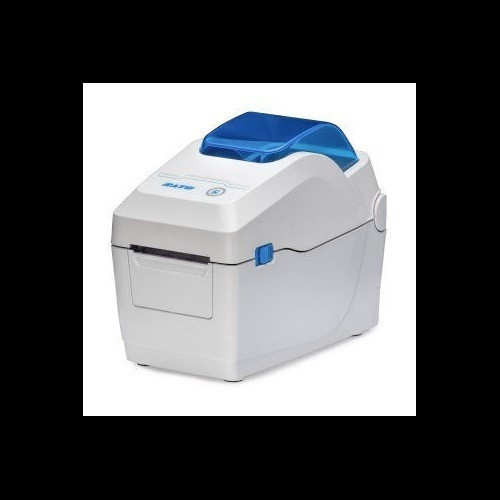
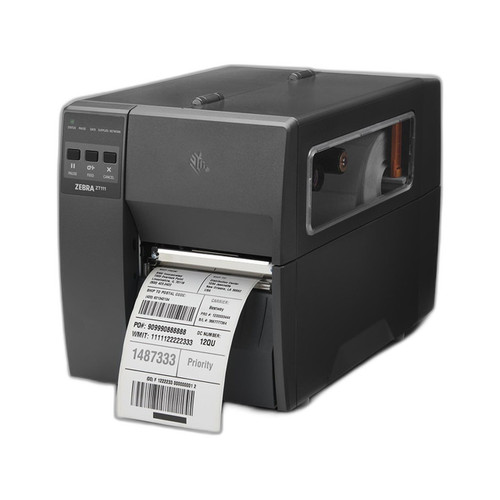
The Sato WS2 W2312-400CN-EX1 and Zebra ZT11143-D01000FZ are both 300 DPI direct thermal desktop label printers targeting fixed-station label production environments such as shipping, receiving, and light manufacturing. Both eliminate ribbon consumables via direct thermal technology and share desktop form factors with comparable connectivity stacks. Buyers evaluating either unit are typically prioritizing barcode output quality, media flexibility, workflow integration, and total cost of ownership at the workstation level. This comparison is grounded strictly in the specifications provided for each model.
In This Guide
- Which printer delivers faster throughput and broader media handling for your label volume?
- Which printer offers broader connectivity and a more operator-friendly interface for your workflow?
- Which printer is easier to deploy, maintain, and operate at a fixed workstation?
- Which should you choose: the W2312-400CN-EX1 or the ZT11143-D01000FZ?
- Side-by-Side Specs
- FAQ
Which printer delivers faster throughput and broader media handling for your label volume?
The Sato W2312-400CN-EX1 specifies a print speed of 7 inches per second (ips) at 300 DPI with a maximum print width of 2.2 inches. It supports media widths from 0.5 inches to 2.83 inches, a maximum roll diameter of 5 inches on a 1-inch core, and a maximum ribbon length of 984 ft (300 m) — though as a direct thermal unit, ribbon use is not required. Print speed for the Zebra ZT11143-D01000FZ is not stated in the provided specifications, making a direct throughput comparison impossible. The Zebra's maximum print width and media width range are likewise not specified. Both units produce 300 DPI output suited to scan-reliable barcodes, but only the Sato's throughput and media envelope are quantified here.
Which printer offers broader connectivity and a more operator-friendly interface for your workflow?
The Sato W2312-400CN-EX1 provides USB 2.0, Ethernet, Wi-Fi, and Bluetooth — four distinct connection paths covering wired LAN, wireless LAN, and short-range wireless simultaneously. It also includes a 2.4-inch color LCD touchscreen display, enabling on-device status monitoring and operator interaction without a host PC. The Zebra ZT11143-D01000FZ provides Ethernet, Bluetooth Low Energy (BTLE), and USB; its Card Bullet 2 references RS-232 as well, which supports legacy WMS integration. No display size or type is specified for the Zebra. Notably, the Sato includes Wi-Fi as a specified interface while the Zebra does not list Wi-Fi in its provided specs. The Zebra's RS-232 port — if confirmed by the full datasheet — is a meaningful advantage in facilities running older serial-connected host systems.
Which printer is easier to deploy, maintain, and operate at a fixed workstation?
The Sato W2312-400CN-EX1 weighs 3.5 lbs (1.6 kg) and measures 6.3 × 7.5 × 6.5 inches, making it one of the more compact desktop thermal printers in its class. It ships with an integrated cutter included and features tool-free printhead replacement — a documented specification that directly reduces maintenance downtime without requiring a technician or tools. Its operating temperature range is 41°F to 104°F (5°C to 40°C), and it runs on AC 100–240V universal input. The Zebra ZT11143-D01000FZ specifies an integrated tear-off bezel in its form factor description and an AC 110–240V power input (US configuration), indicating it is factory-configured for North America rather than a universal global SKU. Physical dimensions, weight, and operating temperature range are not provided for the Zebra in the available specifications.
Which should you choose: the W2312-400CN-EX1 or the ZT11143-D01000FZ?
Our take: The W2312-400CN-EX1 is the stronger choice when documented throughput, wireless LAN connectivity, compact footprint, and operator self-sufficiency are primary criteria. The Sato specifies 7 ips print speed versus no stated speed for the Zebra; includes Wi-Fi alongside Ethernet, Bluetooth, and USB where the Zebra omits Wi-Fi from its listed interfaces; and weighs 3.5 lbs with tool-free printhead replacement and an included cutter — neither weight nor maintenance access is quantified for the Zebra. However, the Zebra ZT11143-D01000FZ references RS-232 support in its bullet copy, which is a tangible advantage in legacy WMS environments, and its North America factory configuration may suit US-only deployments. Buyers cannot make a complete speed or media-width comparison because those Zebra specs are absent. Verify Zebra throughput and media range against its full datasheet before finalizing a selection for high-volume or wide-label applications.
Side-by-Side Comparison
Spec-for-spec, from manufacturer data.
| Specification | Sato W2312-400CN-EX1 | Zebra ZT11143-D01000FZ |
|---|---|---|
| Print Technology | Direct Thermal | Direct Thermal |
| Resolution | 300 DPI | 300 DPI |
| Print Speed | 7 ips | — |
| Max Print Width | 2.2 inches | — |
| Media Width Range | 0.5" to 2.83" | — |
| Max Roll Diameter | 5" OD / 1" core | — |
| Display | 2.4" Color LCD Touchscreen | — |
| Connectivity | USB 2.0, Ethernet, Wi-Fi, Bluetooth | USB, Ethernet, Bluetooth (BTLE) |
| RS-232 | — | Referenced in bullet copy; verify datasheet |
| Wi-Fi | Yes | Not specified |
| Cutter | Included | Integrated Tear-Off (no cutter specified) |
| Printhead Replacement | Tool-free | — |
| Power Input | AC 100–240V, 50/60Hz (universal) | AC 110–240V (US configuration) |
| Weight | 3.5 lbs (1.6 kg) | — |
| Dimensions | 6.3" x 7.5" x 6.5" | — |
| Operating Temperature | 41°F to 104°F (5°C to 40°C) | — |
| Flash Memory | 256 MB | — |
| SDRAM | 128 MB | — |
| User Storage | 128 MB | — |
| Warranty | 1-year | 1-year |
| Form Factor | Desktop | Desktop |
Frequently Asked Questions
Which should you choose: the W2312-400CN-EX1 or the ZT11143-D01000FZ?
The W2312-400CN-EX1 is the stronger choice when documented throughput, wireless LAN connectivity, compact footprint, and operator self-sufficiency are primary criteria. The Sato specifies 7 ips print speed versus no stated speed for the Zebra; includes Wi-Fi alongside Ethernet, Bluetooth, and USB where the Zebra omits Wi-Fi from its listed interfaces; and weighs 3.5 lbs with tool-free printhead replacement and an included cutter — neither weight nor maintenance access is quantified for the Zebra. However, the Zebra ZT11143-D01000FZ references RS-232 support in its bullet copy, which is a tangible advantage in legacy WMS environments, and its North America factory configuration may suit US-only deployments. Buyers cannot make a complete speed or media-width comparison because those Zebra specs are absent. Verify Zebra throughput and media range against its full datasheet before finalizing a selection for high-volume or wide-label applications.
Is the W2312-400CN-EX1 or ZT11143-D01000FZ better for a warehouse running an older serial-connected WMS?
Based on available specs, the Zebra ZT11143-D01000FZ is the more likely fit if RS-232 is required, as its product bullet references RS-232 support alongside USB, Ethernet, and BTLE. The Sato W2312-400CN-EX1 lists USB, Ethernet, Wi-Fi, and Bluetooth but does not specify RS-232 in the provided specifications. Confirm RS-232 availability on both units via their full datasheets before purchasing.
Does the W2312-400CN-EX1 or ZT11143-D01000FZ support wireless LAN for a cable-free workstation?
Only the Sato W2312-400CN-EX1 lists Wi-Fi (wireless LAN) in its specified connectivity: USB 2.0, Ethernet, Wi-Fi, and Bluetooth. The Zebra ZT11143-D01000FZ specifies Ethernet, BTLE, and USB but does not list Wi-Fi in the provided specifications. If wireless LAN is a firm requirement, the Sato is the documented choice; verify against the Zebra's full datasheet if needed.
Which printer is easier to maintain in a high-turnover or low-tech staffing environment?
The Sato W2312-400CN-EX1 specifies tool-free printhead replacement and includes a cutter — both documented features that reduce reliance on technical staff for routine maintenance. It also provides a 2.4-inch color LCD touchscreen for on-device operator feedback. The Zebra ZT11143-D01000FZ does not specify printhead replacement procedure, display type, or cutter inclusion in the available specifications, so a direct maintenance comparison cannot be made from the data provided.
More Label Printer Comparisons
- Sato WT302-403NN-EX1-2 vs Zebra ZT11143-D01000FZ
- Sato WT302-403NN-EX1-2 vs Sato W2312-400CN-EX1
- Sato WT302-403NN-EX1-2 vs Sato W2302-400DN-EX1
- Sato W2312-400CN-EX1 vs Sato W2302-400DN-EX1
- Sato W2302-400DN-EX1 vs Zebra ZT11143-D01000FZ
- Sato W2312-400CW-EX1 vs Zebra ZT11143-D01000FZ
Label Printer Buying Guides
Get a Second Opinion on Your Camera Choice
Share your site layout, coverage goals, and budget. Our team will validate the camera selection, flag anything we would change, and recommend products that match the use case.