
Sato W2312-400CN-EX1 vs Sato W2302-400DN-EX1: Specification Comparison
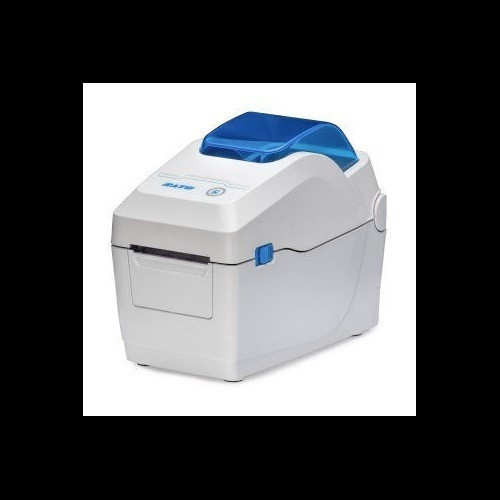
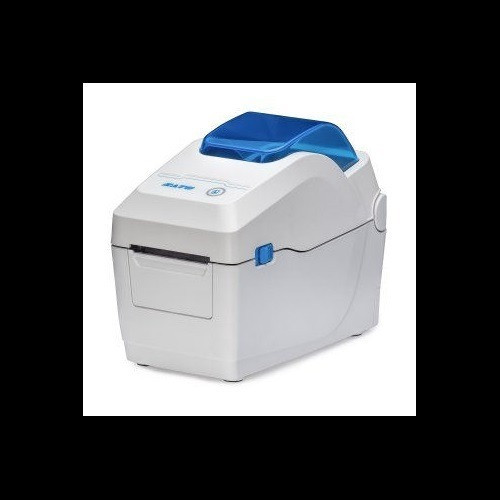
Both the Sato W2312-400CN-EX1 and W2302-400DN-EX1 are desktop direct-thermal label printers in the WS2 series, sharing an identical 300 dpi resolution, 7 ips print speed, 2.2-inch maximum print width, and the same physical footprint. They target operations teams running short-to-medium label volumes from a Windows host over Ethernet, Wi-Fi, Bluetooth, or USB. The comparison centers on the one confirmed hardware differentiation visible in the specs: the W2312-400CN-EX1 includes an inline cutter and tool-free printhead replacement, while neither feature is specified for the W2302-400DN-EX1.
In This Guide
- Which model offers superior finishing and media-handling features for production use?
- Are print performance and connectivity equivalent across both models?
- Do physical footprint, weight, and deployment profile differ between the two models?
- Which should you choose: the W2312-400CN-EX1 or the W2302-400DN-EX1?
- Side-by-Side Specs
- FAQ
Which model offers superior finishing and media-handling features for production use?
The W2312-400CN-EX1 specifies an inline cutter included as a standard feature. This allows automatic label separation without operator intervention, directly reducing handling time on high-volume runs. It also specifies tool-free printhead replacement, meaning field maintenance can be performed without tools, minimizing line downtime during head swaps.
The W2302-400DN-EX1 does not specify a cutter or tool-free printhead replacement in the provided specifications. Neither feature is listed under its hardware or feature fields. Buyers requiring cut-and-present output or simplified field maintenance cannot confirm those capabilities from the available spec data for the W2302-400DN-EX1.
Both models share identical media parameters: width range 0.5" to 2.83", 1" core, 5" maximum roll diameter, and a maximum ribbon length of 984 ft (300 m) — though both are rated for direct thermal only, making ribbon length a carried-over field rather than an operational one for either unit.
Are print performance and connectivity equivalent across both models?
Print performance is identical per the provided specifications. Both models produce 300 dpi resolution at 7 inches per second across a maximum print width of 2.2 inches. Both use direct thermal technology, eliminating ribbon cost on short-duration labels.
Connectivity is identical: USB 2.0, Ethernet, Wi-Fi, and Bluetooth are specified for both units. Memory allocation is also matched at 256 MB Flash, 128 MB SDRAM, and 128 MB user storage on each model. No performance or connectivity advantage can be established between the two from the available specs.
Both carry a 2.4-inch color LCD display and are rated for Windows operating environments. Operating temperature range is 41°F to 104°F (5°C to 40°C) for both. Power supply is AC 100–240V, 50/60Hz on both units.
Do physical footprint, weight, and deployment profile differ between the two models?
Dimensions are identical on both units: 6.3" x 7.5" x 6.5". Weight is identically specified at 3.5 lbs (1.6 kg). Both carry a desktop mount type and a 1-year warranty. Neither model lists rack-mount or wall-mount options in the provided specifications.
The W2312-400CN-EX1 includes the cutter mechanism within those identical dimensions, which means the added finishing hardware does not increase the footprint over the W2302-400DN-EX1 based on the specs provided.
No differences in operating environment, power requirements, form factor, or warranty terms are present in the specifications. Deployment planning — bench space, outlet requirements, host OS — can be treated as equivalent for both models.
Which should you choose: the W2312-400CN-EX1 or the W2302-400DN-EX1?
Our take: The W2312-400CN-EX1 is the stronger choice when automatic label separation and simplified field maintenance are operational requirements. Its specifications confirm an included inline cutter and tool-free printhead replacement — neither of which is listed for the W2302-400DN-EX1. In every other measurable dimension the two models are identical: 300 dpi at 7 ips, 2.2" maximum print width, 6.3" x 7.5" x 6.5" footprint, 3.5 lb weight, matched memory (256 MB Flash / 128 MB SDRAM / 128 MB user), identical connectivity (USB 2.0, Ethernet, Wi-Fi, Bluetooth), and a shared 1-year warranty. The W2302-400DN-EX1 suits deployments where cut-and-present output is not needed and cutter cost is a factor; the W2312-400CN-EX1 suits higher-throughput label lines where operator handling between prints or during head maintenance must be minimized.
Side-by-Side Comparison
Spec-for-spec, from manufacturer data.
| Specification | Sato W2312-400CN-EX1 | Sato W2302-400DN-EX1 |
|---|---|---|
| Print Technology | Direct Thermal | Direct Thermal |
| Resolution | 300 dpi | 300 dpi |
| Print Speed | 7 ips | 7 ips |
| Max Print Width | 2.2" | 2.2" |
| Display | 2.4" Color LCD | 2.4" Color LCD |
| Connectivity | USB 2.0, Ethernet, Wi-Fi, Bluetooth | USB 2.0, Ethernet, Wi-Fi, Bluetooth |
| Cutter | Included | — |
| Tool-Free Printhead Replacement | Yes | — |
| Memory — Flash | 256 MB | 256 MB |
| Memory — SDRAM | 128 MB | 128 MB |
| User Storage | 128 MB | 128 MB |
| Media Width Range | 0.5" to 2.83" | 0.5" to 2.83" |
| Media Core | 1" | 1" |
| Max Roll Diameter | 5" | 5" |
| Dimensions (W x D x H) | 6.3" x 7.5" x 6.5" | 6.3" x 7.5" x 6.5" |
| Weight | 3.5 lbs (1.6 kg) | 3.5 lbs (1.6 kg) |
| Power | AC 100–240V, 50/60Hz | AC 100–240V, 50/60Hz |
| Operating Temperature | 41°F to 104°F (5°C to 40°C) | 41°F to 104°F (5°C to 40°C) |
| Operating System | Windows | Windows |
| Warranty | 1-year | 1-year |
Frequently Asked Questions
Which should you choose: the W2312-400CN-EX1 or the W2302-400DN-EX1?
The W2312-400CN-EX1 is the stronger choice when automatic label separation and simplified field maintenance are operational requirements. Its specifications confirm an included inline cutter and tool-free printhead replacement — neither of which is listed for the W2302-400DN-EX1. In every other measurable dimension the two models are identical: 300 dpi at 7 ips, 2.2" maximum print width, 6.3" x 7.5" x 6.5" footprint, 3.5 lb weight, matched memory (256 MB Flash / 128 MB SDRAM / 128 MB user), identical connectivity (USB 2.0, Ethernet, Wi-Fi, Bluetooth), and a shared 1-year warranty. The W2302-400DN-EX1 suits deployments where cut-and-present output is not needed and cutter cost is a factor; the W2312-400CN-EX1 suits higher-throughput label lines where operator handling between prints or during head maintenance must be minimized.
Is the W2312-400CN-EX1 or W2302-400DN-EX1 better for high-volume label lines?
Based on the provided specifications, the W2312-400CN-EX1 is better suited to high-volume label lines. It includes an inline cutter for automatic label separation and tool-free printhead replacement to reduce maintenance downtime. The W2302-400DN-EX1 does not list either feature in its specifications. Print speed (7 ips) and resolution (300 dpi) are identical on both models.
Do both printers support wireless connectivity?
Yes. Both the W2312-400CN-EX1 and W2302-400DN-EX1 specify Wi-Fi, Bluetooth, Ethernet, and USB 2.0 connectivity. No difference in wireless capability is indicated by the provided specifications for either model.
Is the W2302-400DN-EX1 physically smaller or lighter than the W2312-400CN-EX1?
No. Both models are specified at identical dimensions — 6.3" x 7.5" x 6.5" — and identical weight of 3.5 lbs (1.6 kg). The W2312-400CN-EX1 fits its included cutter within the same footprint, so there is no size or weight penalty for the added finishing hardware based on the specs provided.
More Label Printer Comparisons
- Sato WT302-403NN-EX1-2 vs Zebra ZT11143-D01000FZ
- Sato WT302-403NN-EX1-2 vs Sato W2312-400CN-EX1
- Sato WT302-403NN-EX1-2 vs Sato W2302-400DN-EX1
- Sato W2312-400CN-EX1 vs Zebra ZT11143-D01000FZ
- Sato W2302-400DN-EX1 vs Zebra ZT11143-D01000FZ
- Sato W2312-400CW-EX1 vs Zebra ZT11143-D01000FZ
Label Printer Buying Guides
Get a Second Opinion on Your Camera Choice
Share your site layout, coverage goals, and budget. Our team will validate the camera selection, flag anything we would change, and recommend products that match the use case.