
Epson C31CK51001 vs Brother RJ4230B: Specification Comparison
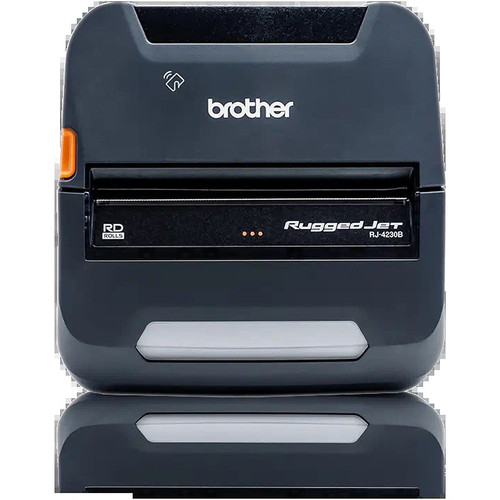
Both the Epson C31CK51001 and the Brother RJ4230B are direct thermal receipt printers operating at 203 dpi with no ribbon consumable — placing them in the same product class for buyers evaluating thermal printing solutions. However, they diverge sharply in deployment model: the Epson is a desktop unit targeting fixed, high-throughput POS counters in retail and hospitality, while the Brother is a ruggedized mobile printer built for field technicians, delivery personnel, and inspectors. A buyer cross-shopping these two is choosing between a stationary high-speed station printer and a portable multi-media field device.

In This Guide
- Which printer delivers higher throughput for your print volume demands?
- Which printer fits your connectivity architecture and deployment environment?
- Which printer supports the media types and programming languages your software stack requires?
- Which should you choose: the C31CK51001 or the RJ4230B?
- Side-by-Side Specs
- FAQ
Which printer delivers higher throughput for your print volume demands?
Print speed is the starkest differentiator. The Epson C31CK51001 is rated at 708.7 inches per second (180 mm/s), a figure consistent with high-velocity fixed POS environments processing continuous receipt queues across multiple terminals. The Brother RJ4230B is rated at 5 inches per second — approximately 142 times slower by the stated specs. For a fixed retail counter printing dozens of receipts per hour, the Epson's throughput is decisive. For a field worker printing one receipt or label per transaction, the Brother's 5 ips is operationally adequate. No duty-cycle or MTBF figures are provided in the supplied specs for either unit, so endurance comparisons beyond speed cannot be made from available data.
Which printer fits your connectivity architecture and deployment environment?
The Epson C31CK51001 connects via Ethernet and USB as standard, with an optional dual Wi-Fi / Bluetooth 5.0 interface available as an add-on. This positions it for wired POS networks with optional wireless expansion — a common architecture in retail and hospitality. Mount types listed include wall and rack, confirming a fixed-installation deployment model. The Brother RJ4230B connects via USB and Bluetooth 4.2 with Apple MFi certification, enabling native pairing with iOS, Android, and Windows devices without drivers or adapters — a critical differentiator for mobile workflows. No Ethernet port or Wi-Fi is specified for the Brother. Paper width also differs: the Epson handles 3-inch receipt rolls; the Brother supports 4-inch media. Buyers needing 4x6 shipping labels or wider field receipts can only fulfill that with the Brother.
Which printer supports the media types and programming languages your software stack requires?
The Epson C31CK51001 is specified exclusively for receipt media on 3-inch thermal rolls. No label or tag support is listed in the provided specs, and no programming language support (ZPL, CPCL, ESC/POS, etc.) is disclosed in the supplied data. The Brother RJ4230B explicitly supports receipts, labels, and tags on 4-inch media, and its specs confirm ZPL and CPCL programming language compatibility — meaning it can be driven by the same label-formatting software stacks used across many enterprise logistics and field-service platforms. The Brother also carries 256 MB RAM for storing templates, fonts, and graphics, enabling offline/store-and-forward print jobs without a live host connection. No RAM or onboard storage figure is provided for the Epson.
Which should you choose: the C31CK51001 or the RJ4230B?
Our take: The C31CK51001 is the stronger choice when the deployment is a fixed, high-volume POS counter requiring maximum throughput on a wired network. Its 708.7 ips print speed dwarfs the Brother's 5 ips — a 140× gap that matters at a busy retail register. It also offers Ethernet for direct network integration and an optional Bluetooth 5.0 / Wi-Fi interface. Conversely, the RJ4230B is the correct choice for mobile field deployments: it supports 4-inch receipts, labels, and tags (versus the Epson's 3-inch receipt-only spec), carries Bluetooth 4.2 with Apple MFi for iOS/Android pairing, stores ZPL/CPCL templates in 256 MB RAM for offline use, and is form-factored for portability. These two units serve fundamentally different use cases; direct substitution is inadvisable. Buyers should select based on deployment model — fixed-counter POS favors the Epson; mobile field printing favors the Brother.
Side-by-Side Comparison
Spec-for-spec, from manufacturer data.
| Specification | Epson C31CK51001 | Brother RJ4230B |
|---|---|---|
| Product Type | Receipt Printer | Receipt Printer |
| Form Factor | Desktop (fixed) | Mobile (portable) |
| Print Method | Direct Thermal | Direct Thermal |
| Print Speed | 708.7 ips (180 mm/s) | 5 ips |
| Print Resolution | 203 dpi | 203 dpi |
| Print Width | 3" | 4" |
| Media Types Supported | Receipts | Receipts, Labels, Tags |
| Connectivity (Standard) | Ethernet, USB | USB, Bluetooth 4.2 |
| Wireless | Optional Wi-Fi / Bluetooth 5.0 | Bluetooth 4.2 (standard), Apple MFi |
| Programming Languages | — | ZPL, CPCL |
| RAM / Onboard Memory | — | 256 MB |
| Display | — | LCD |
| Mount Type | Wall, Rack | — |
| Weight | 2.87 lb (1,300 g) | — |
| Available Colors | Epson White, Epson Black | — |
| Warranty | 1-year | Manufacturer Warranty (duration not specified) |
Frequently Asked Questions
Which should you choose: the C31CK51001 or the RJ4230B?
The C31CK51001 is the stronger choice when the deployment is a fixed, high-volume POS counter requiring maximum throughput on a wired network. Its 708.7 ips print speed dwarfs the Brother's 5 ips — a 140× gap that matters at a busy retail register. It also offers Ethernet for direct network integration and an optional Bluetooth 5.0 / Wi-Fi interface. Conversely, the RJ4230B is the correct choice for mobile field deployments: it supports 4-inch receipts, labels, and tags (versus the Epson's 3-inch receipt-only spec), carries Bluetooth 4.2 with Apple MFi for iOS/Android pairing, stores ZPL/CPCL templates in 256 MB RAM for offline use, and is form-factored for portability. These two units serve fundamentally different use cases; direct substitution is inadvisable. Buyers should select based on deployment model — fixed-counter POS favors the Epson; mobile field printing favors the Brother.
Can either printer work wirelessly with a tablet or smartphone at the point of sale?
The Brother RJ4230B includes Bluetooth 4.2 with Apple MFi certification as a standard feature, enabling direct wireless pairing with iOS, Android, and Windows devices. The Epson C31CK51001 does not include Bluetooth or Wi-Fi as standard; the specs note an optional dual Wi-Fi / Bluetooth 5.0 interface is available as an add-on, but it is not included in the base configuration. If wireless mobile-device connectivity is required out of the box, the Brother is the only option between these two in its base form.
Which printer should I choose if my team prints both shipping labels and receipts in the field?
The Brother RJ4230B is the only unit between these two that supports labels and tags in addition to receipts, and it accommodates 4-inch media width — sufficient for standard 4x6 shipping labels. It also supports ZPL and CPCL programming languages used by common label-management platforms. The Epson C31CK51001 is specified for 3-inch receipt rolls only; no label or tag support is listed in its provided specs. For mixed-media field printing, the Brother is the appropriate selection.
Is the Epson C31CK51001 or the Brother RJ4230B better suited for a multi-terminal retail POS installation?
The Epson C31CK51001 is purpose-built for this scenario. Its Ethernet connectivity supports integration into a shared POS network serving multiple terminals, and its 708.7 ips print speed sustains high receipt volumes at a fixed counter. The Brother RJ4230B connects via Bluetooth 4.2 and USB only — no Ethernet is listed in its specs — and its 5 ips speed is oriented toward single-transaction field use. For a fixed multi-terminal retail environment, the Epson is the operationally appropriate choice.
More Label Printer Comparisons
- Epson C31CK00A9991 vs Brother RJ4230B
- Epson C31CK00A9991 vs Star Micronics TSP1043D
- Epson C31CK00A9991 vs Epson C31CJ99A9981
- Epson C31CK00A9991 vs Epson C31CJ57012
- Epson C31CJ99A9981 vs Brother RJ4230B
- Epson C31CJ99A9981 vs Star Micronics TSP1043D
Label Printer Buying Guides
Get a Second Opinion on Your Camera Choice
Share your site layout, coverage goals, and budget. Our team will validate the camera selection, flag anything we would change, and recommend products that match the use case.