
Epson C31CK50021 vs Brother RJ4230B: Specification Comparison
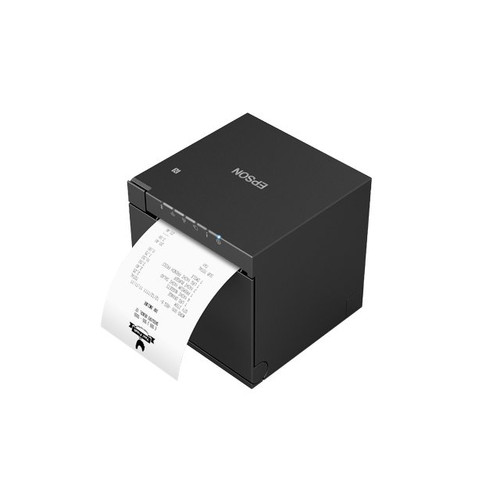
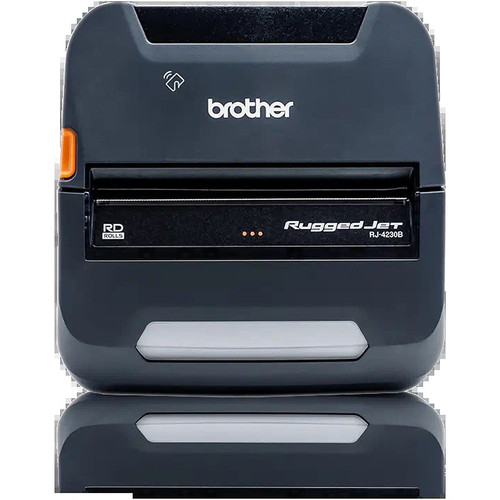
Both the Epson TM-m30III (C31CK50021) and the Brother RuggedJet RJ4230B are direct thermal receipt printers aimed at B2B buyers who need ribbon-free printing. The Epson is a compact countertop unit targeting high-throughput fixed-point-of-sale environments, while the Brother is a rugged mobile printer designed for field personnel printing receipts, labels, and tags on the go. Despite sharing direct thermal technology and 203 dpi resolution, they serve meaningfully different deployment contexts, making this a use-case-driven decision rather than a straightforward spec race.
In This Guide
- Which printer delivers faster throughput for high-volume print queues?
- Which printer fits your connectivity and deployment environment — fixed or mobile?
- Which printer supports a broader range of media types and on-device programming?
- Which should you choose: the C31CK50021 or the RJ4230B?
- Side-by-Side Specs
- FAQ
Which printer delivers faster throughput for high-volume print queues?
Print speed is the sharpest dividing line between these two units. The Epson TM-m30III is rated at 708.7 inches per minute (ips) — a figure drawn directly from its datasheet as maximum monochrome speed. The Brother RJ4230B is rated at 5 inches per second, which equates to 300 inches per minute. That means the Epson prints at roughly 2.4× the linear speed of the Brother under comparable conditions.
For a fixed countertop deployment processing continuous retail or hospitality receipts, the Epson's throughput advantage is operationally significant — the spec sheet cites sub-2-second receipts. The Brother's 5 ips rating is consistent with mobile-class thermal printers and is adequate for occasional field receipts but would create a bottleneck in any queue-intensive environment. Both units print at 203 dpi resolution, so output quality at that resolution is equivalent; the difference is purely in volume capacity.
Which printer fits your connectivity and deployment environment — fixed or mobile?
The Epson TM-m30III supports USB, USB-C, Ethernet, Wi-Fi, and Bluetooth 5.0 dual-mode. Ethernet and Wi-Fi make it native to fixed network infrastructure; Ethernet in particular enables direct integration into POS networks without wireless dependency. The optional OT-WL06 wireless USB adapter expands wireless flexibility further. This breadth of connectivity suits retail counters, hospitality stations, and any environment where a powered, networked printer is permanently stationed.
The Brother RJ4230B offers USB and Bluetooth 4.2 with Apple MFi certification. There is no Ethernet port and no Wi-Fi spec listed. MFi certification means the unit connects natively to iOS devices without third-party apps or pairing workarounds — a concrete advantage for field teams using iPhones or iPads. Android and Windows are also listed as supported platforms. The absence of a network port is not a gap for mobile use; it reflects the design intent of a battery-operated rugged device carried by a technician, delivery driver, or field inspector.
Which printer supports a broader range of media types and on-device programming?
The Epson TM-m30III is specified for thermal receipt paper at a 3-inch (80mm) print width. No label or tag media support is listed in the provided specifications. Its use case is receipts, and its 3-inch width aligns with standard POS roll stock.
The Brother RJ4230B supports receipts, labels, and tags at a 4-inch print width, and its spec sheet lists ZPL and CPCL programming language support alongside 256 MB of onboard RAM. ZPL and CPCL are industry-standard label description languages used by warehouse, logistics, and field-service applications. The 256 MB RAM allows templates, fonts, and graphics to be stored on the device for offline operation — a critical capability when field personnel lack consistent network connectivity. The 4-inch print width also accommodates 4×6 shipping labels, which the 3-inch Epson cannot produce. For any deployment requiring both receipts and labels, or requiring programmable offline templates, the Brother's feature set is functionally broader.
Which should you choose: the C31CK50021 or the RJ4230B?
Our take: The C31CK50021 is the stronger choice when throughput, network integration, and dedicated receipt printing at a fixed POS station are the primary requirements. Its 708.7 ips print speed is approximately 2.4× faster than the RJ4230B's 5 ips (300 ipm), its Ethernet and Wi-Fi connectivity suits permanent networked installations, and Bluetooth 5.0 dual-mode covers supplemental wireless pairing. The RJ4230B is the stronger choice for mobile and field deployments: it is purpose-built as a rugged mobile unit, supports receipts, labels, and tags at a wider 4-inch print width, carries 256 MB RAM for offline ZPL/CPCL template storage, and holds Apple MFi certification for native iOS connectivity — features absent from the Epson's listed specs. Warranty duration is confirmed at one year for the Epson; the Brother's listing states 'Manufacturer Warranty' without specifying a term.
Side-by-Side Comparison
Spec-for-spec, from manufacturer data.
| Specification | Epson C31CK50021 | Brother RJ4230B |
|---|---|---|
| Product Type | Receipt Printer (countertop) | Receipt Printer (mobile) |
| Form Factor | Compact fixed | Rugged mobile |
| Print Method | Direct thermal | Direct thermal |
| Print Speed | 708.7 ips (inches per minute) | 5 ips (inches per second) |
| Print Width | 3 in (80 mm) | 4 in |
| Print Resolution | 203 dpi | 203 dpi |
| Connectivity | USB, USB-C, Ethernet, Wi-Fi, Bluetooth 5.0 | USB, Bluetooth 4.2 |
| Ethernet | Yes | — |
| Wi-Fi | Yes | — |
| Bluetooth | 5.0 dual-mode | 4.2 |
| Apple MFi Certified | — | Yes |
| Media Types | Receipts | Receipts, Labels, Tags |
| Programming Languages | — | ZPL, CPCL |
| RAM | — | 256 MB |
| Display | — | LCD |
| Warranty | 1 year | Manufacturer Warranty (term not specified) |
Frequently Asked Questions
Which should you choose: the C31CK50021 or the RJ4230B?
The C31CK50021 is the stronger choice when throughput, network integration, and dedicated receipt printing at a fixed POS station are the primary requirements. Its 708.7 ips print speed is approximately 2.4× faster than the RJ4230B's 5 ips (300 ipm), its Ethernet and Wi-Fi connectivity suits permanent networked installations, and Bluetooth 5.0 dual-mode covers supplemental wireless pairing. The RJ4230B is the stronger choice for mobile and field deployments: it is purpose-built as a rugged mobile unit, supports receipts, labels, and tags at a wider 4-inch print width, carries 256 MB RAM for offline ZPL/CPCL template storage, and holds Apple MFi certification for native iOS connectivity — features absent from the Epson's listed specs. Warranty duration is confirmed at one year for the Epson; the Brother's listing states 'Manufacturer Warranty' without specifying a term.
Can either printer handle label printing for shipping or inventory tags?
Only the Brother RJ4230B lists label and tag media support in its specifications, along with ZPL and CPCL programming language compatibility and a 4-inch print width that accommodates 4×6 labels. The Epson TM-m30III is specified for thermal receipt paper only at a 3-inch width; no label media support is listed in the provided specs.
Which printer is better suited for a busy retail checkout counter?
The Epson TM-m30III is the more appropriate choice for a high-volume fixed checkout counter. Its rated print speed of 708.7 ips significantly outpaces the Brother RJ4230B's 5 ips, and its Ethernet port enables direct, stable integration into a POS network. The Brother is a mobile unit without an Ethernet interface and is not designed for continuous fixed-point throughput.
Does either printer work natively with iOS devices without additional software?
The Brother RJ4230B carries Apple MFi certification, which enables native pairing and communication with iOS devices. The Epson TM-m30III includes Bluetooth 5.0 dual-mode and lists iOS among compatible platforms, but Apple MFi certification is not stated in the provided specifications for the Epson. Buyers requiring guaranteed iOS certification should verify Epson's MFi status through official Epson documentation.
More Label Printer Comparisons
- Epson C31CK00A9991 vs Brother RJ4230B
- Epson C31CK00A9991 vs Star Micronics TSP1043D
- Epson C31CK00A9991 vs Epson C31CJ99A9981
- Epson C31CK00A9991 vs Epson C31CJ57012
- Epson C31CJ99A9981 vs Brother RJ4230B
- Epson C31CJ99A9981 vs Star Micronics TSP1043D
Label Printer Buying Guides
Get a Second Opinion on Your Camera Choice
Share your site layout, coverage goals, and budget. Our team will validate the camera selection, flag anything we would change, and recommend products that match the use case.